
Rongta Technology RLS Series Manuel utilisateur
Rongta Technology (Xiamen) Group Co., Ltd.
www.rongtatech.com
V1.0
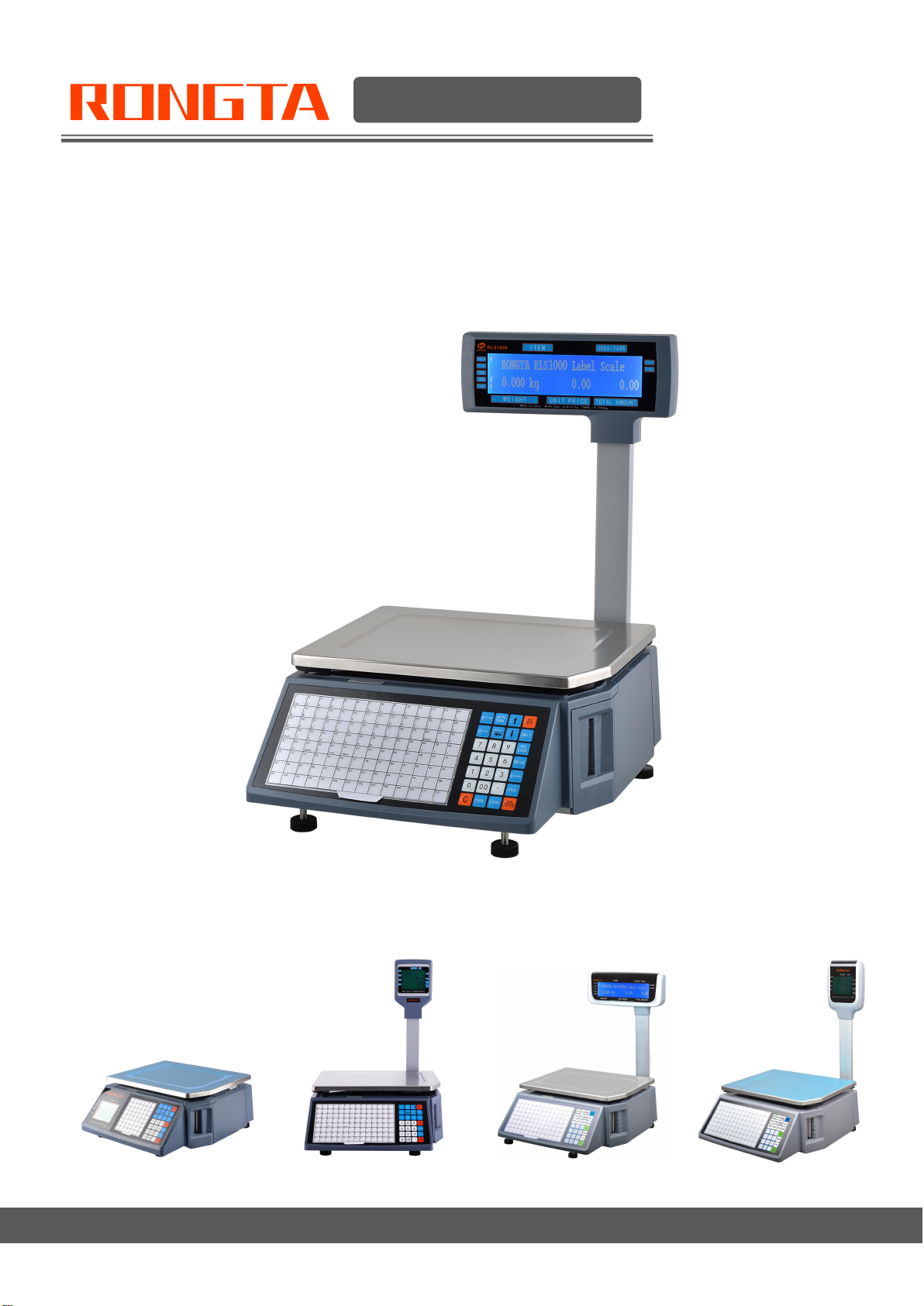
RLS Series Barcode label scale
User Manual

C
Contents
Introduction................................................................................................................... 1
1. The Label scale’s specification............................................................................. 2
2. Features Summary................................................................................................. 3
2.1 Unique and powerful network..................................................................... 3
2.2 Usage is easy to learn..................................................................................3
2.3 Advanced functions and durable quality....................................................3
3. Label scale installation steps.................................................................................4
3.1 Installation...................................................................................................... 4
3.2 The installation of the thermal label paper................................................ 6
3.3 Keyboard........................................................................................................ 7
3.4 Description of label paper............................................................................7
4. Overall Appearance................................................................................................ 7
5. Common easy-to -use operations........................................................................ 8
5.1 Switch on and off...........................................................................................9
5.2 Weighing and pricing.................................................................................... 9
5.3 Tare operation..............................................................................................10
5.4 Discount........................................................................................................10
5.5 Price Changing............................................................................................ 11
5.5.1 Permanent Changing...................................................................... 11
5.5.2 Temporary Changing....................................................................... 11
5.6 Choosing Unit of Weight............................................................................ 11
5.7 Charging by Piece.......................................................................................11
5.8 Price Tag Printing........................................................................................ 12
5.9 Quick Copy...................................................................................................12
5.10 Automatic fast packaging.........................................................................12
5.11 Operation button in common use........................................................... 12
6. Wireless Label Scale Setting Instruction........................................................... 13
6.1 Network connection mode......................................................................... 13
6.2 Router set up............................................................................................... 13
6.3 Label Scale Setting.....................................................................................13
6.4 Computer RLS1000 software settings.....................................................14
7. Function setting..................................................................................................... 14
7.1 Input settings of single item.......................................................................14
7.2 System set up.............................................................................................. 14
7.3 Lock...............................................................................................................16
8. Troubleshooting..................................................................................................... 17
8.1 Scales crash................................................................................................ 17
8.2 Print related issues..................................................................................... 17
8.3 The key issues.............................................................................................20
8.4 Weigh problem............................................................................................ 20
8.5 Communication problem............................................................................ 21
8.6 Display problem...........................................................................................22
8.7 Error code.....................................................................................................22
8.8 Other problems............................................................................................23
9. The acceleration of gravity revised table...........................................................24

1
Introduction
Thank you for choosing our Label scale RLS. In order to operate RLS correctly, User manual is detailed in
function and operation method of RLS , which help user with doubt quickly when come up against
mechanical fault .
Rongta research, develop, produce and sale RLS independently, which is high-performance barcode
label scale.
RLS is the best choice for user in label printing business line with fashion appearance, power function and
high durable, which make RLS more popular in store ,fresh food supermarket ,farmers market and so on.
Note : This product information are subject to change without prior notice.
This information is for reference only. In addition to China's existing laws and regulations, the company
does not undertake any due to the direct or indirect losses caused by use of this information.
The company reserves the final interpretation.

2
1. The Label scale’s specification
The weighing range and accuracy
RLS1000/RLS1000A/RLS1000B/RLS1000C/RLS1000D
Max weight: 6kg/15kg Min weight: 40g
0kg to 6kg * 0.002kg (e=2g) 6kg to 15kg * 0.005kg (e=5g)
RLS1100/RLS1100A/RLS1100B/RLS1100C/RLS1100D
Max weight: 15kg/30kg Min weight: 100g
0kg to 15kg * 0.005kg (e=5g) 15kg to 30kg * 0.010kg (e=10g)
The accuracy grade:
OIML: R76/2006-A-NL1-18.12
Test specifications: OIML R 76-1(2006) and EN 45501:2015
Resolution:
Input sensitivity: greater than or equal to 50u V/D
Zero-point adjustment range: ±60MV
Temperature coefficient: ±0.0012%CTYP
[Zero] ±(0.2μV+0.0008% of Dead Load)/℃TYP
Nonlinearity: 0.01%F.S.
A/D resolution: Max 30000 resolution
Display resolution: 1/3000
A/D conversion rate: 6 times/second
LCD display board:
Info/weight: 5byte(APHA)
Simple lattice: 8 byte
Total lattice: 8byte
Unit of weight: g. kg
Regular:
Power supply: 100V-240V~, 50/60Hz
Power consumption: Standby 3W, line printing 30W
Operating temperature: 0 ℃~40 ℃

3
2. Features Summary
2.1 Unique and powerful network
a. Use the Ethernet interface technology and the data transfer rate has been improved drastically
Advice: When you use the Ethernet interface, suggest using the shielded cable.
2.2 Usage is easy to learn
a. Operate the PLU by single bond to make fast sales, and the front desk staff could use it without
training.
b. 112 direct buttons and 224 hot buttons can be set up, and the common goods can be specified to hot
buttons mostly.
2.3 Advanced functions and durable quality
a. The under machine program can be upgraded by PC, the program will be the latest version and the
function would be the most perfect forever.
b. The design of the Printer structure is exquisite, is not easy to roll the paper.
c. Barcode rotation could extend the lifetime of the print head.
d. Having the function of weighing and pricing for the various packages, along with special designed
barcode printing.
e. Function: It can use a few goods to make up to platter, fruit basket, etc.
f. Each PLU could be set to multiple tags.
g. Each PLU could be used by separated barcode encoding formats, which could solve the
encoding problem from distribution and consignment sales.
h. Each PLU could use separated units.
i. The unit of quantity could be self defined, such as block, packages, etc.
j. PLU has abundant information, Including barcode format, fresh code, package type, information
provision, etc.
k. Rotational printing the whole label.
l. Support Ean-8, Ean-13 and 18 code, completely solving the problem of fresh commodities code.
m. Unique bar code type to manage the fresh commodities by batch.

4
3. Label scale installation steps
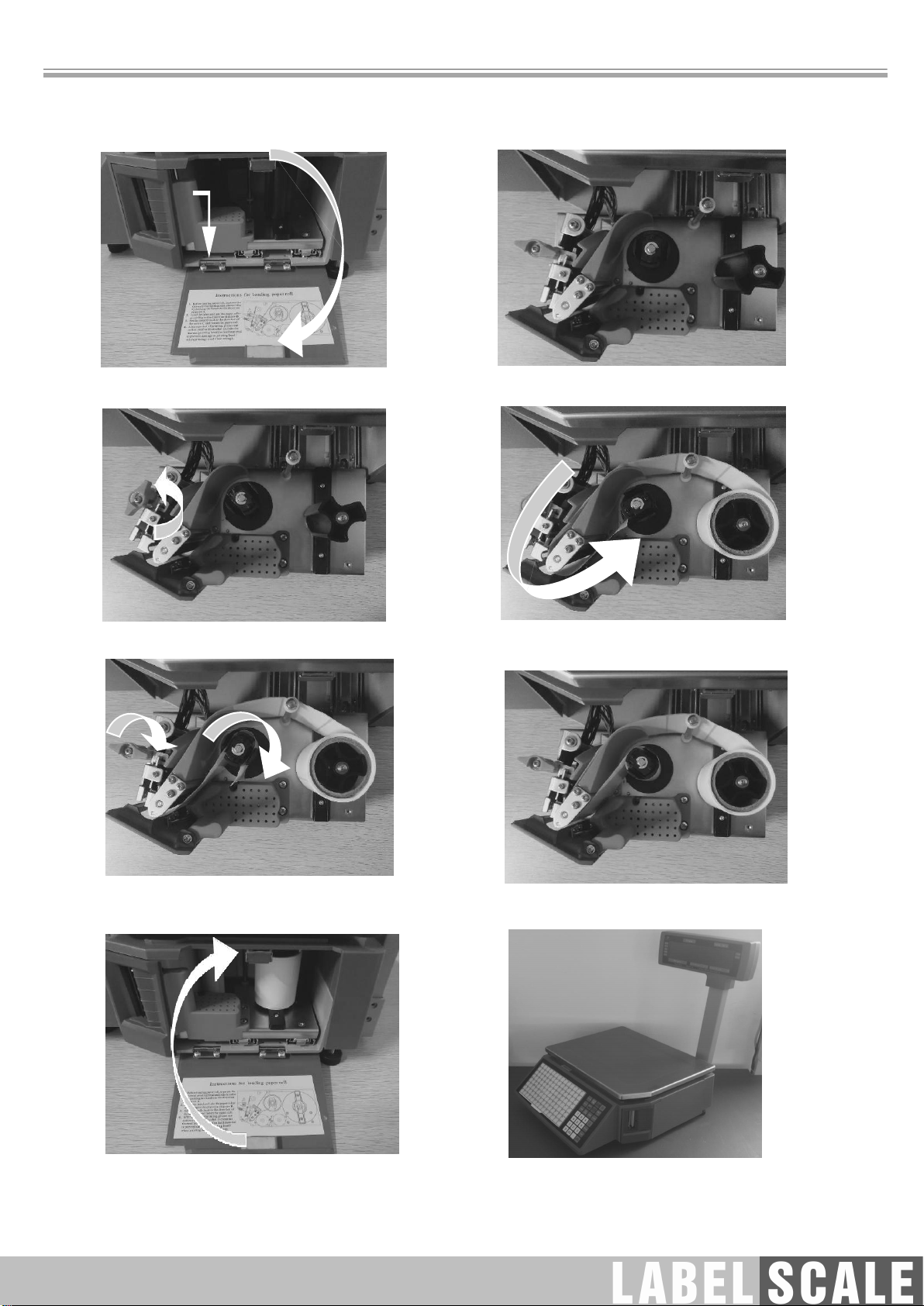
3.1 Installation
RLS1000/RLS1000A/RLS1000B/RLS1100/RLS1100A/RLS1100B
a.Connect air fittings
b.Put the air fittings inside
the display bar
c.Install the display bar
and put the tray
d.Take up the tray the level
tool under the tray.
e.Adjust the feet to make the level
tool inside the little circle

5
RLS1000C/RLS1000D/RLS1100C/RLS1100D
a.Connect air fittings
b.Put the air fittings
inside the display bar
c.Install the display bar
d.Take up the tray the level
tool under the tray.
e.Adjust the feet to make the level
tool inside the little circle
6
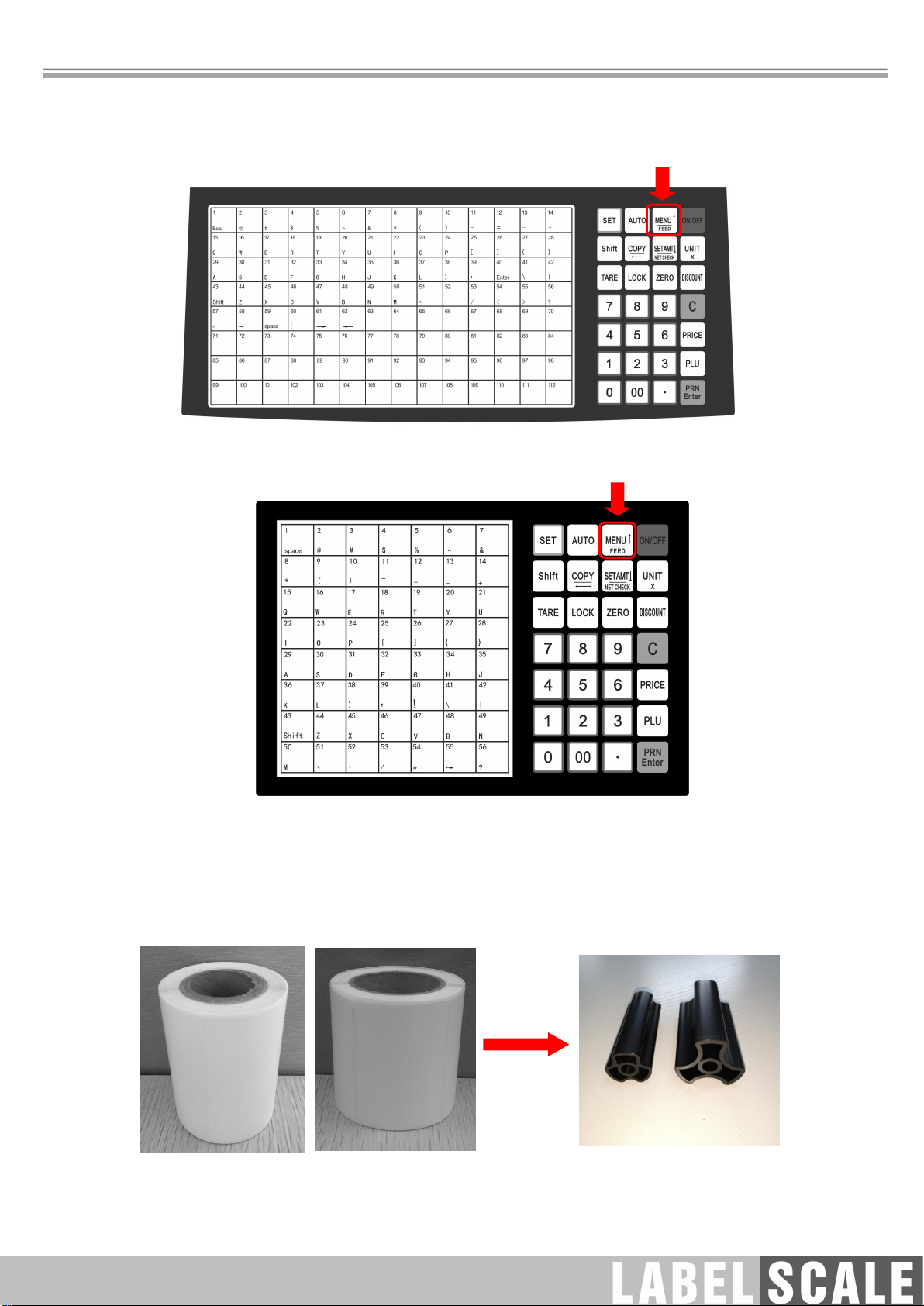
3.2 The installation of the thermal label paper
a. Open the side panel
b. Take out the printer
c. Open the print head
d. Remove first few labels, and then
loading the roll
e. Thread the front of new label roll through the
filter plate and wrap in pick-up clamp ,and close
the printing head (As shown in the figure)
f. Press [] button to roll the label paper
g. Put the printer back to the host printer
h. Close the side cover of the printer
7
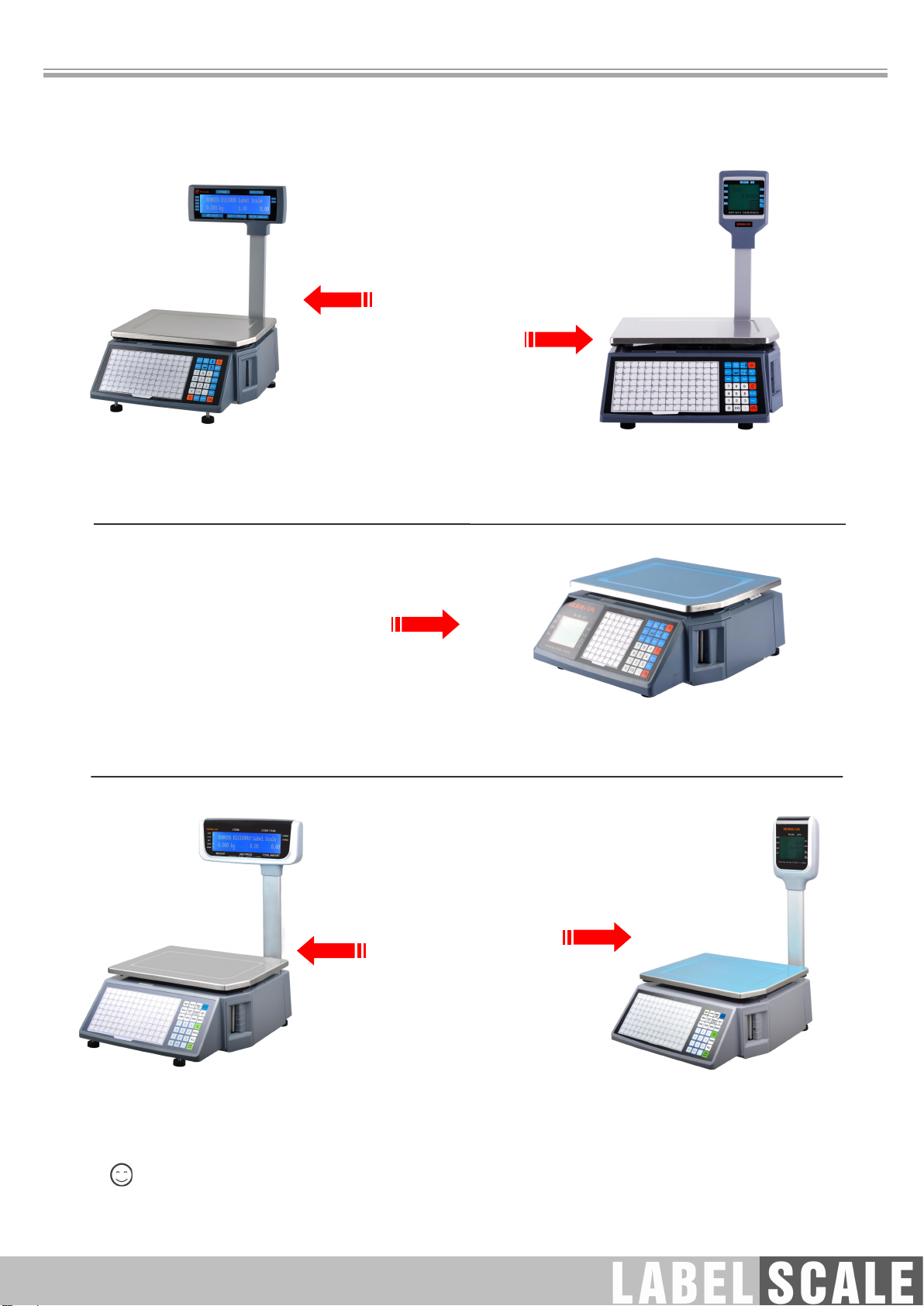
3.3 Keyboard
Press [] button to adjust label position and long press [] button to align paper.
RLS1000/RLS1000A/RLS1100/RLS1100A/RLS1000C/RLS1100C/RLS1000D/RLS1100D
keyboard
RLS1000B/RLS1100B keyboard
3.4 Description of label paper
The label which is used at RONGTA Label Scale is: Thermal Seam Marking Label. As shown below:
Height:60mm,width:(30~60)mm,Max outside diameter: 100mm,Minimum inner diameter:40mm or
26.8mm.
Inner diameter 26.8mm
Inner diameter 40mm
Match the corresponding roll mandrel
(default 40mm, 26.8mm optional)
8
4. Overall Appearance
a. Host
b. Tray
c. Thermal label paper
d. One fuses
e. User manual
f. Serial cable
g. Power cable
RLS1000/RLS1100
Physical appearance: 437 372523mm
RLS1000A/RLS1100A
Physical appearance: 437 372541mm
RLS1000B/RLS1100B
Physical appearance:437 372 170mm
a. Host
b. Tray
c. Display group(A liquid crystal display, display bar)
d. Thermal label paper
e. One fuses
f. User manual
g. Serial cable
h. Power cable
RLS1000C/RLS1100C
Physical appearance:453 372 507mm
RLS1000D/RLS1100D
Physical appearance:453 372 560mm
The pictures are for reference only, please subject to practicality.
a. Host
b. Tray
c. Display group(A liquid crystal display,
display bar, the four screws)
d. Thermal label paper
e. One fuses
f. User manual
g. Serial cable
h. Power cable
Autres manuels pour RLS Series
2
Ce manuel convient aux modèles suivants
10
Table des matières
Autres manuels Rongta Technology Échelle

Rongta Technology
Rongta Technology RLS Series Manuel utilisateur

Rongta Technology
Rongta Technology C1 Manuel utilisateur

Rongta Technology
Rongta Technology AURORA Y1 Manuel utilisateur

Rongta Technology
Rongta Technology RLS Series Manuel utilisateur

Rongta Technology
Rongta Technology RLS1515 Manuel utilisateur

Rongta Technology
Rongta Technology LS015 Manuel utilisateur

Rongta Technology
Rongta Technology AURORA S1 Manuel utilisateur

Rongta Technology
Rongta Technology RLS1000 Manuel utilisateur

Rongta Technology
Rongta Technology RLS1000 Manuel utilisateur


