RM Mobile One 945 Manuel utilisateur

Notebook Details
Fill in the details of your notebook for quick reference:
Model Description : RM Mobile One 945
Part Number (see rear of notebook): ..........................................
Serial Number (see rear of notebook): WO/TO.......……....…..............………
Customer Account Number (see despatch note): ..........................................
RM Support: 0870 200 200
RM website: www.rm.com

RM Mobile One 945 User Manual
PN
RM Mobile One 945 User Manual Edition 1
P.N.
Copyright © Research Machines plc 2005.
All rights reserved. Although you may make copies of this manual
for your own use, you may make no other form of copy of any part
of it without our written permission.
AT and IBM are registered trademarks of International Business
Machines.
Microsoft, Windows and MS-DOS are registered trademarks of
Microsoft Corporation.
PostScript is a registered trademark of Adobe Systems, Inc.
Because our policy is to improve our products and services
continually, we may make changes without notice. We have tried to
keep the information in this manual completely accurate, but we
cannot be held responsible for the consequences of any errors or
omissions.
Research Machines plc,
New Mill House,
183 Milton Park,
ABINGDON, Oxon.
OX14 4SE. Telephone: Abingdon 0870 200 200

Contents
Introduction 1
Safety 7
Plugs and Sockets 7
Cables 8
Fuses 38
Ventilation and Dust Protection 8
Chapter 1 Getting Started 7
Before you Start 10
Disks and Manuals 11
Getting Started 12
Security Considerations 12
Setting up the always on wireless 12
Environment Considerations 13
Chapter 2 System Description 15
The Front of the Notebook 16
The Side of the Notebook 16
The Rear of the Notebook 17
General Summary 18
Special Keyboard Function 18
Instant Launch keys 19
PCMCIA Cards 20
Optical Drives 22
Battery Monitor System 23
Chapter 3 Fitting Hardware Options 28
Fitting a DIMM 24
Removing a DIMM 25
Drive Upgrades 24
Fitting a Drive 24

Chapter 4 Maintenance, Service and Troubleshooting 41
Looking After Your Notebook 29
General Maintenance 29
Moving and Re-packing the Notebook 29
Servicing 30
Problem Solving 31
Notebook 31
Peripherals 32
Software 33
Forgotten Passwords 33
Hard Disk Problems 34
Error Messages During Start-up 32
Before you Ring for Help 38
Battery Care 39
Physical Specifications 40
Glossary


Introduction
Welcome to the RM Mobile One 945 User Manual. This manual provides you with most of
the information you need to use your RM Mobile One 945 notebook.
This manual includes:
_ familiarising yourself with your RM Mobile One 945
_ upgrading your notebook by fitting extra options
_ troubleshooting, if things go wrong
_ technical information about your notebook
_ glossary, which explains all the technical terms used in this manual.
We do not expect you to read every chapter in this manual before you start using your
notebook. However, we suggest you read through this introduction, Chapter 1:- Getting
Started and Chapter 2:-System Description.
Refer to this manual whenever you need further information on how to operate your notebook.

1 Introduction
Safety
Please read the information on this and the following pages. It is
important for your safety.
WARNING: Electricity is dangerous - it is vital to earth all mains-
powered equipment that is designed to be earthed. This includes
the notebook and any peripheral devices you may be using. Even if a
piece of equipment operates correctly, this is no guarantee of
electrical safety. If in any doubt, consult a qualified electrician.
Hazardous voltages are exposed if the cover of the notebook is
removed.
This notebook is designed to meet EN60950, BS7002 and IEC950
safety standards, which apply to information technology equipment,
including electrical business equipment.
RM products comply fully with the European
Electromagnetic Compatibility Directive
(89/336/EEC)
The relevant standards are EN50082-1 and EN55022 and these
refer to:
_ Protection from spurious mains power interference
_ Immunity from external radio frequency interference
_ Safeguards against static discharges (ESD)
_ Reduced radio frequency emission from PCs
This product complies with UL60950-1 1st Edition
2003 Specification for Information Technology
Equipment

Plugs and Sockets
The mains cable provided with your notebook comes with a sealed
moulded plug so no wiring is required.
Always use the mains cable plug provided,
inserted into a standard
3-pin power socket only
. Sockets should be earthed through the
wiring system of the building and must be easily accessible.
Cables
Check the condition of all cables - and particularly mains cables -
regularly. If any are damaged, replace them immediately.
Place the notebook near to the socket to avoid trailing cables.
If you use an extension lead, make sure it is three-core and safely
earthed. Incorrect wiring can be fatal.
•CAUTION: To reduce the risk of fire, use only 26 AWG or
larger UL Listed or CSA certified Telecommunications Line
cord.
•CAUTION – Always disconnect all telephone lines from the wall
outlet before servicing or disassembling the equipment.
Ventilation and Dust Protection
Your RM Mobile One 945 notebook has a cooling fan outlet on the
base of the notebook. Always make sure that all the ventilation
outlets are not obstructed, to prevent your notebook from
overheating.
Unused expansion slots and unused disk drive bays should always
be covered with the supplied blanking plates. This will ensure the
correct airflow inside your notebook and keep dust out. Keeping the
blanking plates in place will also prevent electromagnetic
interference occurring between your notebook and other
equipment.

Note that, while hard disk drives are sealed against dust, CD-ROM
drives cannot be protected in the same way and they may be
damaged if you keep your notebook in an area that is very dusty.
Other Precautions
The Mobile One 945 notebook is designed to be operated at
temperatures between 5°C and 35°C. It is recommended that the
unit remain below 25°C for optimal operation.
WARNING: Before adding or removing any adapter card or
peripheral, be sure to turn the notebook off and disconnect it from
the mains supply. Failure to do so could cause serious damage to
the notebook and associated components, and may cause injury to
yourself or others. Warranty claims made for defects arising from
failure to comply with this instruction will not be entertained by RM
or their suppliers of third party components.
_ Do not tamper with the power supply unit.
_ Do not move the notebook while it is switched on. If you want to
move the notebook, always switch it off and wait for a minute to
allow the hard disk(s) to stop rotating.
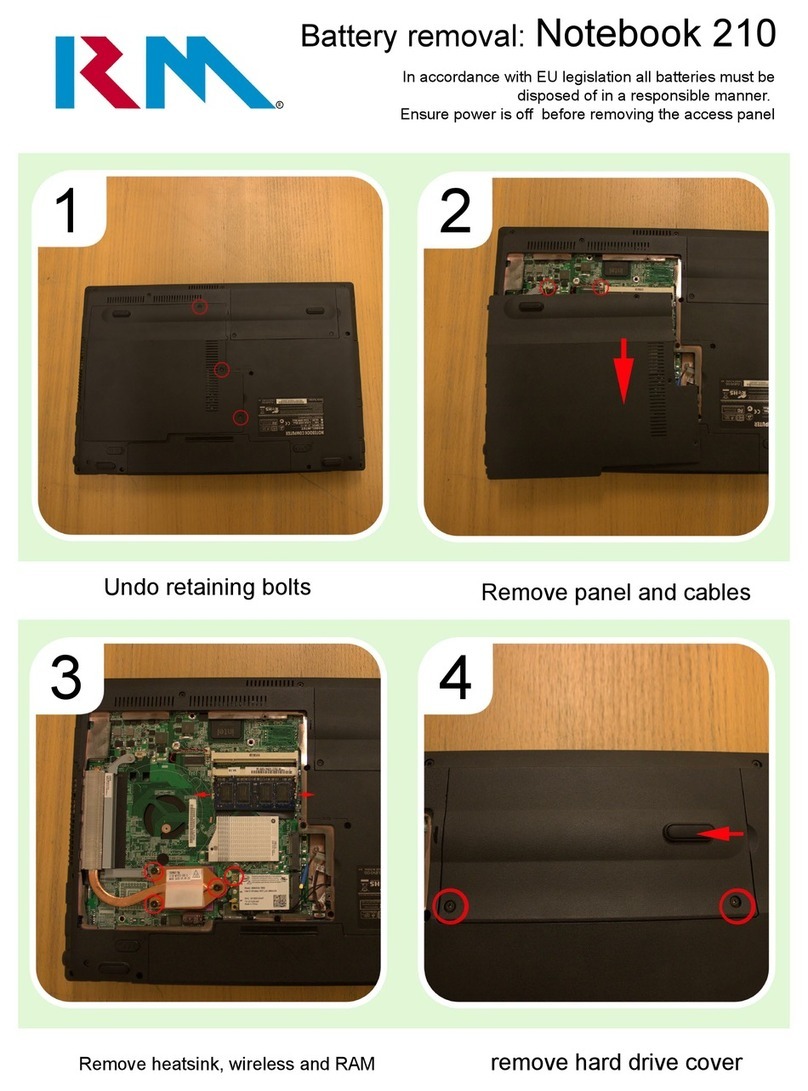
_ Keep the notebook cover screwed on when in use. Always replace
the cover when you have finished working within the notebook and
before you switch it back on.
•
CAUTION: Risk of explosion if battery is replaced by an incorrect
type. Dispose of used batteries according to the instructions.
•
“IMPORTANT SAFETY INSTRUCTIONS – When using your telephone
equipment, basic safety precautions should always be followed to
reduce the risk of fire, electric shock and injury to persons including
the following:
•
Do not use this product near water for example, near a bathtub,
washbowl, kitchen sink or laundry tub, in a wet basement or near a
swimming pool.

•
Avoid using a telephone (other than a cordless type) during an
electrical storm. There may be a remote risk of electric shock from
lightning.
•
Do not use the telephone to report a gas leak in the vicinity of the
leak.
•
Use only the power cord and batteries indicated in this manual. Do
not dispose of batteries in a fire. They may explode. Check with local
codes for possible special disposal instructions.
Conventions
Throughout this manual, the following conventions are used:
<Enter> Press the appropriate key on the keyboard. In this
example, you should press the <Enter> key (_).
<Alt/S> Slashes separate keys. In this example, press the
<Alt> key and hold it down as you press <S>.
Release both keys together.
<> <> <>
<>
These are the right, left, up and down arrow keys.
These keys are on the right of your keyboard.
Table des matières
Autres manuels RM Ordinateur portable