
Ricoh BOOK FOLDER BF90+ Manuel utilisateur

BOOK FOLDER BF90+
Operating instruction
Read this manual carefully before you use this product and keep it handy for future
reference.
For safety, please follow the instructions in this manual.

Part no: 17439
Doc no: x04065

3
TABLE OF CONTENTS
What You Can Do with This Machine ............................................................................... 5
Guide To Components ...................................................................................................... 7
Exterior ......................................................................................................................................... 7
Interior ........................................................................................................................................... 8
1. Basics ................................................................................................. 9
Turning On / Off the Main Power ...................................................................................... 9
Emptying the trim bin ...................................................................................................... 10
2. Operating the Book Folder ..............................................................11
Changing settings ........................................................................................................... 11
General ....................................................................................................................................... 11
Setting Mode ............................................................................................................................... 11
Procedure ................................................................................................................ 11
Begin On-line Production ............................................................................................... 12
3. Clearing Misfeed(s) ......................................................................... 13
Clearing misfeed(s) ......................................................................................................... 13
General..................................................................................................................... 13
Inside the Book Folder ........................................................................................... 13
Exit area ................................................................................................................... 13
4. Troubleshooting .............................................................................. 15
Fault codes ...................................................................................................................... 15
General ....................................................................................................................................... 15
Clear Misfeed(s) ...................................................................................................... 15
Close cover(s) ......................................................................................................... 15
Feed errors ................................................................................................................................. 16
5. REMARKS ........................................................................................ 17
Do’s And Don’ts ............................................................................................................... 17
Where to put Your Machine............................................................................................. 18
Machine environment .................................................................................................................. 18
Power connection ....................................................................................................................... 18
Access to machine ..................................................................................................................... 19
Maintaining Your Machine............................................................................................... 20
Cleaning feed belts ..................................................................................................................... 20
6. Specification .................................................................................... 21
Machine Specifications ................................................................................................... 21
Book Folder BF90+ (option)........................................................................................................ 21
INDEX .................................................................................................... 23

Page intentionally blank

5
What You Can Do with This Machine
The Book Folder BF90+ is an option to the SR90+ Booklet Making system. The Booklet
Making system works online with the Bellini C2a/b, Martini and Bellini C1a/b.
To install the Book Folder BF90+ you need to have a TR90+ Trimmer installed to the SR90+
Booklet Maker. The printouts, which has been stapled, folded and trimmed will be fed into the
BF90+. The BF90+ will form the spine of the booklet square. The booklets will, after passing
the BF90+, have the look as a perfect bound book.
CF90 Cover Feeder
(option)
TR90+ Trimmer
(option)
SR90+ Booklet Maker
Rail (option)
BF90+ Book Folder
(option)

6
The Book Folder BF90+ is controlled from the single user interface on the Booklet Maker.
This Operator Manual will only cover the specific functions of the Book Folder BF90+.
From the Ready screen, scroll down to BF90+ with the
arrow button and press [CHG] button.
Changing settings.
The BF90+ can be set to five different modes. These
are [Auto], [Off], [Mode 1], [Mode 2] and [Mode 3].
Mode 1 to 3 are referred to as manual settings. Select
mode with the arrow button amd press the [OK] button.

7
Guide To Components
Exterior
1
4
6
1 Top cover
2 Belt stacker interlock
3 Belt stacker, upper part
4 Belt stacker
5 Connections
6 Trim bin
7 Base
7
Stacker COM BF90 Terminator POW BF90
2
3
5
8
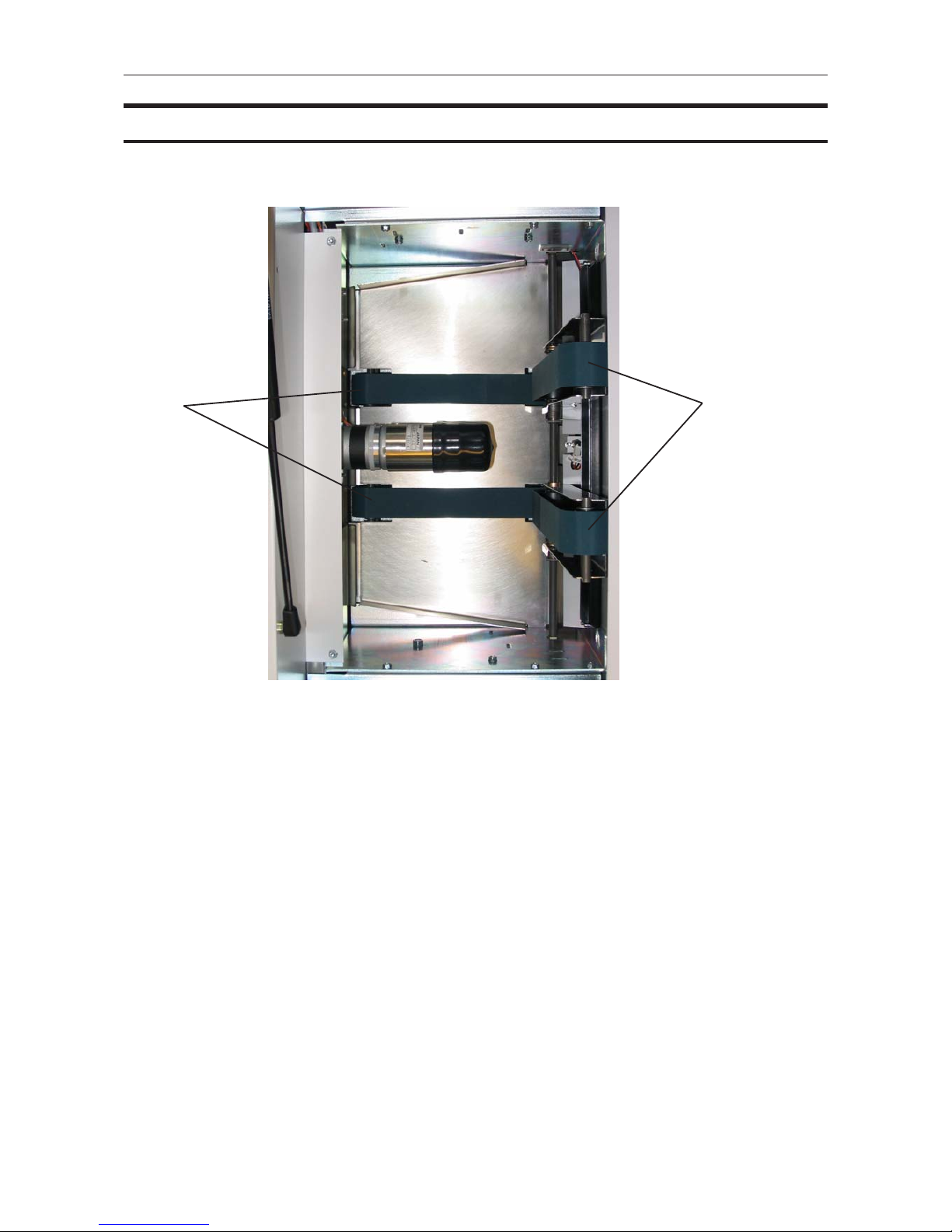
1 Lower feed belts
2 Upper feed belts
12
Interior
Top view,
Upper feed belts in lifted up

9
1. Basics
Turning On / Off the Main Power
1
Plug the power cord (1) into the Book Folder.
Set ON/OFF switch (2) on Book Folder to ON
position.
To avoid an Error message, turn ON the BF90+
before switching ON the SR90+.
2
1
10
Basics
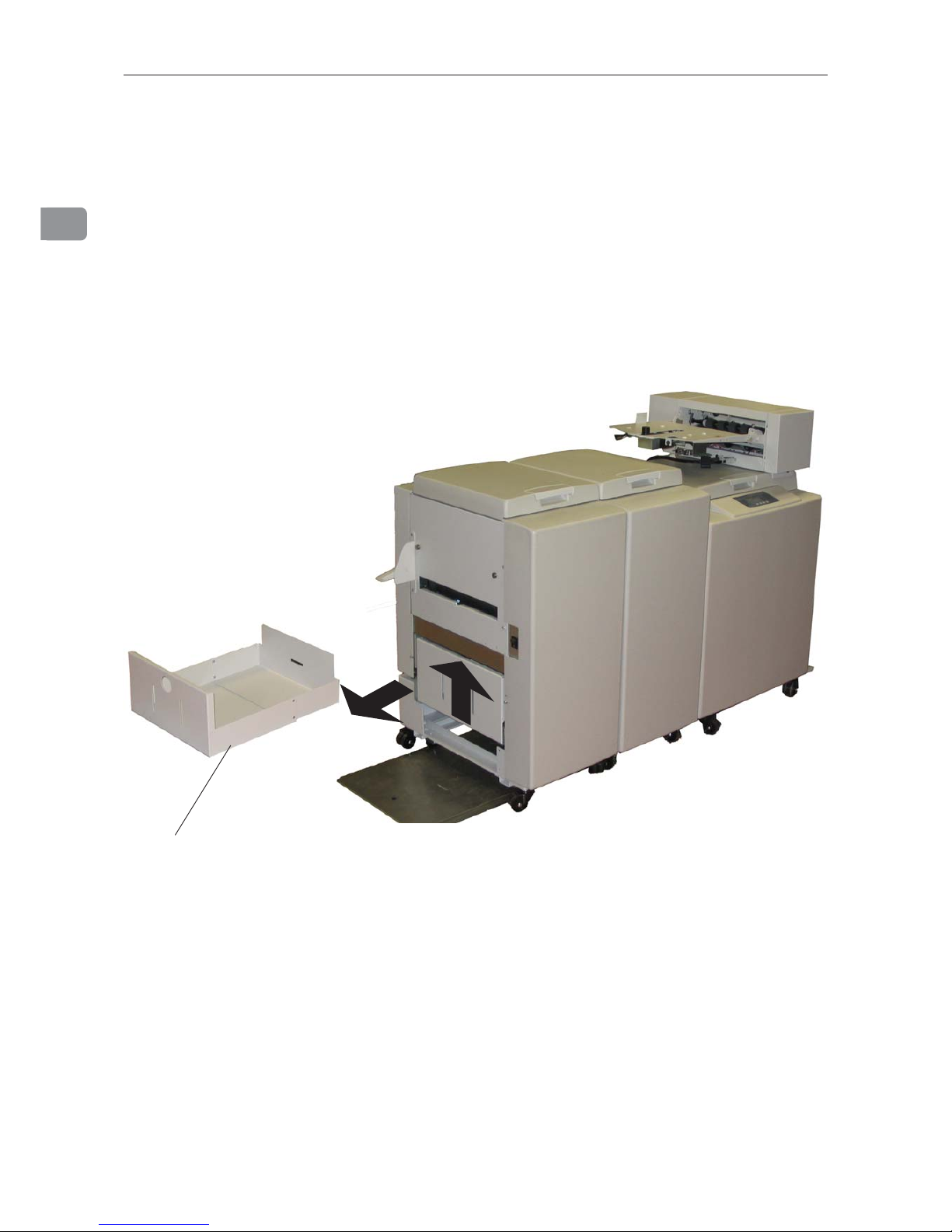
Emptying the trim bin
Remove the trim bin by pulling it out.
trim bin
Table des matières
Manuels Plieuse populaires d'autres marques

Mathias Bauerle
Mathias Bauerle Multipli 35 Manuel utilisateur

Intelli-Fold
Intelli-Fold DF-304C Manuel utilisateur

Pitney Bowes
Pitney Bowes DI425 FastPac Manuel

Hwasung
Hwasung COMPODIS HMK-830 Series Manuel utilisateur

KRUG+PRIESTER
KRUG+PRIESTER IDEAL 8306 Manuel utilisateur

XPOtool
XPOtool 61574 Manuel utilisateur


