
REMEHA iSense Manuel

EN
Digital timer thermosatat
iSense
Installation and
Service Manual
120666-AG

Contents
1 Preface ........................................................................................................4
1.1 General ..................................................................4
2Location of the installation ........................................................................5
2.1 Position of the regulator ......................................5
2.2 Installation and connection .................................6
2.3 Location of the outside sensor ...........................7
2.4 Room sensor .........................................................7
3Start-up ........................................................................................................8
3.1 Fitted control unit .................................................8
3.1.1 Meaning of the symbols on the display ...................8
3.1.2 Functions of the keys ..............................................9
3.2 Setting language, time and date ..........................9
3.3 Default setting .......................................................9
4Setting .......................................................................................................11
4.1 Changing the settings ........................................11
4.1.1 Defining or modifying a timer program ..................11
4.1.2 Setting continuous temperatures ..........................12
4.1.3 Setting the holiday mode .......................................13
4.1.4 Group control ........................................................13
4.2 Operating the controller .....................................14
4.2.1 Selecting a program ..............................................14
4.2.2 Temporarily changing the temperature .................14
4.2.3 Fireplace mode .....................................................15
4.2.4 Information ............................................................15
4.2.5 Groups ..................................................................15
4.3 Changing usage settings ...................................16
4.3.1 Setting the display .................................................16
4.3.2 Setting button locking ............................................16
4.3.3 Setting the language .............................................16
4.3.4 Setting the user level .............................................16
4.3.5 Resetting factory settings ......................................17
4.3.6 Calibration .............................................................17
4.3.7 Restoring a connection with the base station (Only
controller RF) ........................................................17
4.3.8 Connecting extra RF sensors (Only controller
RF) ........................................................................17
4.3.9 Setting the time and date ......................................17
1030211 - 120666-AG

4.3.10 Comfort correction .................................................18
4.3.11 Legionella function ................................................18
4.3.12 Controlling the tap water temperature ...................18
4.3.13 Central heating settings ........................................20
4.3.14 Frost protection - System ......................................21
4.3.15 Frost protection - Room ........................................21
5 Selecting the control strategy .................................................................22
5.1 Six control strategies .........................................22
5.2 Setting the control strategy ...............................23
5.3 Specific settings for weather-compensated
control ..................................................................24
5.4 Heating curve - For example ..............................25
6 Installer settings .......................................................................................26
6.1 Telephone number for service messages and
failure signals ......................................................26
6.2 Service messages on or off ...............................26
6.3 PIN code for menus for the installer and
system .................................................................26
6.4 Digital input .........................................................26
6.4.1 Operation ..............................................................26
6.4.2 Examples ..............................................................27
6.5 Boiler Setting ......................................................29
7 Messages ..................................................................................................30
7.1 Error messages ...................................................30
7.2 Maintenance message ........................................31
7.3 Incidents and solutions ......................................31
8 Menu / Technical data ..............................................................................33
8.1 Menu structure ....................................................33
8.2 Technical characteristics ...................................35
Contents
2030211 - 120666-AG

3030211 - 120666-AG

1 Preface
1.1 General
The Remeha iSense is a timer thermostat with many enhanced
functions.
The controller is supplied in a OpenTherm and RF variant:
4iSense OpenTherm.
4iSense OpenTherm RF(Wireless). With the iBase RF
transmitter.
This installation and service manual describes all the functions of the
iSense. (OpenTherm) (RF)
iSense 1. Preface
030211 - 120666-AG 4

2 Location of the installation
2.1 Position of the regulator
Controller OpenTherm and controller RF
The controller is set to room control by default. The controller can be
installed on an inside wall or in a boiler, if the boiler is suitable for
this. This means that the inside temperature is used to control the
central heating. It is therefore best to locate the controller on an
internal wall in the room in which you spend the most time, such as
the living room.
For Germany: The controller is set to weather-
compensated control by default.
Only controller RF
The following also applies for the controller RF:
4Position the controller at least 1 metres from equipment with
electromagnetic emissions (Washing machines, dryers, cordless
telephones, televisions, computers, microwave ovens etc).
4Position the controller so that it has good reception.
Take account of the fact that objects containing metal will affect the
reception. These include steel-reinforced concrete, mirrors and
windows with a metal coating, insulation films, etc.
CAUTION
Wireless range of controller RF
The range of the controller RF in buildings is generally
30 metres.
Note!
This value is purely an indication! The actual range of the
RF signal depends heavily on the local environment.
Remember that the number of walls and ceilings
(regardless of whether they contain metal or not) can have
a considerable impact on reception. Other objects that
contain metal may also impact the reception.
These include steel-reinforced concrete, mirrors and
windows with a metal coating, insulation films, etc.
The signal strength can be viewed via Menu >
Information.
2. Location of the installation iSense
5030211 - 120666-AG
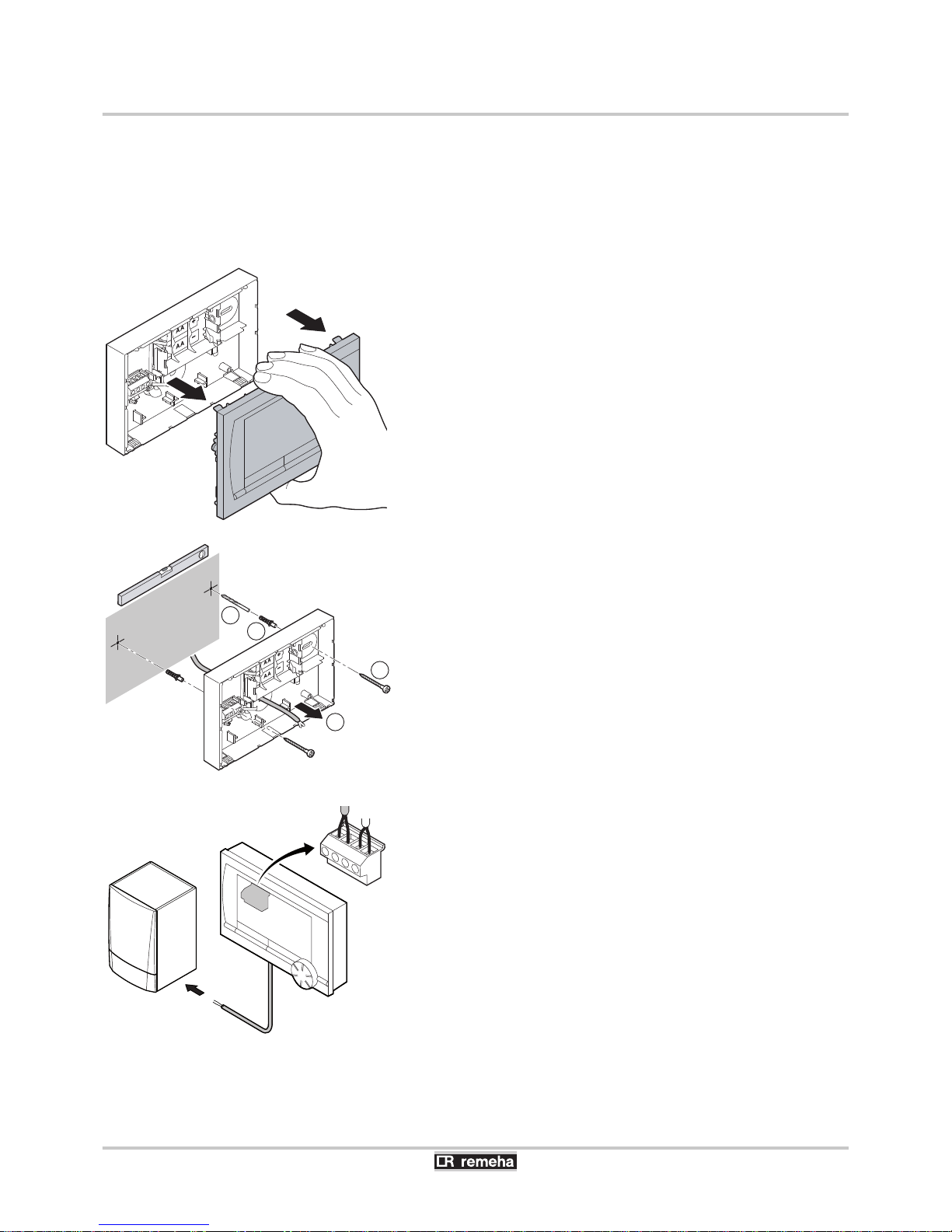
2.2 Installation and connection
Before you can connect the controller, you must first:
4Adjust the boiler so that it can be connected to a OpenTherm
controller. See the installation and service manual for the boiler.
4Shut down the boiler.
To do this, proceed as follows:
1. Open the housing by pulling the front and the base plate apart.
2. Attach the base plate to the wall using the screws and plugs
supplied. Ensure that the OpenTherm connecting wires for the
boiler are poking through the hole in the base plate.
3. (Only controller OpenTherm) Connect the controller to the
OpenTherm connection of the boiler, and to the OT connection of
the controller. OpenTherm is not sensitive to polarity. The wires
are interchangeable.
T001046-D
T001035-C
2
2x
3
2x
4
2x
1
T001036-D
OT
OT
Digi
iSense 2. Location of the installation
030211 - 120666-AG 6

4. (Only controller OpenTherm) Place 3 AA batteries in the
controller if necessary. These are not supplied. The batteries
ensure that the clock keeps running when the boiler is switched
off. The batteries also power the backlights of controllers for
boilers that do not have OpenTherm Smart Power. If you have a
boiler with Smart Power, then the backlight of the controller also
works without batteries.
(Only controller RF) Insert 3 AA batteries into the controller. These
are required to operate the controller RF.
The set programs will be retained if the boiler or controller
is switched off (Even if no batteries are inserted).
The controller is now connected and ready for use. The
base station must now be fitted for the controller RF.
Consult the base station manual for this.
2.3 Location of the outside sensor
An outside temperature sensor is not supplied as standard with the
controller. You only require this sensor if you want weather-
compensated control of the inside temperature.
The following guidelines apply with regard to choosing a location for
an outside temperature sensor:
4Install the outside sensor on the north or north-west side of the
home, away from direct sunlight.
4The sensor must be positioned at least 2,5 metres above ground
level.
4Do not install the outside temperature sensor next to a window,
door, vent etc
Consult the documentation for your boiler for information on
connecting an outside temperature sensor.
2.4 Room sensor
(Only controller RF)
A RF room sensor is optionally available for a controller RF. This
sensor replaces the internal controller sensor.
T001042-C
T001043-B
>2,5m
2. Location of the installation iSense
7030211 - 120666-AG

3 Start-up
3.1 Fitted control unit
3.1.1. Meaning of the symbols on the display
Pictograms
sClock program active
uClock program A active
tClock program B active
!Continuous day temperature
zContinuous night temperature
]Frost protection
{Summer mode
EManual setting
xVacation program
TDHW standby function switched off
\Set temperature
HMeasured temperature
ZOutside temperature measured
IHeating System
Pictograms not shown
DController requesting heat
IN Central heating boiler on for hot water
ID Central heating boiler on for central heating
dButton locking enabled
pGroup 1 selected
qGroup 2 selected
rElectricity production
Warning symbols
eCheck the water pressure in the installation
?Boiler service required
vBattery in controller almost empty
cGeneral warning symbol
wNo wireless connection
T001034-04-A
Mode button B
Mode button A
Temperature TimePictograms
Menu Program
Textbox
menus
iSense 3. Start-up
030211 - 120666-AG 8

3.1.2. Functions of the keys
The controller is menu-controlled, which means it is very simple to
operate.
It only has three buttons.
4The function of button A and button B depends on the
task you are carrying out.
4The function is shown in the display immediately
above the buttons.
4Button C is a push-turn button.
4You press it to confirm choices (Such as menu
selections).
4By turning it you can perform various tasks such as
scrolling through menus or changing values such as
(Temperature Time Date Language).
3.2 Setting language, time and date
When you connect the controller, the language selection menu
appears.
1. Select the desired language by pressing button C, and then press
button C to confirm.
2. Follow the instructions on the display to select the time, year,
month and day.
The controller is now connected and ready for use. The default clock
program is activated after installation. ¼ "Default setting", page
9
The temperature is now controlled by this clock program.
The controller automatically switches between summer
and winter time.
3.3 Default setting
The controller is set to room control by default (Central heating is
controlled on the basis of the inside temperature). Weather-
compensated control of the boiler is also possible (on the basis of the
outside temperature).
Programme schedule
The default clock program sets the temperature daily as follows:
406.00 - 19.00: 20℃
419.00 - 23.00: 21℃
423.00 - 06.00: 15℃ + T
T000059-B
ABC
3. Start-up iSense
9030211 - 120666-AG
Autres manuels pour iSense
2
Table des matières
Autres manuels REMEHA Thermostat

REMEHA
REMEHA iSense Pro DIN AD280 Manuel

REMEHA
REMEHA i Sense Manuel utilisateur

REMEHA
REMEHA qSense Manuel utilisateur

REMEHA
REMEHA iSense Manuel utilisateur

REMEHA
REMEHA iSense Pro DIN AD280 Manuel

REMEHA
REMEHA qSense Manuel utilisateur

REMEHA
REMEHA Timer thermostat Manuel utilisateur

REMEHA
REMEHA iSense Manuel

REMEHA
REMEHA Celcia 20 Manuel utilisateur
Manuels Thermostat populaires d'autres marques

EWELLY
EWELLY EW-181 Manuel utilisateur

Prolon
Prolon T1100 Instructions d'installation

Computherm
Computherm Q20 Manuel utilisateur

Heatmiser
Heatmiser neoStat Manuel utilisateur

Aube Technologies
Aube Technologies TH111GFCI-NP 240 VCA Manuel utilisateur

Mars
Mars HEAT CONTROLLER IR Wireless Thermostat Manuel utilisateur


