
Relat BM3000 Manuel utilisateur

Copyrights © Shenzhen Relat Electronic Technology CO., LTD. All Rights Reserved
User Manual
BM3000 Battery Monitoring System

1/31
User Manual
Content
1. Product Overview..................................................................................................................................................................... 2
1.1. Functions........................................................................................................................................................................2
1.2. Range of Application......................................................................................................................................................2
2. BMS System Description........................................................................................................................................................... 3
2.1. General Specification.....................................................................................................................................................4
2.2. BMS Component List..................................................................................................................................................... 5
2.3. Control Module(BM00MC)............................................................................................................................................ 6
2.4. Battery Sensor(R-Sensor) BM3KRS................................................................................................................................9
2.5. Current Detector (I-Sensor) BM00IS............................................................................................................................10
3. Preparation for Installation.....................................................................................................................................................12
3.1. Preparation Work.........................................................................................................................................................12
3.2. Resource from Client................................................................................................................................................... 12
3.3. Required Tools & Accessories......................................................................................................................................12
3.4. Checking the Product Package.................................................................................................................................... 14
3.5. Quick Installation Guide...............................................................................................................................................14
4. Safety Information.................................................................................................................................................................. 15
5. Installation Guide....................................................................................................................................................................16
5.1. Personal Protective Equipment (PPE) requirements.............................................................................................. 16
5.2. Step 1: Determine battery numbers............................................................................................................................17
5.3. Step 2: Install the Kelvin washers................................................................................................................................ 18
5.4. Step 3: Connect the battery cables............................................................................................................................. 19
5.5. Step 4: Install battery sensor BM3KRS........................................................................................................................ 20
5.6. Step 5: Install Current Detector BM00IS..................................................................................................................... 22
5.7. Step 6: Connect R-bus communication cable..............................................................................................................23
5.8. Step 7: Install Control Module.....................................................................................................................................24
6. Configuration Tool...................................................................................................................................................................25
6.1. Reset IP.........................................................................................................................................................................25
6.2. Cable Connection.........................................................................................................................................................25
6.3. Configuration............................................................................................................................................................... 26
6.4. Alarm Setting List.........................................................................................................................................................28
7. Battery Management Software.............................................................................................................................................. 28
8. Integrated to the 3rd party software......................................................................................................................................29
8.1. RS485 Port....................................................................................................................................................................29
8.2. Ethernet Port............................................................................................................................................................... 30

2/31
User Manual
1. Product Overview
1.1. Functions
BM3000 Battery Monitoring System(BMS) is a multi-channel online-automatic battery test and monitoring
system, which is a newest generation of monitoring systems based on new research on battery
characteristics of battery industry and new technologies of industrial electronic monitoring equipment. And
compared to the conventional DC discharge performance test system for batteries, which have the
following features:
Process by AC test technology, further effectively reveals the battery performance characteristics and
aging trends;
Much smaller discharge current, no damage on battery;
No effect on battery pack assembling and operation environment;
Optical isolation technology and multiple level safety protection;
Real-Time monitoring individual block impedance, voltage, temperature and current
Automatic inspection, maintenance-free, high speed, reliable;
Internal resistance can be reported every day or even every hour as needed;
Diversified event management and alarm criteria for setting;
Detailed historical data record for maintenance analysis of the facts;
Ethernet network management is conducive to expansion and centralized monitoring;
Optional wireless alarms, use of cell phones and other mobile devices for maintenance;
Designed to allow IEEE1188 best practice
MODBUS TCP/IP Protocol for communication
The system have been properly tested and proved by CE certification.
Provide battery management software for measure, record and report, can display the analysis graphs.
1.2. Range of Application
BM3000 Battery Monitoring system can monitor the standard of 2V, 6V, 12V battery, battery capacity is up
to 3000Ah, battery total voltage can reach 48V,110V,220V, 400V and etc, it meets the requirements of most
users.
BM3000 Battery Monitoring System is using advanced testing technology, test internal resistance of battery
each day/week, can effectively reflect the performance of battery, comply with IEEE1188 Standard
recommendations, therefor especially suitable for high reliability requirements of UPS Users such as data
center, telecom base station, power plant, rapid transit railway, semiconductor,medicine, bank,
securities,insurance and etc.

3/31
User Manual
2. BMS System Description
BM3000 Monitoring system using modular level designed, which is easy for the installation and expansion.
BM3000 hardware composed with
→ Control Module,
→ Current Detector,
→ Battery Sensor,
→ Battery Management Software
System configuration as below:
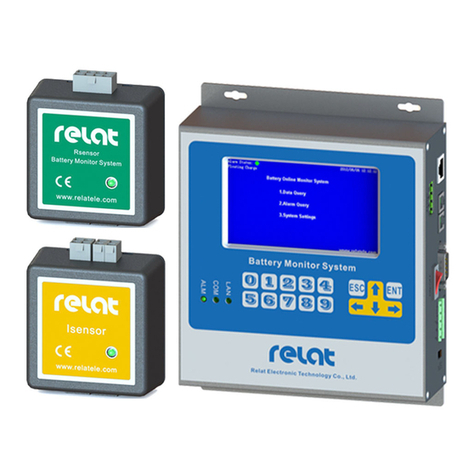
Control Module is the brain of battery monitoring system, it management of battery sensor and current
detector and process all the collecting battery data.
Battery Sensor is measuring individual battery voltage, internal resistance, temperature and transmit these
data to control module via R-BUS port.
Current Detector is measuring battery string current and transmit the data to control module via R-BUS
port.
Battery Management Software

4/31
User Manual
Battery Management Software is installed at laptop or desktop, allows for remote viewing and data
management of all connected battery monitoring systems. Report generation, graph and trending curves,
detailed alarms can all be viewed on multiples of laptop or desktop on the same network.
2.1. General Specification
Table 1. BMS Specification List
Operating Specification
Power Supply Range
DC12V
Power Supply Rating
Max.3.6 Watts
Operating Temperature
-5℃to 50 ℃(23°F ~ 122°F)
Operating Humidity
5% ~ 90%
General Specification
Battery Type
VRLA,SLA,Vented and Nicad Battery
Nominal Battery Voltage
2V, 6V, 12V battery
Max. Connected Battery
254 blocks of battery
Max. Connected Strings
6 battery strings
Measurement Range
Individual Battery Voltage
1.5V to 5V or 5V to 16V
Individual Battery Resistance
0.01mΩ to 40mΩ & 0.1mΩ to 80mΩ
Individual Battery Temperature
-10°C to 70°C (14°F ~ 158°F)
String Voltage
0 to 1500V
Ambient Temperature
-10°C to 70°C (14°F ~ 158°F)
String Current
0 to 1000A
Measuring Accuracy
Individual Battery Voltage
± 0.2%
Individual Battery Resistance
2%
Individual Battery Temperature
±1°C
String Voltage
± 0.3%
String Current
± 1A
Ambient Temperature
±1°C

5/31
User Manual
2.2. BMS Component List
Please check the BMS Component List below,
Table 2.BMS Component List
No.
Product Picture
Product Name
Description
1
Control Module
BM00MC
Max connected with 254 block
batteries and 6 battery strings.
2
Battery Sensor
BM3KRS
One block battery require one
R-Sensor
3
Current Detector
BM00IS
One string batteries require one
I-Sensor
4
Current Transducer
100A – 1000A
One string batteries require one
current transducer
5
Battery Cable with
temperature probe
Accessory of R-Sensor
6
R-bus Communication Cable
Accessory of R-Sensor and
I-Sensor
7
Communication Cable of
Current Transducer
Accessory of Current Transducer
8
Power Cable for Control
Module
Accessory of BM00MC
9
Power Cable of I-Sensor
Accessory of I-Sensor

6/31
User Manual
10
Kelvin Washer
One block battery require 2 PCS
Kelvin Washer
11
RJ11 Connector
Fixed length of Telephone cable
with RJ11 connector.
2.3. Control Module(BM00MC)
Control Module (BM00MC) is the core component of battery monitoring, allowed to wall mounting.
Designed to receive transmitted signals from the Battery Sensor and Current Detector.
Continuously monitors, analyzes, and uploads battery measurements to BMS software
Provides RS-485 or Ethernet communication for remote monitoring.
Table 3. Control Module (BM00MC) Specifications
Model
BM00MC
Operating Temperature
-5℃to 50 ℃(23°F ~ 122°F)
Relative Humidity
5% ~ 90%
Operating Voltage
DC 12V±10%
Power Consumption
3.6 Watt
Communication Ports
Ethernet x 1
RS-485 x 2
Reserved Interface
USB x 1 (Loading firmware)
Monitoring Nodes/Battery
Maximum 254 nodes of batteries and
6 battery strings
Communication Protocol
Modbus
Dimensions (H x W x D)
90*152*27mm(3.54’’x5.98’’x1.06”)
Weight
420 g

7/31
User Manual
Dimensional Drawing as below,
Interface Description
① ② ③ ④ ⑤ ⑥
1LAN : Ethernet interface connect to computer or network switch, allow for web configuration or
connecting to SCADA software via Modbus TCP. (Baud rate is 9600)
2RESET: Long press 5 seconds to reset the device IP address to 192.168.1.100
3Loading: loading the firmware
4RS485: RS485 interface connect with monitoring software, uploading battery data. (Baud rate is
9600)
5DC12 V Input: DC12v Power Supply input
6Dual R-Bus Port : Connect with R-sensors and I-Sensors in a link loop communication

8/31
User Manual
LED Description
① ② ③ ④
⑤ ⑥
① RUN: If BM00MC control module is power on, the green light should be on.
②FAULT: Hardware detection indicator, if there’s any fault component, the red light should be on.
③ALARM: Alarm indicator, if there’s any alarms, the red light should be on.
④IR TEST: If the system is measuring the battery internal resistance, the blue light should be on. IR is short
for internal resistance.
⑤RS485: Communication indicator, the green blinking light should be on when there’s RS485
communication.The right LED is RXD means received data, left LED is TXD means transmit data.
⑥RBUS: When control module is communicated with R-Sensors and I-Sensors, the green light should be
on and blink. The right LED is RXD means received data, left LED is TXD means transmit data.

9/31
User Manual
2.4. Battery Sensor(R-Sensor) BM3KRS
Battery sensor(R-Sensor) BM3KRS can measure the battery cell voltage, temperature and internal
resistance, and transmit the measurement to the Control Module for analysis and storage.
Table 4. Battery Sensor BM3KRS Specifications
Model
BM3KRS-LV
BM3KRS-HV
Cell Voltage
2V/3.7V
6V/12V
Cell Voltage Measurement Range
1.5 - 5V
5 - 16V
Accuracy
±0.2% Full Scale
Internal Resistance Measurement Range
0.01 - 40mΩ
0.1 - 80mΩ
Internal Resistance Repeat Accuracy
±2%
Temperature Measurement Range
-10 - 70°C
Accuracy
± 1 °C
Operating Temperature
0 - 50°C
Humidity
≤ 95%
Power Consumption
< 0.4 W
Isolation Characteristic
Input /Output > 4kV
Communication Interface
RJ10
Communication Protocol
R-bus
Dimensions (H x W x D)
60x59x28mm
Weight
50g
Autres manuels pour BM3000
1
Table des matières
Autres manuels Relat Instrument de mesure
Manuels Instrument de mesure populaires d'autres marques


Endress+Hauser
Endress+Hauser Proline Promag 50 Caractéristiques techniques

Siemens
Siemens SITRANS F Coriolis FCT030 Manuel de la liste des pièces

KLINGER
KLINGER CMF V Series Manuel utilisateur

EXFO
EXFO FTB-2 Manuel d'exploitation et d'entretien

Keysight
Keysight M8290A Manuel utilisateur

ADTEK
ADTEK MW-5 Manuel utilisateur