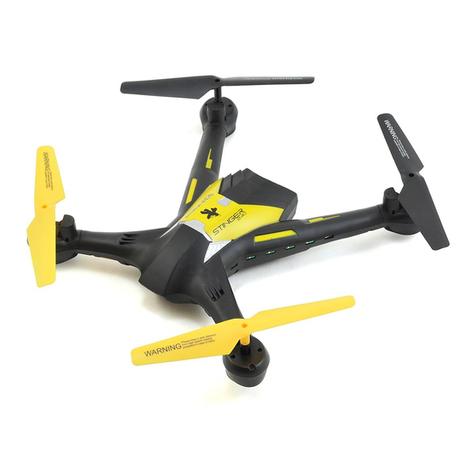
Rage STINGER GPS Manuel utilisateur

INSTRUCTION MANUAL
Total width :
Prop size:
Height:
Weight:
Motors:
Charger:
Specifications
9.00” (229mm)
2.00” (50.8mm)
4.75” (120mm)
7.1oz. (202g)
1503/2600KV Brushless (4 total)
USB charging cable

-2-
Contents
The 1080p HD camera has 1-axis movement (up and down) that can be controlled from
within minutes of opening the box!
an USB charging cable

In order to make it easier and safer to use this product, please read all the contents of this manual
carefully before using this product and make sure to save this manual for future reference.
1.In order to protect the legitimate rights and interests of users, please carefully read the instructions,
disclaimers and safety instructions provided with this product before use.
2.This product is not suitable for people under the age of 14. People under the age of 14 need to use
it under the supervision and guidance of adults with model aircraft flight experience.
3. Once you start using the product, you are deemed to have read, understood, recognized and accepted
all terms and contents of the product's instructions, disclaimers and safety instructions.
4. In the process of using this product, please be sure to strictly abide by and implement the requirements
including but not limited to the instructions and safety instructions. For all personal injuries, accidents,
property losses, legal disputes the user shall bear relevant responsibilities and losses and the seller(s)
will not bear any responsibility.
5.The seller(s) will not be liable for any direct or indirect violation of laws and regulations caused by the
use of the product.
1. This product is not suitable for people under the age of 14.
2. The product has high-speed rotating blades and includes certain dangers in operation.
Do not approach or touch the product while it is running.
3. When using this product, please keep away from dangerous environments such as airports, railways,
highways, high buildings, electric lines, etc.
4. When using this product, please keep away from high electromagnetic interference environments
such as mobile base stations, high-power transmitting equipment, etc.
5. When using this product, please keep away from all types of manned aircraft.
6. Please do not use this product in rain, thunder, dust, fog, snow, strong wind, low temperature and
other harsh environments.
7. This product is a non waterproof design, please do not operate this product near areas of water.
8. When operating this product, always keep a safe distance of about 10 yards between the aircrafts
and people or animals.
9. Always keep the aircraft flying within the operator's visual range. Do not attempt to fly when product
is not visible behind buildings or walls.
10. Do not hover or fly over a crowd or near groups of people.
11. Do not operate this product near a place where children play.
12. Do not use this product to chase vehicles or affect the normal operation of vehicles.
13. Do not turn off the transmitter when the product is flying.f
14. This product can not be used when under the influence of alcohol, fatigue, medications, physical
discomfort, etc.
,
15. Please check the product before each use, including but not limited to the firmness of parts, cracks and
wear of the body and propeller. In case of any abnormality, please stop using and replace the
necessary accessories immediately.
16. Do not attempt to block any moving parts while operating this product.
17. Do not modify this product or use it for any purpose beyond the original design.
18. Do not operate this product in a no fly zone according to laws and regulations.
DISCLAIMER AND SAFETY INSTRUCTIONS
For current safety guidelines and restrictions for locations where you can fly, please see FAA's B4UFLY
app or visit their website at https://www.faa.gov/uas/recreational_fliers/where_can_i_fly/b4ufly/
WARNING
!
DISCLAIMER
SAFETY INSTRUCTIONS
-3-

19. Due to the variety of materials used in the aircraft, high temperature will damage the internal structure
of the aircraft, and lead to unpredictable flight characteristics. Therefore, please keep the aircraft away
from any heat source and avoid exposing to direct sunlight for a long period time.
20. Please follow the product instruction manual.
21. Please use original accessories for maintenance and replacement.
22. Please make sure that other operators understand and abide by the safety instructions.
24. Do not use expanded, leaking or damaged batteries.
25. Keep away from inflammables when charging the battery (such as blankets, solid wood furniture, wooden
boards, etc.)
26. Please use the original charge cord. Do not use other brands or damaged charging cords.
27. Please keep a safe distance from the high-speed rotating blades to avoid the risk of injury.
28. Do not fly the aircraft close to the face or ears to avoid injury or hearing loss.
29. Aircraft should be used as far away from other electrical equipment and magnetic objects as possible
to avoid interference.
30. Please do not short circuit or squeeze the battery to avoid damage to the battery or surrounding objects.
23. The motor can be hot after use. Please do not touch it to avoid burns.
1. There are certain risks in using lithium batteries which may cause significant injury or death to people -
or damage to property. Please use it carefully as the user bears all relevant responsibilities.
2. If the battery leaks, avoid contact with skin and eyes. If it touches the skin, please wash immediately
with soap and clear water. In case of contact with eyes, wash immediately with plenty of water and see
doctor immediately.
3. If the charger emits odor, noise or smoke, please unplug the power supply immediately.
1. Please use the original charge cord for charging. Do not use damaged or other brand chargers.
2. Do not charge batteries that are swollen, leaking or damaged.
4. Do not charge on a surface near inflammables (blankets, wood floor, solid wood furniture, etc.) or
conductive objects. Please keep the battery in view when charging.
5. Do not charge the battery immediately after using the product, allow the battery to cool down for
10-15 minutes.
6. The room temperature when charging the battery should be between 40 °F and 100 °F.
7. Dispose of all electronic components and batteries according to local laws and regulations.
The device consists of electronic components and batteries. For electronic waste, please carry out
according to local waste treatment requirements.
CHARGING PRECAUTIONS
CHARGING INSTRUCTIONS
-4-
3.

PRODUCT OVERVIEW
Blade A
(Clockwise
Rotation)
Blade A
(Clockwise
Rotation)
(Counterclockwise
Rotation)
Blade B
(Counterclockwise
Rotation)
Blade B
Body
Arm
Camera
NOTE
When replacing the blades, ensure that the blades A / B installed on each shaft are consistent.
TRANSMITTER OVERVIEW
-5-
Important Notice! When the power supply of the transmitter is lower than 3.5V, you will hear
a low power beeping sound. When this occurs, you must charge the transmitter before flying.
GPS On/Off
Power Button
Throttle Stick
Gyro
Calibration
Compass
Calibration One Button Take off/Landing
Control Stick
One Key Return
Trim button
Rate switch Camera up and down
adjustment
Long Press for Video
Short press for Photo

-6-
CHARGING AND BATTERY INSTALLATION
CHARGING
TRANSMITTER CHARGING
USB
Micro
USB
The red light will remain on while charging. When battery is fully charged the red light will go out.
The charging time is about 3 hours
.
Note: Please use the factory charge cord. It is NOT recommended to use a damaged or other
branded cord for charging.
①
② ③
1. Hold the end of the battery cartridge
at the indentation and pull out of the
compartment.
(figure 1)
2. Connect the original charge
cord Micro USB to the flight
battery. (figure 2)
3. Plug the USB into a 5V USB
power source.
(figure 3)
The transmitter includes a built-in 3.7V lithium
battery. To charge, connect the micro USB to the
transmitter and the USB to a 5V power source.
The charge light will be on during charging and
will go off when charging is complete. The charge
time should be approximately 3 hours.
Micro USB
USB

-7-
TRANSMITTER INSTRUCTIONS
CONTROL DIRECTIONS
SMART PHONE
INSTALLATION
Up
Up
Down Down
Rotate
Left
Rotate
Right
Rotate
Right
Rotate
Left
Forward
Forward
Backward
Backward
Left-side
Flight
Left-side
Flight
Right-side
Flight
Right-side
Flight
1. Left Control Stick (throttle/yaw) The left stick controls the flight altitude and left and right rotation (yaw)
2. Right Control Stick (pitch/roll) The right stick controls the forward/backward and left/right-side flight direction
1. Open the mobile phone
bracket on the transmitter.
2. Insert the mobile phone into the bracket
on the transmitter and adjust the bracket
as necessary.

-8-
ONE KEY RETURN
20 yards
20 yards
Aircraft location
Take-off point
(landing position) H
One Key Return: When you press One Key Return, the transmitter will beep
continuously and the aircraft will start to return to the take-off position to land.
Once the unit has returned and landed, the beeping on the transmitter will stop
after 3 seconds. This function works only if GPS mode is on.
SAFE RETURN
If the aircraft detects low voltage level, the front and rear lights of the aircraft
will blink slowly and the aircraft will automatically return to a height of about 20
meters within the radius of the take-off point. At this time the aircraft can fly for
about 2-4 minutes. When a second low voltage level is detected and the
aircraft is less than 10 meters high, it will automatically rise to 10-20 meters,
return to take-off point and automatically land. This function will only work when
in GPS mode.
PHOTO AND VIDEO
1. Short press the photo button on the transmitter or touch the photo icon on
the app interface to take photos. The photos will be stored on your smart
device. Both photo and video will only work when your device is connected to
the app!
2. Press and hold the video button on the transmitter, or touch the app
interface to record. Press the video button again or touch the icon to stop
recording. The video will be saved on your smart device. Both photo and video
will only work when your device is connected to the app!
Photo/Video Button
Press and release button for photo.
Press and hold for 1 second to start video recording.
Press and hold again to stop video recording.
While in video mode the blue light on the transmitter will blink.

LIGHTS
RATES
Head
Tail
Red Light Red Light
Blue Light Blue Light
-9-
Return
Indicator Light
Power Indicator
Transmitter
Charging Indicator
Photo/
GPS
Indicator Light
Video
Indicator Light
Fine-Tuning(Trims)
Rate Dial
Rotate the rate dial on the transmitter to change the flight speed.
One beep is low, two beeps is medium, three beeps is high.
When transmitter is turned on, the default setting is low rate.
Short press to enter fine-tuning (trim) mode, use
forward/backward/left fly/right fly control sticks to fine
tune (trim) directions while in flight until the drone has
reached a steady hover and is not drifting in any
direction. To exit Fine Tuning mode, press the button
again.
FINE TUNING ADJUSTMENT (Trims)

Do not fly over or near people, trees, high-voltage power lines, buildings, airports or water.
Do not use this product under severe weather conditions, such as rain, snow, fog and wind speed
exceeding 10-15mph.
It is very important to understand safety guidelines for safe flight. Please read them carefully before flight.
15mph
Fly in a open
unobstructed
environment
Ensure a Strong
GPS signal
Fly within
Visual range
Keep flight
Altitude below 400ft
Keep hair and body parts from rotating blades and motors.
Do not attempt to fly
aircraft in restricted areas.
Recommended flying conditions:
-10-
SAFE FLIGHT GUIDE
STEPS BEFORE TAKE-OFF
Install the battery in the aircraft, then press and
hold the aircraft Power Button for more than 3
seconds. The aircraft will beep and the lights
on the front and rear arms of the aircraft will
flash slowly.
Press the power button on the transmitter. You
will hear a beep and the power light will turn on.
The front lights of the aircraft will remain on solid
and the rear lights will continue to flash slowly.
The binding process is now complete.
400ft
Ce manuel convient aux modèles suivants
1
Table des matières
Autres manuels Rage Drone