
PRT YJ-3020 Manuel utilisateur

Product manual
YJ engraving machine manual

2 3
NO Name QTY Picture
1
2
13
Base
Bolt M5*20
Gantry
Step1
1
1
8
Align the reserved holes in the side plates of the gantry with the
mounting holes in the base, then lock the screws and tighten them
Part-1
Required
Parts
Installation
Steps
1
13
2

4 5
NO Name QTY Picture
3
4
14
Spindle motor
Bolt M6*55
Motor clamp
Step1
1
1
4
As shown in the gure, place the xture and spindle motor to the
mounting hole on the gantry, then lock the nut and tighten it
Part-2
Required
Parts
Installation
Steps
3
4
14

6 7
5
15
5
15
Driver module
Bolt M5*6
1
2
As shown, align the driver module mounting hole with the
preloaded nut, then lock the screw and tighten it
NO Name QTY Picture
Step1
Required
Parts
Installation
Steps
Part-3

8 9
6
12
Plexiglass bafe
Bolt M5*10
2
8
As shown, align the plexiglass bafe mounting hole with the
preloaded nut, then lock the screw and tighten it.
NO Name QTY Picture
Step1
Required
Parts
Installation
Steps
Part-4
6
12
10 11
12V
Spindle
12V
Laser X-axis Y1 Z axis
Y2
USB Port
Offline
Module
12V Fan
Reset
Z Zero
Pause Continue
Water
Cooling
12V 5A
Power
Supply
Power
on/off
Limit Switch
X Y Z
Reset to Factory
Settings
External
Power Supply
External
Spindle
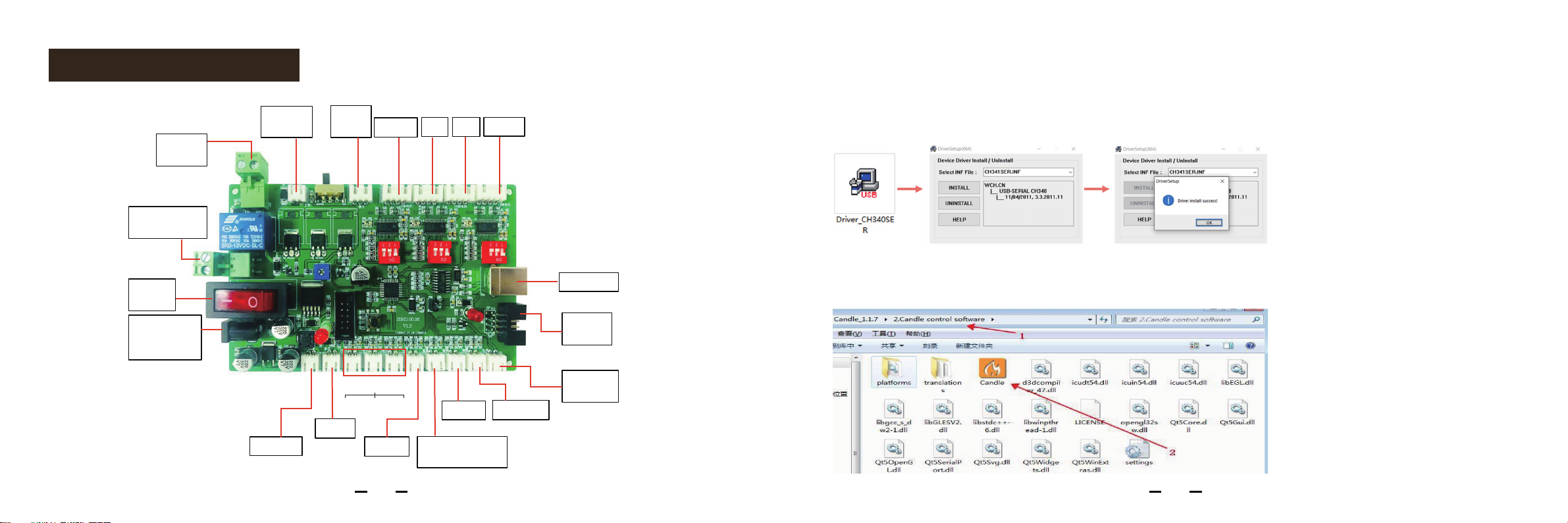
Control Board Wiring Installation instructions of mechanical engraving control software
1. Install the driver (Download from U disk):
2.Open the control software

12 13
3.To Determine your Machine's COM port: 4.Select port and baud rate
•For Windows XP: Right click "My Computer"→ Select "Manage"→ Select "Device
Manager". For Windows 7: Right
click "Computer"→ Select "Manage" → Select "Device Manager" from left pane.
•For Windows 10: Right click “This PC"→ Select "Manage" → Select "Device Manager"
from left pane.
•In the tree, expand "Ports (COM & LPT)“ , your machine will be the USB Serial Port
(COMX), where the “X” represents the COM number, for example COM6.
•If there are multiple USB serial ports, right click each one and check the manufacturer,
the machine will be "CH340“. Select port and baud rate

14 15
1.Open, select G code and import,Clamp the tool.
Software operation
5.Show idle, connection successful

16 17
3. Click send to run the code
2. Move to the starting point of the code and clear the X, Y, Z origin

18 19
4. Move to the starting point of the code and clear the X, Y, Z origin
This Limited Warranty covers a period of 12 months from delivery to Recipient.
This Limited Warranty covers any defects in material or workmanship under normal use
during the Warranty Period.
This warranty covers the repair or replacement of the broken parts at our discretion.
If there is any difculty during using, feel free to contact us for tech support.
Table des matières
Autres manuels PRT Imprimante


