
ProXtend X502 Manuel utilisateur

Full HD Webcam
proxtend.com
USER MANUAL
BEDIENUNGSANLEITUNG
MANUEL UTILISATEUR English
Deutsch
Français

With its 1/2.7” optical sensor,
enhanced optics and autofocus,
combined with an omni-directional
microphone, the ProXtend X502
provides superior image quality,
even in the most demanding light-
ing conditions.
At ProXtend we understand that
megapixels are not everything
when it comes to image quality.
That’s why we focus on the hard-
ware that really matters, ensuring
that you are ‘seen and not just
heard’!
1. HD sensor
2. Omni-directional microphone
3. Auto focus
4. Mini-tripod attachment
5. Flexible clip/base
22 1
3
4
5
FEATURES
PRODUCT OVERVIEW
English
• 1/2.7” CMOS image sensor
• Resolution: 1920x1080p/30fps
• Automatic low light correction
• Auto focus
• Focal length: 100mm to innity
• Omni-directional microphone
• Universal mounting clip

PLACE YOUR WEBCAM
ON MONITOR ON MINI-TRIPOD ON TABLE
CONNECT TO
COMPUTER
Place the webcam where you want it on a computer monitor, at surface or
tripod. On a monitor, unfold the exible clip and place the webcam to grip the
edge of the screen with the foldable exible clip. Plug the USB cable into your
PC’s USB port.
21
English
SYSTEM REQUIREMENTS
• IBM PC or compatible PC or
laptop with USB port
• Pentium 1 GHz or higher CPU
• Minimum 500MB free hard-disk
space
• Minimum 256MB memory
• Minimum Direct X9.O supported
graphics card
• Windows XP/Vista/7/8/10

SPECIFICATIONS
Features and specications are subject to change without prior notice.
Image Sensor 1/2.7" CMOS Image Sensor
Megapixels 2
Max Resolution 2592x1944
Video Resolution 1920x1080
Video Decoding Format H.264/MJPG
Max FPS 30 fps
Exposure Mode Auto
White Balance Auto
Gain Auto
Low Light Compensation Auto
Viewing Angle 77°
Lens Focal Length 100 mm to innity
Focus Type Auto
Microphone Omni-Directional
Audio Sampling Rate 1 Channel 16bit 16K 32K 44.1K 48K
Audio Format PCM, compatible UAC 1.0
Interface USB
Cable Length 1.5 m
Compatible OS Windows XP, Windows 7 (32bit/64bit)
Windows 8. Windows 10. Android V5.0 or
higher OS. MAC OS 10.6 or higher.
English
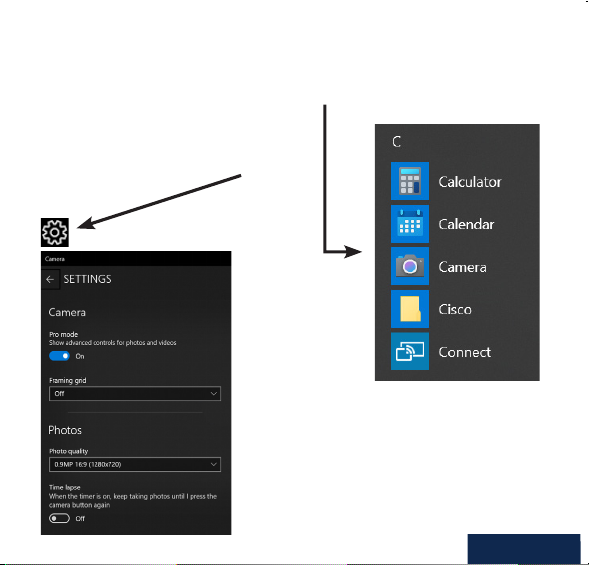
CAPTURE VIDEO AND PHOTOS
Video and photos can be taken with the web camera via the Microsoft Camera
application, available from the Windows start menu.
Once inside the app you can record video
directly from the web camera to your local
hard drive and adjust the video settings of
the web camera.
If using any other 3rd party
camera or instant messaging
software, please consult the
publisher’s user manual.
English

SAFETY WARNINGS
• Please do not place the webcam in extremely damp or dusty locations.
• Please do not place the webcam in places subject to extremely high
temperatures, such as in a closed vehicle or direct sunlight.
• Please do not attempt to modify this webcam or remove the webcam cas-
ing. Internal inspection and repairs should be carried out by an authorized
service facility.
• Do not expose the product to re, water, direct sunlight or physical shock.
• If your webcam has been dropped or the casing has been damaged,
disconnect it from your computer and contact your local dealer or an
authorized service facility. Do not continue to use the camera.
CAUTIONS
If the webcam is hot after working for a long time, we suggest you disconnect it
from the USB port. Avoid touching the lens with your hands and sharp or coarse
items; use clean and soft cloth for cleaning. Avoid knocks and bumps; impacts
may cause damages to the lens, malfunction or scratches to the surface.
DISCLAIMER
Every effort has been made to ensure that the information and procedures in
this guide are accurate and complete, no liability can be accepted for any errors
or omissions and we reserve the right to make product changes without further
notice.
WARRANTY
We warrant that products purchased from authorized distributors will meet the
applicable product specications with no defects in design, assembly, materials
and workmanship. We offer a 7-year warranty.
English

Mit seinem 1/2,7 Zoll optischen
Sensor, der verbesserten Optik und
dem Autofokus in Kombination mit
einem omnidirektionalen Mikrofon
bietet das ProXtend X502 selbst
unter den schwierigsten Lichtver-
hältnissen eine hervorragende
Bildqualität.
Wir bei ProXtend wissen, dass
Megapixel nicht alles sind, wenn es
um Bildqualität geht. Deshalb konz-
entrieren wir uns auf die Hardware,
die wirklich wichtig ist und stellen
sicher, dass Sie gesehen und nicht
nur gehört werden!
1. HD-Sensor
2. Omnidirektionales Mikrofon
3. Autofokus
4. Mini-Stativanschluss
5. Flexibler Clip/Sockel
22 1
3
4
5
FUNKTIONEN
PRODUKTÜBERSICHT
• 1/2,7 Zoll CMOS-Bildsensor
• Auösung: 1920x1080 Pixel/30 fps
• Automatische Korrektur bei
schwachem Licht
• Autofokus
• Brennweite: 100 mm bis unendlich
• Omnidirektionales Mikrofon
• Universal-Befestigungsclip
Deutsch

PLATZIEREN SIE IHRE WEBCAM
AM BILSCHIRM AUF MINI-STATIV AUF TISCH
MIT COMPUTER
VERBINDEN
Platzieren Sie die Webcam an der gewünschten Stelle an einem Computerbild-
schirm, einer achen Oberäche oder einem Stativ. Bei einem Bildschirm klap-
pen Sie den Clip auf und setzen die Webcam über den Rand des Bildschirms.
Stecken Sie das USB-Kabel in den USB-Anschluss Ihres PCs.
21
SYSTEM-
ANFORDERUNGEN
• Windows-PC oder -Notebook mit
USB-Anschluss
• Pentium 1 GHz oder höher CPU
• Mindestens 500 MB freier Fest-
plattenspeicher
• Mindestens 256 MB Haupts-
peicher
• Mindestens unterstützte Grak-
karte Direct X9.O
• Windows XP/Vista/7/8/10
Deutsch

SPEZIFIKATIONEN
Bildsensor 1/2,7 Zoll CMOS-Bildsensor
Megapixel 2
Max. Auösung 2592x1944
Videoauösung 1920x1080
Video-Dekodierungsformat H.264/MJPG
Max. FPS 30 Bilder/s
Belichtungsmodus Auto
Weißabgleich Auto
Gain Auto
Ausgleich bei schwacher Beleuchtung Auto
Betrachtungswinkel 77°
Brennweite der Linse 100 mm bis unendlich
Fokustyp Auto
Mikrofon Omnidirektional
Audio-Sampling-Rate 1 Kanal 16 bit 16 K 32 K 44,1 K 48 K
Audioformat PCM, kompatibel UAC 1.0
Schnittstelle USB
Kabellänge 1,5 m
Kompatibles Betriebssystem:
Windows XP, Windows 7 (32 Bit/64 Bit) Windows 8. Windows 10. Android V 5.0
oder höher. MAC OS 10.6 oder höher.
Merkmale und Spezikationen können ohne vorherige Ankündigung geändert werden.
Deutsch

VIDEO UND FOTOS AUFNEHMEN
Videos und Fotos können mit der Webcam über die Microsoft-Kamera-Anwend-
ung aufgenommen werden, die über das Windows-Startmenü verfügbar ist.
In der App können Sie Videos direkt von
der Webkamera auf Ihre lokale Festplatte
aufzeichnen und die Videoeinstellungen der
Webkamera anpassen.
Wenn Sie eine andere Kamera
oder Instant Messaging-Software
von Drittanbietern verwenden,
lesen Sie bitte im Benutzerhand-
buch des Herausgebers nach.
Deutsch
Ce manuel convient aux modèles suivants
1
Table des matières
Langues :
Autres manuels ProXtend Webcam


