
protech QM1598 Manuel utilisateur

Professional
Sound Level Meter
QM1598
User Manual


3
Sound Level Meter User Manual
Contents
.......................................................................
1-Safety Information
..................................................................
2-Functions Description
................................................................................
3-Specification
....................................................................
4-Name and Functions
.................................................................
5-Calibration Procedures
.............................................................
6-Measurement Preparation
.....................................................................
7-Operating Procedure
..........................................................................................
8-Notice
.................................................................................
9-Accessories
................................................................
10-Installing the software
Page
4
4
5
6
11
12
12
12
12
12

4
Sound Level Meter User Manual
1- Safety Information
Read the following safety information carefully before attempting to operate or service the meter. •
Use the meter only as specified in this manual: •
• Environment conditions
1-Altitude lower than 2000 meters
2-Relatively humidity ≤90%RH
3-Operation Ambient 0~40°C
• Maintenance & Clearing
1-Repair or servicing not covered in this manual should be performed by qualified personnel.
2-Periodically wipe the case with a dry cloth. Do not use solvents or eradicator on this instrument.
Safety symbols
Comply with EMC
2-Functions Description
This Sound Level Meter is designed for noise project; quality control; illness prevention and cure and all •
kinds of environmental sounds measurement. It is applied to the sounds measurement at factory; school;
office; traffic access and household, etc.
• This unit confirms to the IEC61672-1 CLASS2 for
• Sound Level Meters.
• MAX & MIN measurements
• Over range display
• Under range display
• A & C Weighting
• FAST & SLOW response
• Analog AC/DC outputs for connection to frequency analyzer or X-Y shaft recorder

5
Sound Level Meter User Manual
3-Specification
Standard applied:
Accuracy:
Frequency range:
Dynamic range:
Memory:
Level ranges:
Med:
Hi:
Auto:
Frequency weighting:
Time weighting:
Microphone:
Display:
Display Update:
MAX hold:
MIN hold:
HOLD:
Alarm function:
Analog output:
Data output:
Auto power off:
Power supply:
Power life:
Operation temperature and humidity:
Storage temperature and temperature:
Dimension:
Weight :
IEC61672-1CLASS2
±1.4dB
31.5Hz~8KHz
50dB
32700
LO:30dB~80dB
Med:50dB~100dB
Hi:80dB~130dB
Auto:30dB~130dB
A/C
FAST( 125ms ), SLOW( 1s )
1/2 inch electret condenser microphone
4 digits LCD display with a resolution of 0.1dB
2 times/sec.
Hold the Maximum reading
Hold the Minimum reading
Hold the readings
“OVER”is when input is more than upper limit of range.“UNDER”
is when input is less than lower limit of range.
AC/DC outputs from earphone outlet AC=1Vrms ,DC=10mV/dB
USB data traffic
Meter automatically shuts down after approx. 15 minutes of inactivity.
One 9V battery, 006P or NEDA1604 or IEC 6F22.
About 30hours
0°C~40°C,10%RH~90%RH
-10°C~+60°C, 10%RH~75%RH
278 (L) x 76 (W) x 50(H) mm
350g

Sound Level Meter User Manual
6
4-Name and Functions
1-Windscreen
2-LCD:
SYMBOL
LCD
MAX
MIN
OVER
UNDER
FAST
SLOW
dBA
dBC
30-130
REC
AUTO
FULL
HOLD
FUNCTION
4 digits
Maximum hold
Minimum hold
over range
under range
Fast response
Slow response
A-Weighting(responseto human sense)
C-Weighting(response to machine monitor)
Range indicate
Recording data into computer
Auto level range selection
Memory full
Data hold function
Autopower off Press the “SETUP” button to disable power off
Low battery indicate
MAX/MIN
REC A/C
SETUP LEVEL F/S
HOLE
1
2
3
4
5
6
7
8
9
10
11
12
13
14
15
16
17
18

4-REC button
3- Backlight button
1-Turn the backlight ON/OFF
2-DATALOGGER response setting
• Press the button continuously until “INT” symbol appears after the meter turn on, press “LEVEL” to set up
the data memory response, then press “HOLD” to keep the setting.
7
Sound Level Meter User Manual
• DATALOGGER function
Press “REC” button after it power on, the display will show “REC” to start Data Recording, press the button •
again to exit the record(Note: In order to avoid data error, please don’t power it off under REC condition, when
the REC function is deleted then it can power off).
• Adjusting DATALOGGER response
Press the button continuously before power it on, then press , it will be displayed as following: •
Press “LEVEL” button to adjust memory time, press “HOLD” button to hold the setup.
• Data zero function
Press the button continuously before power it on, loosen the button when the display showing •
“CLR” after the meter.
Power on, which indicates that the data in DATALOGGER has been deleted. •
REC
5-HOLD button:
• Press “HOLD” button, The hold function freezes the reading in the display.
Sound Level Meter User Manual
8
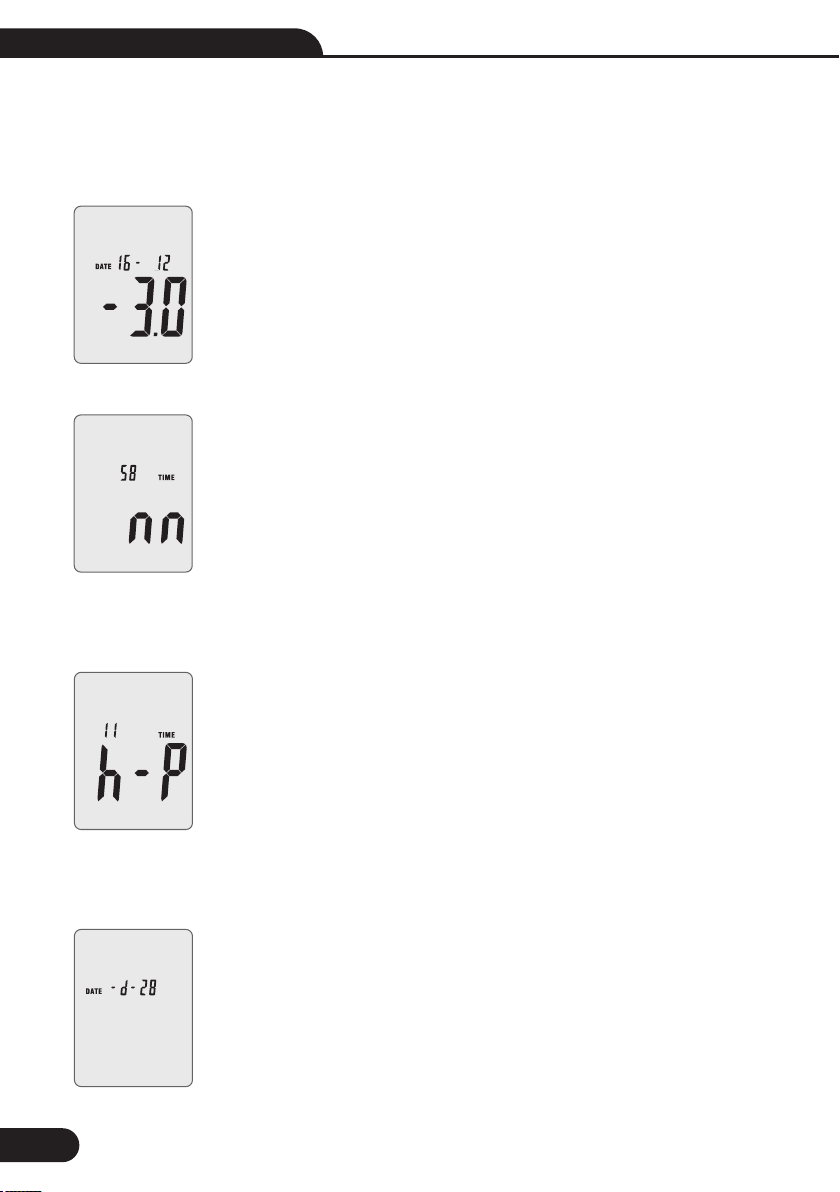
• The display showing “minute” adjustment mode, press “LEVEL” to make the adjustment, press “HOLD”
to keep the setup;
• Press the “SETUP” button third time, the display showing:
• The display showing “hour” adjustment mode, press(h-P=P.M,h-A=A.M)
• “LEVEL” to make the adjustment, press “HOLD” to keep the setup;
• Press the “SETUP” button fourth time, the display showing.
6-SETUP button
• The time chip adjustment
Press “SETUP” button and then power it on, when “TIME” symbol displays then loosen “SETUP”, the meter •
will be under time adjustment mode, at the time the display will show the date as following:
Press the “SETUP” button second time, the display showing: •

9
Sound Level Meter User Manual
• The display showing “month” adjustment mode, press “LEVEL” to make theadjustment, press “HOLD” to
keep the setup;
• Press the “SETUP” button sixth time, the display showing:
• The display showing “year” adjustment mode, press “LEVEL” to make the adjustment, press “HOLD” to
keep the setup;
• Press the “SETUP” button seventh time, the display showing:
• The display showing initialization of the time chip, press “HOLD” to keep the setup; time and date have
returned to factory setup. When the battery is exhausted or replaced, if the time can’t be adjusted then please
initialize the time chip first.
• USB communications setting:
• Turn on the meter, connect the meter with the computer correctly, choose the software COM3(COM4),
hen press “SETUP” , “ ” disappears from the display to indicate and disable auto power off, that the USB
data is transmitting.
7-LEVEL button: Level range selection
• Each time you press “LEVEL” button, the level range will change between “Lo” level, “Med” level, “Hi” level
and “Auto” level in the circular.
• The display showing “date” adjustment mode, press “LEVEL” to make the adjustment, press “HOLD” to
keep the setup;
• Press the “SETUP” button fifth time, the display showing:

Sound Level Meter User Manual
10
9-Frequency weighting select button
• A: A-Weighting
• C: C-Weighting
11-Power button
• Turn the meter power ON/OFF
12-External DC 9V power supply terminal
• For connection with DC 9V power supply.
• Aperture size: external diameter: 3.5mm, internal diameter: 1.35mm
13-USB interface
• USB signal output is a 9600 bps serial interface.
14-AC/DC signal output earphone outlet
• AC: Output voltage: 1Vrms corresponding to
each range step.
• Output impedance: 100Ω
• DC: Output voltage: 10mV/dB
• Output impedance: 1kΩ
DC OUTPUT
AC OUTPUT
GROUND
8-MAX/MIN button:
Maximum and Minimum hold Press this button for one time to enter MAX/MIN measurement, “MAX” will appear on LCD, •
maximum sound level will be captured and held until higher sound level is captured. Press the button again, “MIN” will
appear on LCD and minimum sound level will be captured and held until new lower sound level is captured. Press the button
one more time to exit MAX/MIN measurement.
10-FAST/SLOW button:
Time weighting selection •
FAST: st sampling measurement, 1 time per 125ms. •
SLOW: Slow sampling measurement, 1 time per second. •
Autres manuels pour QM1598
1
Table des matières
Autres manuels protech Instrument de mesure


Manuels Instrument de mesure populaires d'autres marques


Endress+Hauser
Endress+Hauser Proline Promag 50 Caractéristiques techniques

Siemens
Siemens SITRANS F Coriolis FCT030 Manuel de la liste des pièces

KLINGER
KLINGER CMF V Series Manuel utilisateur

EXFO
EXFO FTB-2 Manuel d'exploitation et d'entretien

Keysight
Keysight M8290A Manuel utilisateur

ADTEK
ADTEK MW-5 Manuel utilisateur