
ProDrone Byrd Manuel utilisateur

1
User Manual
V 1.0
ProDrone Byrd

2
Instructions
Warnings
Thank you for using the product of ProDrone. This is a special electronic product. Faulty
operation might damage articles, injure human body and even cause deaths. The caused legal
consequences should be shouldered on your own. Juveniles younger than 18 years old are not
suggested to use this aircraft.
To ensure
the quality of your experience and your personal security, please carefully read the following
profiles before using the aircraft:
1. Disclaimer
2. Battery Safety Guidelines
3. Routine Maintenance Manual
4. List
5. Quick Start Guide
6. User Manual
7. After-Sale Service Manual
Tutorial Video
Besides the above profiles, ProDrone also prepares tutorial video for you.
You can visit www.prodrone-tech.com or scan the following QR code to watch and download the
tutorial video to better learn how to use the aircraft.
CAUTION
RISK OF EXPLOSION IF BATTERY IS REPLACED
BY AN INCORRECT TYPE.
DISPOSE OF USED BATTERIES ACCORDING
TO THE INSTRUCTIONS

3
App Download
To ensure the best experience, please scan the QR code with your mobile device, download and
install the ProFlight App.
For best experience, following devices are suggested to use:
IOS:iPad3、iPad4、iPad_Air、iPad_Air2、iPad_Mini、iPad_Mini2、iPad_Mini3、iPad_Pro.
Android:Samsung tabs 705c、Samsung S6、Samsung S5、Samsung NOTE4、Samsung NOTE3、
HUAWEI Mate 7、HUAWEI P8、HUAWEI Honour 6、HUAWEI Pad、Google Nexus 9、Google
Nexus 7 II、Ascend Mate7、Nubia Z7 mini、SONY Z3 EXPERIA、MIUI 3、MIUI4、MIUI PAD.
※ The supported device list will keep update.
Register
To enjoy perfect after-sale services, please complete your register by visiting
www.prodrone-tech.com.Registering or not will not affect product’s normal use, but we still invite
you to be our VIP. Unscheduled official activities and more privileges have been prepared for you,
stay tuned!
※ Your registration information would be kept strictly confidential.

4
Aircraft
※ Only Advanced and Premium versions have the capacity of ‘Visual and acoustic positioning’.
※ Only Premium version is equipped with the ‘Dropping Box’.

5
Flight Mode
ProDrone Byrd supports the following three modes:
1. P-Mode(Positioning Mode)
When the GPS signal is good, the GPS module is used to position;
When the GPS signal is not good enough or is lost, it will turn to the visual and acoustic
positioning;
When both GPS positioning and the visual and acoustic positioning do not work, only the attitude
stabilization is provided.
2. F-Mode(Course Lock Mode)
In recording the flight direction, its forward direction is that of the aircraft head. In flight, the
flight direction and the forward direction have no relationship with the change of that of the head.
You need not care about the direction of the head and you can conveniently control the flight. This
mode relies on GPS data, so please use it when GPS signal is good.
3. A-Mode(Attitude Mode)
GPS positioning and the visual and acoustic positioning are not used and only the attitude
stabilization is provided.
※ The switch of flight mode on the remote controller could be used to switch the mode of the aircraft.
Please read ‘the switch of flight mode’ for more details.
RTH Mode
ProDrone Byrd has the function of returning to home automatically. If the home point is recorded
successfully before the flight and when the remote controller and the aircraft loss connection, the
aircraft would return to the home point automatically and land on the ground. The following three
conditions would cause the returning: returning to home instantly, returning to home in low
battery and returning to base when the aircraft is out of touch.
1. Home Point

6
Home point refers to the point at which the aircraft has been unlocked for the first time
successfully, when it is in Mode P and the GPS signal is good. Home point is only effective for
the flight at this time.
2. RTH Mechanism
When this mechanism is started, the red LED indicator light at the head of the aircraft keep
on and the blue LED indicator light at the end keep on. At this moment, the aircraft will rise or
descend to the pre-set height (if the current height is lower than the pre-set height, the aircraft will
rise to the pre-set height; if it is lower, and the aircraft will descend to the pre-set height). And it
will fly to the point above the home point and hover for five seconds and then it will slowly land
to the ground.
※ In returning to home, the aircraft could not keep away from barriers automatically. Please change the
set of returning height according to actual conditions to ensure the flight security.
※ Please connect the parameter adjustment software of the flight control system to set the returning
height.
3. RTH Instantly
During the flight, click the ‘Return to home’ button in the remote controller or the ‘Return to
home’ icon in the APP interface, the aircraft will return to home automatically. (Click Return to
Home Instantly with the Remote Controller and Return to Home Instantly with the APP)
4. RTH in Low Battery
There are two mechanisms in this condition, including forewarning for the low battery and
returning to home in serious low battery.
Forewarning for Low Battery
When the electric quantity is less than 30%, the forewarning for the low battery will be triggered.

7
And APP will alarm the warning tone to suggest you to return to home as soon as possible.
RTH in Severe Low Battery
When the electric quantity is less than 20%, the battery is serious low and the aircraft will return
to home mandatorily.
5. RTH in Lose Control
In normal conditions, the GPS signal is good, the compass works normally and the aircraft could
record the home point successfully. If the signal between the remote controller and the aircraft is
interrupted, the aircraft will stay hovering. If the signal interruption lasts for over three seconds,
the aircraft will return to home automatically. In returning, if the signal is back to normal, the
returning will be stopped automatically and you can operate the aircraft again.
※ When the GPS signal is not good enough or there is no GPS signal, the aircraft could not return.
Follow Me
This intelligent tracking mode is also called Follow Me Mode. When the aircraft is in Mode P and
when the GPS signal is good, press the icon the aircraft will be in the intelligent tracking
mode and will follow you (your mobile device) to fly at the height of 5 meters.
※ The moving speed of the mobile device at the ground should not be over 15m/s. Or, the aircraft is
unable to follow you (your mobile device).
※ Since the height of tracking could not be changed, the aircraft might run into barriers in its tracking.
Therefore, it is suggested to operate this tracking function in an open and broad ground.
8
Indicators of Aircraft Status
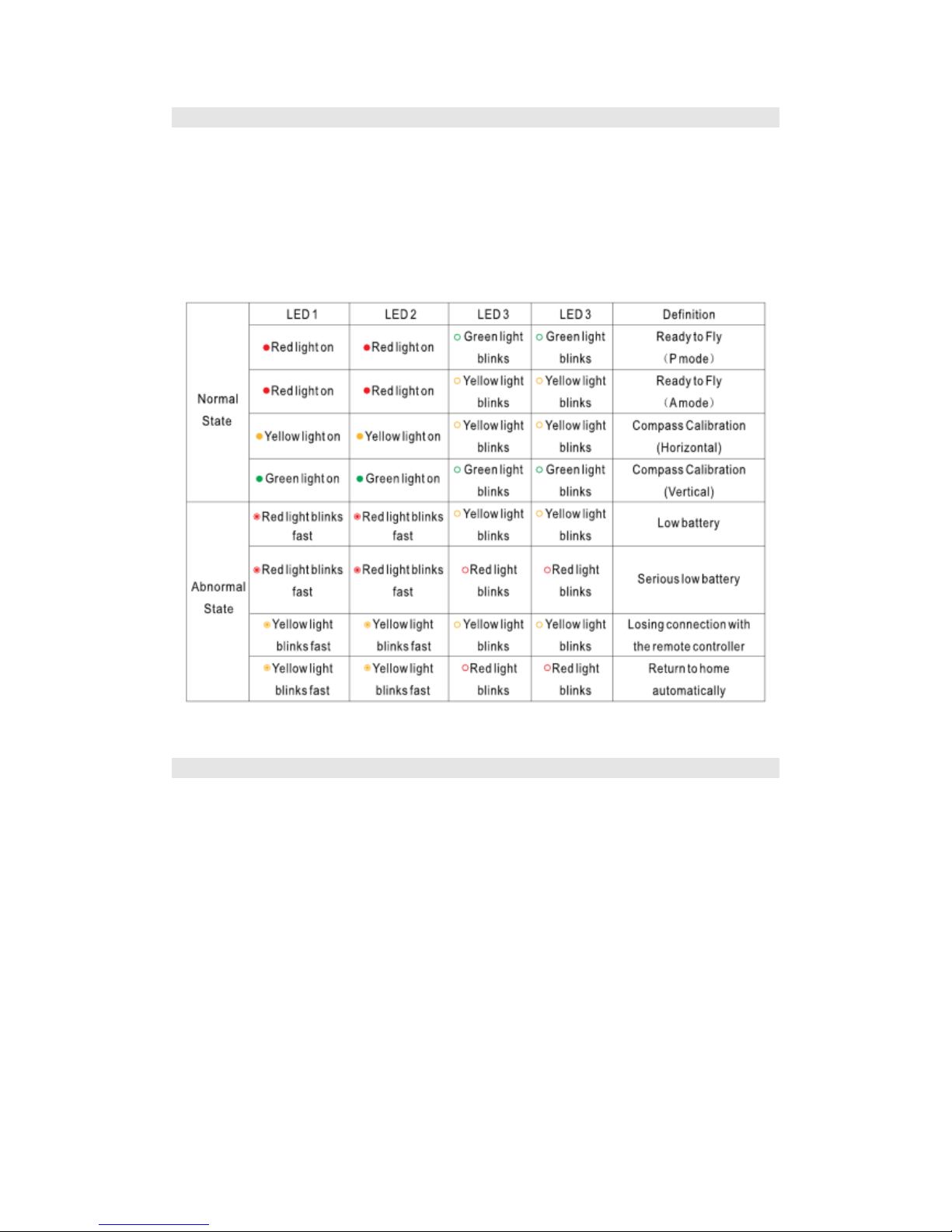
The flight status of the ProDrone Byrd could be judged from the two groups of LED indicator
lights at the head and the end of the aircraft. Their places are shown in the following picture.
The two groups of LED indicator lights show the current status of the flight control system
through different groups of colors and flickers. See the following table for more details.
Vision Positioning System
This positioning system consists of the visible light camera and the ultrasonic module. The former
is used to obtain the position information of the flight to provide reference for the horizontal
direction of the aircraft. And the latter could judge the current flight height to provide reference
for the height from the ground to realize the flight at a certain height.
This system is adaptable to the environment in which the height is lower than 6 meters, where
there is no GPS signal or the GPS signal is not good enough. It could be especially used for indoor
flight.
The precision of the visual and acoustic system is prone to be affected by the illumination

9
intensity and the surface texture of articles. And the ultrasonic could not measure the distance in
certain damping materials. If both vision and ultrasonic do not work, the flight mode will be
turned into the Attitude mode automatically. Therefore, please notice the following conditions in
flight:
The normal flight height of this system ranges from 0.2m to 6m. Please stay in this range when
the aircraft is used indoor;
The illumination condition is 10 lux–100000 lux;
Within the required range of the illumination conditions, all textures could be used to position
the flight except pure colors (such as pure black, pure red, pure white and pure green);
Be cautious on the surface where there is intensive reflect lights or inverted images;
The flight speed should not be too fast and the highest speed should be no more than 8m/s.
The maximum flight inclination should not be more than 30°.
The range of flight temperature is -10℃-55℃.
The flight altitude should not be more than 4000 meters.
※ In Mode P and when the GPS signal is lost or not good enough, the system will turn to the visual and
acoustic positioning mode and no manual operation is needed.
※ This system is only open to ProDrone Byrd Advanced/Premium version.
Stowage Dropping
ProDrone Byrd could be loaded with loads less than 500g (not including the gimbal and the
camera) to eject objects from a long distance.
Before the ejection, the buttons C1 and C2 should be customized to choose the ‘steering gear
control’ in the APP setting interface (see Pxx for more details). The objects to be ejected are to be
put into the container carrier and the container is inserted into the steering gear hole. Operate the
aircraft to the place above the ejection point and press C1 or C2 button to let the container break
away from the aircraft. The ejection is finished.

10
※ This system is only open to ProDrone Byrd Premium version.
Table des matières


