
Printing Innovation iCUBE 1 Manuel utilisateur

-1-
Revision: 2014-09-25
User Guide for iCUBE Series
iCUBE 1-3

-2-
Copyright statement
© 2014 Printing Innovation AG. This document, attachments, and information contained herein
are the confidential and proprietary property of Printing Innovation AG and their suppliers. As
such, this document, attached files, and information contained herein are subject to all
nondisclosure and proprietary information agreements currently in effect with your organization.
Copies of this document, any portion of this document, or attachments may not be transmitted
or disclosed to any third party without the prior written permission of Printing Innovation AG.
© 2014 Printing Innovation AG. All content is the confidential property of, or licensed to, Printing
Innovation AG. (“We” or “us”) are protected under European and Foreign copyright, trademark
and other intellectual property laws.
The following statements will be included in the Appendix:
Warranty
Safety precautions
Regulatory information
Environmental policy and information
Recycling

-3-
Table of Contents
1. Introduction 6
1.1. Introduction to Memjet print technology 6
2. Printer Parts and their functions 8
2.1. Printer 8
2.2. Print Engine 8
2.3. Printhead 8
2.4. Printhead Cartridge Dock 8
2.5. Print Mechanism 9
2.6. Cutter 9
2.7. Ink Cartridges 10
2.8. Ink Connection Ports 12
2.9. Ink Delivery System (IDS) 12
2.10. Bulkhead Assembly 12
2.11. Other IDS Components 13
2.12. Maintenance Module 14
2.12.1. Wiper Station 16
2.12.2. Printing Platen 16
2.12.3. Capping/Spitton Station 17
2.12.4. Printhead servicing events 17
2.13. Print Zone 17
2.14. Onboard Print Engine Controller (OmniPEC) and Main Board 17
2.15. The Controlling System 18
3. Installing the Printer 19
3.1. Choose a location 19
3.2. Unpacking and Setup 19
3.3. Checking the Contents 19
3.4. Connecting the iCUBE 20
3.5. Setting up the Printer 22
3.5.1. Maintenance Module (MM) 22
3.5.2. Installing the Ink Cartridges 24
3.5.3. Installing the Printhead 25
3.5.4. Switch on the Printer 30
3.5.5. Media Handling 31
3.5.1.1. Print Area 31
3.5.1.2. Load Media 31
3.6. Connecting the Printer to a computer 32
3.6.1. Direct connection to a personal computer 32
3.7. Install Printer Driver 33
3.7.1. Driver specifications 38
3.7.1.0. General Tab 38

-4-
3.7.1.1. Layout Tab 39
3.7.1.2. Media Tab 40
3.7.1.3. Import/Export 41
3.8. Label printing, generating print jobs 42
3.8.1. Printing labels from softwares 42
3.8.2. Printing labels from print jobs 42
3.9. Printer buttons 43
4. TOOLBox 44
4.1. User interface 45
4.2. Diagnostics 46
4.3. Ink usage 47
4.4. Network configuration 48
4.5. Service Menus 49
5. Maintenance Guide 50
5.1. Maintenance Overview 50
5.2. Standard Maintenance 50
5.2.1.Daily Maintenance Tasks 52
Aerosol and debris removal
5.2.2.Bi-Weekly Maintenance Tasks 54
Aerosol and debris removal
Paper Path, optical sensor cleaning
Wiper Inspection
5.2.3.Monthly Maintenance Tasks 57
Aerosol and debris removal
Paper Path optical sensor cleaning
Wiper inspection
Waste Ink Absorber inspection
Ink Tubing inspection
Lift Motor Gear inspection
Paper Path Grit Roller inspection
5.2.4.Annual Maintenance Tasks 62
Aerosol and debris removal
Paper Path optical sensor cleaning
Wiper Inspection
Waste Ink Absorber inspection
Ink Tubing inspection
Lift Motor Gear inspection
Paper Path Grit Roller inspection
Moving Part (Motor Test)
Maintenance Module Sled Assembly cleaning
Paper Dust removal

-5-
Ink tank latch/Ink Bay inspection
Cutter ispection
5.2.5. As Needed Maintenance Tasks 70
Printhead Cartridge cleaning (Manual Wipe while installed)
Printhead Cartridge cleaning (Remove Cartridge)
Waste Ink Absorber replacement
6. Troubleshooting 82
6.1. Maintenance Module Troubleshooting 82
6.2. Printhead Troubleshooting 83
6.3. Print Quality Troubleshooting 83
6.4. iCUBE Troubleshouting guide 84
General 84
Checklist before doing any support 84
Troubleshouting Tools 85
Dead engine,EWS,Firmware 86
Print engine error messsage 86
Crit 63-03-phead offline cancel page 87
CARTRIDGE_MISSING 87
DATA_PATH_UNDERRUN 87
Fatal 7102 offline cancel page 88
MAINTENANCE_BUSY 90
PAPERPATH_CUTTER_ERRROR 91
PAPERPATH_FEED_TIMEOUT 91
PAPERPATH_PAPERJAM 91
6.5. Print Quality Issues 92
Color Mixing (CM) 92
Streaking (SR) 102
Dot Misplacement (DP) 108
Banding (BD) 111
Other General Print Quality Errors (GE) 117
Paper Handling (PA) 126
Inkdelivery System (ID) 131
Paper Cutting 133
Firmware Error Message (ER) 134
Maintenance Module (MM) 136
7. Printer Specifications 137

-6-
1. Introduction
The purpose of this manual is to describe the operation of the iCUBE label printer. The
first section provides and overview of the Memjet™ print technology to make you familiar with
the terms and basics of this new technology that forms the basis of the iCUBE printer series. The
following sections walk you through the installation steps, explain the components of the printer
and their roles, and then teach you how to operate your printer. The manual ends with
maintenance and troubleshooting guide.
1.1. Introduction to MemjetRprint technology
Memjet™ Technology is a revolutionary printing technology developed by Silverbrooks
Research (Sidney, Australia). The core of this technology is a full paper width printhead capable
of printing the entire page width at the same time without head movement. The result of this
setup is a breakthrough 12 inch (305 mm) per second printing speed. The printhead is
manufactured with state-of-the art semiconductor technology; an A4 head contains 70,400
nozzles delivering 1600 dpi native resolution at full colour. The nozzles are arranged in 10 rows
having 2 rows for each ink channels. The fixed head spans the width of the label and feeds an
entire label at a time similar to a laser printer. This architecture dramatically improves
performance and ink drop placement accuracy during printing, while decreasing noise and
vibration.
Figure 1 Printing with a traditional moving head and with the
Memjet printhead.
Figure 2: The Memjet 8.5” printhead cartridge showing the ink inlet, outlet
ports, various print-related parts and the printhead.

-7-
Figure 3 The Memjet printhead contains 70,400 nozzles in 10 rows (brown stripe in Figure a).
It shows an electron microscope image of a single nozzle (Figure b).
The small size of the nozzles results in very small (1-2 picolitre) paint drops,
approximately 14 micron drop diameter on paper, effectively achieving the highest print
resolution the human eye can see.
Printing with this type of precision requires many technical details to be solved including
printhead cooling, using special fast drying inks, feeding paper accurately, controlling the
operation of the unit, etc. A unique property of Memjet printing is the special print processor
that uses a custom hardware print pipeline processing engine to render images at a very high
speed. The level of technical standards are reflected by the fact that Silverbrooks Research hold
2500 patents related to Memjet Technology along with another 2000 pending.
a)
b)

-8-
2. Printer parts and their functions
2.1. Printer
The iCUBE printer is a state of the art Memjet printer designed for maximum
usability and performance. The major components of the printer are the print engine, the
controller and the control panel.
2.2. Print engine
The print engine is the heart of the iCUBE printer. It is responsible for the actual print
process. The major subsystems of the engine are the mechanics (paper transport), ink
delivery system (including print head and ink tanks), the print controller and a paper
cutter. The iCUBE controller is responsible to control the operation for the print engine.
You do not need to access and use the print engine directly except when changing print
heads and ink tanks.
2.3. Printhead
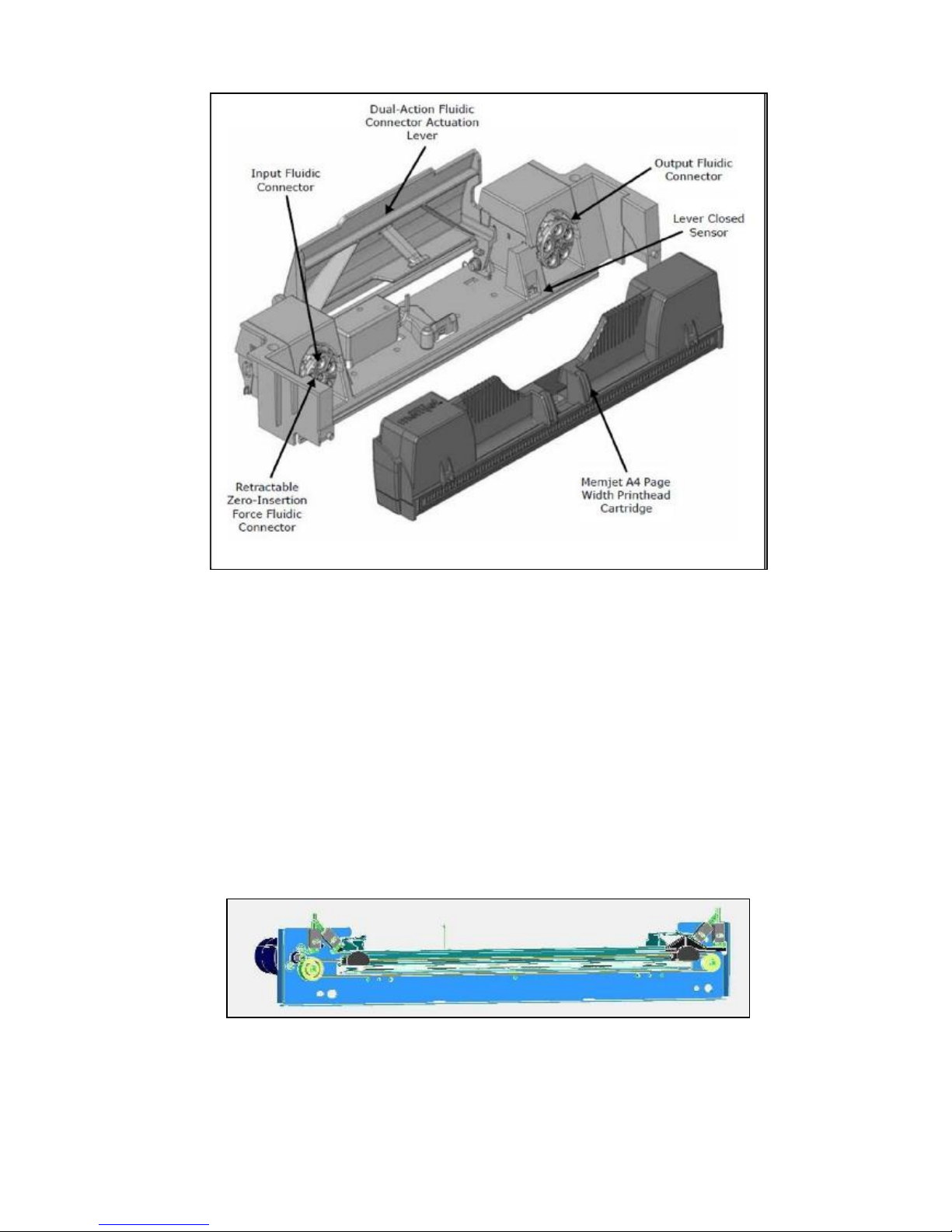
2.4. Printhead Cartridge Dock
The printhead cartridge dock positions the page-wide, static, high-speed Memjet
printhead in the correct location to maintain correct position with the print zone.
Picture of the Print Engine
Picture of the printhead
-9-
2.5. Print Mechanism
During printing, the print mechanism moves the paper through the print zone below the
static printhead.
2.6. Cutter
The NorthStar cutter is designed to provide a complete cut of continuous media in
the crossweb direction. This will provide the ability to singulate labels and enable a break
in continuous media to allow servicing of the printhead.
The cutter has a design target of providing a 400,000 cut life on thin tag media. Cuts are
expected to execute in 0.4 seconds at up to 80 8.5inch cuts/minute.
The cutter unit can be removed or replaced, if necessary, without affecting the
performance of the NorthStar.
Picture of
Fluidic
Connectors and Memjet Printhead Cartridge

-10-
2.7. Ink Cartridges
iCUBE series printers use a single printhead-cartridge and five ink tanks: two black,
one cyan, one magenta and one yellow. During installing the ink cartridges the printer
should be turned off.
Picture of the ink cart
r
idge
Ce manuel convient aux modèles suivants
2
Table des matières


