
Pirelli DISCUS DRG A225G Manuel utilisateur
© (2007) Pirelli Broadband Solutions S.p.A. All Rights Reserved. Proprietary Use Pursuant to Cover Page Instructions.
3

DISCUS™ DRG A225G
© (2007) Pirelli Broadband Solutions S.p.A. All Rights Reserved. Proprietary Use Pursuant to Cover Page Instructions.
4
Copyright © 2007 Pirelli Broadband Solutions S.p.A. All rights reserved. This document contains Pirelli proprietary and
confidential information. No part of this document may be copied, reprinted or reproduced in any material form or elec-
tronically, whether wholly or in part, and no information contained herein may be used or disclosed to third parties unless
under a previous written agreement with Pirelli Broadband Solutions S.p.A setting forth relevant terms and conditions.
Trademarks:
All terms used in this document that are known to be trademarks or service marks have been noted as such. Pirelli can-
not attest to the accuracy of this information. Other product and corporate names used in this document that may be
trademarks or service marks of other companies are used only for explanation and to the owner’s benefit, without intent
to infringe. Use of a term in this document should not be regarded as affecting the validity of any trademark or service
mark.
This publication is subject to change without notice. Pirelli reserves the right to make changes to equipment design and
system components as well as system documentation and literature as progress in engineering, manufacturing methods,
or other circumstances may warrant.
This publication is intended solely for informational and instructional purposes. Refer to the above as to its possible uses.
It constitutes neither a contract with the user hereof nor a warranty or guarantee with regard to any of the Pirelli products
described herein nor shall it be construed to grant a license or any other rights under any proprietary rights to information
or material included herein. Pirelli hereby expressly disclaims any warranty or guarantee, whether express or implied,
with regard to items described herein. Any contract, license, or warranty between Pirelli and the user hereof is created
solely by separate legal documents.

DISCUS™ DRG A225G
© (2007) Pirelli Broadband Solutions S.p.A. All Rights Reserved. Proprietary Use Pursuant to Cover Page Instructions.
5
CONTENTS
INTRODUCTION ...................................................................................... 7
Package Contents ....................................................................................................... 7
Front Panel ............................................................................................................... 10
Rear Panel ................................................................................................................ 11
HARDWARE INSTALLATION ............................................................. 13
Positioning the router............................................................................................... 13
Connecting the router............................................................................................... 14
Connecting the phones............................................................................................. 17
SETUP WIZARD ..................................................................................... 18
ISP Parameters ......................................................................................................... 19
Wireless.................................................................................................................... 19
Firewall .................................................................................................................... 19
Confirm .................................................................................................................... 20
WIRELESS............................................................................................... 21
Channel and SSID.................................................................................................... 21
Wireless Security ..................................................................................................... 22

DISCUS™ DRG A225G
© (2007) Pirelli Broadband Solutions S.p.A. All Rights Reserved. Proprietary Use Pursuant to Cover Page Instructions.
6
STATUS ................................................................................................... 27
SAFETY INFORMATION ...................................................................... 28
CERTIFICATIONS .................................................................................. 29
CE Mark................................................................................................................... 29
WEEE....................................................................................................................... 30
GLOSSARY ............................................................................................. 31

DISCUS™ DRG A225G
© (2007) Pirelli Broadband Solutions S.p.A. All Rights Reserved. Proprietary Use Pursuant to Cover Page Instructions.
7
INTRODUCTION
The DISCUS™ DRG A225G is designed to provide a cost-effective means of
sharing a single broadband Internet connection between several wired and
wireless computers. The Router also provides protection in the form of an elec-
tronic “firewall” preventing anyone outside of your network from seeing your files
or damaging your computers. The Router offers VoIP functionalities through 2
VoIP channels allowing you to use existing analog phones.
The DISCUS™ DRG A225G is an ADSL2+ router, targeted to residential envi-
ronments and SOHO customers, that provides routed broadband services from
a single and modular access point.
The DISCUS™ DRG A225G is the ideal solution for:
1. Connecting multiple PCs and Video game consoles;
2. Sharing broadband internet connections with all home computers;
3. Performing VoIP connections.
Package Contents
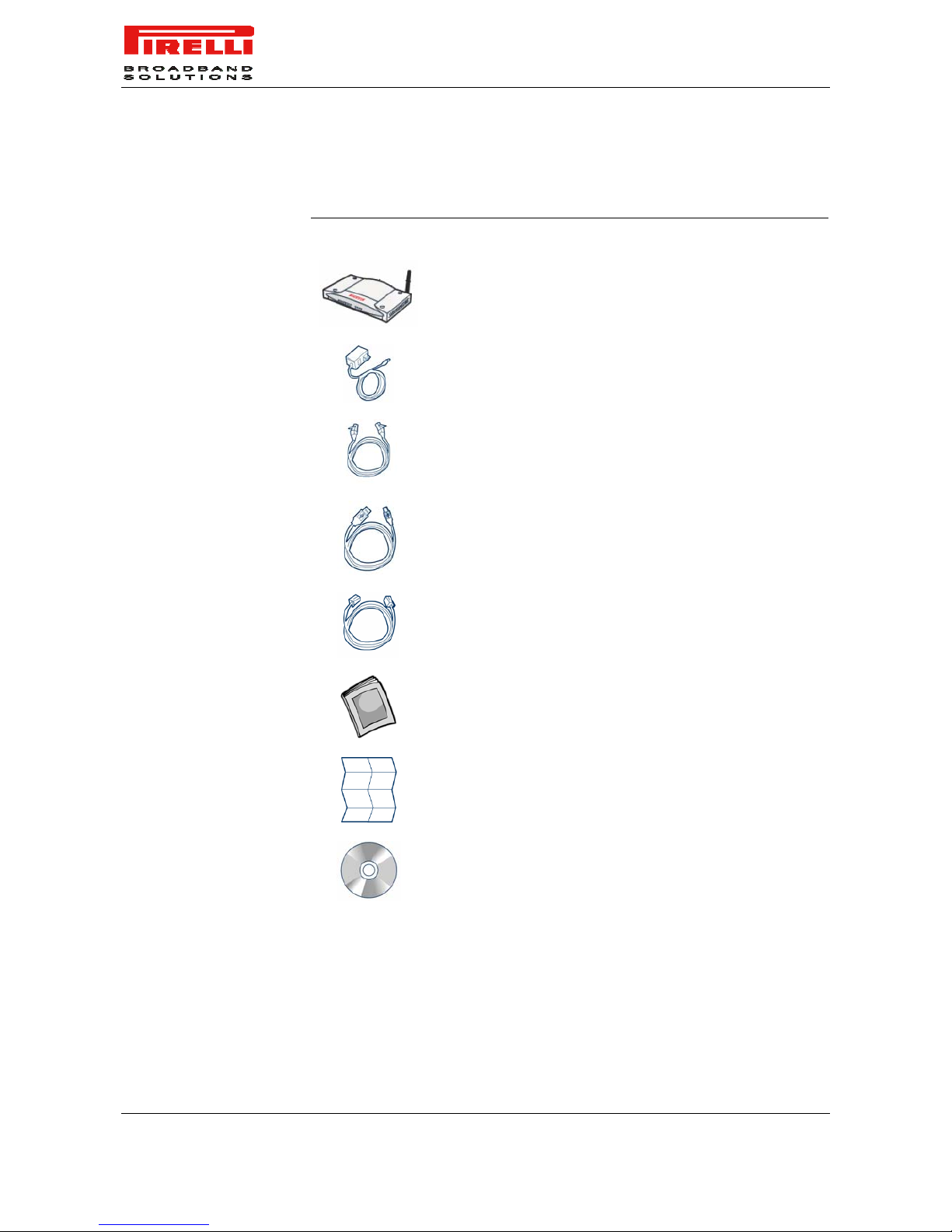
Your new DISCUS™ DRG A225G ADSL2+ Router kit contains the related
hardware and software. In it you will find:
1. One DISCUS™ DRG A225G unit
2. One Power Supply adapter
3. One Ethernet CAT5 cable with RJ-45 plug
4. One USB cable
5. One phone cable RJ-11 plug (ADSL)
6. One User Manual
7. One Quick Installation Guide
8. One CD-ROM
DISCUS™ DRG A225G
© (2007) Pirelli Broadband Solutions S.p.A. All Rights Reserved. Proprietary Use Pursuant to Cover Page Instructions.
8
TABLE 1. Kit Material
Quantity DESCRIPTION
1 DISCUS™ DRG A225G
1 Switching Power Supplier Adapter
1 Ethernet Cable
1 USB Cable
1 Phone Cable
1 User Manual
1 Quick Installation Guide
1 CD-ROM
If any of these items is missing or damaged, please contact your retailer.

DISCUS™ DRG A225G
© (2007) Pirelli Broadband Solutions S.p.A. All Rights Reserved. Proprietary Use Pursuant to Cover Page Instructions.
9
It implements an “always-on” high speed Asymmetric Digital Subscriber Line
(ADSL2/2+) connection to the telephone line on the WAN side, as well several
local connectivity technologies on the LAN side:
•Four switched 10/100 Base-TX Ethernet ports
•One Universal Serial Bus 1.1 (USB) connection to a host PC
•One IEEE 802.11b/g Wireless LAN access point
•Two FXS ports to analog phones
Figure 1 shows a sample network.
Figure 1 Sample Network

DISCUS™ DRG A225G
© (2007) Pirelli Broadband Solutions S.p.A. All Rights Reserved. Proprietary Use Pursuant to Cover Page Instructions.
10
Front Panel
The front panel of the Router contains twelve indicator lights (LEDs) that help to
describe the state of networking and connection operations.
Figure 2 LEDs
Table 1 LED Description
Ref. LED LED
Colour LED Description
on Power On
1 Power Green
off Power Off or failure
on DSL connected
Blinking DSL attempting synchronization2 ADSL
Link Green
off No Cable connected / No DSL line active
on For PPPoA or PPPoE connections this LED will be on when PPP
authentication is successful
3 Online Green
off PPP authentication failed or your connection is not using PPPoA
or PPPoE
DISCUS™ DRG A225G
© (2007) Pirelli Broadband Solutions S.p.A. All Rights Reserved. Proprietary Use Pursuant to Cover Page Instructions.
11
on USB Link Established
4 USB Green
off No USB Link established
on Ethernet Link established
Blinking LAN activity present (traffic in either direction)5 Ethernet Green
off No Ethernet Link established
Blinking Wireless LAN activity present (traffic in either direction)
6 Wireless
LAN Green
off Wireless functionality disabled
on The VoIP connection is up
7 VoIP Green
off VoIP connection down
on The phone is Off-Hook
Blinking Incoming call8 Phone Green
off No call in progress
Rear Panel
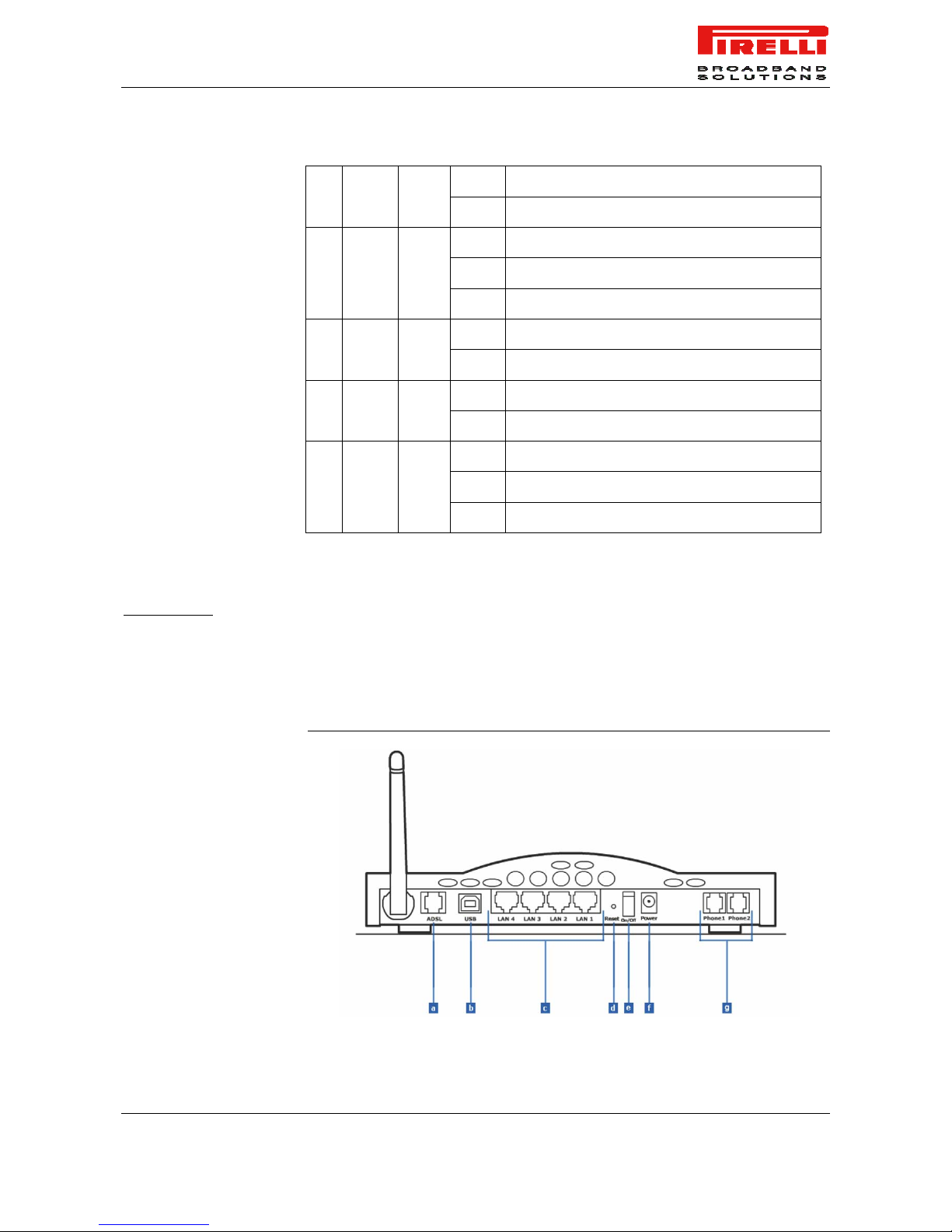
The rear panel of the Router contains a reset button, a power on/off button, a
power adapter port, four LAN ports, one ADSL port, one USB device port and
two FXS ports.
FIGURE 4. Rear Panel

DISCUS™ DRG A225G
© (2007) Pirelli Broadband Solutions S.p.A. All Rights Reserved. Proprietary Use Pursuant to Cover Page Instructions.
12
TABLE 2. Port Description
PORT DESCRIPTION
a Phone DSL connector (ADSL2/2+)
b USB 1.1 Device port
c Four Ethernet ports 10/100 Mbps
d Reset to factory default button
e Power button
f Power connector
g FXS ports
Do not force the antenna beyond its mechanical stops. Rotating the antenna further may cause dam-
age.
Table des matières
Autres manuels Pirelli Routeur réseau


Manuels Routeur réseau populaires d'autres marques


NETGEAR
NETGEAR FS526T - Switch Manuel utilisateur

Korenix
Korenix JetNet 5710G Series Manuel utilisateur

Automated Logic
Automated Logic ZN551 Manuel du propriétaire

Cisco
Cisco ASR 1000 Series Manuel de l'opérateur

EnGenius
EnGenius ESR-9710 Manuel utilisateur

Cisco
Cisco 805 Series Instructions d'utilisation et de sécurité