Phonocar VM315 Manuel utilisateur

FR
DE
EN
IT
ES
ROUTER
4G LTE Pocket WIFI
Istruzioni di montaggio
Installation instructions
Instructions de montage
Montageanleitung
Instrucciones para el montaje
VM315
01/2019

IT
• Quando si utilizza il VM315 per un periodo prolungato, diventa caldo e potrebbe surriscaldarsi. Se ciò dovesse accadere, si
perderà automaticamente la connessione di rete e si spegnerà per proteggersi dal danneggiamento. Se ciò si verica, posizionare
il dispositivo in un ambiente ben ventilato per consentire alla batteria di dissiparsi il calore. Spegnere e riaccendere il dispositivo è
sempre buona norma in caso di anomalie. Per qualsiasi altra cosa rivolgersi sempre all’installatore / rivenditore più vicino.
EN
• When you use VM315 for a long period of time, it gets warm and may overheat.
If this happens, it will automatically lose its connection and turn o to protect itself against the damage. If this occurs, place the
device in a well-ventilated environment to allow the battery to dissipate heat. Switching the device o and on again is always good
practice in case of malfunctions. For anything else, always contact your nearest installer / dealer.
FR
• Lorsque l’on utilise le VM315 pendant une période prolongée, il devient chaud et pourrait se surchauer. Dans ce cas-ci, la
connexion s’arrête automatiquement et l’appareil s’éteint pour éviter tout dommage. En cas de surchaue, placez l’appareil dans
un environnement bien ventilé pour permettre à la batterie de dissiper la chaleur. En cas d’anomalie, il est toujours recommandé
d’éteindre et de rallumer l’appareil. Pour toute autre question, veuillez toujours contacter votre installateur / revendeur.
DE
• Bei längerem Gebrauch des VM315 wird es warm und kann überhitzen.
In diesem Fall verliert das Gerät automatisch seine Verbindung und schaltet sich aus, um sich vor Schäden zu
schützen. Zur Entwärmung des Akkus sollte das Gerät in einer gut belüfteten Umgebung aufgestellt werden. Das
Aus- und Wiedereinschalten des Gerätes ist im Störungsfall immer eine gute Vorgehensweise. Wenden Sie sich für
weitere Informationen immer an Ihren nächsten Installateur / Händler.
ES
• Cuando se utiliza el VM315 durante mucho tiempo, el dispositivo podría calentarse e incluso sobrecalentarse. En el caso de
encontrarse en esta situación, se perderá automáticamente la conexión de red y se apagará para auto-protegerse evitando en
este modo de dañarse. Si nos encontramos delante de esta situación, posicionar el dispositivo en un lugar ventilado para permitir
a la batería de disipar el calor acumulado. Apagar y encender nuevamente el dispositivo es siempre una buena norma en caso de
anomalías. Para cualquier otro asunto contactar con el instalador o el revendedor más cercano.
Precauzioni • Warnings • Précautions • Vorsicht • Precauciones

3
IT-ENUtilizzo •Use
2G / 3G / 4G

4
IT-EN
1Slot micro SD Card
2
Alloggiamento batteria
3
Led di stato alimentazione:
SPENTO Batteria carica o dispositivo spento
VERDE INTERMITTENTE Batteria in carica
VERDE FISSO Massimo livello di carica
ROSSO FISSO Basso livello di carica
ROSSO INTERMITTENTE Necessita di carica
Led messaggi:
BLU Cartella messaggi
BLU INTERMITTENTE Presenza di messaggi
Led stato WI-FI:
BLU Stato Wi-Fi
Led intensità segnale
:
ROSSO FISSO No internet o SIM card non
inserita
BLU FISSO 3G connesso / funzionante
VERDE FISSO 4G connesso / funzionante
4
Tasto accensione/spegnimento.
Premere per circa 4 secondi.
5
Tasto WPS
6
Porta micro USB
7
Reset
1Micro SD Card slot
2
Battery housing
3
Led power supply:
SWITCHED OFF Battery full or Unit switched-o
GREEN FLASHING Battery being recharged
GREEN FIX Battery-charge at max level
RED FIX Battery-charge at low level
RED FLASHING It needs to be charged
Led messages:
BLUE Messagges folder
BLUE FLASHING Received messages
Led WI-FI:
BLUE Wi-Fi status
Led signal-intensity
:
RED FIX Signal absent or SIM card not present
or not correctly inserted
BLUE FIX 3G connected / working
GREEN FIX 4G connected / working
4
ON/OFF key.
Press for 4 seconds
5
WPS Keys
6
Micro USB port
7
Reset
Funzioni • Functions
1
2
5
67
3
4
IT EN

5
IT-EN
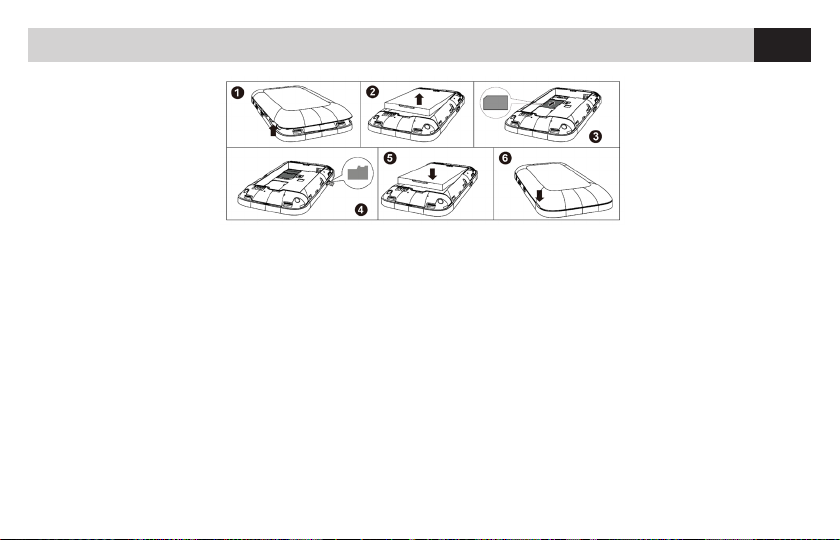
Aprire il coperchio posteriore del router ed inserire la SIM card
nello slot dedicato. In caso si volesse utilizzare la funzione“le
sharing”per condividere les audio e video sui dispositivi con-
nessi, caricare i le su una micro sd card e inserirla nell’apposito
slot. Chiudere il coperchio posteriore e mettere sotto carica la
batteria tramite il cavo USB in dotazione.
BATTERIA
Se il VM315 Pocket Wi-Fi non viene utilizzato per molto tempo
o se la batteria è completamente esaurita, il WI-FI si interrompe
immediatamente dopo l’accensione, quindi per un po‘di tempo
è necessario lasciare in carica la batteria prima di poter utilizza-
re o riutilizzare il prodotto.
ACCENSIONE
Tieni premuto per circa 4 secondi il pulsante accensione.
Open the rear-cover on the Router and insert the SIM-card
into the related slot. If you wish to make use of the function
“le sharing”, in order to share Audio/Video-les amongst the
connected devices, charge the les onto a micro-SD and insert
the micro-SD into the related slot. Close rear-cover again and
use the supplied USB-cable to charge the Battery.
BATTERY
If the VM315 Pocket Wi-Fi is not used for a long time or if
the battery is completely out of charge, the WI-FI will stop
immediately after powering up, so for a while you need to leave
the battery charging, before you can use or reuse the device.
TURN-ON
Switch-on the Router by pressing the key for at least 4 seconds.
Impostazioni • Settings
IT EN

6
IT-EN
CONNESSIONE DISPOSITIVI TRAMITE WI-FI
Accendere il router premendo il tasto accensione/spegnimento per
almeno 4 secondi.
Eettuare la ricerca WI-FI dal dispositivo no ad individuare Phono-
car VM315.
Connettersi al router e quando richiesta immettere la password
“12345678”, in seguito sarà comuqnue possibile modicarla.
Aprire il proprio browser internet. Digitare nella barra degli indirizzi
la seguente stringa http://192.168.0.1 Entrare nella gestione del di-
spositivo digitando le credenziali:
USER: admin PASSWORD: admin
Una volta entrati nella gestione dispositivo sarà possibile eettuare
la congurazione.
CONNECTING DEVICES THROUGH WI-FI
Switch-on the Router by pressing the key for at least 4 seconds. Eect
WI-FI-research from the device, until you nd PhonocarVM315.
Connect to the Router and, on request, digit the password“12345678”.
From that moment, you can modify the password.
Open your Internet-browser.
On the address-line, digit the following code http://192.168.8.1
Enter the device-management by typing the following data: USER:
admin PASSWORD: admin
As soon as you enter into the device-management, you can set your
mobile-phone company for the 3G-connection.
IT EN
Connettività • Networkig

7
IT-ENConnettività • Networkig
SCHERMATA PRINCIPALE MAIN MENU
IT EN

8
IT-EN
WI-FI SLEEP (Modalità di risparmio della batteria)
Se nessun dispositivo Wi-Fi è accesso e il VM315 non é connes-
so con il cavo USB, il Wi-Fi si spegne automaticamente. Quando
il dispositivo è collegato ma è in modalità di risparmio della
batteria, premendo il pulsante di accensione, il pulsante WPS o
iniziando a caricarlo, il WI-Fi si accende.
Connettività • Networkig
WI-FI SLEEP (Battery Saving Mode)
If no Wi-Fi device is on and the VM315 is not connected via
the USB cable, the Wi-Fi switches o automatically. When the
device is connected but in battery saving mode, the WI-Fi will
turn on, by pressing either the power key, or the WPS key or
starting to charge it.
IT EN

9
IT-ENConnettività • Networkig
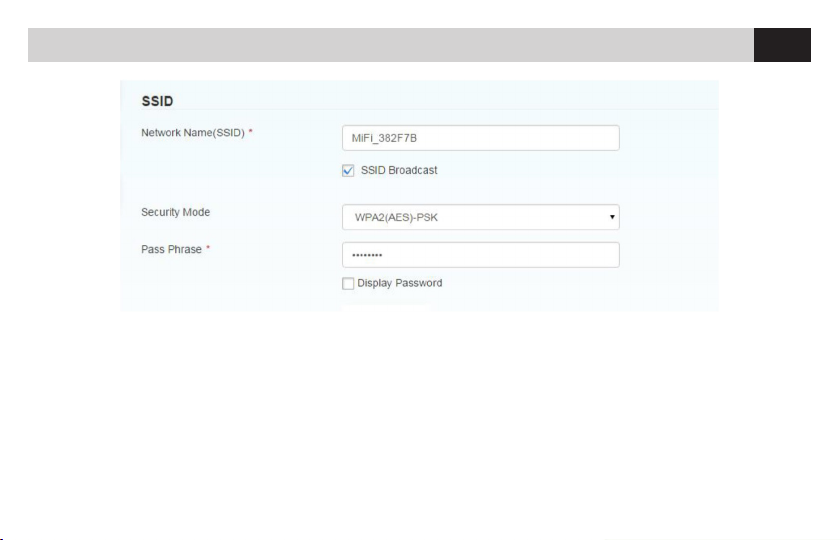
MODIFICA SSID E PASSWORD
Si consiglia di modicare l’SSID e la password del VM315 prima
di utilizzarlo. L’SSID e la password di default sono stampati sullo
stesso.
CHANGING SSID AND PASSWORD
We recommend that you change the SSID and password of
the VM315 before using it. The SSID and default password are
printed on it.
IT EN

10
IT-ENConnettività • Networkig
CONDIVISIONE SCHEDE SD
HTTP SHARE MODE: Supporta solo il lesystem FAT / FAT32
MODALITÀ CONDIVISIONE HTTP: Condividi SD card via web-
browser. La mappatura della SD card via USB sarà disabilitata.
USB: L’utente può accedere all’SD card solo tramite cavo USB.
La pagina Web di condivisione SD card verrà disabilitata.
PATH TO SHARE: Puoi inserire il percorso di condivisione, come /
Picture. Digitando solo una barra nel percorso da condividere, ac-
cetti di condividere l’intera scheda SD. Non può essere un punto,
e non può contenere i seguenti caratteri: <>“’& + / \: * | #?.
SHARING SD CARDS
HTTP SHARE MODE: Supports only FAT / FAT32 lesystem
HTTP SHARING MODE: Share SD card via web-browser. The
mapping of the SD card via USB will be disabled.
USB: The user can access the SD card only via USB cable.
The SD card sharing web page will be disabled.
PATH TO SHARE: You can enter the sharing path, such as /
Picture. By typing only one bar in the path to be shared, you
agree to share the entire SD card. It cannot be a point, and it
cannot contain the following characters: <> “’& + / \: * | #?.
IT EN
Table des matières
Autres manuels Phonocar Routeur réseau
Manuels Routeur réseau populaires d'autres marques

NETGEAR
NETGEAR FS526T - Switch Manuel utilisateur

Korenix
Korenix JetNet 5710G Series Manuel utilisateur

Automated Logic
Automated Logic ZN551 Manuel du propriétaire

Cisco
Cisco ASR 1000 Series Manuel de l'opérateur

EnGenius
EnGenius ESR-9710 Manuel utilisateur

Cisco
Cisco 805 Series Instructions d'utilisation et de sécurité