
Penn A25 Series Manuel de service

A25 Series Warm Air Control with Manual
Reset Product/Technical Bulletin
Description
The A25 Series Warm Air Control with Manual Reset is designed to shut down fans, burners,
dampers, etc., when the temperature of the sensed air becomes greater than the controller’s
setpoint.
When the sensed temperature increases to the controller’s setpoint, the A25’s switch will open.
Manual reset is required to reclose the electrical circuit. The A25 may be used as a high limit control
in the supply air duct (or plenum) where a lockout type control is desired or required by local code.
Figure 1: The A25 Series Warm Air Control with Manual Reset
Features and benefits
Trip-free reset lever
Does not allow the reset switch to hold the contacts in a closed (on) position
Pilot duty electrical rating for up to 600 volts maximum
Enables direct control of high voltage motor starters
Enclosed switch
Protects switch contacts from dust
Rod and tube sensing element
Provides maximum response and allows for a high maximum sensing element temperature
Adjustable duct mounting flange
Controls the depth of sensor insertion into the airstream; compensates for insulation depth
A25AN, A25CN, A25CP
LIT-125118 24-7664-656 Rev. C
2021-09-29
Wide temperature range
Enables the A25 to be used with many applications
Application overview
A standard application for the A25 Series Warm Air Control with Manual Reset is to stop the
operation of air conditioning or ventilating fans upon a temperature rise. Models A25AP and A25CP
are Factory Mutual approved for use as fire protection devices.
Installation
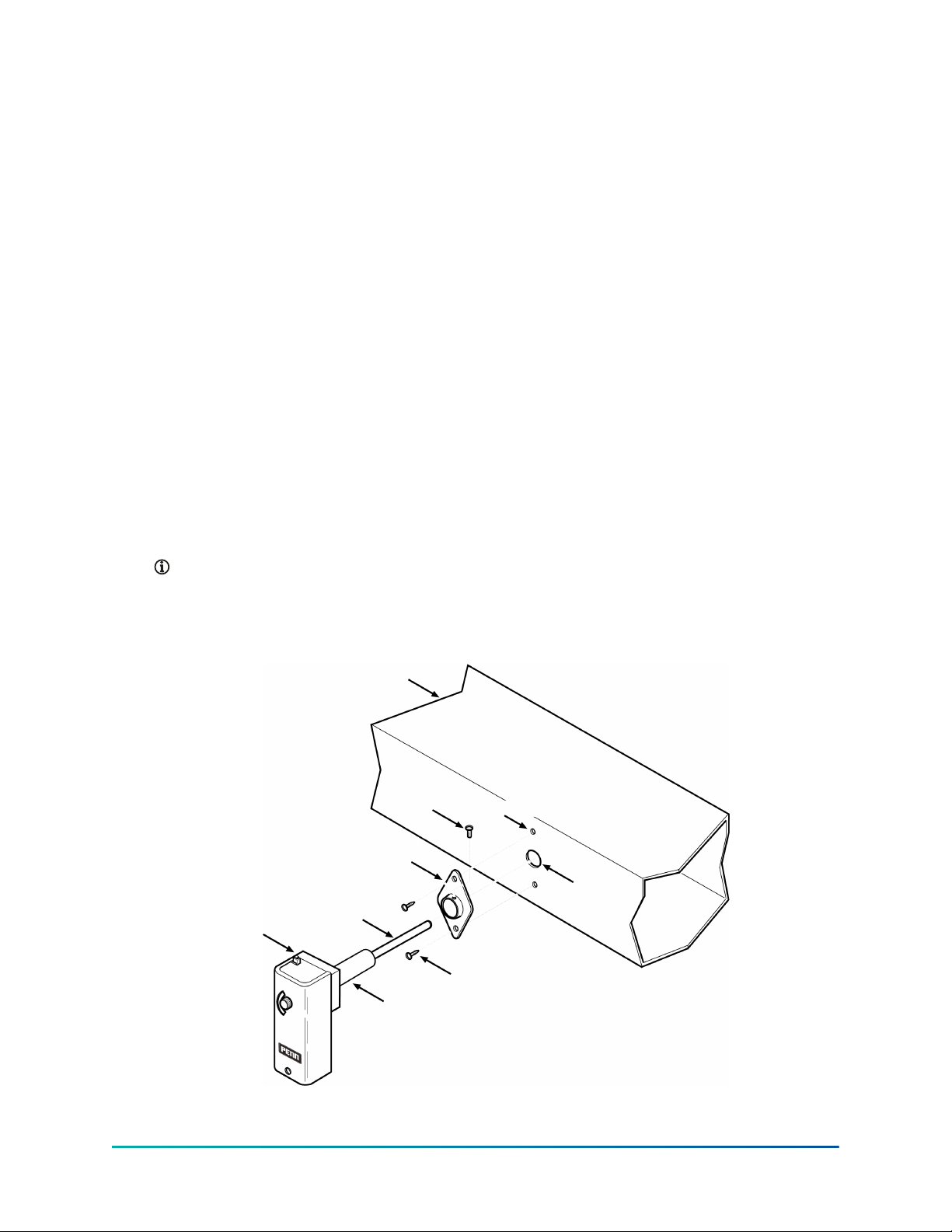
1. Select a mounting location for the A25 in the duct (or plenum). The location must allow the
sensing element to sense the average temperature in the duct.
2. Drill (or cut) a 1-3/8 in. hole in the duct at the selected mounting location (refer to Figure 2).
3. Using the flange as a template on the duct, mark the location for two 1/2 in. (13 mm) No. 10
sheet metal screws.
4. Punch (or drill) both sheet metal screw holes in the duct at the marked locations.
5. Secure the flange to the duct with two 1/2 in. (13 mm) No. 10 sheet metal screws provided.
6. Insert the sensing element and sleeve through the flange installed in Step 5 (and into the
duct).
7. Secure the A25 to the flange by screwing the set screw firmly against the sleeve. Do not
overtorque the set screw.
Note: Insert the sensing element as far as possible into the air stream without allowing
it to contact any object inside the duct. Provide at least 5-3/4 in. (14 cm) clearance
between the sensor and any other objects inside the duct.
Figure 2: Installing the A25
A25 Series Warm Air Control with Manual Reset Product/Technical Bulletin2
Wiring
WARNING
Shock hazard
To avoid electrical shock or damage to equipment, disconnect all power before making wiring
connections.
If available, follow the instructions for the unit onto which the A25 will be installed. Make all wiring
connections only with copper conductors and in accordance with the National Electrical Code and
local regulations. Refer to the label inside the A25’s cover for the maximum electrical rating.
Models A25CN and A25CP SPDT (Single Pole Double Throw)
Units
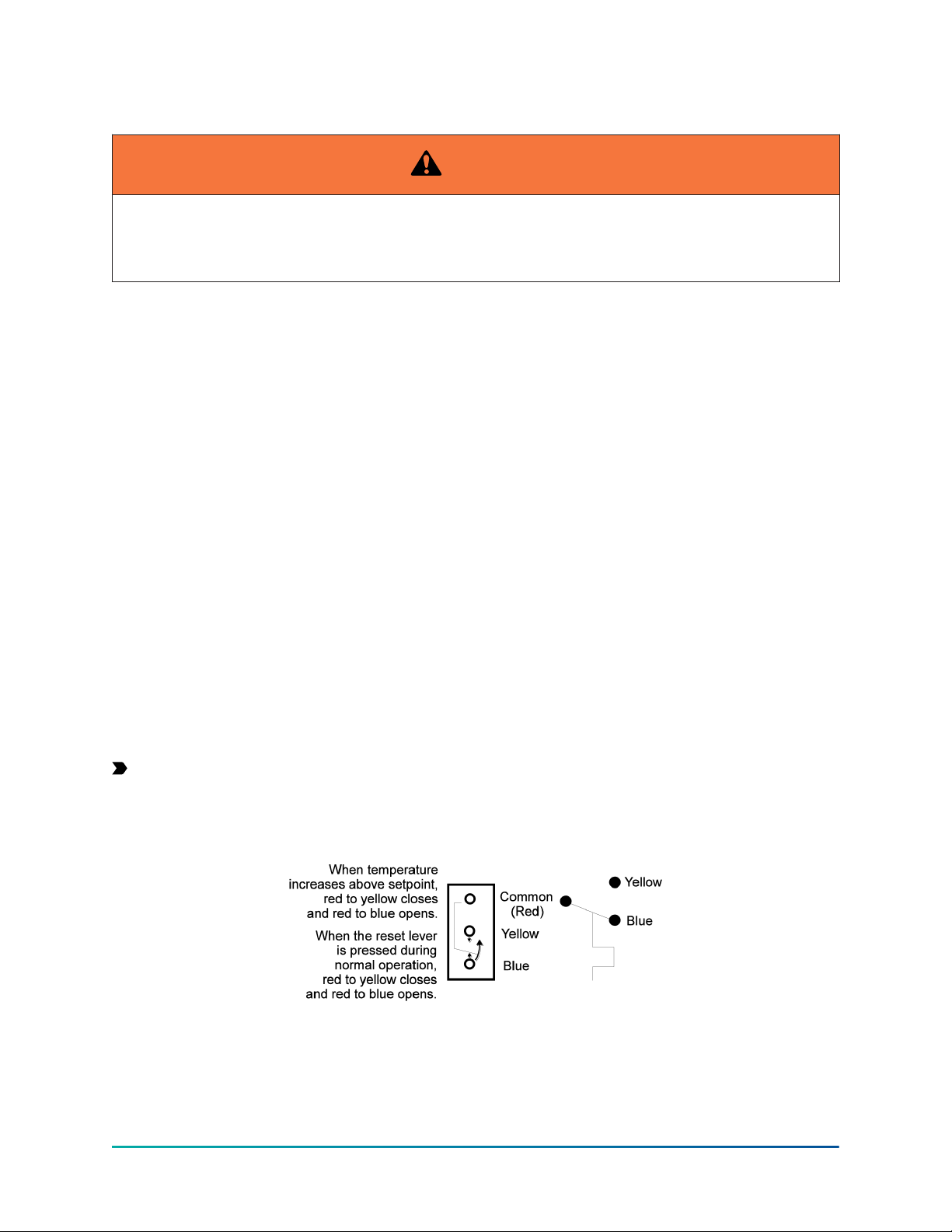
The wiring terminals on the SPDT models are color coded:
• Red is common.
• The red to yellow circuit closes on temperature increase.
• The red to blue circuit opens on temperature increase.
Refer to Figure 3 and Figure 4 for terminal identification and typical wiring connections.
When the reset lever is pressed during normal operation, the trip free contacts are activated, the
red to blue contact opens and the auxiliary red to yellow contact closes. At this point, the auxiliary
system will activate.
Model A25AN SPST (Single Pole Single Throw) Units
When the temperature increases to above the setpoint, the circuit opens. When the reset lever is
pressed after the sensed temperature decreases to approximately 20F° (11C°) below the setpoint,
the circuit closes.
Refer to Figure 5 and Figure 6 for terminal identification and typical wiring connections.
Important: Only use the terminal screws furnished with the A25 (8-32 x 1/4 in. binder head).
Use of other screws will void warranty, may damage switch terminals, and result in improper
connections.
Figure 3: Terminal identification for A25CN and A25CP SPDT models
3A25 Series Warm Air Control with Manual Reset Product/Technical Bulletin

Figure 4: Wiring diagram of A25CN SPDT model
Figure 5: Terminal identification for A25AN SPST model
Figure 6: Wiring diagram for A25AN SPST model
Checkout procedure
After installing the A25, perform the following procedures. Observe at least three complete
operating cycles to verify that all components are functioning properly. If the unit fails to checkout,
refer to the troubleshooting chart (Table 2). Do not attempt to make adjustments.
Return air applications
1. After completing the installation and wiring procedures, turn on the power to the circuit.
2. Turn the setpoint knob counterclockwise until the A25 shuts down the system. The A25
should lockout and the alarm or signal (if applicable) should activate.
Note: The setpoint at shutdown should equal the approximate duct air temperature.
3. Turn the setpoint knob clockwise to the desired setpoint. Nothing should happen.
4. Press the reset lever. The system should restart and the alarm or signal (if applicable) should
shut off.
A25 Series Warm Air Control with Manual Reset Product/Technical Bulletin4

Supply air applications
1. After completing the installation and wiring procedures, turn on the power to the circuit.
2. Raise the supply air temperature to the setpoint temperature.
Note: The supply air temperature can be raised by simulating a fan failure or restricting
the return air flow.
3. When the system shuts down, determine the temperature at the A25 sensing element. The
temperature reading should closely approximate the A25’s setpoint at which the system is
shut down and (if applicable) the alarm or signal is activated.
4. Return the system to normal operation by re-establishing air flow or by restarting the fan.
5. Press the reset lever. The system should restart and the alarm or signal (if applicable) should
shut off.
Operation: Models A25AN and A25CN
Setpoint Adjustment: Adjust the A25 setpoint by rotating the setpoint knob (Figure 7). The setpoint
is displayed in the setpoint window.
Test Procedure:
To test (trip) the A25: Raise the temperature at the sensor above the setpoint or lower the setpoint
below the ambient temperature. The control should lockout (trip).
To reset after test: Lower the temperature at the sensor to 20F° (11C°) below the setpoint or raise
the setpoint to 20F° (11C°) above the ambient temperature. Press the reset lever. The A25 should
reset (closing the circuit).
Reset Procedure: Verify that the temperature has dropped to 20F° (11C°) below setpoint. Press the
reset lever to reset the A25 (closing the circuit).
Figure 7: Models A25AN and A25CN
Operation: Model A25AP
Setpoint Adjustment: Loosen the cover screw (Figure 8) and remove the cover. Adjust the setpoint
by rotating the adjusting screw. When adjusted, re-install the cover. Tighten cover screw.
Test Procedure:
To test (trip) the A25: Raise the temperature at the sensor above the setpoint or lower the setpoint
below the ambient temperature. The control should lockout (trip).
To reset after test: Lower the temperature at the sensor to 20F° (11C°) below the setpoint or raise
the setpoint to 20F° (11C°) above the ambient temperature. Press the reset lever. The A25 should
reset (closing the circuit).
5A25 Series Warm Air Control with Manual Reset Product/Technical Bulletin

Reset Procedure: Verify that the temperature has dropped 20F° (11C°) below setpoint. Press the
reset lever to reset the A25 (closing the circuit).
Figure 8: Model A25CP
Dimensions
Figure 9: A25 dimensions, in./mm
Repairs and replacement
Do not make field repairs. For a replacement control, contact your nearest Johnson Controls
representative.
Table 1: Ordering information
Item Product code
number
Product description
A25 Series Warm Air Control
with Manual Reset
A25AN-1
A25CN-1
A25CP-1
SPST, opens on temperature rise, setpoint knob adjustment.
SPDT, setpoint knob adjustment.
SPDT, concealed screwdriver adjustment, Factory Mutual approved.
A25 Series Warm Air Control with Manual Reset Product/Technical Bulletin6

Troubleshooting
Table 2: Troubleshooting chart
Symptom Problem Solution
The A25 is not sensing properly. The sensing element may not be
extended into the airstream or the
sensing element is contacting an object
inside of the duct (or plenum).
Insert the sensing element as far as
possible into the airstream without
allowing it to contact any object inside
the duct (or plenum).
The system does not operate. Incorrect switch connections or
improper wiring.
Damaged sensor.
The A25 is tripped.
Ensure that the wiring connections
follow the wiring diagrams in the Wiring
section.
Check connections.
Replace the A25.
Reset the A25.
A25 does not lockout upon a
temperature rise beyond the setpoint.
The A25 is defective. Replace the A25.
The A25 does not sense the correct air
temperature.
The A25 is defective. Replace the A25.
A25 will not reset. The temperature in the duct (or plenum)
is not 20F° (11C°) below the setpoint.
Check system for overheating or fire.
7A25 Series Warm Air Control with Manual Reset Product/Technical Bulletin

Technical specifications
Table 3: A25 Series Warm Air Control with Manual Reset technical specifications
Specification Description
Product A25AN-1: SPST, opens on temperature rise, setpoint knob adjustment.
A25CN-1: SPDT, setpoint knob adjustment.
A25CP-1: SPDT, concealed screwdriver adjustment, Factory Mutual approved.
Range 25 to 215°F (-4 to 102°C)
Volts, AC 120 VAC 208 VAC 240 VAC 277 VAC
Motor FLA 116 9.2 8 -
Motor LRA196 55.2 48 -
Noninductive A 16 16 16 16
Electrical Ratings
Pilot Duty: 125 VA at 24/600 VAC
Case 104°F (40°C)Ambient Temperature
(Maximum) Element 300°F (149°C)
Conduit Opening 7/8 in. (22 mm) diameter hole for 1/2 in. conduit
Switch Snap-acting contacts in dust protected enclosure
Cover Finish Gray baked enamel
High Limit Dial Stop 125°F
Case 0.063 in. (1.6 mm) galvanized steelMaterial
Cover 0.025 in. (0.64 mm) cold rolled steel
Mounting Flange for flat surface
Reset Positive, trip-free reset mechanism (manual reset 2 operation). Control can be reset when
the temperature drops 20F° (11C°) below the dial setting.
Sensing Element Bi-metal rod and tube construction
Individual pack 1.8 lb. (0.8 kg)Shipping Weight
Overpack of 12 units 23 lb. (10.4 kg)
Wiring Connections Screw-type terminals
Agency Listing UL listed: File MP640, Guide MBPR
cUL listed: File MP640, Guide MBPR7
Factory Mutual Approved (Models A25AP and A25CP only): Class 3545
1 FLA = Full Load Amps; LRA = Locked Rotor Amps. Values are equivalent to a 1 HP motor rating in accordance with UL353.
The performance specifications are nominal and conform to acceptable industry standards. For
application at conditions beyond these specifications, consult the local Johnson Controls office.
Johnson Controls shall not be liable for damages resulting from misapplication or misuse of its
products.
Single point of contact
APAC Europe NA/SA
JOHNSON CONTROLS
C/O CONTROLS PRODUCT MANAGEMENT
NO. 32 CHANGJIANG RD NEW DISTRICT
WUXI JIANGSU PROVINCE 214028
CHINA
JOHNSON CONTROLS
VOLTAWEG 20
6101 XK ECHT
THE NETHERLANDS
JOHNSON CONTROLS
507 E MICHIGAN ST
MILWAUKEE WI 53202
USA
For more contact information, refer to www.johnsoncontrols.com/locations.
© 2021 Johnson Controls. All rights reserved. All specifications and other information shown were current as of document
revision and are subject to change without notice.
www.penncontrols.com
Ce manuel convient aux modèles suivants
3
Table des matières
Autres manuels Penn Système de contrôle

Penn
Penn A28 Series Manuel utilisateur

Penn
Penn A421 Series Manuel utilisateur

Penn
Penn System 450 Series Manuel de service

Penn
Penn A421 Series Manuel utilisateur

Penn
Penn P78 Series Manuel utilisateur

Penn
Penn P77 Series Manuel utilisateur

Penn
Penn System 450 Series Manuel de service

Penn
Penn System 450 Series Manuel utilisateur

Penn
Penn Connected PC10 Manuel utilisateur

Penn
Penn V43 Series V243 Series Manuel


