
Outsunny C00-026V80 Manuel utilisateur

INafe002_US_CA
Art No.:
C00-026V80
C00-026V81
C00-030V80
EN
Compressor Car Fridge
Instruction Manual

EN
Please read this operating manual carefully before using this appliance. Keep it
safe for future reference. If the device is given to another person, ensure the
manual is included.
The manufacturer can not be held liable for damage resulting from improper use
or incorrectoperation.
Content
1 Safety instructions .......................................................................................3
1.1 General safety .........................................................................................3
1.2 Using the fridge safely .............................................................................4
2 Appliance application ..................................................................................4
3 Functions ......................................................................................................4
4 Display and operation .................................................................................5
4.1 Display & control panel ...........................................................................5
4.2 Refrigerator power ..................................................................................5
4.3 Temperature settings ...............................................................................5
4.4 Low voltage protection monitor settings ..................................................5
4.5 Mode settings...........................................................................................6
4.6 Reasons for error code displaying on the screen ...................................7
4.7 Energy saving tips ...................................................................................7
5 Connecting the refrigerator.........................................................................7
5.1 Using the DC plug to connect the appliance............................................8
5.2 Connecting to an AC power supply. ........................................................8
6 Using the refrigerator...................................................................................8
6.1 Turning on the refrigerator ......................................................................8
6.2 Turning off the refrigerator ..................................................................... 9
6.3 Defrosting............................................................................................... 9
7 Cleaning and maintenance. .......................................................................10
7.1 Replacing the DC plug fuse. ..................................................................10
7.2 Cleaning the refrigerator.........................................................................10
8 Guarantee. .................................................................................................. 10
9 Troubleshooting ........................................................................................ 11
10 Disposal. ...................................................................................................12
11 Technical data. ..........................................................................................12
-2-

EN
1. Safety instructions
1.1 General safety
WARNING!
● Do not operate the cooling device if visibly damaged.
● If the power cable is damaged, it must be replaced by customer service to pre-
vent safety hazards.
● This cooling device should only be repaired by qualified personnel, improper
repair can lead to potential hazards.
● Cleaning and maintenance must not be carried out by children without supervi-
sion.
● Children must be supervised to ensure that they do not play with the cooling
device.
● Always keep the cooling device out the reach of children under the age of eight
years.
● Do not store any explosive substances, such as spray cans with a flammable
propellant in the cooling device.
CAUTION!
● Disconnect the cooling device from the power supply:
--- Before cleaning and maintenance.
--- After every use.
● Food should be stored in its original package or in suitable containers.
NOTICE!
● Check the voltage specification on the rating label matches the power supply.
● Only connect the cooling device as follows:
--- Connect the DC cable to a DC power supply in the vehicle.
--- Connect the DC cable to an AC adapter, then connect the adapter to the
AC power supply.
● Never pull the cable to take out the plug.
● If the refrigerator is connected to the DC outlet, disconnect the appliance and
other power consuming devices from the battery before connecting a quick
charging device.
● If the appliance is connected to the DC outlet, disconnect it when turning off the
engine. Otherwise, you may discharge the battery.
● This appliance is not suitable for transporting caustic material or material that
contains solvents.
● The insulation of this appliance contains flammable cyclopentane and requires
special disposal procedures. Ensure the appliance is recycled properly at the end
of its life cycle.
1.2 Using the refrigerator safely.
CAUTION!
● Before using, ensure the wire and plug are dry.
-3-

EN
NOTICE!
● Do not use electrical devices inside the appliance, unless recommended by the
manufacturer.
● Keep naked flames and other heat sources (heaters, direct sunlight, ovens etc)
away from the appliance.
● Danger of overheating!
Keep the appliance in ventilated areas. Place it away from walls and other objects,
allowing air to circulate.
● Do not cover the ventilation openings.
● Do not fill the container with ice or liquid.
● Keep this appliance out of water.
● Keep the appliance away from heat and moisture.
2. Appliance application.
The refrigerator is designed to be used from:
● A DC on-board power supply from a vehicle, boat or caravan.
● A DC auxiliary battery.
● An AC power supply via an adapter.
CAUTION! Health hazard!
● Please check if the cooling capacity is suitable for storing food or medicine.
3. Functions.
This appliance can refrigerate or freeze food. A fast acting and efficient cooling
system provides cooling with a compressor and control module. The appliance is
designed for mobile use.
Function description:
● Three-level battery monitor for protecting the vehicle battery.
● Displays the temperature gauge (switches off automatically when battery is low).
● Temperature adjustment.
-4-
EN
4. Display and operation.
NOTICE!
● Place the appliance horizontally for more than six hours before its first use.
● Clean the inside and out side with a damp cloth before the first use. Refer to
'Cleaning and 'maintenance' for more information.
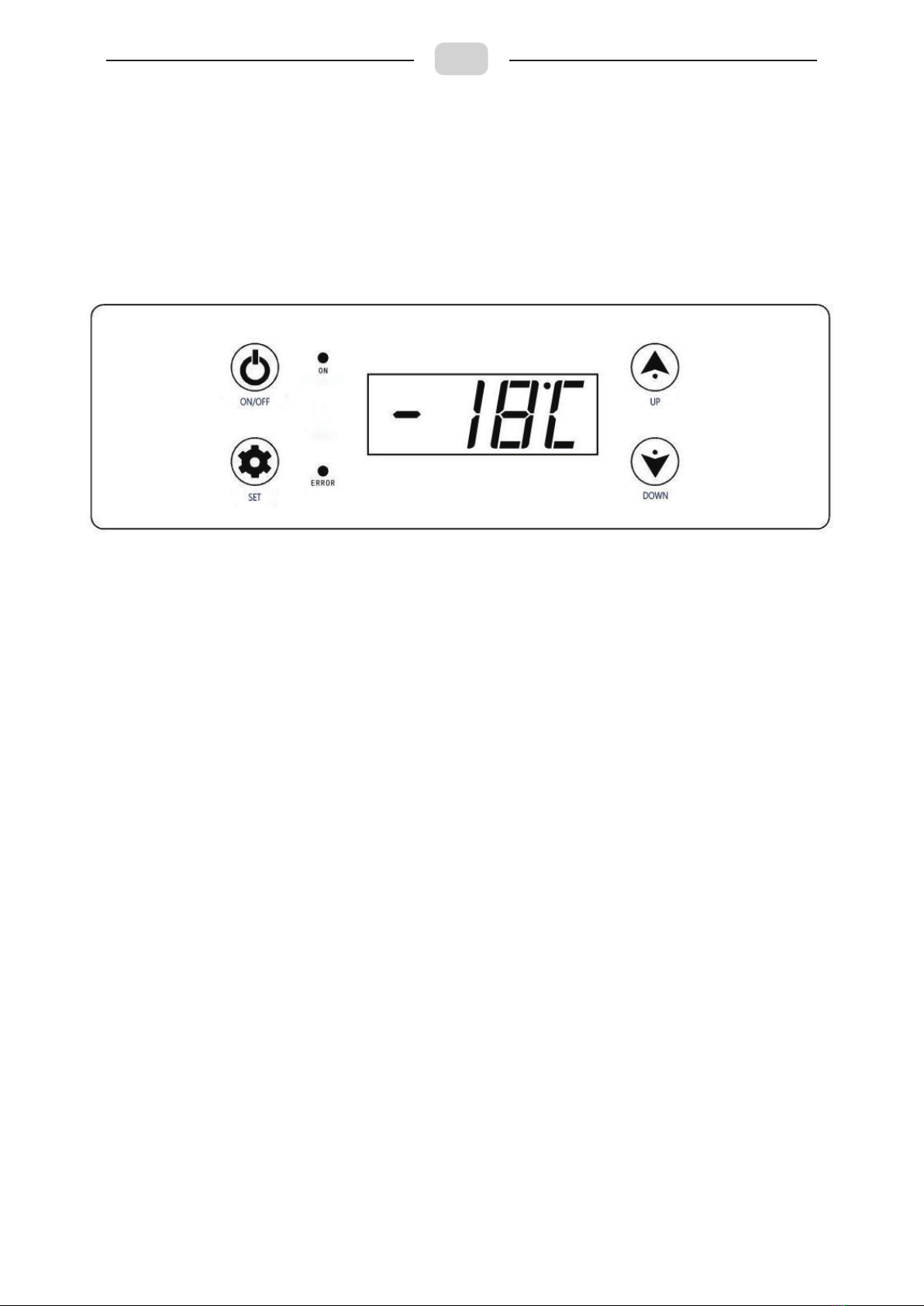
4.1 Display & control panel:
4.2 Refrigerator power:
● Switch on: Gently touch 'ON/OFF' once.
● Switch off: Hold 'ON/OFF' for approxamately five seconds.
4.3 Temperature settings:
● Switch on the appliance.
● Select temperature display unit: Hold the ‘down’ and ‘set’ button at the same
time for 10 seconds. ‘°C’ or ‘°F’ will flash on the display screen. Press ‘up’ or
‘down’ to select Celsius or Fahrenheit. The selected unit will flash on the screen
for a few seconds, then it will return to displaying the temperature.
● Temperature setting: Press the ‘set’ button once, then press ‘up’ or ‘down’ to
select your temperature. The selected number will flash on the screen for a few
seconds, then it will return to displaying the current temperature.
4.4 Low voltage protection monitor settings:
-5-

EN
This appliance has a three-level battery monitor, which protects your vehicle bat-
tery from draining when the device is connected to the on-board DC supply.
If the appliance is on whilst the vehicle ignition is off, the fridge will automatically
turn off, once the battery falls below a certain level. The appliance will switch back
on when the battery is recharged.
NOTICE! Danger of damage!
When switched off by the battery monitor, it will no longer be fully charged. Avoid
starting repeatedly or operating without it being properly charged.
The battery monitor on the 'H3' level responds faster than 'H1' and 'H2'.
When using the starter battery, select 'H3'. If the cooling device is connected to a
supply battery,select 'H1'.
● Turn on the refrigerator.
● There are three levels of low voltage protection: H1, H2 and H3: Hold the ‘UP’
and ‘DOWN’ button at the same time for five seconds. The three levels will flash
on the screen, choose by pressing ‘UP’ or ‘DOWN’. The selected level will flash
for a few seconds, before returning to the current temperature.
4.5 Mode settings:
● Mode selection: There are two modes:
HH mode: The appliance will work normally. The ‘on’ light will be red in this function.
ECO mode: The appliance will be in energy saving mode. The ‘on’ light will be green.
Press the ‘set’ button twice for ‘HH’ and ‘ECO’ to flash on the screen. Press ‘UP’ or
‘DOWN’ to select the mode. Your setting will flash on the screen for a few sec-
onds, before returning to the current temperature.
Monitor Level H1 H2 H3
12VSwitch-off voltage 10.3V 10.8V 11.3V
Restart voltage 11.1V 11.8V 12.6V
24VSwitch-off voltage 21.5V 22.3V 24.3V
Restart voltage 22.7V 23.7V 25.7V
-6-

EN
4.6 Reasons for error codes displaying on the screen:
4.7 Energy saving tips:
● Keep in a ventilated area and protected from direct sunlight.
● Ensure hot food has cooled down before placing into the appliance
● Do not constantly open the appliance.
● Do not leave the appliance open for long periods.
● Defrost when a layer of ice forms.
● Avoid low temperatures.
5 Connecting the refrigerator:
WARNING! DC extension cord.
● It is not recommended to us an extension cord, as it could cause a safety
hazard.
● Do not tamper with extension cord wires under any circumstance.
● Do not use power strips or a two-way splitter.
● Always uncoil the cord to avoid overheating.
Connecting to a battery (vehicle or boat), the cooler can be operated with
DC 12V or 24V.
NOTICE! Danger of damage!
Disconnect the cooler and other consumer units from the battery before you con-
nect the battery to a quick charging device.
-7-

EN
Overcharging can damage the appliance.
This appliance has an electronic system to prevent short-circuiting when connect-
ing to a battery.
5.1 Using the DC plug to connect the appliance.
NOTICE! Danger of damage!
The provided cable has a fuse inside the plug. Do not remove this fuse.
Only use the provided DC cable.
● Plug the DC cable into the appliance power inlet.
● Connect the cable to the power outlet.
5.2 Connect to an AC power supply.
● Plug the DC cable into the appliance power inlet.
● Connect the DC cable to the cigar lighter socket of an AC adapter (Adapter not
included).
● Connect the cable of the AC adapter to the AC power outlet.
NOTICE! Danger of damage!
● Only use the provided AC adapter.
● Never handle plugs and switches with wet hands or when standing on a wet
surface.
● If you are using the appliance on a boat from a power supply 120V, you must
install a residual circuit breaker between 120V AC power and the refrigerator.
Seek advice from a professional technician.
6 Using the refrigerator.
6.1 Switch on the refrigerator.
NOTICE! Danger of overheating!
Keep the appliance in a ventilated area. Ensure the openings on the appliance are
not covered.
Keep the appliance away from walls and objects so air can properly circulate.
● Place the appliance on a flat and solid
surface.
-8-

EN
● Close the appliance.
● Switch on the cooler.
NOTICE! Danger of low temperature!
Only place objects into the appliance that are intended to be cooled to the select
temperature.
NOTE!
The temperature of the inside appliance is what will display on the screen. Room
temperature will differ from what is displayed.
6.2 Turning off the refrigerator.
● Empty the cooler.
● Switch off the cooler.
● Unplug the appliance.
If the appliance is off for a long time:
● Leave the cover slightly open to prevent unwanted odours.
6.3 Defrosting.
Humidity can form frost in the appliance, which will reduce the cooling capacity.
Defrost the appliance to avoid this.
NOTICE! Danger of damage!
Never use sharp tools to remove ice or loosen frozen objects.
Read the following steps to defrost the fridge.
● Take out the contents from the fridge.
● If necessary, place them in another fridge to keep cool.
● Switch off the appliance.
● Leave the cover open.
● Wipe any excess water.
-9-

EN
7 Cleaning and maintenance.
7.1 Replacing the DC plug fuse.
● Take off the adapter sleeve from the DC plug.
● Unscrew the top half of the plug..
● Carefully remove the top of the plug from the bottom.
● Take out the contact pin.
● Replace with a new fuse, ensuring it is the same type and rating.
● Put the plug back together.
7.2 Cleaning the refrigerator.
● Clean the inside and outside of the fridge with a damp cloth.
● Ensure all vent opening are free of dust and dirt to prevent overheating.
WARNING!
Always unplug the fridge before cleaning and maintenance.
NOTICE! Risk of damage.
● Never clean the fridge under running water.
● Do not use abrasive cleaning agents or hard objects when cleaning, as this
could cause damage.
8 Guarantee.
If the product is faulty, please contact the supplier or retailer.
Forrepairsandreturns,pleaseincludethefollowingdocumentswhenyouare sending
the device.
● A copy of the receipt with a purchasing date.
● A reason for the claim or description of the fault.
-10-
Ce manuel convient aux modèles suivants
2
Table des matières
Langues :
Autres manuels Outsunny Réfrigérateur


