EB4400 (5-SLOT BP) 3
7Applying Power Correctly..............................................................................................................................................29
7.1 Connecting to electrical outlet................................................................................................................................................................29
7.2 Connect Power Cord(s) ...........................................................................................................................................................................29
8Powering UP the Computer...........................................................................................................................................31
9Hardware Check............................................................................................................................................................32
9.1 Verify Board LEDs.................................................................................................................................................................................... 32
9.2 Fault LEDs (RED)......................................................................................................................................................................................33
9.3 Verify Adapter Card LEDs ........................................................................................................................................................................34
9.4 Adapter Card LED Definitions..................................................................................................................................................................35
9.5 Slot LEDs.................................................................................................................................................................................................. 35
9.6 Power Distribution Board LED.................................................................................................................................................................36
9.7 Front LED................................................................................................................................................................................................. 36
9.8 Power Supply LED Indicator ....................................................................................................................................................................37
10 Software Installation.....................................................................................................................................................38
10.1 Software Driver Installation...............................................................................................................................................................38
11 Verify HIB Device ..........................................................................................................................................................39
11.1 Linux OS............................................................................................................................................................................................. 39
11.2 Windows 10 / Server .........................................................................................................................................................................41
11.2.1 HIB Cards and Backplane..............................................................................................................................................................41
12 Verify PCIe cards ...........................................................................................................................................................43
12.1 Linux ..................................................................................................................................................................................................43
12.2 Windows............................................................................................................................................................................................44
13 IPMI ..............................................................................................................................................................................46
13.1 Connect Ethernet Cables ...................................................................................................................................................................46
13.2 Locate Mac Address & IP Address...................................................................................................................................................... 47
13.3 Start Internet browser .......................................................................................................................................................................48
14 Other Technical Information .........................................................................................................................................49
14.1 Upstream and Downstream Slots ......................................................................................................................................................49
14.2 Slot LEDs ............................................................................................................................................................................................ 49
14.3 Board LEDs.........................................................................................................................................................................................50
14.4 Slot Type............................................................................................................................................................................................ 50
14.5 PS_ON................................................................................................................................................................................................50
14.6 ARF6 Connector.................................................................................................................................................................................51
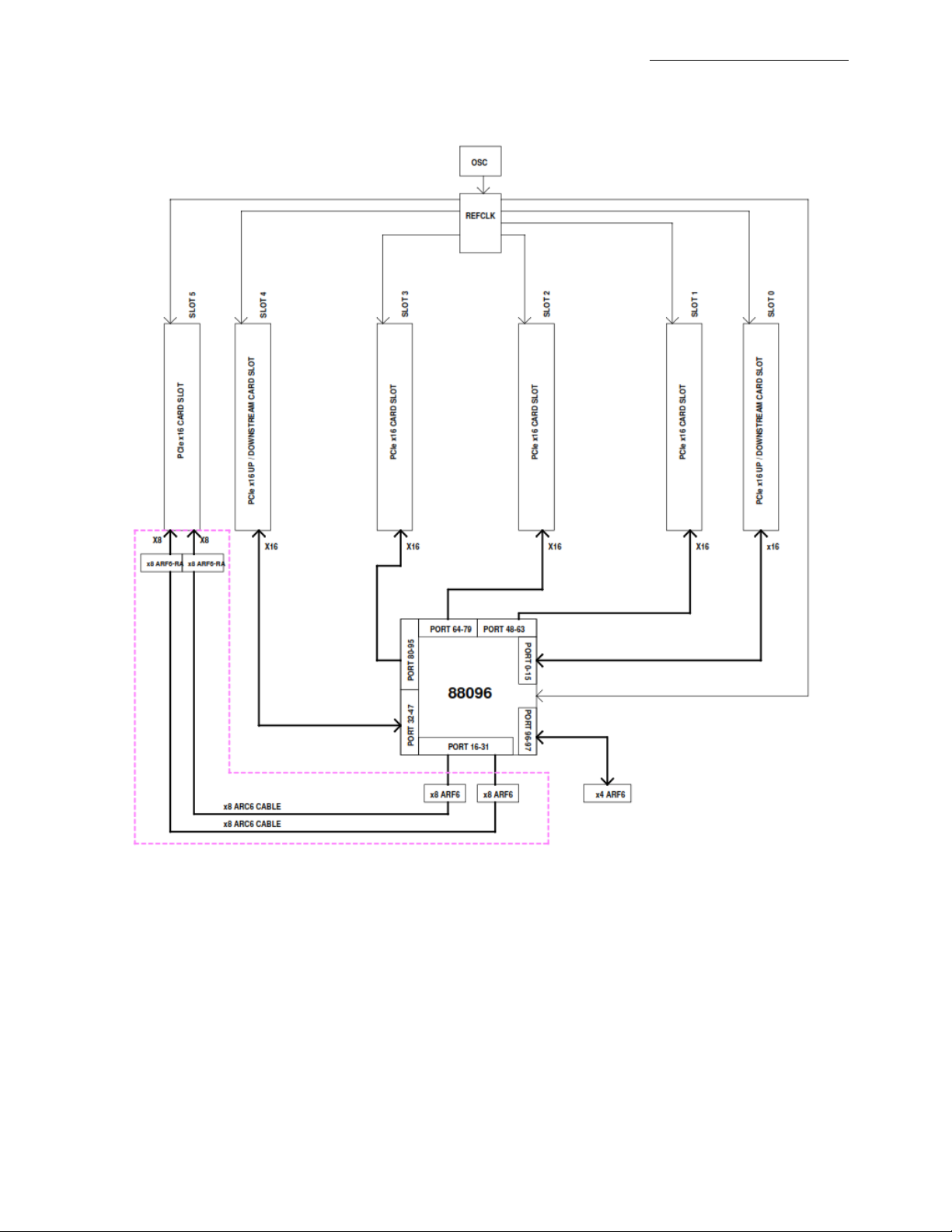
14.6 Slot Number and Port Mapping......................................................................................................................................................... 51
14.7 Power Cords ......................................................................................................................................................................................52
14.7.1 Specifications ............................................................................................................................................................................... 52
14.7.2 Power cord socket and voltage tables world standards ...............................................................................................................52