
Openreach ONT Mode d’emploi

bre
network
Developer Guide
Version 7.1 – August 2018
How to build a

2.
Home
wiring
5.
Multi dwelling
Units (MDUs)
8.
Modular jointing
chambers –
QuadboxTM
3.
Developer
self-install
6.
Commercial
units
11.
Health and
safety advice
9.
Joint boxes,
footways and
frames & covers
4.
Cabling
and ONT
positioning
7.
Duct laying
10.
List of
abbreviations
and acronyms
CON
TENTS 1.
Internal
equipment
12.
Quality control
checklist

3
Internal equipment
1
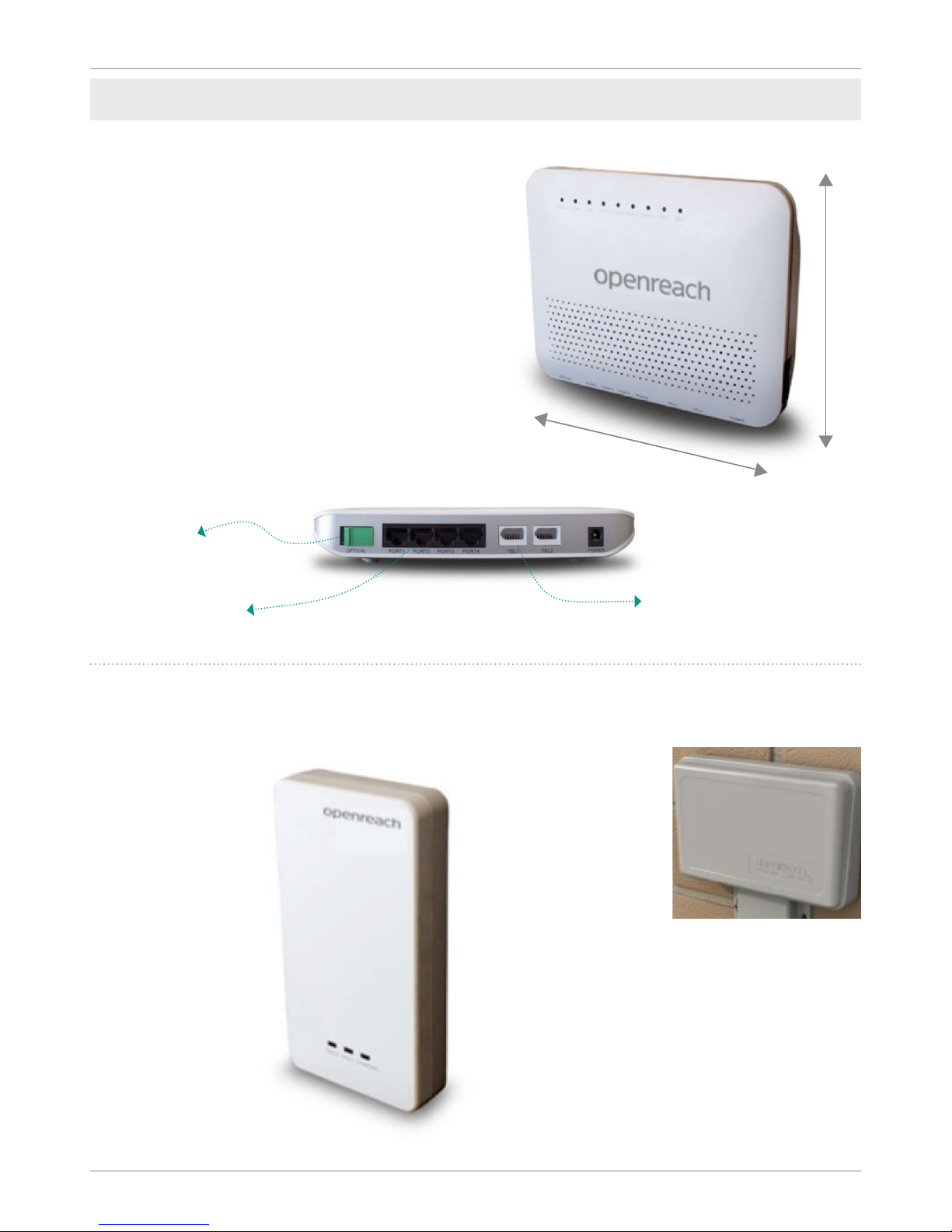
The ONT is the Openreach demarcation point.
It replaces the traditional copper master socket.
The Openreach ONT sits in an enclosure along with
the Battery Backup Unit (BBU) and associated wiring,
keeping everything neat and tidy. The enclosure is
designed for simple wall mounting with just 2 screws.
• Optical port connects to the external
Customer Splice Point.
• Ethernet port connects to the
communications provider's (CP) router.
• Telephony port connects to voice network.
Openreach Optical Network
Termination (ONT) and enclosure
254mm
215mm
Battery Backup Unit (BBU)
The BBU sits in the enclosure along with the ONT. It supports
voice calls for approximately an hour should there be any
interruption to the mains power supply.
A red warning light will ash when a replacement battery is
required. Openreach warranties the battery for 90 days, where
it then becomes the responsibility of the home owner.
How to build a fibre network - version 7.1
4
Openreach: Developer Guide
Internal equipment
Legacy ONT
The legacy ONT was the previous piece of
equipment used before the introduction of the
1+1 in January 2018.
This ONT is mounted directly to the wall and has
no associated enclosure.
• Optical port connects to the external
Customer Splice Point.
• Ethernet ports connect to the CP router.
• Telephony ports connect to voice network.
155mm
195mm
Optical
port
Ethernet
ports
Telephony
ports
The CSP houses
the external
connectorised
bre cable and
the connected end
that ts into the
ONT. The CSP sits
of the outside of
the house.
Where you self-install there will be no internal
CSP, instead the connectorised cable will plug
directly into the ONT. If the connectorised
cable end is damaged during installation
then an internal CSP may be required to be
tted to complete installation. This will be
undertaken at the commissioning stage by
Openreach. Your Field Based Co-ordinator
(FBC) will guide you through this.
BBU
The battery backup
supports voice calls
for approximately
one hour should
there be any
interruption to the
mains power supply.
A red warning light
will ash when
a replacement
battery is required.
Openreach
warranties the battery
for 90 days, where
it then becomes the
responsibility of
the home owner.
Customer Splice Point (CSP)

5
The wiring that you install in your customer’s
properties is pivotal to their experience.
Your options in the installation
of internal wiring are shown
as below
Implications of locating the service
provider’s router in a cupboard
It is important to note that the Wi-Fi service
your customer receives is dependent upon
the intended location of the communication
provider’s router. Placing the router in a
service cupboard or under stairs cupboard will
signicantly reduce the speed and coverage
your customer will receive.
It is highly recommended that if you position
the router in this way that you provide additional
RJ45 ports within the home. Ideally for optimum
speeds to be enjoyed using Wi-Fi service it
is recommended that you locate the router
centrally within the property.
For information, advice and guidance around
positioning, please refer to: PAS: 2016 Next
Generation Access for new Build Homes Guide.
All internal wires and sockets beyond the
ONT are the responsibility of the developer/
future home owner.
If any part of the connectorised internal
bre cable is found to be damaged at
commissioning, it is the developer’s
responsibility to replace it.
If the homeowner experiences a lack of
service or poor service, which is due to
a fault within the internal installation
of wiring, which requires Openreach to
rectify, the homeowner will be charged.
Please note
Home wiring
2
How to build a fibre network - version 7.1

6
Openreach: Developer Guide
The simple install
The simplest installation will be the provision of the Openreach equipment
(i.e. the ONT will be positioned adjacent to the outside wall) to which the customer
then attaches the router, provided by their communications provider. Without
internal data cabling, this relies on wireless extenders using.
the homes electricity cabling system to provide internet connection to other rooms in
the house. Power sockets should be provided for the Openreach equipment and for the
communications provider’s router and for the wireless extenders / adaptors if used.
CSP: Customer Splice Point
ONT: Optical Network Termination
BBU: Battery Backup Unit
Option 1
Connectorised bre cable
Voice cable
Ethernet cable
Home wiring
External
Internal

7
Option 2
Relocating the ONT and BBU
Some developers want to position the v and Battery Backup Unit (BBU) further
inside the property. This will require a longer connectorised internal bre
cable which is recommended to be installed in a protective conduit to the
external Customer Splice Point (CSP) plus the provision of a power socket for
the equipment. Additional Cat6* cabling is required for this option from the
ONT & BBU to connections in the study and living room. These connections
should terminate in an RJ45 socket. A power socket should be provided for the
communications provider’s router, if the router is placed near the RJ45 socket
or a double socket if it is placed by the ONT and BBU.
*Cat6 is the preferred option to ‘future proof’ for modern devices
CSP: Customer Splice Point
ONT: Optical Network Termination
BBU: Battery Backup Unit
Connectorised bre cable
Voice cable
Ethernet cable
Home wiring
How to build a fibre network - version 7.1

8
Openreach: Developer Guide
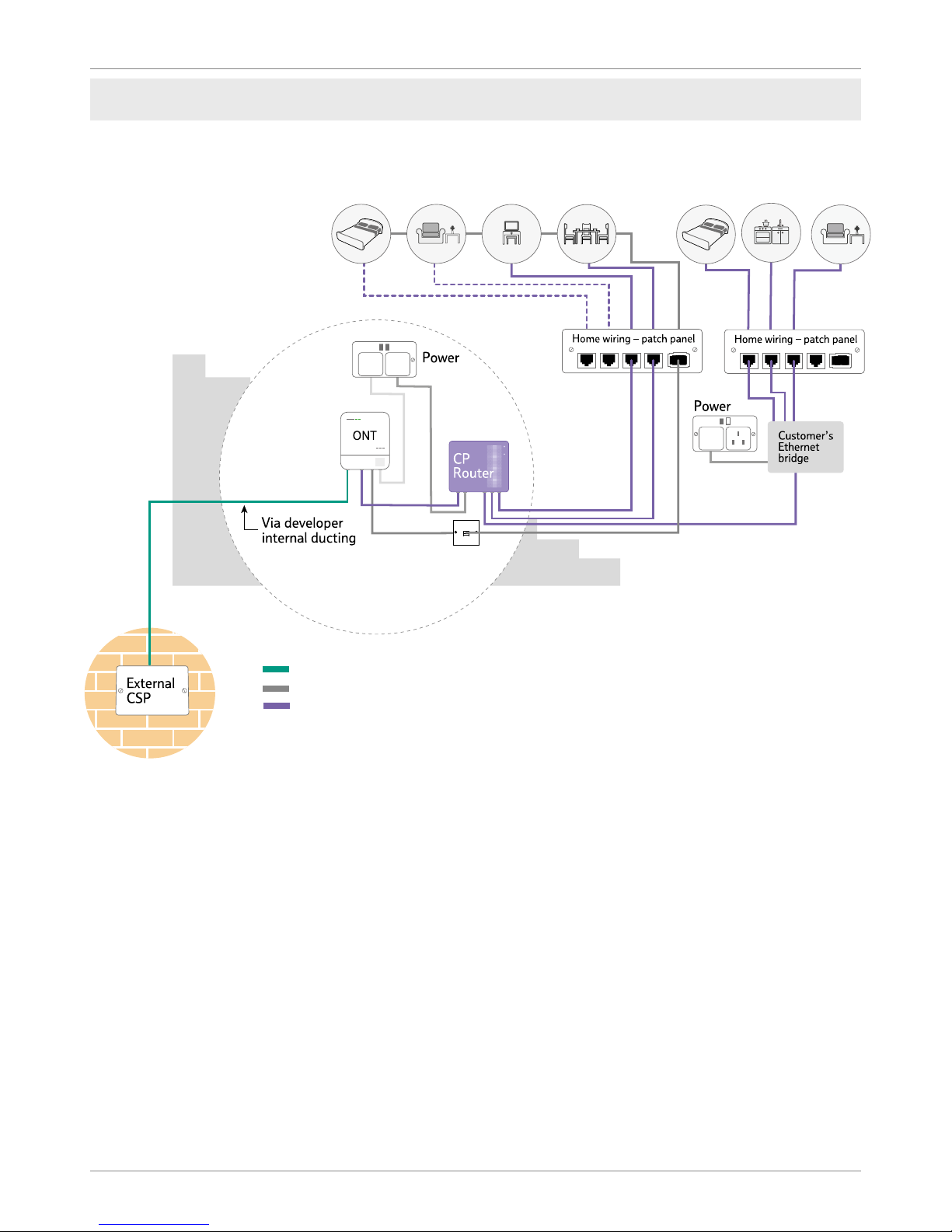
As per option 2 this extends the number of xed sockets so that the home owner doesn’t
need to rely on wireless connections in the majority of the house. This would enable the
down-streaming of 4K television in those areas where the customer is most likely to use
high bandwidth applications like streaming TV, gaming consoles or video conferencing.
One double power socket should be provided for the Openreach equipment and for the
communications provider’s router. We recommend that all the data cabling from the
rooms are terminated in a data patch panel (example as below) in close proximity to
the ONT to facilitate easy connection.
It is also recommended that where an aerial socket is provided for televisions that
an ethernet data socket and associated wiring is also provided.
CSP: Customer Splice Point
ONT: Optical Network Termination
BBU: Battery Backup Unit
Connectorised bre cable
Voice cable
Ethernet cable
Relocating the ONT and BBU and
adding data points in multiple rooms
Home wiring
Option 3
9
Home wiring
The networked home
This option offers data cabling from wherever the Openreach ONT & BBU equipment is located,
to all rooms in the home using a home wiring patch panel and RJ45 data sockets throughout.
This could be offered either as standard or a customer paid option and will guarantee the best
customer experience and help differentiate your property.
We recommend that all the data cabling from the rooms are terminated in a data patch panel
in close proximity to the ONT (Optical Network Termination) or the communications provider’s
router to facilitate easy connection.
Option 4
CSP: Customer Splice Point
ONT: Optical Network Termination
BBU: Battery Backup Unit
Connectorised bre cable
Voice cable
Ethernet cable
How to build a fibre network - version 7.1

10
Openreach: Developer Guide
Home wiring
When Openreach install the equipment we will
install the ONT wherever the incoming bre cable
is located. Where you self-install the ONT, you will
have control over when the equipment is installed.
The ONT will remain the property of Openreach in
both installation scenarios.
Where you are self-installing the Openreach
equipment we will supply the ONT, along with the
battery back-up and the connectorised internal
bre cable you need. If you are installing the ONT
opposite the cable entry hole, you will need to install
a ush mounted double back box on the internal
wall where the ONT is to be located.
The ONT will be installed at this location unless an
alternative position has been agreed with your FBC
and the appropriate connectorised internal bre
cable run in a continuous fault-free length to the
alternative position.
While the provision of internal wiring beyond
the Openreach ONT is the responsibility of
the developer, you can contract an Openreach
engineer to do this work for you. If interested,
please contact your local customer network
solutions team on 0800 783 2023. Terms
and Conditions for the provision of internal
wiring will apply.
Provision of the Openreach equipment
Voice Cabling
• Voice extension cabling shall run direct from
the ONT voice port. Connection to the ONT
is made via a BS6312 431A Plug inserted
into voice port 1. This socket must be a slave
socket, not a master socket.
• Extension sockets shall be located close to
power sockets for easy equipment connection.
A minimum of 50mm between telephone
cables and power cables shall be left
throughout.
• Where this isn’t practical, telephone and power
cables must be separated by an acceptable
divider (i.e. of rigid, non-conducting material).
• Extension wiring must be telephone/data
grade and have plain annealed solid copper
conductors of a diameter between 0.5mm and
0.63mm. The conductors shall be in twisted
pair format. The conductor resistance shall
be of a maximum of 96 ohms/km. The cable
sheath shall be PVC.
Data Cabling
• As a rule of thumb connectorised internal
bre cables shall not exceed the minimum
bend radius (i.e. no smaller than) of a £2 coin.
• Detailed information on cable installation and
separation is given in the British Standards.
• Code of Practice 6701, Part 1 (particularly
clause 6) and the relevant sections of the
latest IEE Regulations for electrical Installation
(Regulation 525 is of particular importance).
• The wiring pattern for cabling must be either
in series or spur. For data it must be point to
point as speeds will be impacted after the rst
point of a daisy chain.
• We’d recommend data cabling rooms
likely to benet most from a physical
connection, like the room with the main
TV and the home ofce.
Please note: If connectorised cable is damaged by developers during installation then an
internal Splice Point may be required to be tted to complete installation. This will be undertaken
at commissioning stage by Openreach.
Installation of internal cabling
How to build a fibre network - version 7.1
Table des matières
Manuels Routeur réseau populaires d'autres marques


NETGEAR
NETGEAR FS526T - Switch Manuel utilisateur

Korenix
Korenix JetNet 5710G Series Manuel utilisateur

Automated Logic
Automated Logic ZN551 Manuel du propriétaire

Cisco
Cisco ASR 1000 Series Manuel de l'opérateur

EnGenius
EnGenius ESR-9710 Manuel utilisateur

Cisco
Cisco 805 Series Instructions d'utilisation et de sécurité