
Onn ONA16TM009 Manuel utilisateur

Model: ONA16TM009
PRODUCT GUIDE
47-80” Tilting TV Wall Mount
2
IMPORTANT SAFETY INSTRUCTIONS – SAVE THESE INSTRUCTIONS – PLEASE READ ENTIRE MANUAL PRIOR TO USE
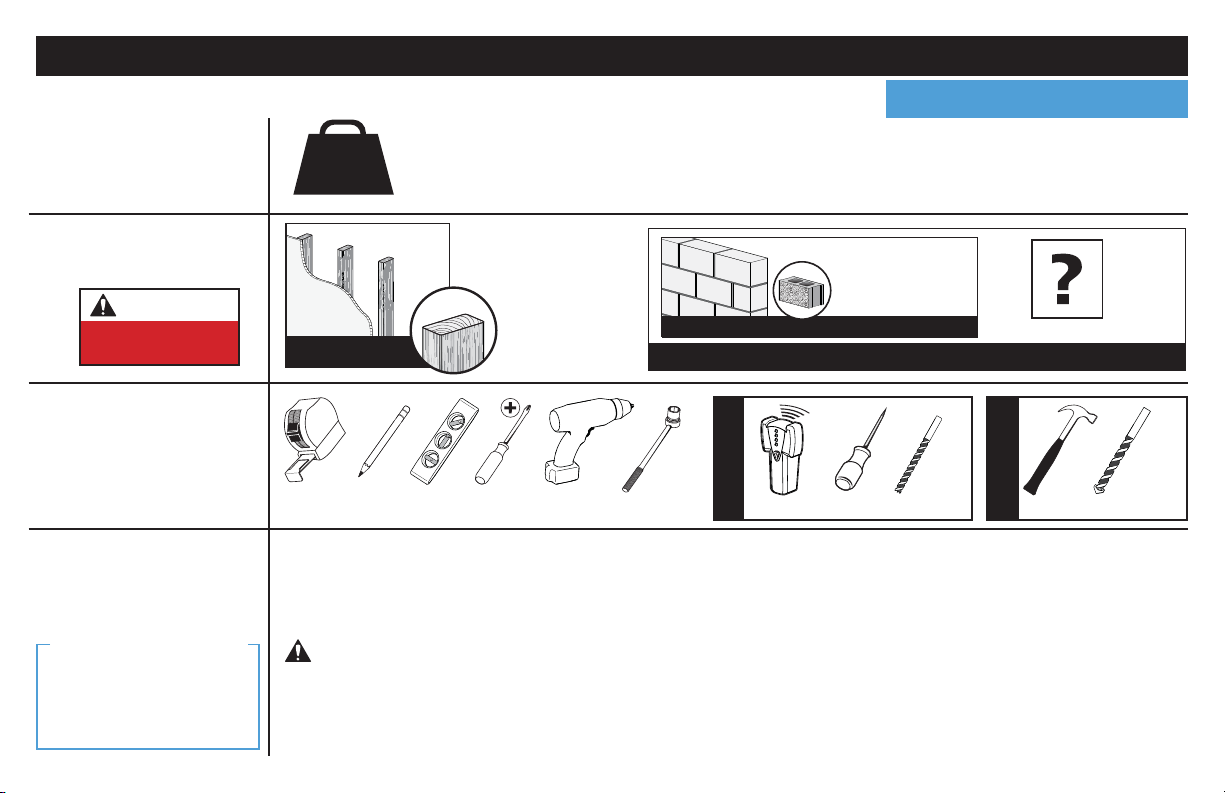
Before getting started, let’s make sure this mount is perfect for you! Para Español ver página 14
No
—
Perfect!
Yes
—
This mount is NOT compatible. Call 877-689-1665 to find a compatible mount.
Please read through these instructions completely to be sure you’re comfortable with this easy install process.
Also check your TV owner’s manual to see if there are any special requirements for mounting your TV.
If you do not understand these instructions or have doubts about the safety of the installation, assembly or use
of this product, contact Customer Service at 877-689-1665.
Do you have
all the tools
needed?
1
2
3
4
What is your
wall made of?
130 lbs.
(58.9 kg)
Ready to begin?
Does your TV
(including accessories)
weigh more than
130 lbs. (58.9 kg)?
CAUTION:
DO NOT install
into drywall alone
Drywall with
wood studs? Solid concrete or
concrete block?
Perfect!
CAUTION: Avoid potential personal injuries and property damage!
●This product is designed for use in wood stud, solid concrete, and concrete block walls - DO NOT install into drywall alone
●The wall must be capable of supporting five times the weight of the TV and mount combined
●Do not use this product for any purpose not explicitly specified by manufacturer
●Manufacturer is not responsible for damage or injury caused by incorrect assembly or use
Wood Stud Install
Concrete Install
Awl
Pencil Level Stud Finder
Screwdriver
Tape
Measure
7/32 in.
(5.5 mm)
Wood
Drill Bit
Electric
Drill Hammer
1/2 in.
(13 mm)
Socket
Wrench Drill Bit
3/8 in.
(10 mm)
Concrete
Unsure?
Call Customer Service: 877-689-1665
Concrete kit required (not included)
We’ll Make It Stress-Free
If you have any questions,
just give us a call.
877-689-1665.
We’re ready to help!
3
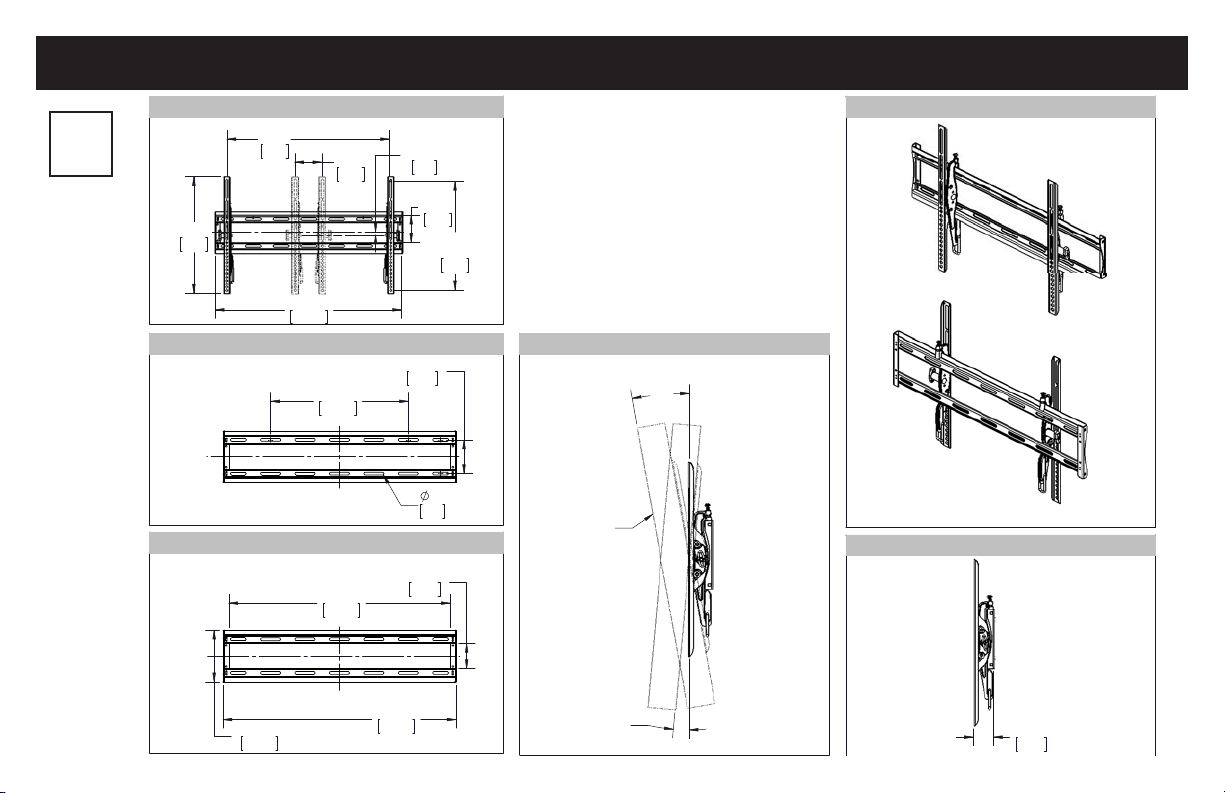
MIN
3.94
100
MAX
23.62
600
16.93
430
27.06
687.4
OFFSET
.38
9.7
MAX
15.75
400
MIN
3.94
100
.33
8.4
16.00
406.4
3.91
99.4
C
L
SYM
C
L
SYM
25.72
653.4
27.06
687.4
2.93
74.4
6.00
152.4
C
L
SYM
C
L
SYM
2.03
51.7
ESTIMATED
48" TV
10°
5°
TV INTERFACE
WALL PLATE
WALL PLATE OPENING
SIDE VIEW - TILT RANGE
SIDE VIEW - RETRACTED
3-D
Dimensions
in.
[mm]

4
M5 x 12mm
M8 x 16mm
M5 x 35mm
M8 x 35mm 22mm
M6 x 12mm M6 x 35mm
M5 M6/M8
M6 x 20mm
M8 x 20mm
TV Brackets
01 02
x1 x1
Parts and Hardware
WARNING: This product contains small items that could be a choking hazard if swallowed. Before starting assembly, verify all parts
are included and undamaged. If any parts are missing or damaged, do not return the damaged item to your dealer; contact Customer Service.
Never use damaged parts!
Parts and Hardware for STEP 1
NOTE: Not all hardware included will be used.
03
04 06
05 07
08
09
x4
x4 x4
x4 x4
x4
TV Screws
10 x4
x4
Washers
11 x4 12 x4
Spacers
13 x4

5
Concrete Installation Kit (NOT INCLUDED)
5/16 x 2¾ in.
5/16 x 2¾ in.
.695 x .350 x .075 in.
.695 x .350 x .075 in.
14 x1
Parts and Hardware for STEP 2
Lag Bolts
Lag Bolts
Wall Plate
16 x4
Washers
Washers
15 x4
Contact Customer Service at 877-689-1665 to have these
additional pieces shipped directly to you.
Concrete Anchors
For concrete installations ONLY
CAUTION: Do not use in drywall or wood
Fischer UX 10 x 60R
C1 x4
C2 x4
C3 x4

6
STEP 1 Attach Brackets to TV
M5 M6 M8
FLAT BACK ROUND BACK CABLESINSET HOLES
1.1 Select TV
Screw Diameter
1.2 Select TV
Screw Length
Hand thread screws into the threaded inserts
on the back of your TV to determine which
screw diameter (M5, M6, or M8) to use.
ab
If your TV has a flat back, AND you want your TV closer to
the wall, use the shorter screws (a).
Use the spacers and longer screws (b) to accommodate:
• Round/irregular back TVs
• TVs with inset mounting holes
• Extra space needed for cables
Too Short
Too Long
CAUTION:
Verify adequate thread
engagement with your screw/
washer/spacer combination
AND TV bracket (STEP 1.3).
-Too short will not hold the TV.
-Too long will damage the TV.
Correct
Standard configurations
are shown. For special
applications, or if you
are uncertain about your
hardware selection,
contact Customer Service
at 877-689-1665.

7
1.3 Attach TV Brackets
Center the TV brackets 01 and 02 over your TV hole pattern as shown - making sure the brackets are level.
NOTE: The tilt tension knob Ton TV brackets 01 and 02 should be oriented to the outside edges.
Install using the screw/washer/spacer combination (a) or (b) you selected for your TV.
CAUTION: Avoid potential personal injuries and property damage! DO NOT use power tools for this step. Tighten the screws only
enough to secure the TV bracket to the TV. DO NOT overtighten the screws.
IMPORTANT: Ensure TV bracket is securely fastened before moving on to the next step. aFlat Back
bRound Back / Extra Space
13
03 04 05 06 07
11
11
12
12
08 09 10
01
02
T
T

8
1. Locate your studs. Verify and mark the CENTER of the stud by finding the stud edges using an awl, a thin nail, or an edge to edge stud finder.
2. Position the wall plate 14 at your desired height and line up the holes with your stud center line. Level and mark the four hole locations.
12
Min. 16 in.
(406 mm)
Max. 5/8 in.
(16 mm) 14
CAUTION: Avoid potential personal injury or property damage!
• Drywall covering the wall must not exceed 5/8 in. (16 mm)
• Minimum wood stud size: common 2 x 4 in. (51 x 102 mm) nominal 1½ x 3½ in. (38 x 89 mm)
• Minimum horizontal space between fasteners: 16 in. (406 mm)
STEP 2A Attach Wall Plate Wood Stud Installation

9
4
314
15 16
3. Drill four pilot holes using a 7/32 in. (5.5 mm) diameter drill bit.
IMPORTANT: Pilot holes must be drilled to a depth of 2 3/4 in. (69.8 mm). Be sure to drill into the center of the studs.
4. Install wall plate 14 using four lag bolts 15 and four washers 16 . Tighten the lag bolts only until they are pulled firmly against the wall plate.
CAUTION: Avoid potential personal injury or property damage! All four lag bolts 15 MUST BE firmly tightened to prevent unwanted
movement of the wall plate 14 .Ensure the wall plate is securely fastened to the wall before continuing on to the next step.
Go to STEP 3 on PAGE 12.
2 3/4 in. (69.8 mm)
7/32 in.
(5.5 mm)

10
1. Position the wall plate 14 on the wall at your desired height. Level the wall plate and mark the four hole locations.
2. Drill four pilot holes using a 3/8 in. (10 mm) diameter masonry drill bit.
IMPORTANT: Pilot holes must be drilled to a depth of 3 in. (75 mm). Never drill into the mortar between blocks.
21
Concrete Installation Kit is not included
(see page 5) Contact Customer Service at
877-689-1665 to have the additional hardware
shipped directly to you.
Min.
16 in. (406 mm)
14
3/8 in.
(10 mm)
3 in. (75 mm)
CAUTION: Avoid potential personal injury or property damage!
• Mount the wall plate 14 directly onto the concrete surface
• Minimum solid concrete thickness: 8 in. (203 mm)
• Minimum concrete block size: 8 x 8x 16 in. (203 x 203 x 406 mm)
• Minimum horizontal space between fasteners: 16 in. (406 mm)
STEP 2B Attach Wall Plate
Solid Concrete or Concrete Block Installation
Table des matières
Langues :
Autres manuels Onn Support et étagère


Manuels Support et étagère populaires d'autres marques

Salamander
Salamander Acadia AC/W/L400/WH Manuel utilisateur

Fohhn
Fohhn VAT-09 Guide de l'utilisateur

ricoo
ricoo FS0522 Manuel utilisateur

AMSOIL
AMSOIL BMK-22 Guide rapide

Kargo Master
Kargo Master 48220 Manuel utilisateur

Milestone AV Technologies
Milestone AV Technologies SIMPLICITY SLF2 Manuel utilisateur


