
Nubert nuConnect trX Manuel d'instructions

nuConnect trX 1 07/2020 EN
®
nuConnect trX
Transceiver
Wireless Transmitter / Receiver
Safety Instructions
Technical Data
Operating manual
Warranty Terms

nuConnect trX 2 07/2020 EN
Instructions
Technical Data

nuConnect trX 3 07/2020 EN
Device approval and conformity with EC directives
Nubert electronic GmbH hereby declares that this product complies with the 2014/53/EU direc-
tives, provided that it is installed and used in accordance with the manufacturer‘s instructions.
The full text of the EU Declaration of Conformity is available at the following Internet address:
https://www.nubert.de/konformitaetserklaerungen/716/
• Do not change the serial number of the device. It is part of the operating approval.
• If the device is repaired or modified by workshops or other third parties not authorized by
Nubert, it loses its operating license.
• Only accessories and devices may be connected which in turn comply with all legal require-
ments and are approved.
• The device may only be used for the applications specified in the „Intended Use“ section
Intended use
This device is designed exclusively for sound reproduction in dry rooms. Use the device only
as described in this manual. Any other use (particularly safety-relevant or medical use, instal-
lation in open environment like IP-certified products) is considered improper and may result in
property damage or even personal injury. Nubert electronic GmbH does not assume any liability
for damages caused by improper use.

nuConnect trX 4 07/2020 EN
Safety instructions
The entire operating manual, in particular the safety instructions, must be read in full before
connecting and commissioning the device. For your own safety, be sure to follow all warnings
and safety instructions in this manual and on the device. The user is not permitted to carry
out any work on the device other than the described work. Keep this document so that you
have access to it at all times. Furthermore, it must also be handed over to possible re-owners.
Key to the symbols
The triangle symbol with exclamation mark (without additional comment) indicates
important instructions for commissioning, operation and maintenance of the device.
The term Caution! next to the triangle symbol indicates a medium risk. Failure to
observe this warning may result in property damage.
The term Danger! next to the triangle symbol indicates a high risk. Failure to observe
this warning may result in death or personal injury.
This symbol indicates that you must read and observe the operating instructions and
the safety and warning notices in order to operate the device.
Devices with this symbol may only be used
in a dry indoor environment.
Equipment marked with this symbol must not be disposed of with household waste.
Refer to the Disposal section at the end of this manual.

nuConnect trX 5 07/2020 EN
General information
Never leave the device unattended when in use
Danger of electric shock!
To avoid the risk of electric shock, the device may not be opened by the user. There are no user-
serviceable parts inside the device. Service work and repairs are reserved for qualified specia-
lists authorized by Nubert. If you need service, please contact Nubert electronic GmbH directly
Danger of suffocation!
Never let children use or play with neither speaker nor packaging unattended. Make sure that
children cannot remove any small parts from the device! These parts could be swallowed and
cause suffocation. In case of swallowing any parts, contact a doctor immediately!
Danger of injury or damage!
When moving the device, take care to avoid injury and damage!
Caution!
The device can only be switched off completely by disconnecting it from the power supply.
Therefore, it must be positioned so that you have free access to either the USB connector on
the device or the power supply. If any of the following situations occurs, the device must be
• The device has been damaged or has fallen down.
• Power cord or plug is damaged
• Objects or liquid have got into the device
• The device has been exposed to excessive moisture or rain.
• The device does not work properly or exhibits a significant reduction in performance.
• The device smells burnt, develops smoke or makes unusual noises.
Only use accessories recommended by Nubert!

nuConnect trX 6 07/2020 EN
Installating instructions
Caution!
An unstable location can damage the device.
• Only place the device on a flat, stable surface and make sure that it cannot be knocked
over!
• Also make sure that no unintentional pulling can occur on the cables to avoid knocking
over the device or damaging the connection sockets!
• Keep strong mechanical shocks away from the device!
Caution!
Excessive heat build-up inside the unit can shorten its service life or lead to fire.
•
Never cover the device! Make sure that there is sufficient air circulation around the device!
• Do not operate the device near heat sources such as radiators or stoves!
• Do not expose to direct sunlight!
• Never place burning candles or similar open fire sources on or near the device!
Danger of explosion!
Installation in unsuitable locations can cause explosions. Do not use the device
• in environments where there is a risk of fire or explosion!
• at extremely low or extremely high temperatures!
• near flammable gases or vapours!
• near strong dust!
• near flammable materials!
Danger of electric shock!
The device has no special protection against the intrusion of liquids or objects into the
system. There is therefore a risk of electric shock.
• Never touch the device with wet hands!
• Only use the device in a dry place!
• Do not operate it outdoors or in damp rooms!
• The device must be protected from liquids of all kinds, including dripping and splashing
water.
• Do not place any containers containing liquids (e.g. flower vases) on or near the device!
• If the device is moved from a cold environment to a warm room, condensation may form
inside the unit. Wait at least six hours until the device has reached room temperature and
is dry before switching it on!
• No objects or foreign bodies may get into the device.
• Should the device come into contact with liquids or should objects have gotten inside,

nuConnect trX 7 07/2020 EN
General Connection Instructions
• Only insert the USB plug of the power supply cable into USB connectors of intended de-
vices such as computers or USB power supplies! Make sure that the device receives 5 V
DC from the power source! Do not connect the device to any other power sources!
• Make sure that all connections have been made correctly and that all plugs are firmly
seated in the connectors before connecting the device to the power source.
• Disconnect the power-source before changing any cable-connections
• If you want to disconnect connections on the device, always pull the plug, never at the
cable!
• Use only the intended cables and connectors! Failure to do so may result in damage or
malfunction.
• If the device is not used, or is unsupervised, for a longer period of time, disconnect the
power source by disconnecting the power cable at either device or power source!!
• Only use cables and accessories recommended by Nubert!
Care and cleaning tips
Caution!
• Improper handling of the device may result in damage.
• Always disconnect the power supply from the mains before cleaning the device!
• Never use strong cleaning agents or solvents such as petrol, spirit or similar!
• Before recommissioning, make sure that all connections are correct, that there are no
short circuits and that the device and power supply is completely dry.
Service
If you have any questions or problems during the commissioning of your Nubert system,
please do not hesitate to contact our service team:
• Phone:
0049 7171 8712-0
• E-mail:
• Please keep your customer number ready!

nuConnect trX 8 07/2020 EN
Technical Data nuConnect trX
Product type Wireless Audio Transmitter / Receiver
Audio Transmitter Configuration
Input, Analogue 1x LINE IN, unbalanced (3.5 mm jack)
Input, Digital 1x SPDIF optical (TOSLINK) max. 96 KHz, 24 bit
1x USB (USB-C) max. 48 kHz, 16 Bit
Output 1x Nubert X-Connect wireless output, stereo,
192 KHz, 24 bit
Audio Receiver Configuration
Input 1x Nubert X-Connect wireless input, stereo,
192 KHz, 24 bit
Output, Analogue 1x unbalanced (3.5 mm jack)
Output, Digital 1x SPDIF, electrical (USB-C)
(for use with Nubert digital Port-inputs)
General
Gain, Transmitter to Receiver 0 dB
Latency, Transmitter to Receiver 20 ms
Signal-to-Noise Ratio 118 dBA (SPDIF IN)
103 dBA (LINE IN)
THD+N 0.006 % (A-weighted) SPDIF IN/OUT
0.03 % (A-weighted) LINE IN/OUT
Frequency Response 20 – 22 khz (+0, -0.5 dB) SPDIF IN / OUT
20 – 22 kHz (+0, -0.5 dB) LINE IN / OUT
Input Sensitivity 3 V rms (for 0 dB FS)
Max. Input Level 3 V rms
Max. Output level 3 V rms
Power supply voltage 5 V DC
Power requirements in operation 1.5 Watts
Wireless Frequency bands Transmitter Power
5180 – 5240 MHz 15.75 dBm / 37.6 mW
5736 – 5818 MHz 15.75 dBm / 37.6 mW
Dimensions 4.7 x 1.7 x 9 cm
Weight 60 g
nuConnect trX 9 07/2020 EN
Unpacking and Scope of Delivery
Unpacking
To avoid possible damage to the enclosure of the device, do not use sharp or pointed objects
when unpacking it. Please keep the packaging in a safe place in case you need to transport
the device at a later date.
Scope of Delivery
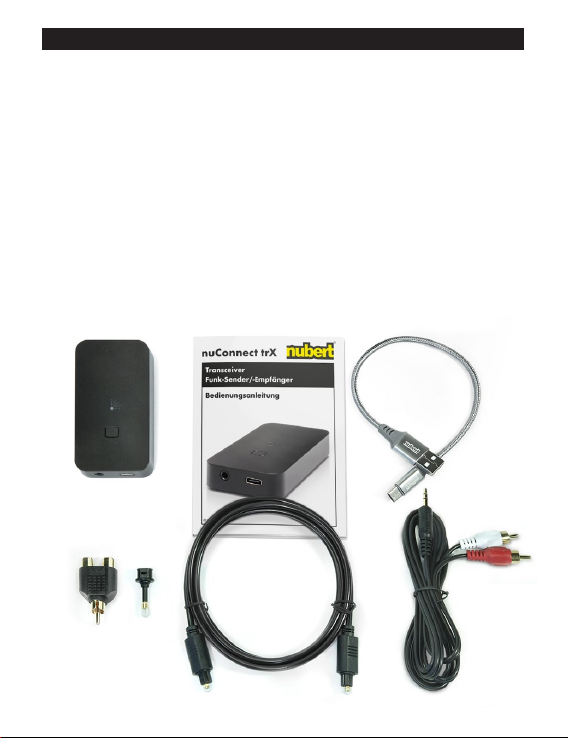
If the delivery is complete, it contains the following parts:
• 1 nuConnect trX
• 1 USB-A – USB-C cable, 20 cm
• 1 3,5mm jack – phono cable, 1.5 m
• 1 TOSLINK optical cable, 1.5 m
• 1 TOSLINK – 3.5 mm optical jack adaptor
• 1 phono 1x male – 2x female Y-split adaptor

nuConnect trX 10 07/2020 EN
Operating manual
Table des matières


