
Ntron 100 Series Manuel utilisateur

5/17/2007 1
100 Series
Media Converter &
Industrial Ethernet Switches
User Manual &
Installation
Guide

5/17/2007 2
Industrial Media Converter Installation Guide
102MC-XX
102MCE-XX-YY
104TX
105TX
108TX
Where: XX = ST or SC and YY = -15, -40, or -80

5/17/2007 3
Copyright, © N-TRON Corp., 2007
820 S. University Blvd., Suite 4E
Mobile, AL USA 36609
All rights reserved. Reproduction, adaptation, or translation without prior written permission from N-TRON
Corp. is prohibited, except as allowed under copyright laws.
Ethernet is a registered trademark of Xerox Corporation. All other product names, company names, logos
or other designations mentioned herein are trademarks of their respective owners.
The information contained in this document is subject to change without notice. N-TRON Corp. makes no
warranty of any kind with regard to this material, including, but not limited to, the implied warranties of
merchantability or fitness for a particular purpose. In no event shall N-TRON Corp. be liable for any
incidental, special, indirect or consequential damages whatsoever included but not limited to lost profits
arising out of errors or omissions in this manual or the information contained herein.
Contact Information
N-TRON Corp.
820 South University Blvd.
Suite 4E
Mobile, AL 36609
TEL: (251) 342-2164
FAX: (251) 342-6353
Website: www.n-tron.com

5/17/2007 4
GENERAL SAFETY WARNINGS
WARNING: Do not operate the equipment in the presence of flammable gasses or fumes. Operating
electrical equipment in such an environment constitutes a definite safety hazard.
WARNING: If the equipment is used in the manner not specified by N-TRON Corp., the protection provided
by the equipment may be impaired.
WARNING: Do not perform any services on the unit unless qualified to do so. Do not substitute
unauthorized parts or make unauthorized modifications to the unit.
WARNING: Do not operate the unit with the end plates removed, as this could create a shock or fire
hazard.
WARNING: Do not operate the equipment in a manner not specified by this manual.
ENVIRONMENTAL SAFETY WARNINGS
WARNING: Disconnect the power and allow to cool 5 minutes before touching.
ELECTRICAL SAFETY WARNINGS
WARNING: Disconnect the power cable before removing the end plates.
WARNING: Do not operate the unit with the end plates removed.
WARNING: Do not work on equipment or cables during periods of lightning activity.
WARNING: Do not perform any services on the unit unless qualified to do so.
WARNING: Observe proper DC Voltage polarity when installing power input cables. Reversing voltage
polarity can cause permanent damage to the unit and void the warranty.

5/17/2007 5
HAZARDOUS LOCATION INSTALLATION REQUIREMENTS
1. This equipment is suitable for use in Class I, Div 2, Groups A, B, C, and D, or unclassified or non-
hazardous locations.
2. WARNING: Explosion Hazard - Substitution of components may impair suitability for Class I,
Division 2.
3. WARNING: Explosion hazard, do not disconnect while the circuit is live or unless the area is known to be
non-hazardous.
4. WARNING: Explosion Hazard - Do not remove or replace the device unless power has been switched off
or the area is known to be non-hazardous.
5. Use 60/75ºC rated Copper wire, (022Nm) 2 inch-lbs Tightening torque for field installed connectors.
6. WARNING: Install only in accordance with Local & National Codes of Authorities Having Jurisdiction.
7. Class I, Div 2 Installations require that power connections must be current limited at the power source with
an in-line fuse rated at 0.5A.
8. Class I, Div 2 installations require that all devices connected to this product must be UL listed for the area in
which it is installed.
9. Limited Operating Voltage: 12-30V for Class I, Div 2 installations.

5/17/2007 6
100 Series Industrial Ethernet Switches
The 100 Series Unmanaged Industrial Ethernet Switches support high speed layer 2 switching between
ports. This series of switches are housed in a ruggedized aluminum enclosure, and provide Category-5
compliant 10/100-BaseT connections for high performance network design, and hub/repeater upgrades.
The 102MC/MCE is a two port unmanaged media converter that converts 10/100BaseTX copper to
100BaseFX full duplex fiber.
The 104TX, 105TX, and 108TX are affordable and share a small footprint. Each switch is capable of auto
negotiating 10/100 Mb and half/full duplex communications.
The 102MC utilizes the IEEE compliant SC or ST duplex connectors for fiber optic communication. All
10/100Base-TX ports utilize the RJ45 shielded connectors.
Key Features
•Full IEEE 802.3 & 100Base-FX Compliance
•Extended Environmental Specifications
•Support for Full/Half Duplex Operation
•LED Link/Activity Status Indication
•Autonegotiation, Autosensing Speed, Duplex, and Flow Control
•Up to 1.0 Gb/s Maximum Throughput
•Industry Standard 35mm DIN Rail Mounted Enclosure

5/17/2007 7
PACKAGE CONTENTS
Please make sure the Serial over Ethernet package contains the following items:
1. 100 Series Media Converter or Ethernet Switch
2. Instruction Sheet
Contact your carrier if any items are damaged.
UNPACKING
Remove all the equipment from the packaging, and store the packaging in a safe place. File any damage
claims with the carrier.
CLEANING
Clean only with a damp cloth.
INSTALLATION
Read the following warning before beginning the installation:
WARNING
Never install or work on electrical equipment or cabling during periods of lightning activity. Never connect
or disconnect power when hazardous gasses are present.
LASER SAFETY (FXE -40 and -80 Only)
WARNING: CLASS 1 LASER PRODUCT. Do not stare into the laser.
5/17/2007 8
DIN-Rail Mounting
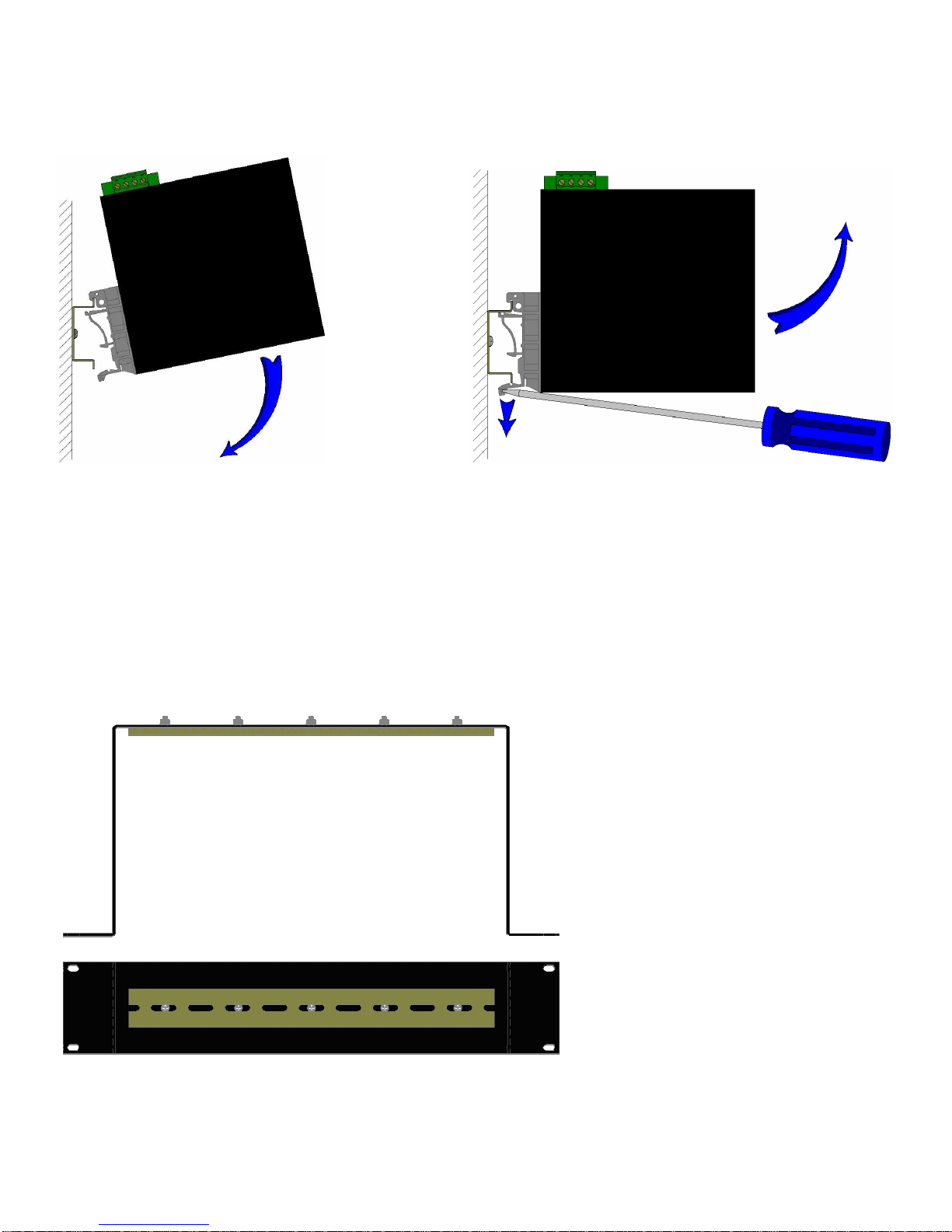
Install the unit in a standard DIN rail. Recess the unit to allow at least 2” of horizontal clearance for CAT5e
cable bend radius.
To install the unit to 35mm industrial DIN rail,
place the top edge of the included mounting
bracket on the back of the unit against the DIN
rail at a 15° angle as shown. Rotate the bottom of
the unit to the back (away from you) until it
snaps into place.
To remove the unit from the 35mm industrial
DIN rail, place a flat head screwdriver into the
release clip found at the bottom of the unit, and
apply downward force on the clip until it
disengages from the bottom of the unit from the
DIN rail. Rotate the bottom of the unit towards
you and up at an approximate 15° upward angle
to completely remove the unit.
Most N-Tron™ products are
designed to be mounted on industry
standard 35mm DIN rail. However,
DIN rail mounting may not be
suitable for all applications. Our Rack
Mount Assembly (P/N: 900-RM)
may be used to mount the 102MC
enclosures to standard 19" racks as an
option.

5/17/2007 9
FRONT PANEL
102MC/MCE
From Top to Bottom:
SPD Speed LED
LNK/ACT Link/Activity LED
RJ45 Ports Auto sensing 10/100BaseT Connection
Green LED lights when Power is connected
NOTE: The RJ45 data port has two LED’s located at the left side of the connector. The top LED indicates
Activity (ACT), and the lower LED indicates Link (LNK) status.
LED’s: The table below describes the operating modes:
LED Color Description
ON Power is Applied.
OFF Power is OFF.
ON Link established, no Activity on cable.
BLINKING
Link established, Activity on cable
LNK/ACT
OFF No link activity on cable.
SPD ON LINK is 100Mbps.
OFF Link is 10Mbs.

5/17/2007 10
APPLYING POWER (Top View)
Unscrew & Remove the DC Voltage Input Plug from the top header.
Install the DC Power Cables into the Plug (observing polarity on unit).
Plug the Voltage Input Plug back into the top header.
Tightening torque for the terminal block power plug is 0.22 Nm/0.162 Pound Foot.
All LED’s will flash ON Momentarily.
Verify the Power LED stays ON (GREEN).
Note: Either V
1
or V
2
can be connected to power for minimal operation. For redundant power
operation, V
1
and V
2
plugs must be connected to separate DC Voltage sources. Use wire sizes of 16-28
gauge. The power cord should be limited to less than 10 meters in order to ensure optimum
performance.
Recommended 24V DC Power Supplies, similar to:
100-240VAC:
N-Tron NTPS-24-1.3, DC 24V/1.3A
Autres manuels pour 100 Series
1
Ce manuel convient aux modèles suivants
11
Table des matières
Autres manuels Ntron Matériel réseau

Manuels Matériel réseau populaires d'autres marques

Matrix Switch Corporation
Matrix Switch Corporation MSC-HD161DEL Manuel utilisateur

B&B Electronics
B&B Electronics ZXT9-IO-222R2 Manuel utilisateur

Yudor
Yudor YDS-16 Manuel utilisateur

D-Link
D-Link ShareCenter DNS-320L Manuel utilisateur

Samsung
Samsung ES1642dc Instructions d'utilisation

Honeywell Home
Honeywell Home LTEM-PV Instructions de montage


