
NOMA MEDIUM Manuel utilisateur

USER MANUAL
READ AND SAVE THESE INSTRUCTIONS
MEDIUM
PRODUCT NO. 043-0741-4 LARGE
PRODUCT NO. 043-0742-2

2
TABLE OF CONTENTS
01. KNOW YOUR AIR PURIFIER
02. OPERATING INSTRUCTIONS
03. SMART WIFI SETUP
04. CLEANING INSTRUCTIONS
05. FILTER REPLACEMENT
06. PRODUCT SPECIFICATIONS
07. FAQs
08. SAFETY / CAUTIONS
09. TROUBLESHOOTING
10. WARRANTY & DISPOSAL
3
7
11
13
15
17
18
19
21
22
43
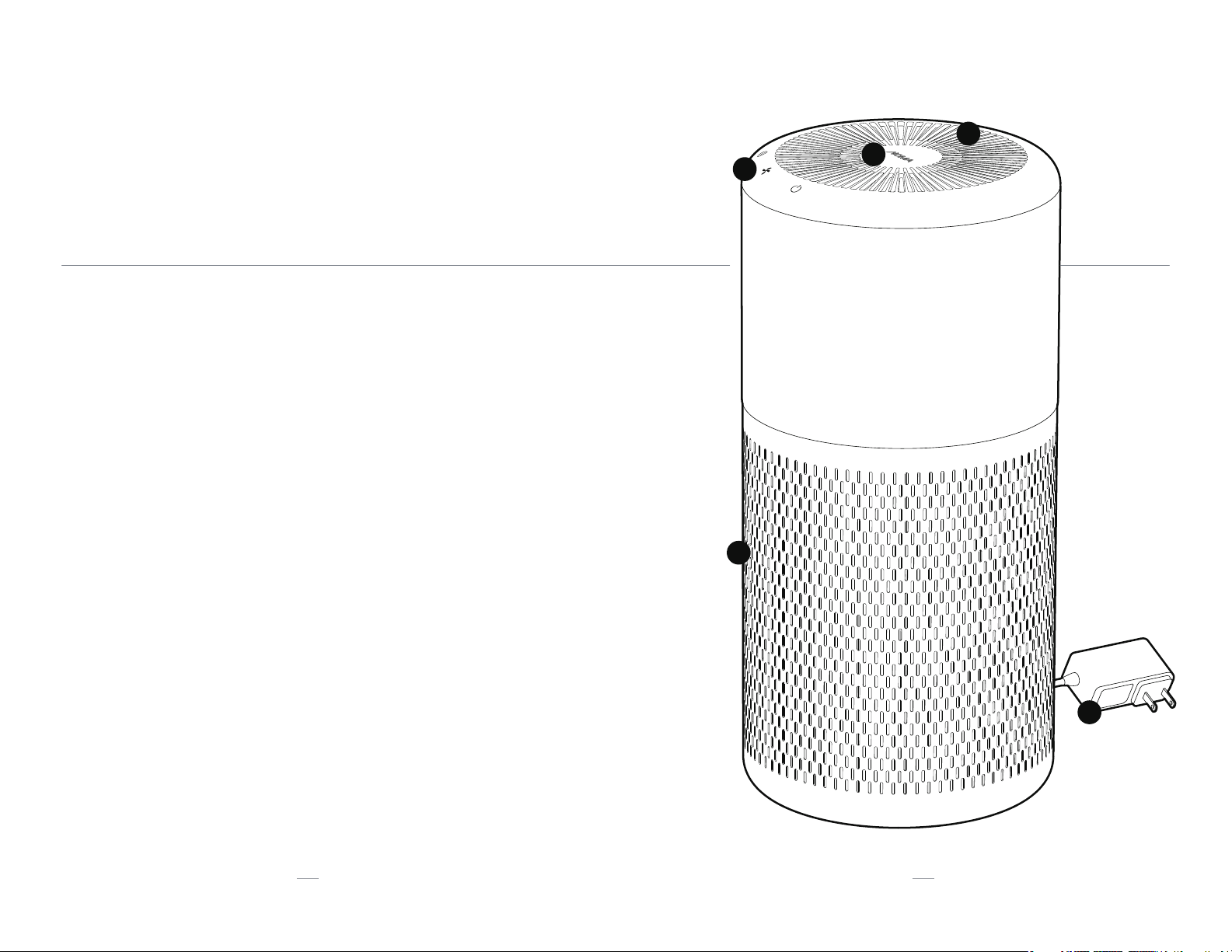
KNOW YOUR AIR PURIFIER
FEATURES
01.
02.
03.
04.
05.
AIR OUTPUT VENT
AIR QUALITY INDICATOR RING
CONTROL PANEL
AIR INPUT GRILLE
AC PLUG
01 01
03
04
05
02
65
01
02
04
05
03
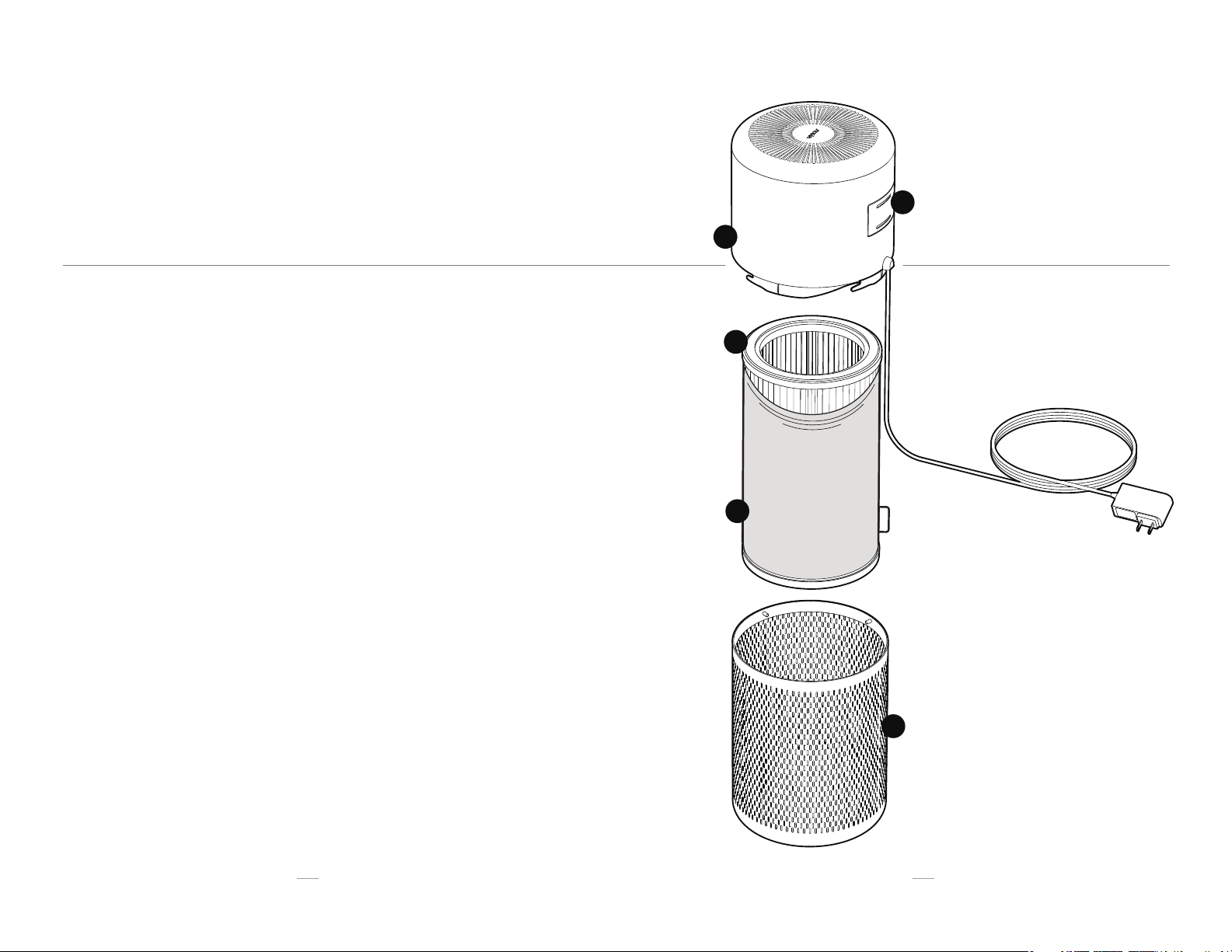
KNOW YOUR AIR PURIFIER
FEATURES
01.
02.
03.
04.
05.
AIR QUALITY SENSOR DOOR
FAN HOUSING
TRUE HEPA FILTER
PRE-FILTER
AIR INTAKE GRILLE
01

02
OPERATING INSTRUCTIONS
SET UP DIRECTIONS
87
01. Place
Place your air purifier on the floor and be sure nothing is covering the air
intake grille.
03. Sense
The air quality indicator ring will automatically illuminate and start detecting
the quality of your air. It will turn blue if the quality is great, pink if the quality
is average, and red if the quality is poor.
05. Set Up Smart WiFi Function (Optional)
See “Smart WiFi Setup“ Chapter (3) for Smart WiFi set up details.
06. Relax
Enjoy your air purifier in quiet, peaceful, bliss.
04. Set
Select your optimal settings by referring to the OPERATING INSTRUCTIONS
(pages 9 - 10).
02. Power
Plug in the air purifier and press the Power Button once. The unit will start
immediately on the AUTO setting .
02. 03.
Captures up
to 99.97%
of airborne
particles as
small as 0.3
microns.

109
02
03. Timer Button
Set the purifying duration for 2, 4 or 8 hours.
07. Night Mode
To dim the indicator lights, press and hold the Power Button for 2 sec-
onds. To exit night mode, press and hold the Power Button for 2 seconds
again.
05. Ionizer Switch
Turn on the optional Ionizer to help your air purifier trap airborne particles
more eciently.
04. Smart WiFi Button
See “Smart WiFi Setup“ Chapter (3) for Smart WiFi set up details.
01. Power Button
Push once to turn on the air purifier and the unit will start immediately on
the AUTO setting .
a) AUTO Fan Speed
Fan speed will automatically adjust according to the air quality indicator
ring. If the indicator detects poor air quality (red ring), the fan speed will
automatically turn to High. If the indicator detects great air quality (blue
ring), the fan speed will automatically switch to Low.
02. Fan Speed Button
Change the fan speed to AUTO, Low, Medium or High.
OPERATING INSTRUCTIONS
CONTROLS AND SETTINGS
03 02 01
06. Filter Replacement Indicator
Only when the True HEPA filter needs to be replaced will the indicator
beside the Power Button illuminate. Follow the FILTER REPLACEMENT
instructions on page 16 and when completed, reset the indicator by pressing
and holding the Power and Timer buttons for 2 seconds.
04
05

07. No Cloud Connection
If the Cloud is down and the device can not connect, the Connected icon
will flash slowly. After 3 minutes of no connection the air purifier will stop
trying to connect and the flashing will stop.
01. Power Button
When the Power button is turned on, press and hold the WiFi button .
The Connected icon will flash slowly while the unit waits for a connection.
11
03
SMART WIFI SETUP
SMART INTERFACE WORK FLOW
12
02. Pre-Connected Network
If any pre-connected WiFi network is found, the unit will connect
automatically and the Connected icon will stay lit.
03. No Pre-Connected Network
If no pre-connected WiFi network is found, follow the NOMA iQ app
instructions to connect. Once connected, the Connected icon will stay lit.
04. No Network Found
If no WiFi network is found after 3 mins, the WiFi function will automatically
for 2 seconds.
06. Reset WiFi Connection / Pairing Mode
To reset your WiFi connection or set it to pairing mode, press and hold
the WiFi and Power button down at the same time and listen for 5
consecutive beeps. The Connected icon will start flashing slowly as it
waits for the new WiFi connection.
08. Power Cycle or Outage
Once a connection has already been established, in the event of a power
outage or if the unit is unplugged, press the power button to turn the unit
on and hold the Wi-Fi button to re-establish the connection.

13
CLEANING INSTRUCTIONS
CARE & MAINTENANCE
Make sure the air purifier is turned o and unplugged.
For a quick cleaning, wipe down the unit with a soft, lightly dampened
cloth. Do not get the fan housing too wet as problems may arise during
operation.
For a more thorough cleaning, dust the air output vent and air intake
grille with a small soft brush and use a dry, soft cloth to wipe down the
exterior.
To clean the pre-filter, refer to Pre-Filter Maintenance for instructions.
When the Filter Replacement Indicator turns on, the True HEPA filter
needs to be replaced. Follow FILTER REPLACEMENT directions on page 15
for instructions. Do not wash the True HEPA filter.
Make sure the air purifier is turned o and unplugged.
Follow the first 2 operations of FILTER REPLACEMENT on page 15.
Vacuum the pre-filter or machine wash in cool water and dry on the
gentle cycle.
Be sure the pre-filter is dry and slip it back onto the True HEPA filter by
following the last 2 operations of FILTER REPLACEMENT on page 16.
General Maintenance
01.
02.
03.
04.
05.
Pre-Filter Maintenance
01.
02.
03.
04.
14
04
Air Quality Sensor Maintenance
01.
02.
03.
Open the air quality sensor door located behind the fan housing.
Use a dry cotton swab or soft cloth to gently wipe the sensor.
Close the air quality sensor door to ensure no moisture reaches the
sensor.
01. 02. 03.

15
Rotate the fan housing
counter-clockwise and lift from air
intake grille.
Take the filter our of the air intake
grille.
Remove the pre-filter from the True
HEPA filter.
0201
16
05
FILTER REPLACEMENT
TRUE HEPA FILTER REPLACEMENT
IMPORTANT:
True HEPA filter should be replaced every 3-6 months. The life of the filter will
vary depending on air quality and usage.
Dispose of the used True HEPA filter
and replace with a new filter.
Slip the pre-filter back onto the True
HEPA filter and place back into the
air intake grille.
Put the fan housing back onto the air
intake grille, rotating clockwise until the
fasteners lock into the groove.
Reset the Filter Replacement Indicator by
pressing and holding the Power and Timer
buttons for 2 seconds.
0403

17
06
PRODUCT SPECIFICATIONS
OVERVIEW
18
07
FAQs
FREQUENTLY ASKED QUESTIONS
Q: What does the Clean Air Delivery Rate (CADR) mean?
A: CADR is a measure of the volume of air that is processed by the
purifier. The higher the CADR, the more powerful the air purifier.
Q: What does a pre-filter do?
A: It extends the life of your True HEPA filter by initially filtering out
larger particles, such as mould and pollen.
Q: What does an Ionizer do?
A: Ionizers electrically charge a room’s air molecules so your air
purifier can trap airborne particles more eciently.
Q: Will my settings be saved if I turn off my air purifier?
A: Yes, if kept plugged in and the WiFi is still connected in the
background, the air purifier will return to the last settings it was on
before being turned o. If unplugged, the unit will return to the
default AUTO setting when turned back on and will search for the
connected WiFi network to connect automatically.
For any other questions on how to run your smart device, please visit
www.canadiantire.ca/nomaiq
Pro
duct Name
duct Name
NOMA iQ True HEPA
Smart WiFi Medium
Air Purifier
NOMA iQ True HEPA
Smart WiFi Large
Air Purifier
Product No. 043-0741-4 043-0742-2
Clean Air Delivery
Rate (CADR) 130 177
Optimal Room Size MEDIUM SPACE:
200 sq. ft. (18.6 m2)
LARGE SPACE:
275 sq. ft. (25.5 m2)
Pre-Filter Used
NOMA®Reusable
Medium Air Purifier
Pre-Filter
NOMA®Reusable
Large Air Purifier
Pre-Filter
Main Filter Used
NOMA®True
HEPA Medium
Replacement Filter
NOMA®True HEPA
Large
Replacement Filter
Ionizer Switch Yes Yes
Number of Fan
Speeds 33
Energy Star
Certified Yes Yes
cETLus Listed Yes Yes
AHAM Certified Yes Yes
Input Voltage AC 120 V | 60Hz |
24W
AC 120 V | 60Hz |
38W
Ce manuel convient aux modèles suivants
3
Table des matières
Langues :
Autres manuels NOMA Purificateur d'air


