
Nitgen NAC-2500LM Manuel utilisateur

NAC-2500LM User Manual

- 2 -
ⓒ Copyright 2006 NITGEN Co., Ltd.
All rights reserved
NITGEN Customer Service Center
Tel. 080-060-1600
(Toll Free)
Fax. +82-31-451-6722
E-mail: customer@nitgen.com
URL: http://www.nitgen.com
Reproduction of part or all of the contents in any form is prohibited
other than in accordance with the permissions.
Product specification can be changed and upgraded to improve
functionality without prior notice.
NITGEN, NITGEN logo are registered trademark of NITGEN.

- 3 -
Table of Contents
CHAPTER 1. INTRODUCTION .................................................................... 5
1.1 Product Introduction......................................................................................... 5
1.2 Product Features and Specification.................................................................. 7
CHAPTER 2. HOW TO USE....................................................................... 12
2.1 Detailed Product Parts .................................................................................... 12
2.2 LCDScreen Layout....................................................................................... 14
2.3 Fingerprint Use................................................................................................ 15
2.4Authentication.................................................................................................. 16
2.4.1Fingerprint................................................................................................... 16
2.4.2Password...................................................................................................... 21
2.4.3RF Card (optional)....................................................................................... 22
2.4.3Others: Automatic Attendance Mode........................................................... 23
CHAPTER 3. ENVIRONMENT SETTING................................................... 24
3.1 Menu Composition .......................................................................................... 24
3.2 Entering into Menu ......................................................................................... 27
3.3 Basic Menu....................................................................................................... 28
3.4 Detailed Menu.................................................................................................. 30
3.4.1 User Management....................................................................................... 30

- 4 -
3.4.2 Fingerprint Sensor Setting.......................................................................... 45
3.4.3 UI (User Interface) Setting ......................................................................... 54
3.4.4 System Setting............................................................................................ 57
3.4.5 Network Setting....................................................................................... 66
3.4.6 Cofirmation of Terminal Information ...................................................... 72
3.4.7 Factory Default Setting............................................................................... 74
APPENDIX 1: NETWORK CONNECTION ERROR AND SOLUTIONS..... 78
APPENDIX 2: TERMINAL INITIALIZATION ERROR AND SOLUTIONS .. 80
APPENDIX 3: LAW AND REGULATION.................................................... 81
APPENDIX 4: WIEGAND PROTOCOL FORMAT ...................................... 82
APPENDIX 5 : EMERGENCY SCREEN..................................................... 84

- 5 -
Chapter 1. Introduction
1.1 Product Introduction
Overview
The use of biometrics system continuously increases in various
authentication systems and in areas that require a higher level
of security because of its ease of use and economical benefits.
Among a number of biometrics system, a fingerprint recognition
system is not only easy to use but also enables economical
product development. It takes up the most part of the market
as it allows a wide variety of application. NITGEN, a leader
in the fingerprint recognition area, has provided fingerprint
recognition solutions for the management of PC security,
knowledge, safe, access control, electronic payment and
financial clearings. Continuous R&D activities and quality
management ensure that NITGEN meets evolving needs and demands
of the market and the customers.
NITGEN access control system is a culmination of world-renowned
technologies from NITGEN including fingerprint recognition
algorithms, optical sensor, embedded design and software
applications. Unlike legacy access control systems that use
only password and ID card, it provides the ease of use and tight
security with no risk of forgetting password, stolen cards or
forgery. The system is designed to provide maximum operational
efficiency over the network by enabling remote monitoring on
terminals that have been independent so far.
NITGEN access control system allows various combinations of FR
card, password and fingerprints. It also meets the common set
of requirements and special needs in the corporate and
- 6 -
government sectors with such functions as shortened ID, 1:N
matching and voice guidelines.
The manual gives in-depth explanation as to how to use NITGEN
access control terminal (NAC-2500LM).
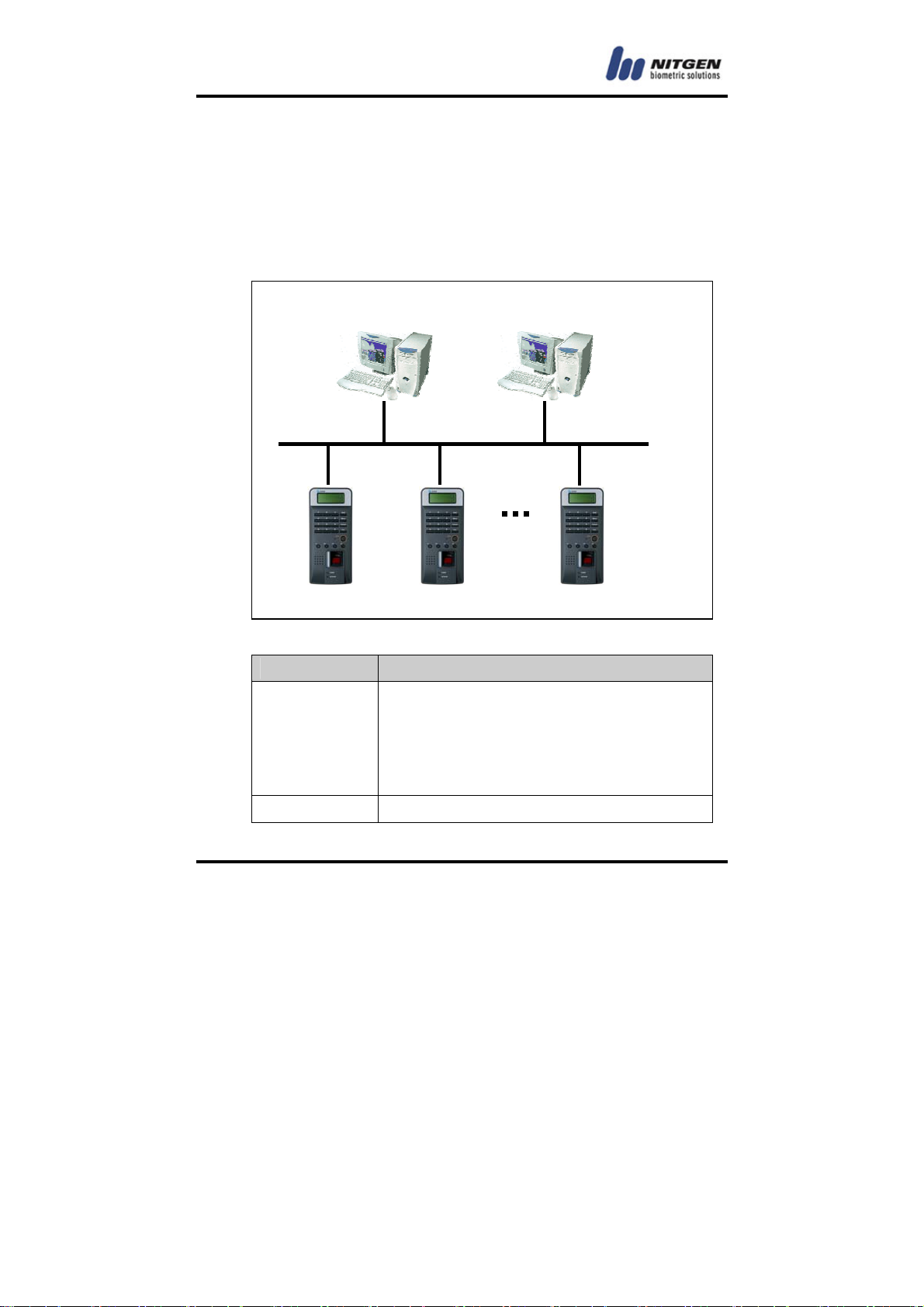
System Components
Main Features
Server PC
1. Server S/W : Access Sever
2. Terminal communication, log data
collection
3. user information & log DB
4. authentication
Client PC 1. Client S/W : Remote Manager/Monitor
Network
Server PC
Terminal
Client PC
NAC-2500
Access Server
Remote Manager
Remote Monitor

- 7 -
2. user registration and other management
3. Terminal status and event monitoring
Terminal
( NAC-2500LM )
1. user check and authentication
2. access door control
NITGEN access control terminal(NAC-2500LM) can be used alone for
full functionality or can be used in connection with the network
together with admin programs (Access Server, Remote Manager,
Remote Monitor) in order to reduce the number of terminals and
to ensure an easier and a more effective management. Server
S/Wand Client S/W can be placed within one PC.
1.2 Product Features and Specification
Product Features
NITGEN access control system (NAC-2500LM) has the following
features.
① access control and management on small & medium number of
users
② a combination of various authentication methods
(fingerprint, password, RF card)
③ network-based access control on terminals for multiple
users
④ easy remote management on the system (Server/Client PC can
be separated)
⑤ view on user’s access history and various additional
functions

- 8 -
⑥ real-time access monitoring
⑦ access control by period and time
⑧ SDK (S/W Developer’s Kit) for the development of
application programs such as attendance management program
(separate)
⑨ high-speed 1:N authentication
⑩ enhanced user-friendliness and ease of use (shortened ID,
Auto-on)
⑪ perfectly verifies the authorized user with its fake
fingerprint identification function
System Specification (Connected to Server)
Specification Details
Connection
Terminal
Maximum 255 units
Remote
Management 8 concurrent accesses to server
# of Users to be
Registered
10,000 users
Network TCP/IP, 10M bps
Authentication
Type
fingerprint, password, RF card
(optional)
Authentication
Speed
1:1 mode: less than 1 second
1:N mode: refer to Application Note
Note) Enterprise version software
Unlimited terminal access. (Proportional to system

- 9 -
capacity)
Unlimited number of registered users. (Proportional to
system capacity)
1:1 server authentication only.
Detailed Specification: Terminal
Function Spec.
Display
Type 128 * 32 Dots LCD
Language Default: Korean, English
Additional Type A:
Japanese, Chinese, Spanish
French, Thai, Indonesian
Additional Type B:
Polish, Farsi, Malay, Hebrew
,Vietnamese(voice only) ,
Portuguese
Sensor
Model OPP03 LFD
Type Optical
Resolution 500 DPI
Additional Auto on / Latent Image Check
Live Finger Detection
Authentication
Speed 1:1 mode: less than 1 sec
1:N mode: Application Note
Algorithm FRR: less than 0.1%,
FAR: less than 0.001%
# of registered
users Terminal 2000(1 fingerprints per user)
1000(2 fingerprints per user)
Communication TCP/IP 10 base-T Ethernet
(optional)

- 10 -
RS-485 Max. 115200bps
(Custom requirement)
Wiegand 1. Input: provided with the
use of external card reader
2. Output
Access Controller mode:
Facility Code and ID
Reader mode:
Values read from Card
reader
※4 characters only for ID
Size Case 90 (W)* 200 (L)* 48 (H) mm
Door support Dead Bolt / Strike / EM Lock / auto door
Power
Adapter 1 In: AC 100V ~ 240V, 50/60 Hz
Out: DC 12V, 3A (24V OK)
Adapter 2 In: AC 100V ~ 240V, 50/60 Hz
Out: DC 5V, 3A
Additional
Function
Guidelines recorded in voice
Downloadable logo/firmware
ID length (4 ~ 15 digits)
Authentication results to be displayed in
LED
Optional
Network Board
Door Control Board
RF Module
[13.56MHz Mifare(10M 93.5 ㏈㎶/m )]
Table des matières
Autres manuels Nitgen Contrôleurs d'accès IP

Nitgen
Nitgen NAC-3000 Manuel utilisateur

Nitgen
Nitgen NAC-5000 Manuel utilisateur

Nitgen
Nitgen eNBioAccess-T2 Manuel utilisateur

Nitgen
Nitgen NAC-2500LR Manuel utilisateur

Nitgen
Nitgen NAC-2500+ Manuel utilisateur

Nitgen
Nitgen NAC-2500 Manuel utilisateur

Nitgen
Nitgen NAC-3000 Instructions de montage

Nitgen
Nitgen eNBioAccess-T1 Manuel utilisateur


