
Nexvoo CC520 Manuel utilisateur

4K AI USB Class Camera
User Manual
(Model: CC520)
NEXVOO CLASSCAM
Version: 1.1

5.9-ft(1.8m) USB cable
(Type-C to Type-A)
Wall mount kit
9.8-ft(3m)
(12V/1A)
4K AI USB Class Camera
User Manual
(Model: CC520)
NEXVOO ClASSCAM
Version: 1.1
User Manual

6
7
12V 1
1. The CLASSCAM is equipped with a 4K telephoto camera, giving your virtual
learners to see the teacher and a clear whiteboard writing of the classroom,
so they will not miss any action.
2. 6mm lens focal length.
3. 4K 30fps Ultra HD video,
4. Support multiple video encoding: H.265 / H.264 / MJPEG / YUV
5. With its built-in beamforming noise-reducing microphone, you can clearly
pick up the voice of the teacher.
6. AI auto framing and AI speaker tracking.
7. USB plug-and-play connectivity.
8. Works with most video applications for Class.
1. Keyboard
2. Microphones
3. HDR Camera, 4K telephoto lens
4. Camera LED
5. Function LED
6. PC interface
7. Power port (DC 12V/1A)

Note: Only after AI is turned off, you can adjust the lens angle through the
remote control.
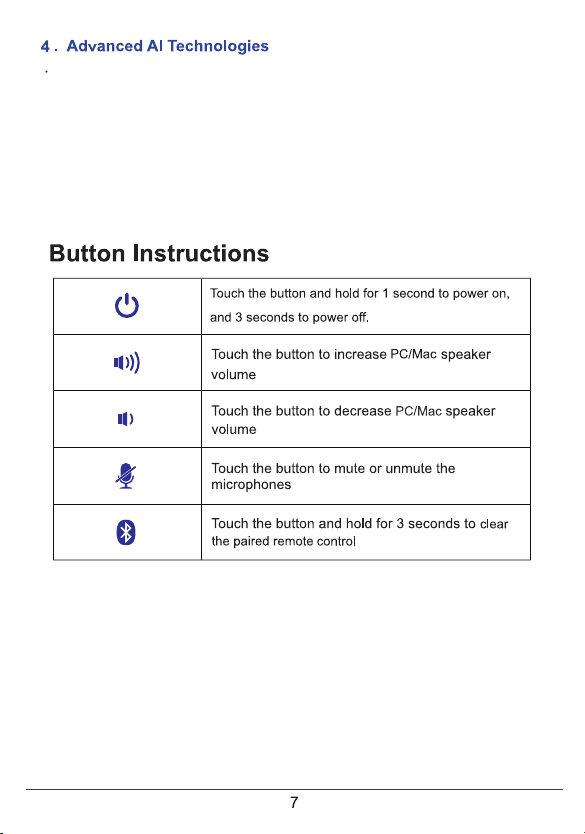
1. Power On/Off
2. Microphone Mute
3. Bluetooth
4. Volume down
5. Volume up
17
18
8. Mute
9. Preset 2
10. Preset 1
11. Pan and Tit
12. Rotate lens
13. Zoom in
14. Volume up
15. Zoom out
16. Volume down
17. Bluetooth
18. AI Switch

Mounting ceiling
1 2 3
4 5 6

Press the Power button for 1 sec to turn on the device.
Or connect the CLASSCAM to the PC/Mac via the supplied USB cable, the device
will automatically turn on.

ClASSCAM will automatically search remote control’s Bluetooth after power-on. If the
remote control is found, CIASSCAM can pair and connect automatically with remote
control. If the remote control is not found within 3 minutes, please press any key to make
the remote control enter pairing mode again.
The remote control is lost or cannot be found, how to pair a new remote control, you
can do the following:
Touch the Bluetooth button for 3 seconds to clear the paired remote control,
CIASSCAM will automatically search and connect to the new remote control.
Note: The control distance of the remote control is about 10m (32.8 ft).
PC/Mac volume
The CLASSCAM offers Auto-Tracking Camera which can automatically follow each
teacher when recording videos and remained zoom into the whiteboard spaces where
they are teaching. Once installed, your teachers will be able to launch their Learning
software (Zoom, Teams, Meet, etc.) and let our advanced AI technology do the rest.
Give your classrooms a virtual PTZ(Pan, Tilt, Zoom) experience on a budget.
Note: You can turn off or turn on AI Technology by AI button through the Remote control.

Always on
Always on The device is turned off when connected with DC.
Blink slowly
Blink quickly
The microphone is muted.
The AI function is turned off (Blink for 2 seconds).
The paired Bluetooth remote control is deleted (Blink for
2 seconds).
The device is updating the firmware.
Press and hold the power button for 1 second to turn on
the device used external power supply.
Plug in the USB cable to automatically turn on the device.
Blink slowly
Blink quickly
The device is searching for the remote control (Blink for
1 minute).
The AI function is turned on (Blink for 2 seconds).
The device saves the lens preset zone successfully
(Blink for 2 seconds).
The camera is turned 180° by remote control successfully
(Blink for 2 seconds).
The device is paired with the remote control successfully
(Blink for 2 seconds).

You can configure the Nexvoo ClassCam CC520 USB video device on the Web
management.
You can configure the following settings on the Web management.
• View device information
• Remote control configuration
• Camera Tracking
• System update & reset
• Change password
• Restore default settings
Note: Web management only supports Windows system.
Web management
1. After ClassCam CC520 is connected to the power supply, it will automatically turn on.
The device turns on the AP mode, The SSID of the device’s WIFI is: Nexvoo
ClassCam.
2. Search for " Nexvoo ClassCam" and connect via WIFI on your computer.
Network configuration
1. Start the browser, enter http://192.168.1.1 to open the login interface of the ClassCam
CC520 Web management platform.
2. Enter the username and password, click "Sign in" to login to the web management
platform. (Default username: Admin, Password: 123456)
Note: Some browsers may not be fully compatible. It is recommended to use Chrome
/Firefox/Microsoft Edge browser etc.
Login Web management
Table des matières


