Table of Contents
Introduction ........................................................................................................................................................................................1
Specifications.....................................................................................................................................................................................1
Cables................................................................................................................................................................................................2
Basic Operation .................................................................................................................................................................................2
Features and Functions ..................................................................................................................................................................... 3
Installation.......................................................................................................................................................................................... 4
Control Options..................................................................................................................................................................................5
Front Panel Keypad Control...........................................................................................................................................................6
Making Connections ..................................................................................................................................................................6
Volume Control .......................................................................................................................................................................... 7
Memory Functions ..................................................................................................................................................................... 7
Serial Menu................................................................................................................................................................................7
RS232 Control ...................................................................................................................................................................................8
Remote Connection ....................................................................................................................................................................... 8
Baud Rate...................................................................................................................................................................................... 8
Unit Address ..................................................................................................................................................................................8
Command Protocol ........................................................................................................................................................................9
RS-232 Command Protocol Quick Reference ...............................................................................................................................9
RS-232 Command Protocol Full Specification ...............................................................................................................................9
CC - Save Matrix Connections Into Memory Bank..................................................................................................................... 9
RC - Restore Matrix Connections From Memory Bank .............................................................................................................. 9
CB - Change Baud Rate For All Switches................................................................................................................................ 10
RS - Internal Reset .................................................................................................................................................................. 10
RV - Read NTI Version String .................................................................................................................................................. 10
RU - Read Unit Size................................................................................................................................................................. 10
CS - VIDEO Connect One Output/User Port To Input/CPU Port ............................................................................................. 10
CA - VIDEO Connect All Outputs/Users Port To Input/CPU Port............................................................................................. 10
RO - VIDEO Read Connection For Output/User Port .............................................................................................................. 11
AS - AUDIO Connect One Output/User Port To Input/CPU Port ............................................................................................. 11
AA - AUDIO Connect All Outputs/Users Ports To Input/CPU Port ........................................................................................... 11
AO - AUDIO Read Connection For Output/User Port .............................................................................................................. 11
AM - Set Mute State For Output/User Port .............................................................................................................................. 11
AV - Set Volume Level For Output/User Port........................................................................................................................... 12
AR - Read Mute, Volume For Output/User Port....................................................................................................................... 12
RS232 Interface Test Program .................................................................................................................................................... 12
Main Options............................................................................................................................................................................ 12
Matrix Switcher's Control Program For Windows 9X, NT, AND 2000 .......................................................................................... 13
Infrared Control (Optional) ............................................................................................................................................................... 14
Battery Replacement ................................................................................................................................................................... 14
Specifications............................................................................................................................................................................... 14
Troubleshooting ........................................................................................................................................................................... 14
DDC Support (Optional)................................................................................................................................................................... 15
Safety Statements ........................................................................................................................................................................... 15
Rack mounting Instructions.............................................................................................................................................................. 16
Table of Figures
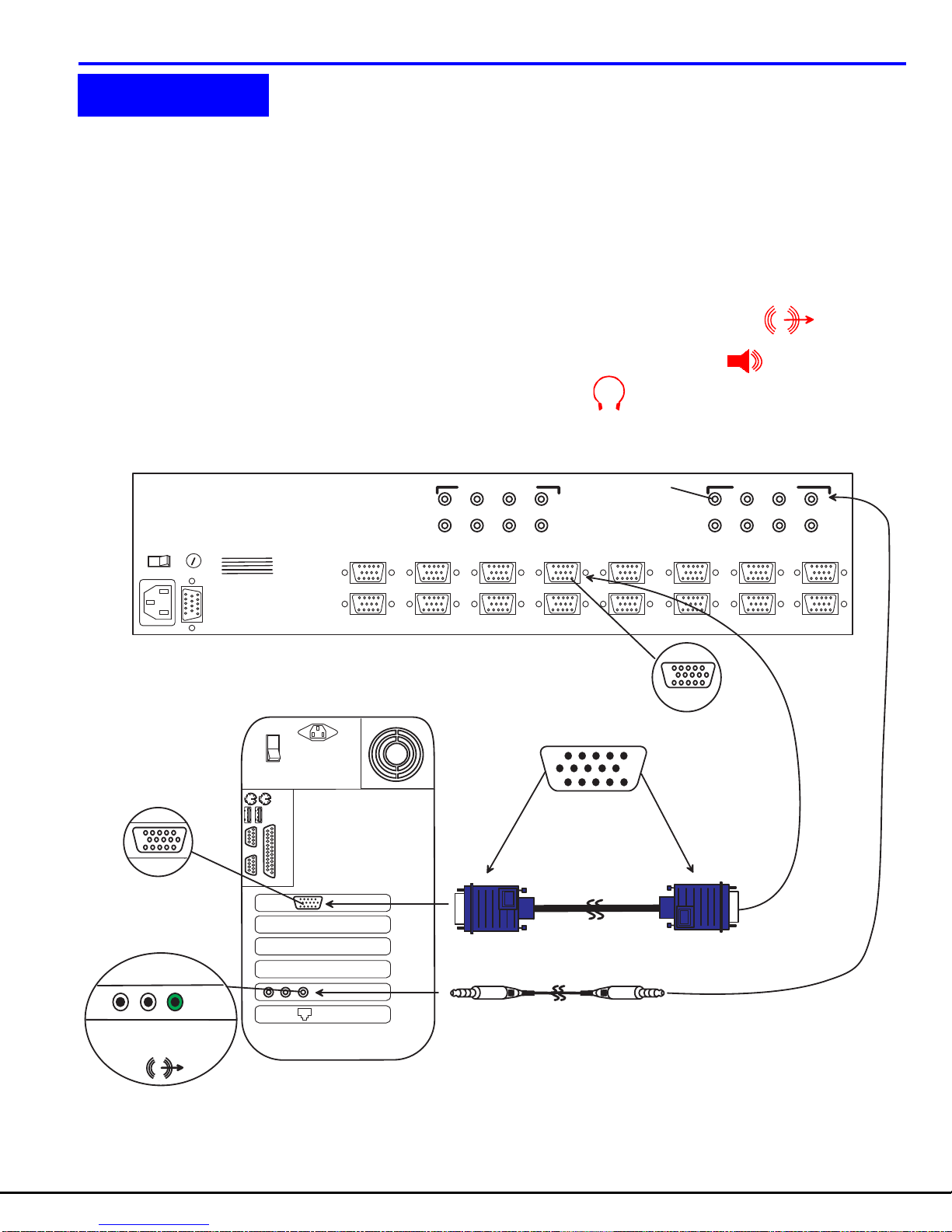
Figure 1- Install Audio and Video Source Cables ........................................................................................................... 4
Figure 2- Install Monitors and Speakers ......................................................................................................................... 5
Figure 3- RS232 Connections for Daisy-chain................................................................................................................ 8