NetMan 204 Manuel utilisateur


INTRODUCTION
Thank you for choosing our product.
The accessories described in this manual are of the highest quality, carefully designed and built in
order to ensure excellent performance.
This manual contains detailed instructions on how to install and use the product.
This manual must be stored in a safe place and CONSULTED BEFORE USING THE DEVICE
for proper usage instructions as well as maximum performance from the device itself.
NOTE: Some images contained in this document are for informational purposes only and may not
faithfully demonstrate the parts of the product they represent.
Symbols used in this manual:
Warning Indicates important information that must not be ignored.
Information Provides notes and useful suggestions for the User.
SAFETY
This part of the manual contains SAFETY precautions that must be followed scrupulously.
The device has been designed for professional use and is therefore not suitable for use in
the home.
The device has been designed to operate only in closed environments. It should be
installed in rooms where there are no inflammable liquids, gas or other harmful substances.
Take care that no water or liquids and/or foreign bodies fall into the device.
In the event of a fault and/or impaired operation of the device, do not attempt to repair it but
contact the authorized service centre.
The device must be used exclusively for the purpose for which it was designed. Any other
use is to be considered improper and as such dangerous. The manufacturer declines all
responsibility for damage caused by improper, wrong and unreasonable use.
- 2 -

ENVIRONMENTAL PROTECTION
Our company devotes abundant resources to analyzing environmental aspects in the development
of its products. All our products pursue the objectives defined in the environmental management
system developed by the company in compliance with applicable standards.
Hazardous materials such as CFCs, HCFCs or asbestos have not been used in this product.
When evaluating packaging, the choice of material has been made favoring recyclable materials.
Please separate the different material of which the packaging is made and dispose of all material in
compliance with applicable standards in the country in which the product is used.
DISPOSING OF THE PRODUCT
The device contains internal material which (in case of dismantling/disposal) are considered
TOXIC, such as electronic circuit boards. Treat these materials according to the laws in force,
contacting qualified centers. Proper disposal contributes to respect for the environment and human
health.
© The reproduction of any part of this manual, even in part, is prohibited unless authorized by the
manufacturer.
The manufacturer reserves the right to change the product described at any time without prior notice for
improvement purposes.
- 3 -

CONTENTS
DESCRIPTION ____________________________________________________ 6
OVERVIEW ____________________________________________________________6
PACKAGE CONTENTS _____________________________________________________6
FRONT PANEL __________________________________________________________7
Network port _____________________________________________________________ 7
Micro-USB port ___________________________________________________________ 7
Serial port _______________________________________________________________ 7
Led _____________________________________________________________________ 7
Reset button _____________________________________________________________ 8
USERS _______________________________________________________________8
NETWORK SERVICES _____________________________________________________9
SSH_____________________________________________________________________ 9
Serial network ____________________________________________________________ 9
Wake-on-LAN_____________________________________________________________ 9
HTTP____________________________________________________________________ 9
SNMP ___________________________________________________________________ 9
UDP_____________________________________________________________________ 9
Modbus TCP/IP __________________________________________________________ 10
BACnet/IP_______________________________________________________________ 10
FTP ____________________________________________________________________ 10
Email___________________________________________________________________ 10
Reports_________________________________________________________________ 10
UPS VALUES AND EVENTS HISTORY LOG ARCHIVE _______________________________11
Eventlog ________________________________________________________________ 11
Datalog _________________________________________________________________ 11
ENVIRONMENTAL SENSORS (OPTIONAL)_______________________________________12
Available sensors ________________________________________________________ 12
INSTALLATION __________________________________________________ 12
CONFIGURATION ________________________________________________ 13
OVERVIEW ___________________________________________________________13
Configuration via HTTP/HTTPS _____________________________________________ 13
Configuration via USB ____________________________________________________ 14
Configuration via SSH ____________________________________________________ 14
CONFIGURATION MENU DESCRIPTION ________________________________________15
Start menu ______________________________________________________________ 15
Setup __________________________________________________________________ 16
- 4 -

IP config________________________________________________________________ 18
Time setting_____________________________________________________________ 19
Scheduled NTP __________________________________________________________ 20
UPS config______________________________________________________________ 20
Services 1 ______________________________________________________________ 21
SNMPv1 config __________________________________________________________ 22
SNMPv1 community ______________________________________________________ 22
Email config_____________________________________________________________ 23
Email logic ______________________________________________________________ 24
Miscellaneous ___________________________________________________________ 25
Activation 1 _____________________________________________________________ 26
Services 2 ______________________________________________________________ 26
Wake-On-LAN address ____________________________________________________ 27
Wake-On-LAN delay ______________________________________________________ 27
Activation 2 _____________________________________________________________ 28
Sensors Config __________________________________________________________ 28
I/O Sensors _____________________________________________________________ 30
Security ________________________________________________________________ 31
Save and load ___________________________________________________________ 33
Password recovery _______________________________________________________ 33
Wi-Fi setup (optional card required) _________________________________________ 34
Expert mode ____________________________________________________________ 35
CONFIGURATION OF SEVERAL DEVICES _______________________________________35
FIRMWARE UPGRADE ____________________________________________ 36
FIRMWARE UPGRADE VIA HTTP ____________________________________________36
FIRMWARE UPGRADE VIA FTP _____________________________________________36
SNMPV3 CONFIGURATION ________________________________________ 37
MODBUS TCP/IP PROTOCOL_______________________________________ 39
BACNET/IP CONFIGURATION ______________________________________ 43
MODEM CONFIGURATION _________________________________________ 45
TECHNICAL DATA ________________________________________________ 47
NETWORK CABLE ______________________________________________________47
OPERATING AND STORAGE CONDITIONS_______________________________________47
- 5 -

DESCRIPTION
OVERVIEW
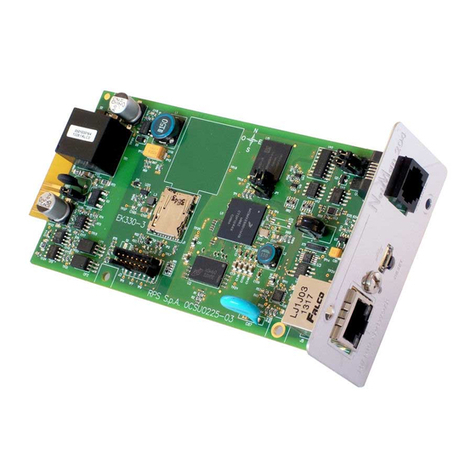
NetMan 204is a device that allows UPS management through a LAN (Local Area Network); the
accessory supports all the main network protocols (SNMP v1 and v3, TCP/IP, HTTP and so on)
and is compatible with Ethernet 10/100Mbps IPv4/6 networks. The UPS can therefore be
integrated easily into medium and large-sized networks.
The device also records UPS values and events in the history log archive and can manage
optional environmental sensors (not supplied with the device, but provided separately)
PACKAGE CONTENTS
NetMan 204
USB cable
CD-Rom (User manual)
Quick start
- 6 -

FRONT PANEL
A: Network port
B: Led
C: Reset button
D: Micro-USB port
E: Serial port
Network port
NetMan 204 connects to 10/100 Mbps Ethernet networks by means of connector RJ45. The LEDs
built into the connector describe the status of the network:
•Left LED:
SOLID YELLOW: NetMan204 has detected a valid link.
FLASHING YELLOW: NetMan204 is receiving or transmitting data packets.
•Right LED
SOLID GREEN: NetMan204 is connected to a network operating at 100 Megabits per second.
Micro-USB port
NetMan 204 makes available an USB communication port through which it is possible to configure
it (see paragraph “Configuration via USB”).
Serial port
NetMan 204 makes available a serial communication port to which you can connect environmental
sensors (not supplied with the device, but provided separately) or a modem (not supplied with the
device) for UPS teleservice.
Led
This led describes the status of NetMan 204:
•SOLID RED: NetMan 204 is not communicating with the UPS (verify PRTK Code).
•FLASHING RED: the DHCP server does not have assigned a valid IP address to NetMan 204.
•OFF: regular working.
- 7 -

Reset button
The reset button allows to restart the NetMan204 or to load a default configuration with a
predefined static IP address.
To reset NetMan204: keep press the reset button until the red led start flashing (ca. 2 seconds)
and then release it.
To load a configuration with predefined static IP address: keep press the reset button; first the
led starts flashing, then turns to solid red (ca. 10 seconds). When the led is solid red, release the
reset button and the NetMan 204 will reboot with:
•IP address: 192.168.0.204
•Netmask: 255.255.0.0
•SSH service enabled
•HTTP service enabled
HTTP and SSH service are enabled temporarily without changing the configuration saved
in non-volatile memory.
USERS
It is possible to access to NetMan 204 with three different users (admin / fwupgrade / user).
Username Default password Privileges
admin admin user with right to modify the configuration
fwupgrade fwupgrade user with right to upgrade the firmware
user user user with right to read and download the log files
- 8 -

NETWORK SERVICES
NetMan 204 implements a series of services based on the main network protocols. These services
can be activated or deactivated according to requirements (see paragraph “Configuration”). A brief
description for each of these is given below.
SSH
By means of a SSH client (available on all the main operating systems) a remote connection with
NetMan 204 can be established to change its configuration (see paragraph “Configuration via
SSH”).
Serial network
To emulate a point-to-point serial connection through the network (TCP/IP protocol) in order to use
special function service software.
Wake-on-LAN
NetMan 204 can send “Wake-on-LAN” command for remote computers boot.
HTTP
Using the HTTP (Hyper Text Transfer Protocol), is possible to configure the NetMan 204 and the
status of the UPS can be monitored by means of a web browser without having to install additional
software. All the most popular web browsers are supported.
SNMP
SNMP (Simple Network Management Protocol) is a communication protocol that allows a client
(manager) to make requests to a server (agent). NetMan 204 is an SNMP agent.
To exchange information, manager and agent use an addressing technique called MIB
(Management Information Base). There is a MIB file for each agent, defining which variables can
be requested and the respective access rights. The agent can also send messages (TRAP) without
a prior request from the manager, to inform the latter of particularly important events. SNMPv3 is
the evolution of SNMP and introduces new important features related to security. (See paragraph
“SNMPv3”).
UDP
UDP (User Datagram Protocol) is a low level network protocol that guarantees speed in the
exchange of data and low network congestion. It is the protocol used by the UPSMon software for
monitoring and control of the UPS.
The UDP connection uses the UDP 33000 port by default but can be configured on other ports
according to requirements.
- 9 -

Modbus TCP/IP
The UPS status can be monitored by means of the standard network protocol MODBUS TCP/IP.
Modbus TCP/IP is simply the Modbus RTU protocol with a TCP interface that runs on Ethernet.
BACnet/IP
The UPS status can be monitored by means of the standard network protocol BACnet/IP.
BACnet (Building Automation and Control networks) is a data communication protocol mainly used
in the building automation and HVAC industry (Heating Ventilation and Air-Conditioning).
FTP
FTP (File Transfer Protocol) is a network protocol used for file exchange. NetMan 204 uses this
protocol for:
1. download of files of the UPS values and events history log archive (Datalog and Eventlog);
2. download and upload of configuration files;
3. firmware upgrade.
In both cases a client FTP is required, configured with these parameters:
•Host: hostname or NetMan 204 IP address;
•User: see chapter “Users”;
•Password: current password.
The connection can also be established using a web browser (all the most popular web browsers
are supported), by inserting the hostname or IP address of the NetMan 204.
Email
NetMan 204 can send a notification e-mail if one or more alarm conditions occur. The e-mails can
be sent to up to three recipients and they can be sent for seven different kinds of alarm.
SMTP (Simple Mail Transfer Protocol) is the protocol used to send the e-mails. They are sent to an
SMTP server on port 25. For more details, see paragraph “Configuration”
Reports
NetMan 204 can send periodic e-mails with an attachment containing the files of the UPS values
and events history log archive.
This service can be used to periodically save the history log archives.
The “Email” service must be enabled in order to send reports; the reports are sent to all the
addresses configured for this service (for more details see paragraph “Configuration”).
- 10 -
Autres manuels pour 204
1
Table des matières
Autres manuels NetMan Carte réseau
Manuels Carte réseau populaires d'autres marques

3Com
3Com EtherLink 3C509B Manuel utilisateur

TRENDnet
TRENDnet TEG-PCITX Manuel utilisateur

Cisco
Cisco MC16E Manuel utilisateur

Delta Electronics
Delta Electronics Braking Modules VFDB Series Manuel utilisateur

TwinMOS
TwinMOS Booming Manuel utilisateur

Dialogic
Dialogic Media Board DM/V1200BTEPEQ Manuel utilisateur

Buffalo
Buffalo AirStation WLI-PCM-L11GP Manuel utilisateur

National Instruments
National Instruments NI 9234 Manuel utilisateur

Hama
Hama 49276 Manuel utilisateur

Linksys
Linksys WCF54G - Wireless-G Compact Flash Card Manuel d'utilisation

Compaq
Compaq Wireless LAN 100 Manuel utilisateur

Bose
Bose PowerMatch Dante Manuel utilisateur


