
Netgate SG-5100 Manuel utilisateur

Secure Router Manual
SG-5100
© Copyright 2022 Rubicon Communications LLC
Aug 25, 2022


CHAPTER
ONE
GETTING STARTED
Use the following steps to configure the TNSR Secure Router.
1. To configure the Network Interfaces and gaining access to the Internet, follow the instructions provided in the
Zero-to-Ping documentation.
Note: Not all steps in the Zero-to-Ping documentation will be necessary for every configuration scenario.
2. Once the Host OS is capable of reaching the Internet, check for updates (Updating TNSR) before proceeding.
This ensures the security and integrity of the router before TNSR interfaces are exposed to the Internet.
3. Finally, configure the TNSR instance to meet the specific use case. The topics are listed on the left column of
the TNSR Documentation site. There are also TNSR Configuration Example Recipes that might be of assistance
when configuring TNSR.
2

CHAPTER
TWO
INPUT AND OUTPUT PORTS
2.1 Rear Side
2.2 Network Ports
Table 1: Netgate 5100 Network Interface Layout
Port Label Linux Label TNSR Label Port Type Port Speed
IGB0 enp3s0 GigabitEthernet3/0/0 RJ-45 1 Gbps
IGB1 enp4s0 GigabitEthernet4/0/0 RJ-45 1 Gbps
IX0 enp6s0f0 GigabitEthernet6/0/0 RJ-45 1 Gbps
IX1 enp6s0f1 GigabitEthernet6/0/1 RJ-45 1 Gbps
IX2 enp8s0f0 GigabitEthernet8/0/0 RJ-45 1 Gbps
IX3 enp8s0f1 GigabitEthernet8/0/1 RJ-45 1 Gbps
Note: Default Host OS Interface is enp3s0. The Host OS Interface is one network interface that is only available to
the host OS and not available in TNSR. Though technically optional, the best practice is to have one for accessing and
updating the host OS.
3
Secure Router Manual SG-5100
Status LED State Description
Left LED
(Link Status)
Solid Amber Link has been established and there
is no activity on this port
Blinking Amber Link has been established and there
is activity on this port
Off No link has been established
Right LED
(Speed)
Solid Green Operating as a 100 Mbps connection
Blinking Amber Operating as a Gigabit connection
(1000 Mbps)
Off No link has been established
2.3 Other Ports and Indicators
• Console (Mini-USB)
• Status LEDs
• 2x USB 3.0
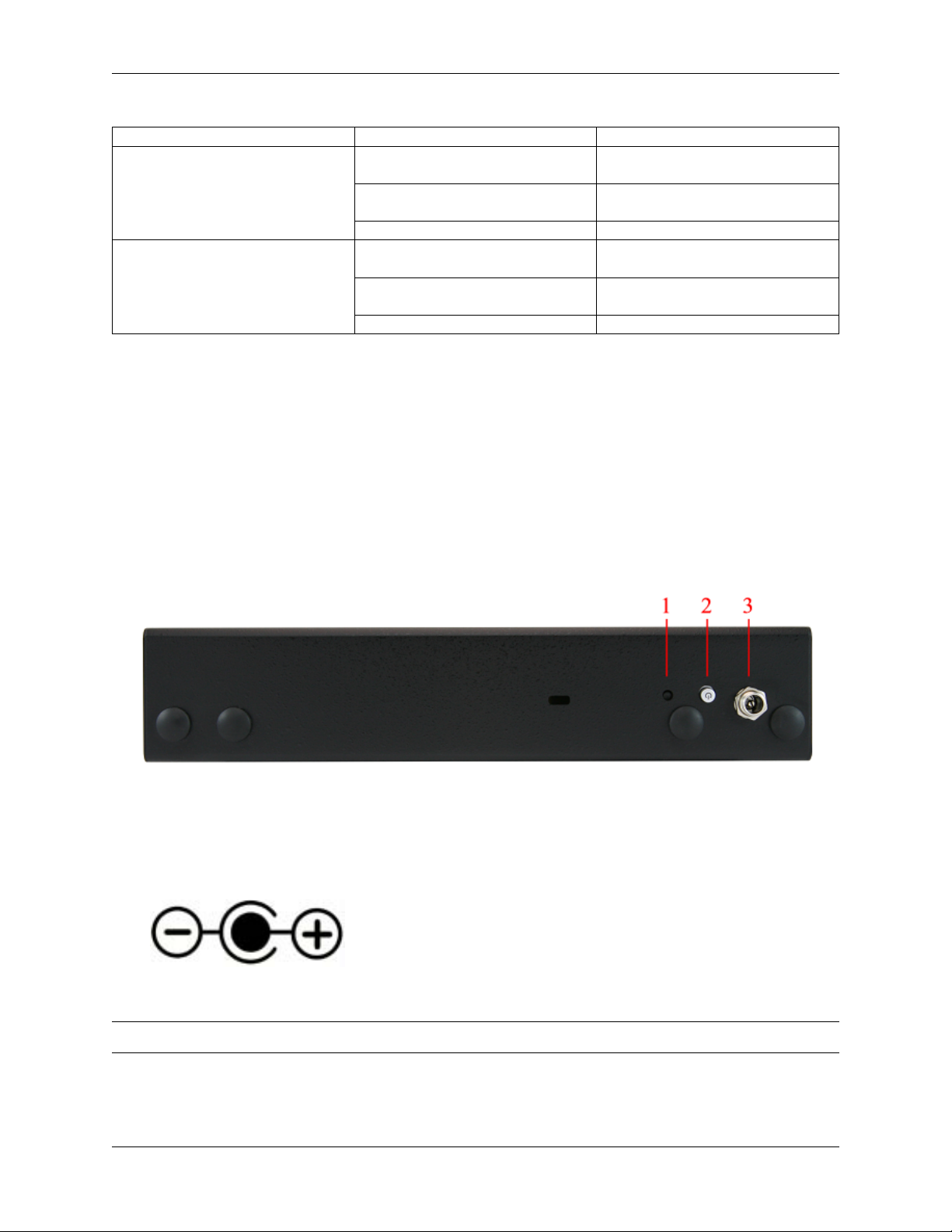
2.4 Front Side
1. Receessed Reset Button
2. Power Button
3. Power (12VDC with threaded locking connector)
Center Pin Positive
Note: The power button on the Netgate 5100 has been programmed to perform a graceful shutdown when depressed.
© Copyright 2022 Rubicon Communications LLC 4

CHAPTER
THREE
CONNECTING TO THE CONSOLE PORT
This guide shows how to access the serial console which can be used for troubleshooting and diagnostics tasks as well
as some basic configuration.
There are times when directly accessing the console is required. Perhaps GUI or SSH access has been locked out, or
the password has been lost or forgotten.
3.1 Install the Driver
AProlific PL2303 USB-to-UART Bridge driver is used to provide access to the console, which is exposed via the
USB Mini-B (5-pin) port on the appliance.
If needed, install an appropriate Prolific PL2303 USB to UART Bridge driver on the workstation used to connect
with the device.
Windows
There are drivers available for Windows available for download.
macOS
There are drivers available for macOS available for download.
Linux
There are drivers available for Linux available for download.
FreeBSD
3.2 Connect a USB Cable
Next, locate an appropriate USB cable that has a USB Mini-B (5-pin) connector on one end and a regular USB Type
Aplug on the other end. These cables are commonly used with smaller USB peripherals such as GPS units, cameras,
and so on.
Gently push the USB Mini-B (5-pin) plug end into the console port on the appliance and connect the USB Type A
plug into an available USB port on the workstation.
Tip: Be certain to gently push in the USB Mini-B (5-pin) connector on the device side completely. With most cables
there will be a tangible “click”, “snap”, or similar indication when the cable is fully engaged.
5

Secure Router Manual SG-5100
3.3 Apply Power to the Device
On some devices when using a USB serial console port the serial port will not appear on the client operating system
until the device is plugged into a power source.
If the client OS does not see the serial device, connect the power cord to the device to allow it to start booting.
If the device appears without power, then better to wait until the terminal is open before connecting power so the client
can view the entire boot output.
3.4 Locate the Console Port Device
The appropriate console port device that the workstation assigned as the serial port must be located before attempting
to connect to the console.
Note: Even if the serial port was assigned in the BIOS, the workstation OS may remap it to a different COM Port.
Windows
To locate the device name on Windows, open Device Manager and expand the section for Ports (COM & LPT).
Look for an entry with a title such as Prolific USB-to-Serial Comm Port. If there is a label in the name that contains
“COMX” where X is a decimal digit (e.g. COM3), that value is what would be used as the port in the terminal program.
macOS
The device associated with the system console is likely to show up as, or start with, /dev/cu.usbserial-<id>.
© Copyright 2022 Rubicon Communications LLC 6

Secure Router Manual SG-5100
Run ls -l /dev/cu.*from a Terminal prompt to see a list of available USB serial devices and locate the ap-
propriate one for the hardware. If there are multiple devices, the correct device is likely the one with the most recent
timestamp or highest ID.
Linux
The device associated with the system console is likely to show up as /dev/ttyUSB0. Look for messages about the
device attaching in the system log files or by running dmesg.
Note: If the device does not appear in /dev/, see the note above in the driver section about manually loading the
Linux driver and then try again.
FreeBSD
The device associated with the system console is likely to show up as /dev/cuaU0. Look for messages about the
device attaching in the system log files or by running dmesg.
Note: If the serial device is not present, ensure the device has power and then check again.
3.5 Launch a Terminal Program
Use a terminal program to connect to the system console port. Some choices of terminal programs:
Windows
For Windows the best practice is to run PuTTY in Windows or SecureCRT. An example of how to configure PuTTY is
below.
Warning: Do not use Hyperterminal.
macOS
For macOS the best practice is to run GNU screen, or cu. An example of how to configure GNU screen is below.
Linux
For Linux the best practices are to run GNU screen,PuTTY in Linux,minicom, or dterm. Examples of how to
configure PuTTY and GNU screen are below.
FreeBSD
For FreeBSD the best practice is to run GNU screen or cu. An example of how to configure GNU screen is
below.
© Copyright 2022 Rubicon Communications LLC 7

Secure Router Manual SG-5100
3.5.1 Client-Specific Examples
PuTTY in Windows
• Open PuTTY and select Session under Category on the left hand side.
• Set the Connection type to Serial
• Set Serial line to the console port determined previously
• Set the Speed to 115200 bits per second.
• Click the Open button
PuTTY will then display the console.
Fig. 1: An example of using PuTTY in Windows
© Copyright 2022 Rubicon Communications LLC 8
Autres manuels pour SG-5100
3
Table des matières
Autres manuels Netgate Routeur réseau


Manuels Routeur réseau populaires d'autres marques


NETGEAR
NETGEAR FS526T - Switch Manuel utilisateur

Korenix
Korenix JetNet 5710G Series Manuel utilisateur

Automated Logic
Automated Logic ZN551 Manuel du propriétaire

Cisco
Cisco ASR 1000 Series Manuel de l'opérateur

EnGenius
EnGenius ESR-9710 Manuel utilisateur

Cisco
Cisco 805 Series Instructions d'utilisation et de sécurité