
Nefit ModuLine 300 Manuel utilisateur

For the user and installer
6 720 646 264 (12/2010) NL
Operating manual
thermostat
ModuLine 300

2
Nefit B.V. • http://www.nefit.nl
Operating manual ModuLine 300 • edition 12/2010
Technical specifications are subject to change without prior notice.
Contents
1 Brief outline 4
1.1 Overview buttons 4
1.2 Display symbols 5
1.3 Overview 6
2 Introduction 10
2.1 General 10
2.2 Function-overview 11
2.3 Check version number 11
3 Installation 12
3.1 Choose installation location 12
3.2 Assemble wall panel 12
3.3 Assemble (disassemble) thermostat 13
3.4 Commissioning the thermostat 14
3.5 Setting the date and time 14
3.6 After a power failure 14
4 Set-up time program 15
4.1 Set-up temperature level 15
4.2 Set-up time program 16
5 Menu 1 – Time program 17
5.1 View or change switching point(s) 17
5.2 Insert switching point(s) 18
5.3 Remove switching point(s) 18
5.4 Enter new time program 18
5.5 Change temperature level 19
5.6 Reset the time program to factory settings 19
6 Menu 2 – Operating settings 20
6.1 Domestic hot water operation 20
6.2 Room temperature at off-function 21
6.3 DHW at off-function 21
6.4 Advance pre-heating 22
6.5 Button illumination 22
6.6 Summer-/wintertime change over 23

3
Technical specifications are subject to change without prior notice.
Operating manual ModuLine 300 • edition 12/2010
Nefit B.V. • http://www.nefit.nl
Contents
6.7 Reset operating settings to factory settings 23
7 Service menu 24
7.1 Access code 24
8 Service menu 3.1 – General service-settings 25
8.1 Set-up language 25
8.2 PID-setting 25
8.3 Calibrate room temperature 26
8.4 Calibrate time 26
8.5 Do you use a solar cylinder module 27
8.6 Set-up heating circuit 27
8.7 Reset factory settings 27
9 Remedy malfunctions 28
9.1 Remedy malfunctions 28
9.2 Remedy malfunctions (for installer) 29
10 Technical data 31
11 Glossary 32
12 Fill in schedules 33
12.1 Fill in schedule time program 33
Safety regulations
Never remove the thermostat.
Avoid high temperatures, moisture and dusty environment.
Do not use water or cleaning agents when cleaning.
This can lead to short circuit or damage of the thermostat.
Interrupt the power supply of tthe boiler before starting the
installation.
4
Nefit B.V. • http://www.nefit.nl
Operating manual ModuLine 300 • edition 12/2010
Technical specifications are subject to change without prior notice.
Brief outline1
1Briefoutline
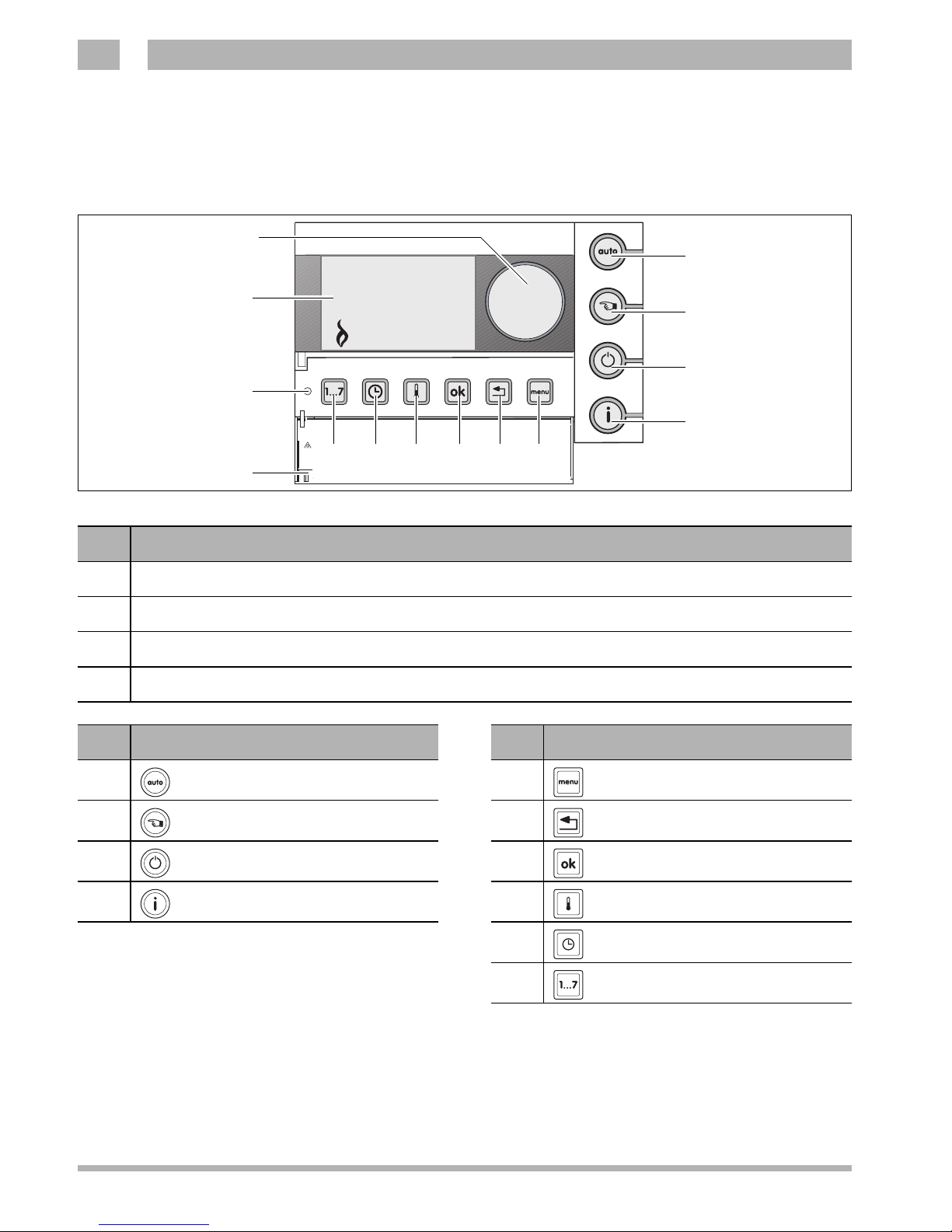
1.1 Overview buttons
Fig. 1 Overview ModuLine 300
09:18 06.01.08
21
5˚C
1
2
3
45
10 911121314
6
7
8
pos. description buttons
1cover (use the recess on the left to open the cover)
2standard view is activated when cover is closed
3display
4set-up button
pos. button for basic functions pos. button for additional functions
5auto-operation (set program) 9menu
6manual operation 10 back
7off-function 11 OK
8information 12 temperature
13 time
14 date
5
Technical specifications are subject to change without prior notice.
Operating manual ModuLine 300 • edition 12/2010
Nefit B.V. • http://www.nefit.nl
Brief outline 1
1.2 Display symbols
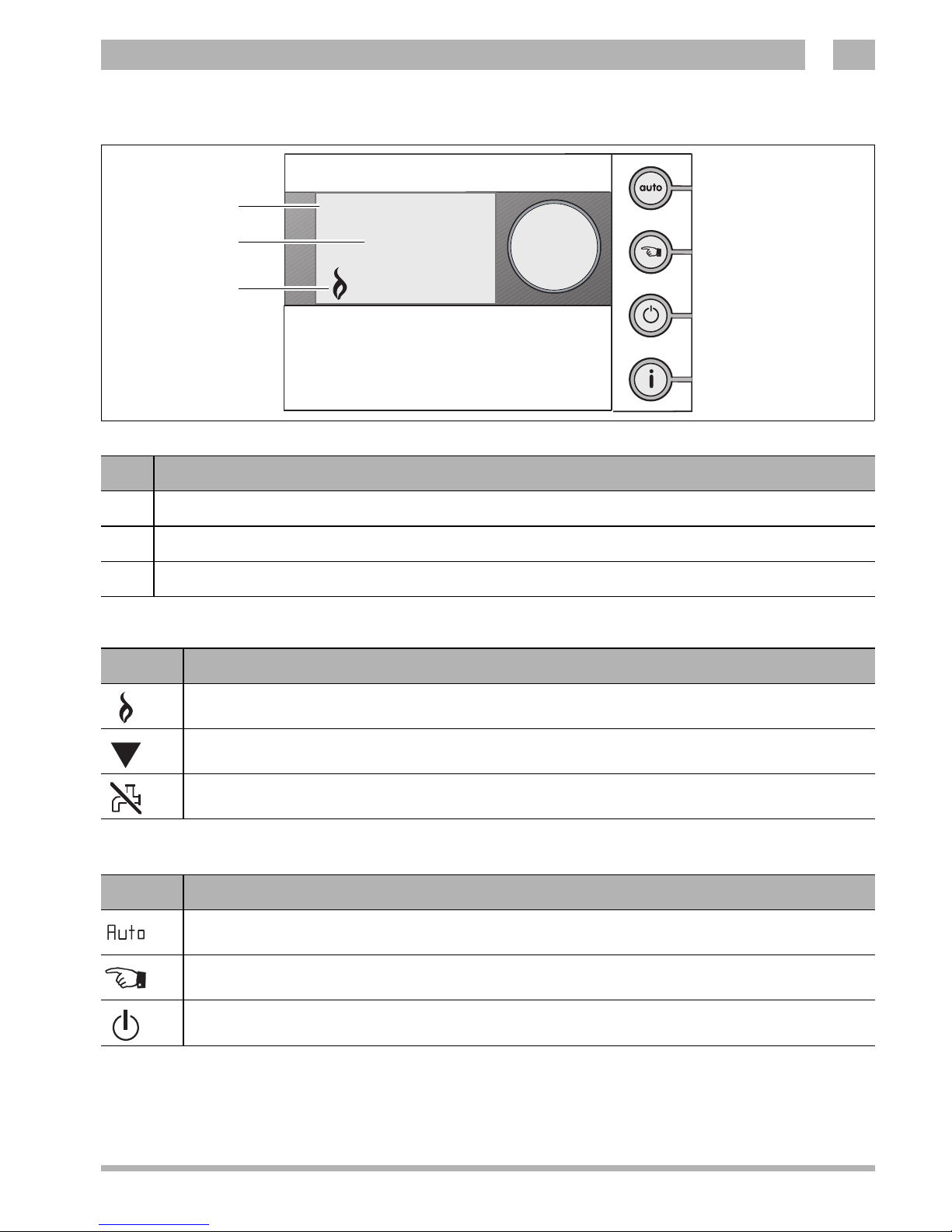
Explanation of the symbols in the standard view
When button illumination is turned off (→paragraph 6.5):
Fig. 2 Standard display ModuLine 300
09:18 06.01.08
21
5˚C
17
16
15
pos. description standard display
15 time and date
16 measured room temperature
17 symbol view
symbol explanation
Boiler is operating
Arrow points to the button to be operated.
Domestic hot water (DHW) operation is turned off
symbol explanation
Auto-operation (time program) is turned on.
Manual operation is turned on.
Boiler is turned off, freeze protection is active.
DHW operation according to paragraph 6.3.

6
Nefit B.V. • http://www.nefit.nl
Operating manual ModuLine 300 • edition 12/2010
Technical specifications are subject to change without prior notice.
Brief outline1
1.3 Overview
Change temperature:
- During "auto-operation"
zChange the temperature by turning the
set-up button.
- During "manual operation"
zChange the temperature by turning the
set-up button.
De-activating the central heating
The space heating is turned off with the "off-
function".
Domestic hot water is available depending on
the setting.
Fig. 3 Change temperature - auto-operation
Ingestelde
ruimtetemperatuur
21.5
°C
The adjusted temperature remains
active till the following switching point
in the time program. The set
temperature setting of the time
program is then taken over again.
Fig. 4 Change temperature - manual operation
Ingestelde
ruimtetemperatuur
18.5
°C
An adjustment during "manual
operation" remains maintained till:
– the next manually change is made;
– it is switched to "auto-operation".
Fig. 5 De-activating the central heating
Vorstbescherming
actief. Ingestelde
ruimtetemperatuur:
7.0
°C
The "off-function" can be adjusted to
own desire. This applies to the set-up
of the room temperature and
domestic hot water setting,
→paragraph 6.2 and 6.3.
7
Technical specifications are subject to change without prior notice.
Operating manual ModuLine 300 • edition 12/2010
Nefit B.V. • http://www.nefit.nl
Brief outline 1
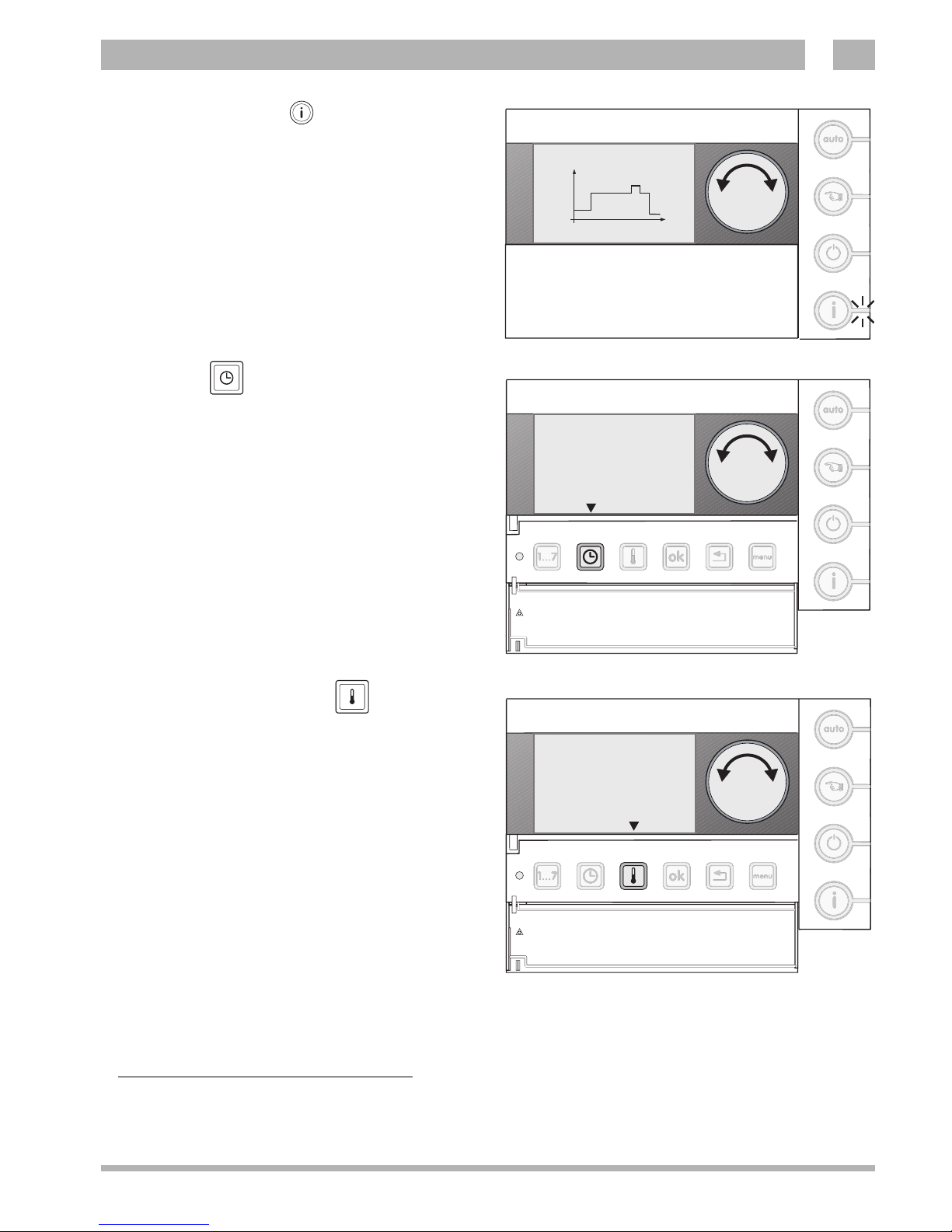
Request information
Via this button the following information is
successively displayed:
– the set temperature during the day program
or manual operation;
– the boiler water pressure1);
– the flow temperature of the boiler;
– the operating mode.
Set-up time
Use the button "time" and the set-up button to
change the time.
zKeep the button "time" pressed and turn the
set-up button to change the hours.
zRelease the button "time".
zKeep the button "time" pressed again and
turn the set-up button to change the
minutes.
Set-up temperature levels
Use the button "temperature" to change a
temperature level.
zPress the button "temperature" briefly.
zPress the button "temperature" to select the
desired temperature level.
zKeep the button "temperature" pressed and
turn the set-up button to adjust the
temperature (→also paragraph 4.1).
Fig. 6 Request information
Dagprogramma CV-1
21.0
16.0
ma 09:18 18.0°C T2
1) This information is only shown, if the boiler supports this function.
Fig. 7 Set-up time
Tijd: Stel uren in
--:--
Druk toets onder pijl
en draai ronde knop
Fig. 8 Set-up temperature levels
Temp. nacht (T1)
16.0°C
Druk toets onder pijl
en draai ronde knop

8
Nefit B.V. • http://www.nefit.nl
Operating manual ModuLine 300 • edition 12/2010
Technical specifications are subject to change without prior notice.
Brief outline1
Navigate
- Enter the menu
zBriefly press the button "menu".
zSelect with the set-up button the desired
menu.
zPress the button "OK" to enter the selected
menu.
- Browse / next step
Use the set-up button to browse through the
menu, or to go through the time program.
zTurn the set-up button to browse through
the menu.
- Confirm
Use the button "OK" to confirm the question
asked on the display or to enter a menu.
zBriefly press the button "OK".
Fig. 9 Enter the menu
09:18 06.01.08
21
5°C
09
:
1
8
06
.
01
.
0
8
2
1
5
°
C
Fig. 10 Browse through the menu
Menu-------------2
Gebruiksinstellingen
Me
n
u
-----
-
-
-----
-
2
Geb
r
ui
k
s
i
nste
lli
n
g
e
n
Fig. 11 Confirm
Gebruiksmenu------2.8
Toetsverlichting?
aan
G
e
b
ru
ik
s
m
e
n
u
-
-
-
-
-
-
2
.
8
Toets
v
e
r
l
ichti
n
g
?
a
a
n

9
Technical specifications are subject to change without prior notice.
Operating manual ModuLine 300 • edition 12/2010
Nefit B.V. • http://www.nefit.nl
Brief outline 1
- Change setting
Use the button "OK" and the set-up button to
change the settings in the menu.
zKeep the button "OK" pressed and turn
the set-up button.
- Return to the menu / standard display
Use the button "return" to return to the menu
or standard display.
Fig. 12 Change settings
Gebruiksmenu
------
2.8
Toetsverlichting?
aan
G
e
b
r
u
i
k
s
m
e
m
n
u
-
-
-
--
-
2
.
8
T
o
e
t
s
v
e
r
l
i
c
h
t
i
n
g
?
a
a
n
Fig. 13 Return to the menu
Gebruiksmenu------2.8
Toetsverlichting?
aan
G
e
b
ru
ik
s
m
e
n
u
-
-
-
-
-
-
2
.
8
Toets
v
e
r
l
ichti
n
g
?
a
a
n
By closing the cover, the standard
display is activated immediately.

10
Nefit B.V. • http://www.nefit.nl
Operating manual ModuLine 300 • edition 12/2010
Technical specifications are subject to change without prior notice.
Introduction2
2Introduction
Congratulation with the purchase of this
thermostat ModuLine 300.
The thermostat ModuLine 300 is intended for
operating and regulating the Nefit boiler in
your home.
The ModuLine 300 can be connected to all
boilers, which are listed in table 1.
Advice:
zHave the installer explain the thermostat.
zRead this manual carefully before use.
2.1 General
The ModuLine 300 thermostat is easy to
operate. At the right side of the display are
four buttons. These buttons allow to quickly
switch between the time program and manual
operation, or information be obtained of the
settings of the thermostat and the boiler.
At the bottom of the cover are a number of
buttons for the set-up of the thermostat
function. Usually, these settings only have to
be carried out the first time.
During the navigating, there appear
accompanying texts on the display. By means
of "question and answer" can set-ups easily
be carried out.
Installation, maintenance en repairs
may only be carried out by accredited
installation companies.
Table des matières
Autres manuels Nefit Thermostat

Manuels Thermostat populaires d'autres marques

EWELLY
EWELLY EW-181 Manuel utilisateur

Prolon
Prolon T1100 Instructions d'installation

Computherm
Computherm Q20 Manuel utilisateur

Heatmiser
Heatmiser neoStat Manuel utilisateur

Aube Technologies
Aube Technologies TH111GFCI-NP 240 VCA Manuel utilisateur

Mars
Mars HEAT CONTROLLER IR Wireless Thermostat Manuel utilisateur


