
nedis DCAM15BK Manuel utilisateur


aQuick start guide 5
cKurzanleitung 9
bGuide de démarrage rapide 13
dVerkorte handleiding 18
jGuida rapida all’avvio 22
hGuía de inicio rápido 27
iGuia de iniciação rápida 31
eSnabbstartsguide 36
gPika-aloitusopas 40
fHurtigguide 44
2Vejledning til hurtig start 48
kGyors beüzemelési útmutató 52
nPrzewodnik Szybki start 57
xΟδηγό γρήγορη εκκίνηση 61
1Rýchly návod 66
lRychlý návod 70
yGhid rapid de iniiere 74
1
2
3
4
5
6
7
8
9
q
w
e
r
t
y
u
A

B
5
aQuick start guide
Dashboard Camera DCAM15BK
For more information see the extended manual online:
ned.is/dcam15bk
Intended use
The DCAM15BK is a dashboard camera that can be mounted to the windshield
of your vehicle.
This product is intended to take photos, record videos and playback recordings
and is equipped with a parking mode and g-sensor.
The product is not intended for professional use.
Any modication of the product may have consequences for safety, warranty
and proper functioning.
Specications
Product Dashboard Camera
Article number DCAM15BK
Dimensions (l x w x h) 87 x 54 x 38 mm
Input voltage 5 VAC
Input current 1 A
Battery Lithium-ion polymer 3.7 VDC / 200 mAh
Battery capacity 200 mAh
Rechargeable Yes
Storage temperature --20 °C – 60 °C
Operating temperature --10 °C – 50 °C
Display 3.0 inch HD display
Viewing angle 120 degrees
Video Loop video / motion detecting
Video format .MOV
Video encoding H.264

6
Video resolution 1080p (30fps) / 720p / 848 x 480 / VGA (60fps)
Image resolution 4032 x 3024 / 3648 x 2736 / 3264 x 2448 / 2592
x 1944 / 2048 x 1536 / 1920 x 1080 / 1280 x 960
/ 640 x 480
Video output HDMI
Seamless video Yes
Boot automatically video Support
Language English, German, French, Italian, Spanish, Dutch,
Danish, Swedish, Finnish, Romanian, Hungarian,
Czech
Recording audio Built-in microphone
The microphone can be switched on/o
Memory card MicroSD card
Memory card capacity 1 - 32 GB
USB interface Mini5Pin USB2.0
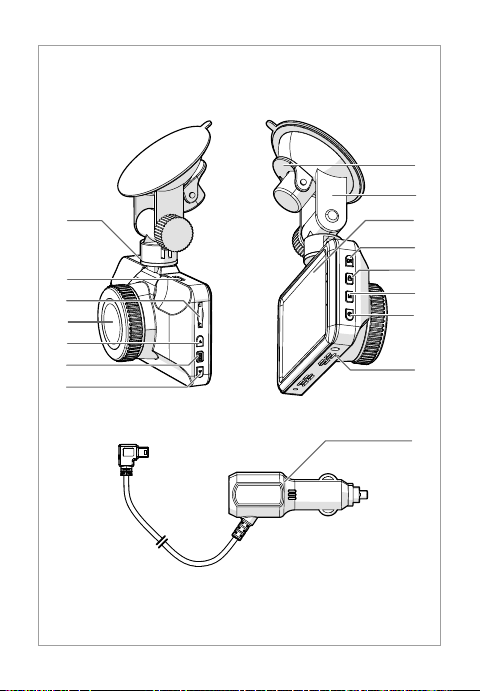
Main parts (image A)
Mini USB port
Mini HDMI output
MicroSD card slot
Lens
Up button
Menu button
Down button
Suction x clip
Suction x
Display
OK button
Lock button
Mode button
On/o button
Speaker
Auxiliary power plug
Safety instructions
-
WARNING
• Ensure you have fully read and understood the instructions in this document
before you install or use the product. Keep this document for future
reference.
• Only use the product as described in this document.
• Do not use the product if a part is damaged or defective. Replace a damaged
or defective product immediately.
• Do not drop the product and avoid bumping.
• Keep the product out of reach from children.

7
• This product may only be serviced by a qualied technician for maintenance
to reduce the risk of electric shock.
• Disconnect the product from the power source and other equipment if
problems occur.
• Do not expose the product to water or moisture.
• Non-rechargeable batteries are not to be recharged.
• Do not short-circuit a cell or a battery.
• In the event of a cell leaking, do not allow the liquid to come in contact with
the skin or eyes. If contact has been made, wash the aected area with
copious amounts of water and seek medical advice.
• Disconnect the power supply before making or breaking the connections to
the battery.
• Plug the charger into a grounded power outlet.
• Do not use any charger other than that specifcally provided for use with the
product.
• Do not cover ventilation openings.
• Be careful when using the product while driving. Always focus your attention
on the road.
• Do not place the product near heat sources, this can damage the product.
• Do not expose the product to very hot or very cold temperatures or drastic
changes in temperature or humidity.
• Do not install the product within the operation range of the airbag.
• Ensure the product and the power cable are installed and do not interfere
with the sight of the driver or impede with the operation of any driving
controls.
Installing the product (image B)
Before using the product, the user shall check the applicable laws and
regulations on the use of the product.
In some jurisdictions, the use of this product can be considered as an invasion
of privacy.
The mounting of the product on the windshield might be regulated by law in
some jurisdictions.
It is the user’s own responsibility to consult the local laws and regulations
before installing and using this product.
4Switch o the car engine.
1. Clean and degrease the spot where you want to x the product.

8
4Place the product just behind or below the rearview mirror.
2. Place suction x A9on the windshield.
3. Use the suction x clip A8to x the product to the windshield.
4. Insert a microSD card (not included) into the microSD card slot A3.
5. Adjust the position of the lens A4for optimal view of the road.
4Ensure the product and the power cable are installed and do not interfere
with the sight of the driver or impede with the operation of any driving
controls.
4Always focus your attention on the road.
Connecting the product to the power supply
Option 1:
1. Plug the auxiliary power plug Auinto the mini USB port A1.
2. Plug the other end of Auinto an auxiliary power outlet.
Option 2:
1. Charge the product using the USB port A2.
4While charging a green LED lights up, when fully charged the light is o.
4The product automatically switches on and starts recording when you switch
on your car engine.
4The camera switches o 5 seconds after the engine is o.
Using the product
Menu
1. Press menu A6to enter the setup menu interface.
2. Press A5or A7to navigate through the menu.
3. Press OK Awto conrm a selection.
4. Press A6to exit the menu.
Press Arto toggle between video mode, photo mode and playback mode.
Video mode
1. Press Arto enter the video mode.
2. Press Awto start or stop recording.
4The indicator LED will blink blue.
Press Awto switch o the LED.
4The product automatically saves recordings on the SD card.

9
Emergency lock
In video mode, press the lock button Aeto save the recording as a read-only
le.
This recording cannot be overwritten or deleted when not connected to a
computer.
cKurzanleitung
Dashcam DCAM15BK
Weitere Informationen nden Sie in der erweiterten
Anleitung online: ned.is/dcam15bk
Bestimmungsgemäße Verwendung
Die DCAM15BK ist eine Dashboard-Kamera, die an der Windschutzscheibe Ihres
Fahrzeugs angebracht werden kann.
Dieses Produkt ist gedacht zum Aufnehmen von Fotos und Aufzeichnen von
Videos und ist mit einem Parkmodus und einem Beschleunigungssensor
ausgestattet.
Das Produkt ist nicht für den professionellen Einsatz gedacht.
Jegliche Modikation des Produkts kann Folgen für die Sicherheit, Garantie und
ordnungsgemäße Funktionalität haben.
Spezikationen
Produkt Dashcam
Artikelnummer DCAM15BK
Größe (L x B x H) 87 x 54 x 38 mm
Eingangsspannung 5 VAC
Eingangsstrom 1 A
Batterie Lithium-Ionen-Polymer 3,7 VDC / 200 mAh
Akkukapazität 200 mAh
Wiederauadbar Ja
Lagertemperatur --20 °C – 60 °C

10
Betriebstemperatur --10 °C – 50 °C
Anzeige 3,0 Zoll HD-Display
Blickwinkel 120 Grad
Video Video-Schleife / Bewegungserkennung
Videoformat .MOV
Video-Codierung H.264
Videoauösung 1080p (30fps) / 720p / 848 x 480 / VGA
(60fps)
Bildauösung 4032 x 3024 / 3648 x 2736 / 3264 x 2448 /
2592 x 1944 / 2048 x 1536 / 1920 x 1080 /
1280 x 960 / 640 x 480
Videoausgabe HDMI
Nahtloses Video Ja
Automatischer Videostart Unterstützt
Sprache Englisch, Deutsch, Französisch, Italienisch,
Spanisch, Niederländisch, Dänisch,
Schwedisch, Finnisch, Rumänisch,
Ungarisch, Tschechisch
Erstellen von Aufnahmen Integriertes Mikrofon
Das Mikrofon kann ein-/ausgeschaltet
werden
Speicherkarte microSD-Karte
Speicherkartenkapazität 1 - 32 GB
USB-Schnittstelle Mini5Pin USB2.0
Hauptbestandteile (Abbildung A)
Mini-USB-Anschluss
Mini HDMI-Ausgang
Einschub für
Micro-SD-Karte
Objektiv
Hoch-Taste
Menu-Taste
Runter-Taste
Saughalter-Klemme
Saughalter
Anzeige
OK-Taste
Sperrtaste
Modus-Taste
Ein/Aus-Schalter
Lautsprecher
Auto-Netzstecker
Table des matières
Langues :
Autres manuels nedis Caméra embarquée


