NEBRA RockPi Manuel utilisateur

© 2022 Passion Radio / NEBRA –www.passion-radio.com
Quick Specifications
Dimensions
94x70x53 mm (Excluding Antenna)
Weight
353g
Power Requirement
12V 2.5A USB-C
Maximum TX Power
24-27dBm**
Network Connectivity
1GBit Ethernet, 2.4/5GHz 802.ac WiFii
Antenna Connection
RP-SMA Female
Rated Ambient Temperature
20-30°C
Base SOM
ROCK Pi RK3399 Processor
CPU Specification
Dual Core Cortex A72 1.8GHz and Quad Core Cortex A53 1.4GHz
High Endurance Storage
32GB
RAM
2GB
Package Contents
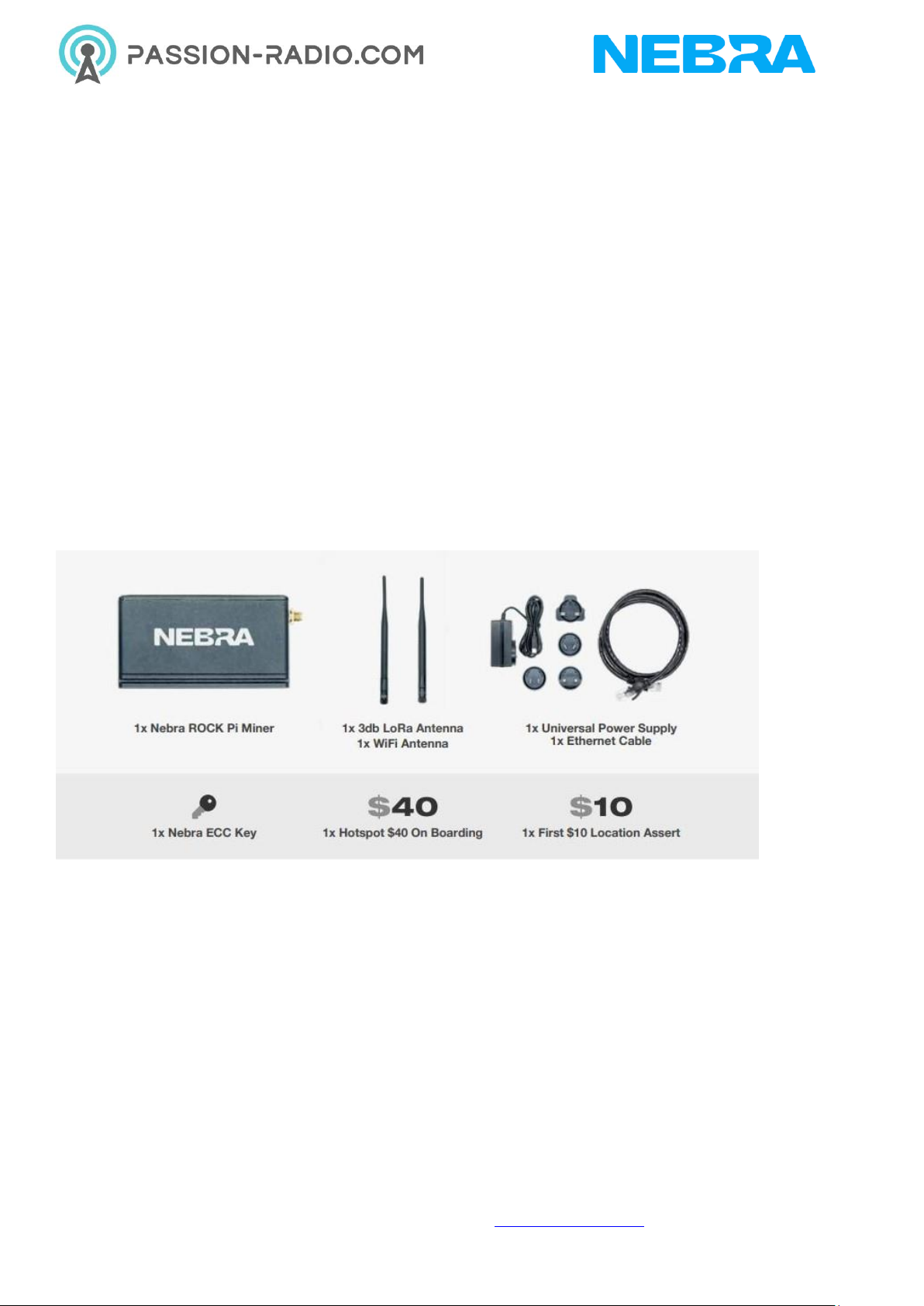
•1 x Nebra ROCK Pi Miner
•1 x 3db LoRa Antenna
•1 x WiFi Antenna
•1 x Universal Power Supply
•1 x Ethernet Cable
•1 x Hotspot $40 On Boarding Fee
•1 x First $10 Location Assert Fee
Please note the above image is for illustrative purposes only, colours of some parts may change.

© 2022 Passion Radio / NEBRA –www.passion-radio.com
Block Diagram
Antenna Specifications
Specification
470Mhz Model
868 & 915Mhz Models
Frequency Range
420-480
860-930 Mhz
Peak Gain
3 dBi
3 dBi
VSWR
< 2.3
< 1.8
Input Impedance
50 Ohms
50 Ohms
Length
17.2CM
20.7CM
Dimensions
The Nebra Indoor Hotspot is 94x70x53MM In size when nothing is connected.

© 2022 Passion Radio / NEBRA –www.passion-radio.com
Interfaces
Connectors
1. Type C Connector For Power
2. Power and Activity LED Indicators.
3. Interface Button
4. RP-SMA Female Connector for the WiFi 3dbi antenna
5. RP-SMA Female Connector for the LoRaWAN 3dbi antenna
6. 10/100/1000 Ethernet
Firmware
The RockPi Indoor Helium Hotspot runs a customizd software to provide high reliability and ensure your
units are as up to date as they can be.
Your hotspot will update approximately once a week in an automatic process, we will announce updates
via various social media platforms when they happen.
The software is open source and available on our Helium Miner Software repo on GitHub :
https://github.com/nebraltd/helium-miner-software

© 2022 Passion Radio / NEBRA –www.passion-radio.com
Unit Information
Each unit has a sticker located on the base of the unit.
This includes the following important Information:
•FREQ: Frequency of the Unit
•ETH: Ethernet MAC address
•NSER: Nebra Serial Number
•RPi: Raspberry Pi Serial Number
You will require some of this information when linking your unit to our remote management dashboard :
https://dashboard.nebra.com/

© 2022 Passion Radio / NEBRA –www.passion-radio.com
Indoor Hotspot Quick Start Guide
•Warnings
•Preparing Nebra ROCK Pi Indoor Hotspot
•Configuring Nebra ROCK Pi Indoor Hotspot
•Onboarding Video
Warnings
Please remember to follow these important warnings when using your Nebra ROCK Pi Indoor Hotspot:
•Never power on the ROCK Pi Indoor hotspot without it's antenna connected as this may damage
the unit.
•Do not place in direct sunlight or on hot surfaces (e.g a heater).
•The Indoor unit's case is designed to be used indoors, and is not suitable for use outdoor usage.
•The ROCK Pi Indoor hotspot comes with a 12v power adapter, so don't use that adapter to power
any generic Type-C devices like a mobile phone or anything and vice versa, it will damage the
device.
Preparing Nebra ROCK Pi Indoor Hotspot
Step 1: First screw in the included antenna into the connector on the back of the hotspot.
If you are using wired connection, plug an ethernet cable in between a router and the ethernet port on the
hotspot.

© 2022 Passion Radio / NEBRA –www.passion-radio.com
Step 2: Next find a suitable location for your Hotspot to be positioned, to provide the best coverage we
recommend placing it near a window just out of direct sunlight. You’ll need to be near a mains power
source too.
Please check "Ideal Hotspot Placement" Guide : https://github.com/NebraLtd/Helium-
Guides/blob/main/docs/handy-guides/hotspot-ideal-location.md
Step 3: Assemble the appropriate adapter for country onto the universal power supply, plug into mains
power and insert power cable into the hotspot.

© 2022 Passion Radio / NEBRA –www.passion-radio.com
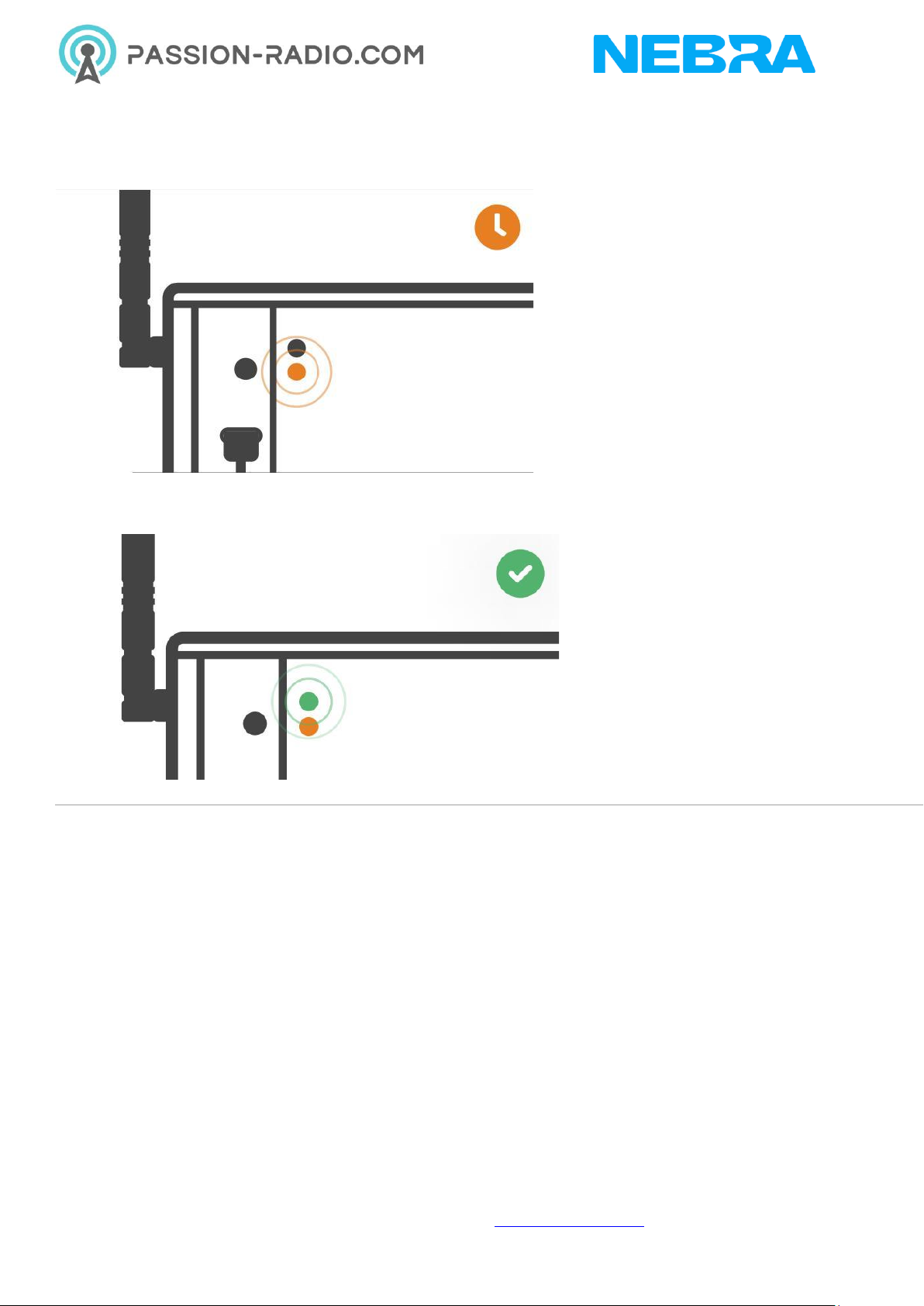
Step 5: When the hotspot is powered up, the lower orange LED will be on. It will take up to 5 minutes to
configure after the first boot.
This process may take slightly longer as it’ll also perform firmware updates as soon as it gets a connection
to the internet. Once it's done you can see the Green light led is turned on.

© 2022 Passion Radio / NEBRA –www.passion-radio.com
Configuring Nebra ROCK Pi Indoor Hotspot
To configure your Hotspot, you will require the Helium Network application installed on a Mobile Phone,
and for you to have gone through the account setup process to continue.
For the best results, Nebra Hotspots require some ports to be port forwarded on your network. Please
check our security and port forwarding pages for more details.
Prerequisites
•Ready to connect nebra hotspot
•Helium application with account.
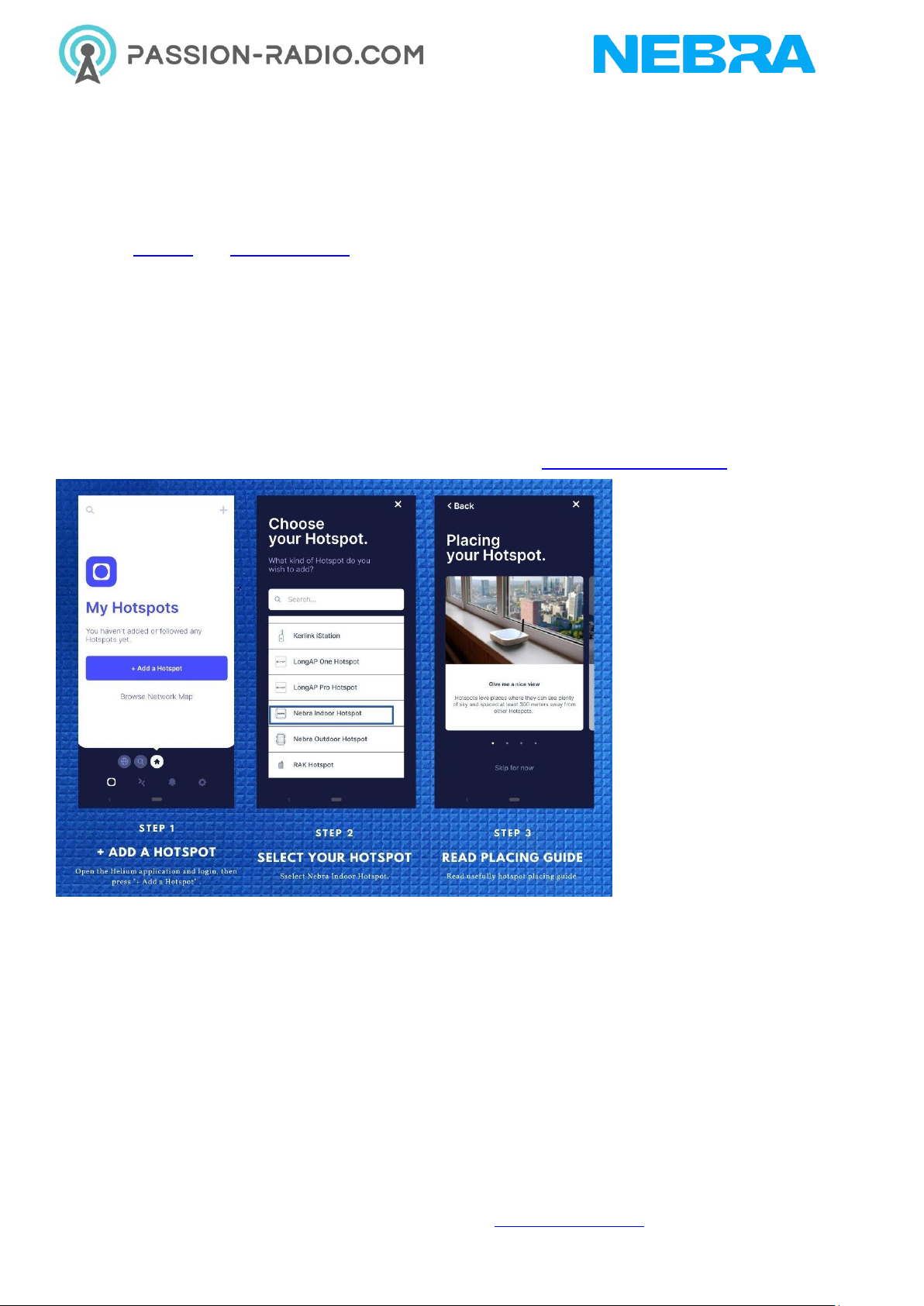
Step 1: Open the Helium application and login, then press + Add a Hotspot.
Step 2: Next click Set up Hotspot, from here you will want to select Nebra Indoor Hotspot.
Step 3: Place your hotspot in appropriate location, please reffer Ideal Hotspot Placement
Step 4: Accept diagnostics permission , This will allow Nebra Ltd to identify issues with your Hotspot in a
secure way
Step 5: Power Up the Nebra hotspot, and please note that never power on the Indoor/Outdoor hotspot
without it's antenna connected as this may damage the unit.

© 2022 Passion Radio / NEBRA –www.passion-radio.com
Step 6: Turn on mobile phone bluetooth and Push the button on the back of the unit once to enable
pairing
Step 7: Select your hotspot in the app, you can check it is the correct one by matching the last 6 characters
shown in the application with the last 6 characters of the mac address printed on the sticker on the bottom
of the hotspot.
Step 8: The app will show the available Wi-Fi networks within range of your Hotspot.
Step 9: Once you provide the WiFi details, it will take few minutes to complete the connection
If you are using Ethernet, tap Use Ethernet Instead and skip to Step 10.
If using Wi-Fi, tap on the name of your Wi-Fi network on the app which will bring you to the following
screen.
Step 10: Next you need to submit antenna height and power details.
Table des matières
Autres manuels NEBRA Routeur sans fil