
Nayar Systems GSR Lite Manuel utilisateur

GSR Lite
1 — ast update: Aug 17, 2021
Nayar Systems
Copyright © 2021 Nayar Systems

Table of Contents
1. Manufacturer note ............................................................................................................................. 1
2. Device description............................................................................................................................. 2
2.1. Front connections....................................................................................................................... 4
2.2. Top side EDs ........................................................................................................................... 5
2.3. Rear connections ....................................................................................................................... 7
2.4. Side connections........................................................................................................................ 8
3. Installation and start-up .................................................................................................................... 9
4. SMS configuration........................................................................................................................... 11
5. Technical support............................................................................................................................ 15

1. Manufacturer note
This manual describes good practices recommended by Nayar Systems in order to ensure an optimal
performance in safe conditions. Any improper manipulation, damage caused during the installation of the
device and, in general, an incorrect use not explained in this document may void the warranty.
The device must be manipulated only by qualified and skilled professionals with specific technical
knowledge to avoid a failure of the device due to an inappropriate manipulation.
The optimal performance of the device can be ensured in good working conditions. This does not
include interferences, network signal attenuation due to placing the antennas in an improper location like
for example surrounded by metallic surfaces, etc.
Nayar Systems is not responsible for damage as a result of ignoring the indications and
recommendations included in this manual.
The device must not be wet nor installed in humid places.
Operating Humidity 10% – 90%
Optimal working temperatures are between 0ºC and 40ºC.
*
Nayar Systems GSR ite - 1
Page 1 of 15

2. Device description
GSR · GSM Smart Router® Lite is a device specially designed for elevators and IoT networks. It
integrates 4G technology,WiFi and additional connections with the purpose of turning the elevator into
an internet device.
Inside the box
• GSR · GSM Smart Router® ite
• Power supply
• Wifi antennas x2
• 4G antennas x2
Technical specifications and connections
• CPU architecture: RAMIPS
• RAM: 128 MB
• Flash: 16 MB
• Wifi: 150M 2.4Ghz wifi, 802.11 b/g/n support
• SIM slot
• Mini PCI Express 4G modem
• RJ45 Ethernet 10/100Mbps (5 ports)
• USB Host (0.5A)
• SMA F connector for 3G/4G antenna (2 connectors)
• RP-SMA F connector for WiFi antenna (2 connectors)
Nayar Systems GSR ite - 1
Page 2 of 15

Dimensions
Nayar Systems GSR ite - 1
Page 3 of 15
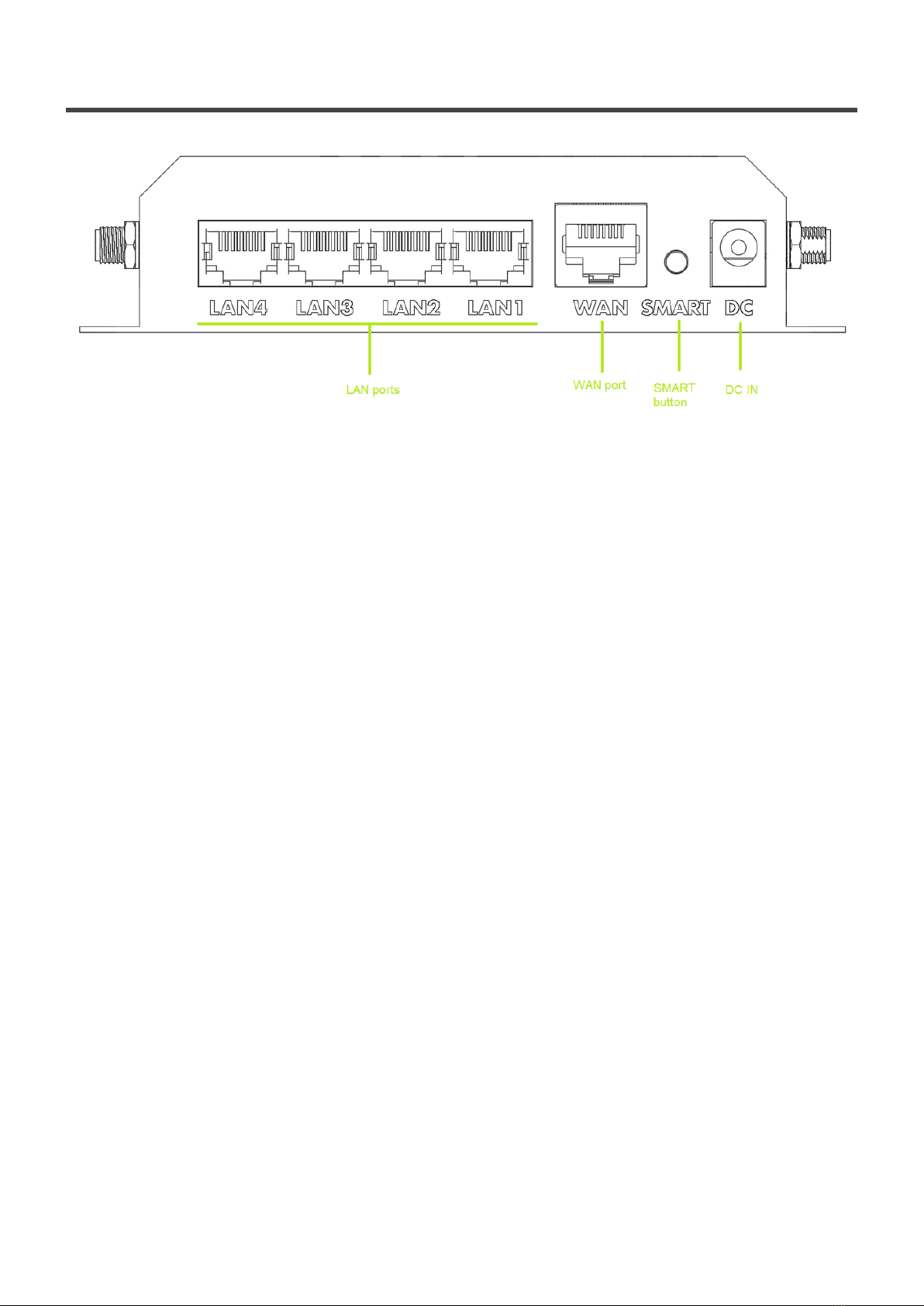
2.1. Front connections
•LAN ports: 4× 10/100/100M – provides connectivity to other devices
•WAN port: 1× 10/100/100M – can receive connectivity from another device
•SMART button:
◦ Offline Wifi – short press between 0.5 and 2 seconds. GSR will generate a new wifi hotspot
visible as “GSR_F85E3C…” displaying the complete ID for that particular device. Connect
with your smartphone and Nayar Systems APP for local configuration. This network won’t
provide access to the internet. The password for this network is 12345678.
◦ Factory reset – hold pressed between 15 and 60 seconds. All EDs will turn on and off after
the device is reset to factory settings.
•DC IN: Input for the power supply. When possible, the device must be always powered with the
original power supply. In case the original power supply can not be used, it is recommended to use
a 12V and 2A power unit.
Nayar Systems GSR ite - 1
Page 4 of 15

2.2. Top side LEDs
Signal LEDs
Very low signal strength / error
ow signal strength CSQ 10-14/31
Average signal strength CSQ 15-20/31
High signal strength CSQ 21-31/31
Network LED
Device not registered in any network
Device registered in a 2G network (slow blinking)
Device registered in a 3G network (fast blinking)
Device registered in a 4G network
Nayar Systems GSR ite - 1
Page 5 of 15

Sync LED
Configuration changed via platform or SMS / PIN error (blinking)
Wifi LED
No active wireless network
Active wireless network, by default visible as “GSR”
Data transmission in progress (blinking)
USB LED
No SIM card detected / no mobile network detected
Mobile network detected, no registration (slow blinking)
Mobile network detected, registration successful (fast blinking)
Power LED
Device not powered
Device powered ON
Nayar Systems GSR ite - 1
Page 6 of 15

2.3. Rear connections
•USB port: compatible with USB 2.0 (0.5A) devices like USB-serial converters, USB HUB, binary
acquisition card, etc. Nayar Systems recommends using only USB devices provided by the
company given in order to ensure that GSR® ite and the platform operate correctly.
•SD card slot: GSR® ite does not use this expansion given that all data is processed and sent to
the cloud to ensure the highest level of security.
Nayar Systems GSR ite - 1
Page 7 of 15

2.4. Side connections
Side connections
•Wifi connectivity: the antennas provided with the device must be connected to the indicated
connectors in order to use WiFi capabilities. Always use both antennas labeled as 2.4G.
•Mobile network connectivity: the antennas provided with the device must be connected to the
indicated connectors in order to use WiFi capabilities. Always use both antennas labeled as 4G.
•SIM slot: place for a 2FF size Mini SIM card. It does not work with microSIM (3FF) nor nanoSIM
(4FF) cards. It must be inserted as described in the following image
Nayar Systems GSR ite - 1
Page 8 of 15
Table des matières
Autres manuels Nayar Systems Contrôleurs d'accès IP


