
Nakanishi Sonic Cutter ZERO Manuel utilisateur


21
English
Thank you for your purchase of Sonic Cutter ZERO Ultrasonic Cutter. This product is a device that
can be used for cutting and deburring of plastic materials, rubber, urethane, etc. as well as for cutting
sheets, cloths, etc. Please read this manual carefully before use. We hope you will enjoy using this
product for many years to come. Please keep this manual in a place where the user can read or refer
to it at all times.
CONTENTS
1. Safety precautions ........................................... 22
2. Product information ......................................... 25
2–1 Bundled items ................................................25
2–2 Names of parts ...............................................26
3. Preparation before use .................................... 29
3–1 Connecting the main power cord ...........................29
3–2 Connecting the handpiece ..................................29
3–3 Connecting the foot switch (optional) ......................29
3–4 Replacing the blade .........................................30
4. How to use .......................................................31
5. Maintenance ................................................... 32
5–1 Fuse replacement ............................................32
5–2 Care ...........................................................32
6. Setup .............................................................. 33
6–1 User setting operations ......................................33
6–2 Setting the forced stop time when not in use .............34
6–3 Setting the notification volume .............................34
6–4 Setting the watt display and amplitude display ............34
6–5 Setting the foot switch ......................................35
6–6 Setting the handpiece heat protection function ...........35
6–7 Initializing Settings ...........................................35
7. Troubleshooting ............................................... 36
7–1 Error code ................................................................. 36
7–2 Failure causes and countermeasures ......................37
8. After sales service ........................................... 39
8–1 Warranty ......................................................39
8–2 Contact for inquiries .........................................39
8–3 Product disposal .............................................39
9. Specifications ................................................. 40
9–1 Specifications ............................................................ 40
9–2 Conforming standards .......................................40
9–3 Protection sircuitry ...........................................41
9–4 Symbol ..................................................................... 41

22
1 Safety Precautions
Please read the operation manual thoroughly, make sure you understand all warnings and cautions prior to operating
the system and only use the system in the manner intended.
These warnings and cautions are intended to avoid potential hazards that could result in personal injury or damage to
the device. These are classified as follows in accordance with the seriousness of the risk.
Class Degree of Risk
WARNING A hazard that could result in bodily injury or damage to the device if the safety
instructions are not properly followed.
CAUTION A hazard that could result in light or moderate bodily injury or damage to the
device if the safety instructions are not followed.
NOTICE Keep this manual in a safe place for future reference.
ŠGROUNDING INSTRUCTIONS
ƔIn the event of a malfunction or breakdown, grounding provides a path of least resistance for electric current to
reduce the risk of electric shock. This tool is equipped with a power cord having an equipment grounding conductor
and a grounding plug. The plug must be plugged into a matching outlet that is properly installed and grounded in
accordance with all local codes and ordinances.
ƔDo not modify the plug provided-if it will not fit the outlet, have the proper outlet installed by a qualified electrician.
ƔImproper connection of the equipment-grounding conductor can result in a risk of electric shock. The conductor with
insulation having an outer surface that is green with or without yellow stripes is the equipment grounding conductor.
If repair or replacement of the power cord or plug is necessary, do not connect the equipment-grounding conductor
to a live terminal.
ƔCheck with a qualified electrician or service personnel if the grounding instructions are not completely understood, or
if in doubt as to whether the tool is properly grounded.
ƔUse only 3-wire extension cords that have 3-prong grounding plugs and 3-pole receptacles that accept the tool's
plug.
Ɣ(120V) This tool is intended for use on a circuit that has an outlet that looks like the one illustrated in Sketch A in
Figure (below). The tool has a grounding plug that looks like the plug illustrated in Sketch A in Figure (below). A
temporary adapter, which looks like the adapter illustrated in Sketches B and C, may be used to connect this plug to
a 2-pole receptacle as shown in Sketch B if a properly grounded outlet is not available. The temporary adapter should
be used only until a properly grounded outlet can be installed by a qualified electrician. The green-colored rigid ear,
lug, and the like, extending from the adapter must be connected to a permanent ground such as a properly grounded
outlet box.
Ɣ(240V) This tool is intended for use on a circuit that has an outlet that looks like the one illustrated in sketch D in
figure.
ƔNOTE: Adapter in (Figure B) is not for use in Canada.
GROUNDING
PIN GROUNDING
CONTACT
METAL
SCREW
(A)
COVER OF GROUND
OUTLET BOX
(B)
(C)
(D)
ADAPTER
GROUNDING
MEANS
ƔUse proper extension cord. Make sure your extension cord is in good condition. When using an extension cord, be
sure to use one heavy enough to carry the current your product will draw. An undersized cord will cause a drop in line
voltage resulting in loss of power and overheating. Table (below) indicates the correct size to use depending on cord
length and nameplate ampere rating. If in doubt, use the next heavier gauge. The smaller the gauge number, the
heavier the cord.

23
Safety Precautions
English
Ampere Rating Volts Total length of cord
120V
240V 7.5m (25ft.)
15m (50ft.) 15m (50ft.)
30m (100ft.) 30m (100ft.)
60m (200ft.) 45m (150ft.)
90m (300ft.)
More Than Not More
Than
0 6 18 16 16 14
6 10 18161412
10 12 16 16 14 12
12 16 14 12 Not Recommended
Use the table above for your correct voltage.
WARNING
ƔFor safety reasons, always wear protective gloves and goggles when using this product.
ƔDo not drop or impact the product. Strong impacts may result in deformation or damage.
ƔDo not modify or disassemble this product in any way that is not described in the instruction manual. This can
have a significant impact on performance and safety. If the controller is disassembled, you may receive an
electric shock due to the high voltage section inside. In the event of malfunction or repair, please contact the
place of purchase for repair.
ƔBe sure to ground the grounding wire of the power cord before use. Failure to do so may result in a malfunction,
fire or electric shock.
ƔDo not use this product in an unventilated room where there is a risk of explosion or near flammable materials. If
the tool is in contact with flammable materials for a long periods of time in an oscillating state, it may ignite.
ƔUse the controller at room temperature in the range of 10 - 40°C (75 - 104ºF), with no condensation.
Condensation may cause a short circuit or an electric shock.
ƔAvoid installing the controller in the vicinity of high temperature, high humidity, condensation, corrosive or
explosive gases, flammable gases, salt damage, and direct sunlight. Failure to do so may result in a malfunction,
fire or electric shock.
ƔThe bottom of the controller also serves as a heat sink. Install it so that the space between it and the work desk
is not blocked. A temperature increase can occur inside the controller, causing failure.
ƔIf there is any dust or damage to the threaded part of the blade holder, handpiece, or blade mountings, normal
oscillation will not be possible. It can also cause the handpiece to heat up. In addition,the handpiece maygenerate
heat,so be sure to remove any dust before use.
ƔMake sure the blade is securely installed. If it is not secured firmly, it will cause a loss of power and heat in the
handpiece.
ƔDo not touch the blade or horn during ultrasonic vibration or immediately after the output stops. The blade and
horn parts may become hot and may cause injury or burns.
ƔIf oil or other contaminants get into the handpiece, it may cause a malfunction. Do not lubricate the handpiece.
ƔDamaged main power cord must be replaced with new cord as they may cause fires or electric shock due to a
short circuit. Please contact us or your local distributor for details.
ƔWhen shipped, the handpiece comes with a blade attached. Remove the cap to avoid touching the blade and
causing injury.
ƔIf the blade is over-tightened or cracked, turning the ON / OFF key to "ON" may cause the blade to break off and
fall out oftheholder.

24
Safety Precautions
CAUTION
ƔThe operating environment for this product is 10 - 40°C (75 - 104ºF),, humidity is 30 - 75% RH,, and air
pressure is 700 - 1,060 hPa. Also, use the controller in a non-condensing environment. If used beyond this
range, it may cause malfunctions or damage.
ƔStore the product in a place where the temperature is between 10 - 50°C, degrees Celsius, the humidity is
between 30 - 75% RH, the air pressure is between 500 and 1,060 hPa, and there is no dust, sulfur or salt air.
ƔWhen installing the controller, provide a space of 10 cm behind the controller to allow for smooth insertion and
removal of the power cord in the event of an emergency.
ƔBefore starting to use the product, please inspect it in advance and make sure that there is nothing wrong. If you
notice any abnormality, contact your dealer for repair.
ƔIf the blade or handpiece becomes hot or if a strange noise occurs suddenly during use, stop using it immediately
and check the entire system. If the blade is damaged, do not continue to use it. Replace the blade with a new
one.
ƔBefore turning on the Main power switch or the controller's ON / OFF key (foot switch), make sure that nothing is
in contact with the tip of the handpiece or the blade. Oscillation can be difficult to start if there iscontact. Re-
cuting in the middle of a cut may not be possible if material is stuck to the blade.
ƔIf you hear an abnormal noise coming from the tip of the handpiece, the blade may be broken in the groove at the
tip of the horn, or it may not be installed properly.
ƔDo not turn the ON / OFF key (foot switch) to "ON" with the cap on the handpiece tip.
ƔIf the blade breaks right off at the base after replacing it, the replacement blade may not be correctly installed.
Check the replacement blade for burrs, and replace it witha new blade. Do not use blades with holes inthem.
NOTICE
ƔThis product uses an ultrasonic oscillator. The proximity of computers and LAN cables may affect them. Also, if
there is a radio receiver nearby, there may be noise.
ƔWhen in use, if the operation sounds peculiar to ultrasonic vibration is generated. We recommend that you wear
earplugs.
ƔSet the power switch to OFF after use. Also, unplug the power cord when not in use for long periods of time.
ƔThe user is responsible for operation and maintenance.

25
English
2 Product Information
2–1 Bundled items
After opening the package, please check that the contents of "Table - 1 List of Contents " are inorder.
In the unlikely event that any of the contents of the package are inadequate, please contact " 8–2
Contact for inquiries " or the dealer from whom you purchased the product.
Table - 1 List of Contents
No. Name Code No. Quantity Note
Main power cord - 1 2m
Controller 7785 (120V) 1-
7786 (230V)
Handpiece 7787 1 Cord 3m
Fuse - 2 T1.6AH 250V
T:Time lag type
H:High interrupting capacity
Spare blades - 40 BDC-200P 30r
Made by NT Incorporated
Hexagon wrench - 2 2mm
Spare set screws - 4 M4 x P0.7 x L4
O-ring - 1 -
Operation manual - 1 -
The above items are included in the "standard set". When purchasing a controller, only items 1, 2, 4 and 9 are included in the
package.
Table - 2 List of Option
Name Code No. Description
Foot switch 8103 FC-24
ྲྀᢅㄝ᭩
OPERATION MANUAL

26
Product Information
2–2 Names of parts
Overall Structure
Handpiece
Main power switch
Controller
Control panel
Pedal
Handpiece
socket
Foot switch socketInlet with power
supply fuse
㸺Back of controller㸼㸺Foot switch㸼(Optional)
27
Product Information
English
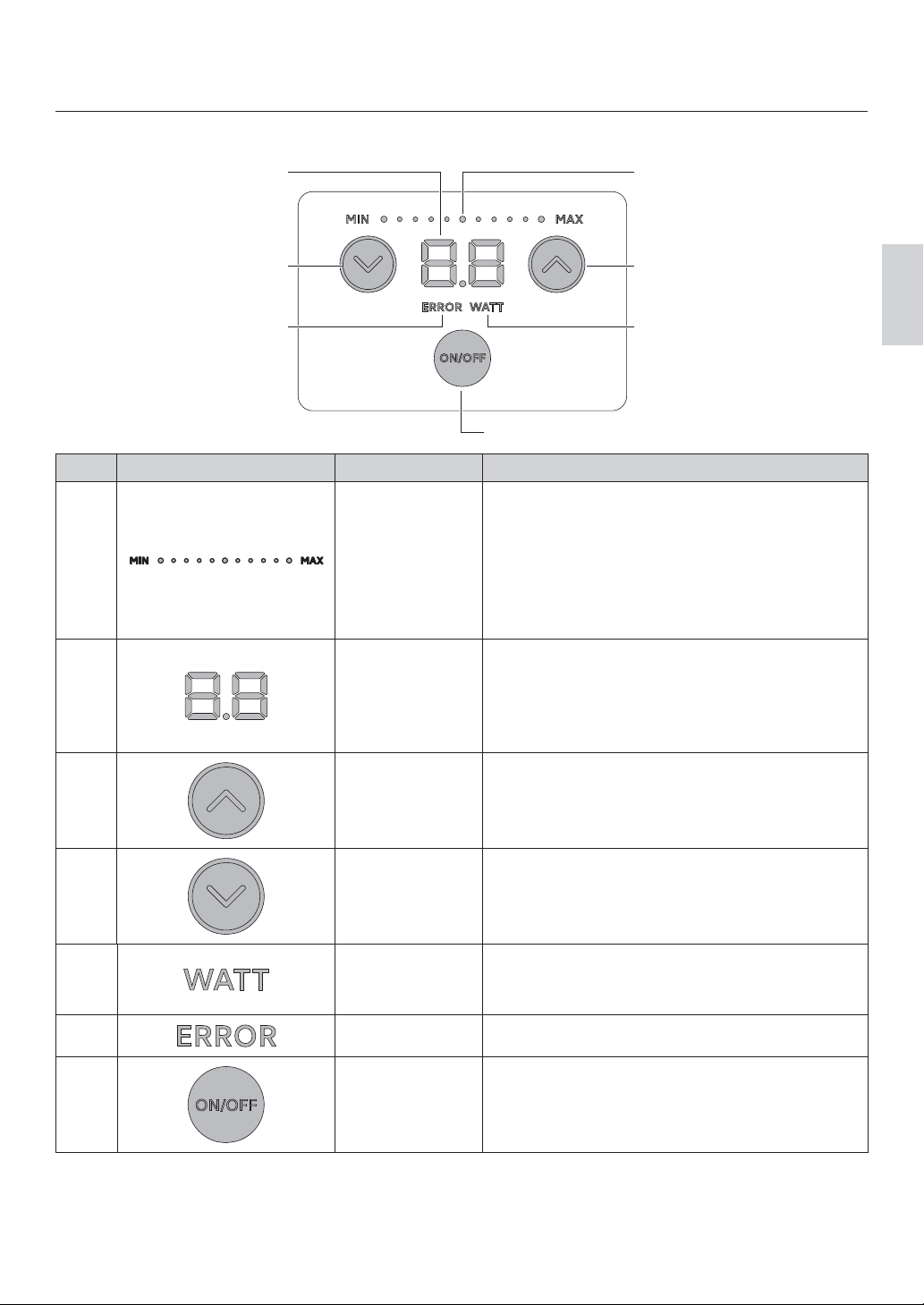
Control panel
AB
C
G
EF
D
No. indication name function
APower level
indicator
Displays the power level.
About the display.
>0,1@ OLW ĺ EOLQNLQJ ĺ OLW ĺ
EOLQNLQJ OLW ĺ EOLQNLQJ ĺ
[MAX] (lit ).
Indicates the increase or decrease
of the output level by repeatedly lighting and
blinking in 21 step variable .
BIndicator
Displays the watt, amplitude, and ERROR
values.
Indication display of amplitude. Maximum
amplitude is displayed in 50 divisions. Please
use this as a guide for cutting.
CUP key Increase the power level.
Pressing and holding the UP key raises the
output level continuously.
DDOWN key
Reduce the power level.
Pressing and holding down the DOWN key
allows you to continuously lower the Power
level.
EWATT This is displayed when W units are set.
(See "6–4 Setting the watt display and amplitude
display")
FERROR This is displayed in case of an error.
GON / OFF Key Start and stop the handpiece.

28
Product Information
Handpiece
No. name Note
1 Blade Protector Cap This cap to protect the blade from direct contact with the hand. If
the inner O-ring is damaged or lost, please use the spare O-ring
included in the package.
2Blade Please purchase replacement blades at a tool store or stationery
store.
BDC-200P angle 30rMade by NT Incorporated.
3 Set screw Screws for attaching the blade.ࠉM4 x P0.7 x L4
4 Horn This is the part where the ultrasonic vibration is output from the
handpiece.
12
34

29
English
3 Preparation before use
3–1 Connecting the main power cord
1 Make sure the main power switch is in the OFF
position. 2 Insert the main power cord into the Inlet with power
supply fuse. Then plug it into a commercial power
outlet.
3–2 Connecting the handpiece
Align the plug of the handpiece with the handpiece socket on the back of the controller and insert it.
3–3 Connecting the foot switch(optional)
When using a foot switch, align the foot switch plug with the foot switch socket and insert.
Table des matières
Autres manuels Nakanishi Coupeur


