
Multi Media Medium Kwizoke Manuel utilisateur


IMPORTANT PAGES
Quick assembly guide 3
Karaoke song quick play 5
Karaoke 19
Katchyphrases 12
Hi Lo Cards 13
ingo 14
Gangster Pursuit / Camel Racer 15
Kwizoke Talking Quiz 11
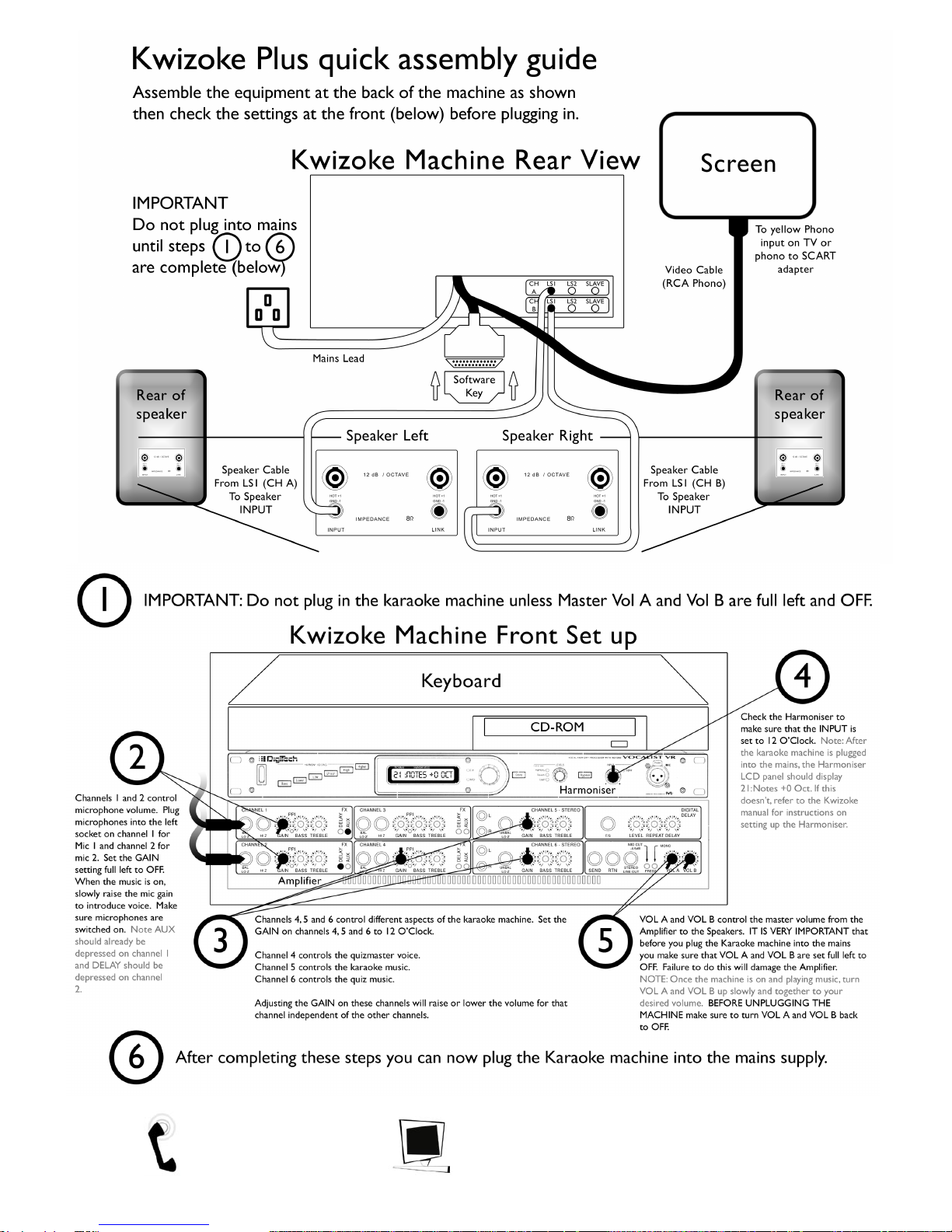
Tel: UK (01204) 387410 http://www.mmm.co.uk 3

Tel: UK (01204) 387410 http://www.mmm.co.uk 4

Karaoke song quick play
Once you ha e gone through the Kwizoke Plus quick assembly guide and powered up the
machine, the Karaoke software will load. You should see the following screen:
This is the Karaoke song selection screen. There are different ways of searching for a song but
here we will co er two. For more information on finding songs, see the Karaoke section.
Searching for a Karaoke song by i le
To search for a song by title, you simply start to type the title of the song into the keyboard.
After three of four letters ha e been typed, the screen will display a list of songs which match
the letters you typed.
If no song appears, we do not ha e that song. Press the backspace key to go back some
letters and try again, or a different song. Please refer to your 'Karaoke song listing by title' to check
exact spellings of song names as this will make a difference.
Searching for a Karaoke song by ar is
To search for a song by artist you must use the cursor keys to select the at sign and
press return . You can now enter the name of the artist by typing in the keyboard. After
three of four letters ha e been typed the screen will display a list of artists which match the
letters you ha e typed. Please refer to your 'Karaoke song listing by artist' to check exact spellings of
artist names as this will make a difference.
Tel: UK (01204) 387410 http://www.mmm.co.uk 5

Selec ing a song
You should now be able to see the artist or song that you ha e searched for. Use the cursor
keys to mo e the arrows up and down next to your choice. Select your choice by
pressing the return key . If you ha e searched by artist you will then be gi en a list of the
songs for that artist so you can continue to use the cursor and return keys to chose and select.
If you search by ar is and are hen aken back o he A-Z menu his means here
are oo many songs from ha ar is o fi on screen. Simply ype in he firs and
second le er of he song you are looking for in o he keyboard o bring up a lis .
The song will now be loaded and ready to play. You will notice that the play button highlighted
in the diagram abo e is glowing. Press the return key to start the karaoke song.
Tel: UK (01204) 387410 http://www.mmm.co.uk 6

Once the song is playing you will notice some stars which slowly disappear. These are
indicators displaying a countdown when the song introduction finishes and the singer will start
singing.
When the words appear on screen, you will see that the singer should sing the syllables and
words when they are highlighted in Red. Additionally there is a faint melody sound for the
singer to follow.
When playing a song for the first time, it is a good idea to introduce olume from the master
olume dials gradually until you get the olume le els to what you desire.
Next, turn on a microphone plugged into Channel 1 and start to sing, gradually increasing the
Channel 1 Gain dial until you reach the olume le el of the singer oice. You should now be
set up for the rest of the session. Please note ALWAYS turn do n the Master Volume dials before
you turn off the Karaoke machine.
When the song is due to finish, a microphone will appear along with the song details. When
the song has completely finished the song play screen with appear with the gold bar at the
bottom.
Tel: UK (01204) 387410 http://www.mmm.co.uk 7

Re urning o he song selec ion menu
Once the song has finished playing and you are returned to the song play screen, you can
return to the song selection screen by using the cursor keys and press 'UP' wice. You
will then see an arrow containing 'ABC'. This indicates returning to the selection menu. Press
return when the 'ABC' appears to return to the song selection screen.
You can now repea he ins ruc ions above o find and play songs on he Karaoke
machine.
Tel: UK (01204) 387410 http://www.mmm.co.uk 8

KWIZOKE ENTERTAINMENT SYSTEM
A1200 KEYBOARD MODEL
GENERAL RULES OF OPERATION
Identify your KMS disc (The latest Kwizoke Master System disc)
Kwiz (5 weeks)
Katchyphrazes (5 weeks)
Bingo
Hi Lo Cards
To opera e:-
Simply insert the disc into the CD dri e of the Kwizoke machine [RESET] and wait for a MENU
of options to appear.
Press the or buttons to mo e the cursor o er any of the
MENU options and press
Note:- TO RESET – PRESS + + TOGETHER
The A keys are to the left and right of the space bar
Tel: UK (01204) 387410 http://www.mmm.co.uk 9
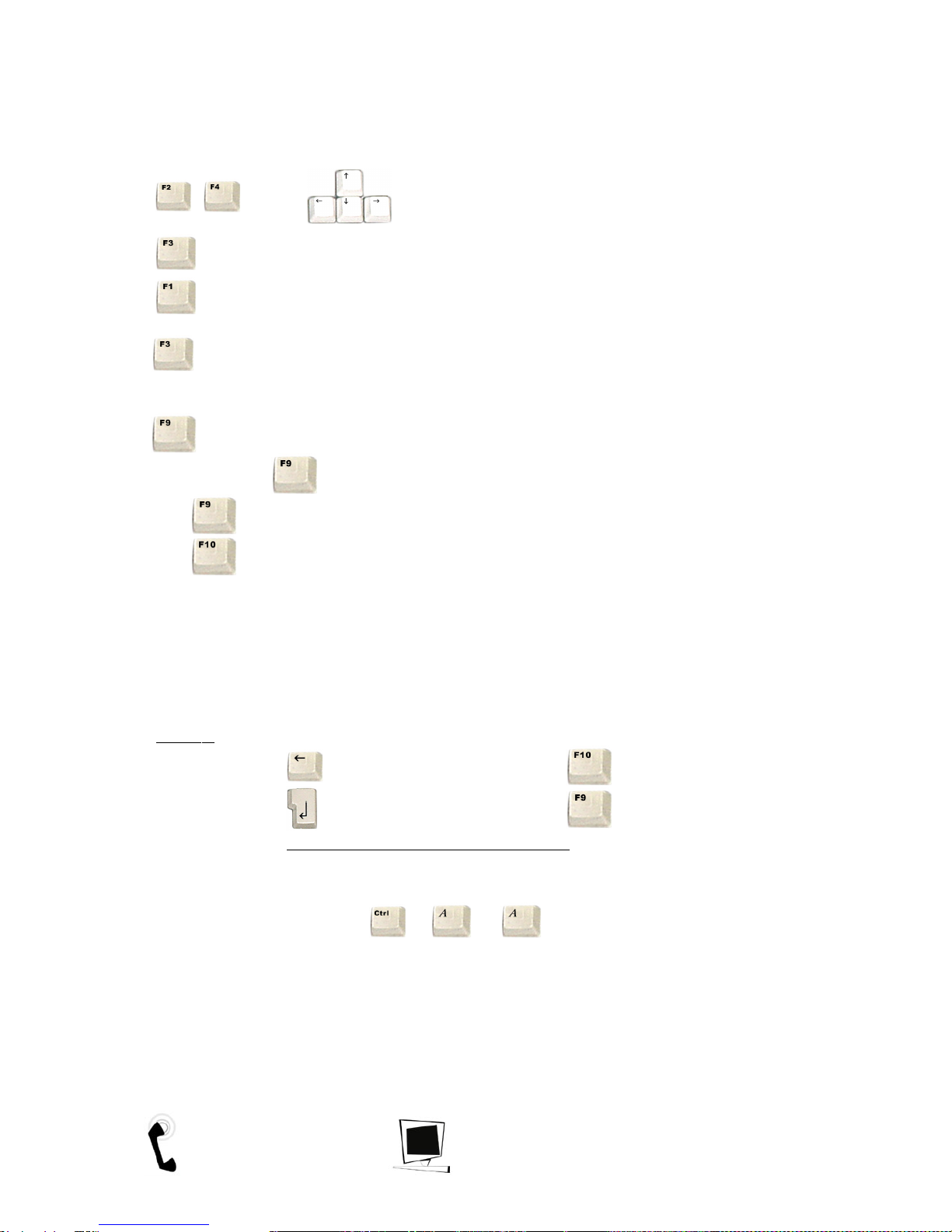
THE BUTTONS - WHAT THEY DO
or mo e the cursor around.
- Acti ate question in automatic mode continuously.
- Stop the automatic mode.
Automatic mode stops after question 20 has been asked and waits for the operator to press
to start the answers sequence.
Button – Ask a question / answer indi idually.
After pressing and while picture is shown:
= Repeat question / answer indi idually
= Select next question.
Feel free to experiment - It’s your night, and if you need more assistance, please refer to
example of keyboard at the end of this manual.
Note :-
ACKSPACE CAN E USED AS [F10]
RETURN CAN E USED AS [F9 ]
[Do not use the enter button on the numeric pad]
Note:- TO RESET – PRESS + + TOGETHER
The A keys are to the left and right of the space bar
Tel: UK (01204) 387410 http://www.mmm.co.uk 10
Ce manuel convient aux modèles suivants
1
Table des matières
Manuels Système de karaoké populaires d'autres marques


Karaoke Warehouse
Karaoke Warehouse Player 2000 Manuel utilisateur

VocoPro
VocoPro DVG-888K II Manuel utilisateur

ION
ION DISCOVER KEYBOARD USB Manuel utilisateur

The Singing Machine
The Singing Machine SMVG-620 Manuel utilisateur

Singsation
Singsation CENTER STAGE FREESTYLE Manuel utilisateur

RSQ
RSQ NEO K-2 Manuel utilisateur


