MSSC Smart-Jet BLUE Manuel utilisateur

Contents
1. Introduction .............................................................................................................................4
2. Specifications..........................................................................................................................5
3. Keyboard Definition ................................................................................................................5
4. Layout......................................................................................................................................6
5. Installation...............................................................................................................................7
6. External sensor connection...................................................................................................11
7. Feature menu.........................................................................................................................12
8. First run of your Smart-Jet.....................................................................................................13
9. Message.................................................................................................................................13
10. Operate ..................................................................................................................................14
10.1. Install Ink Cartridge...........................................................................................................14
10.2. Stop printing .......................................................................................................................17
10.3. Start printing.......................................................................................................................17
10.4. Purge..................................................................................................................................17
11. Settings ..................................................................................................................................17
11.1. Speed.................................................................................................................................17
11.2. Resolution...........................................................................................................................17
11.3. Density ...............................................................................................................................18
11.4. Printing Delay.....................................................................................................................18
11.5. Counter...............................................................................................................................19
11.6. Logo ...................................................................................................................................20
11.7. Time ...................................................................................................................................20
11.8. Date....................................................................................................................................20
11.9. Font....................................................................................................................................21
11.10. Print Side............................................................................................................................21
11.11. Sensor................................................................................................................................22
11.12. Wi-Fi...................................................................................................................................22
11.13. Random Jetting ..................................................................................................................22
11.14. Direction.............................................................................................................................23
11.15. Name..................................................................................................................................23
11.16. Print Mode..........................................................................................................................23
11.17. Shift Code...........................................................................................................................24
11.18. Rollover hour......................................................................................................................24
11.19. Printer Information..............................................................................................................24
11.19.1. Product Count.....................................................................................................................25

11.19.2. Ink Level.............................................................................................................................25
11.20. Default................................................................................................................................25
12. Update firmware.....................................................................................................................26
13. Important handling cautions ..................................................................................................27
14. Product Warranty...................................................................................................................27
15. Ink Cartridges Maintenance ..................................................................................................28
15.1. Printhead cleaning:.............................................................................................................28
15.2. Storage procedure:.............................................................................................................30
16. Appendix ...........................................................................................................................................................31
16.1 Accessories & Parts .............................................................................................................................31

MSSC, LLC Collinsville, IL USA Tel: 618-343-1006 Fax: 618-343-1016 80100 Rev
28816 www.msscllc.com
4
1.Introduction
Smart-Jet Industrial Inkjet Printer is provided and branded by MSSC, LLC. This compact and
lightweight printer is designed for ease of operation in the packaging industry with multiple
features:
WIFI connection via smartphones and tablets using Android and iOS operating systems
USB keyboard direct connection without PC
SD card slot built in for easy upgrading of firmware
Built in photo-sensor
AUX I/O port for external sensor and photo-sensor connections
Nozzle switching and self-cleaning capabilities to extend the lifetime of the printhead
Auto system back-up and reset to secure data
Plug and print with HP45 printhead technology licensed by Hewlett Packard
Adjustable optical density (up to 5 levels)
Accept both water based and solvent based inks
Note: Smart-Jet can be controlled over Wi-Fi using Apple or Android devices. To download MSSC, LLC
App on the Apple App store, search for keywords MSSC or SmartJet. For the Apple device the username
to log into the app is Administrator and the password is mssc@smartjet. For Android devices, the
username to log into the app is Administrator and the password is mssc@smartjet2012.

MSSC, LLC Collinsville, IL USA Tel: 618-343-1006 Fax: 618-343-1016 80100 Rev
28816www.msscllc.com
5
2.Specifications
3. Keyboard Definition
No.
Key
Meaning
1
Enter
Confirm/ save
2
ESC
Turn back to previous menu
3
Left, Right
Move the menu forward or backward
4
Up, Down
Change value
5
Shift
Upper case
6
Ctrl
Insert: Date, Time, Counter, Shift Code, Expiration date,
Advanced menu
7
Backspace
Delete character in message
8
Backspace
Reset Ink level
No.
Description
Functions
1
Model
Smart-Jet
2
Printhead
Drop-On-Demand Thermal Inkjet: TIJ2.5
3
Printing Technology
Drop-On-Demand Thermal Inkjet
4
Resolution & Print Speed
300 dpi @ 75 m/min
150 dpi @ 150 m/min
100 dpi @ 230 m/min
5
Ink Type
Water-based and solvent-based inks
6
Dimension (L x W x H)
106 mm x 53 mm x 83 mm
(4.17 inch x 2.09 inch x 3.27 inch)
7
Operation Condition
05 - 400C (41 –1040F)
8
Humidity
20 –80%
9
Net Weight
530 g or 1.16 lbs (excluding printhead cartridge)
10
Power supply
AC: 100V - 240V, 50/60Hz, 1.6A
11
Maximum power consumption
30 watts

MSSC, LLC Collinsville, IL USA Tel: 618-343-1006 Fax: 618-343-1016 80100 Rev 28816
www.msscllc.com
6
4.Layout
Skid plate
Note: For a detailed drawing including sizing, please see appendix of this manual

MSSC, LLC Collinsville, IL USA Tel: 618-343-1006 Fax: 618-343-1016 80100 Rev 28816
www.msscllc.com
7
5. Installation
Step 1: The skid plate guide

MSSC, LLC Collinsville, IL USA Tel: 618-343-1006 Fax: 618-343-1016 80100 Rev 28816
www.msscllc.com
8
Step 2: Install base clamp to the side of the conveyor
Step 3: Installing the clamps to the round bar

MSSC, LLC Collinsville, IL USA Tel: 618-343-1006 Fax: 618-343-1016 80100 Rev
28816 www.msscllc.com 9
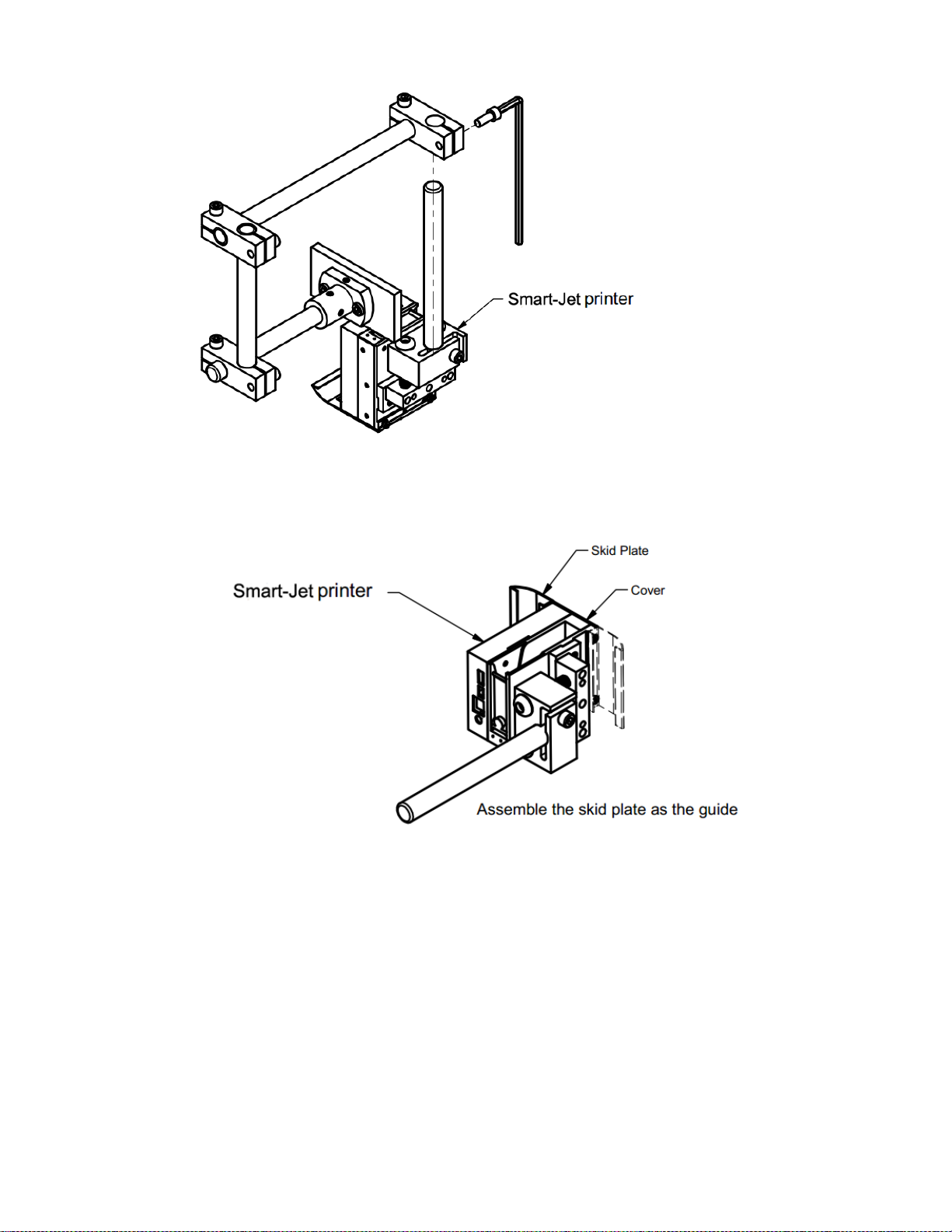
Step 4: Installing the printer, select the suitable bar length for each case
Case A
Case B

MSSC, LLC Collinsville, IL USA Tel: 618-343-1006 Fax: 618-343-1016 80100 Rev 28816
www.msscllc.com
10
Step 5: Installing the skid plate
Notes:
Push the cover plate fit to the printer when assembling the skid plate
Note: In addition to hardware
included, "Print Down Kit" part
# 80805 needs to be purchased
separately. See page 31
Autres manuels pour Smart-Jet BLUE
4
Ce manuel convient aux modèles suivants
1
Table des matières
Autres manuels MSSC Imprimante

MSSC
MSSC QM1610 Manuel utilisateur

MSSC
MSSC QM2-101 Manuel utilisateur

MSSC
MSSC Smart-Jet Plus Guide d'installation

MSSC
MSSC qm7500 Manuel utilisateur

MSSC
MSSC Smart-Jet Plus Manuel utilisateur

MSSC
MSSC QM1610 Manuel utilisateur

MSSC
MSSC Smart-Jet BLUE Manuel utilisateur

MSSC
MSSC Smart-Jet BLUE Manuel utilisateur

MSSC
MSSC QM1610 Manuel utilisateur

MSSC
MSSC Smart-Jet Plus Manuel utilisateur