
MRMC Robotic Pod Manuel utilisateur

CRANES AND RIGS | BROADCAST | HEADS & DSLR | PRODUCT PHOTOGRAPHY | RENTALS
Robotic Pod
Quick Start Guide
Product code: MRMC-1464-01

ii
Robotic Pod Quick Start Guide
Product code: MRMC-1464-01
© 2017 Mark Roberts Motion Control Ltd. All rights reserved.
No part of this publication may be reproduced, transmitted, or translated
by any means — graphical, electronic, or mechanical — including
photocopying, recording, taping, or storage in an information retrieval
system, without the express written permission of Mark Roberts Motion
Control.
Although every care has been taken to ensure that the information in this
document is accurate and up to date, Mark Roberts Motion Control
continuously strives to improve their products and may make changes to
the hardware, firmware, and software described in this document. Mark
Roberts Motion Control therefore cannot be held responsible for any
error or omission in this document.
All product names mentioned herein are the trademarks or registered
trademarks of their respective owners.
Contact information
Mark Roberts Motion Control Ltd.
Unit 3, South East Studios
Blindley Heath
Surrey
RH7 6JP
United Kingdom
Telephone: +44 (0) 1342 838000
E-mail: info@mrmoco.com (sales and general enquiries)
support@mrmoco.com (customer support)
Web: www.mrmoco.com
www.mrmocorentals.com

iii
Robotic Pod Quick Start GuideRobotic PodQuick Start Guide
Contents
Chapter 1 Quick Start..................................................................... 1
Important safety instructions ...............................................1
Power and connections................................................1
General care...................................................................1
Location .........................................................................2
Intellectual property.....................................................2
Overview .................................................................................3
Mounting positions................................................................3
Setting up the hardware ........................................................3
Connecting the cables .........................................................11
Chapter 2 Setting up the Robotic Pod System using MHC.......... 15
Home Zeroing – Pod ...........................................................16
Changing system configuration and network settings....17
Launching MHC as Admin.......................................17
Network setup ......................................................................19
Adding Pods ................................................................19
Adding the Type of Pod .............................................20
Changing a Pod’s name..............................................20
Assigning Pods to user(s) ..........................................21
Removing a Pod..........................................................21
Editing network settings on the Pod........................21
Adding users .........................................................................22
Logging in as a User ...................................................23
Testing the Head Connectivity .................................23
Triggering the camera..........................................................23
Tools tab ................................................................................24
EXPORT ROBOT SETTINGS..................................24
IMPORT ROBOT SETTINGS..................................25
Reset Robot..................................................................26
Reset Camera ..............................................................26
Remote Direct Toggle ................................................26
Reset 10-Pin ................................................................26
Change Network Quality ..........................................26
Test Network Quality ................................................27
Environment tab .................................................................27
Subsequent sessions.............................................................27

Robotic Pod Quick Start Guide
iv
Appendix 1 Troubleshooting........................................................... 30
Typical symptoms, causes, and actions .............................30
Appendix 2 FTP Setup in MHC ...................................................... 33
Appendix 3 Pod connectors ............................................................ 37
Connector pin-outs..............................................................37
Panel mount connector..............................................37
Panel mount connector..............................................38
Power In connector ....................................................38
Mains In connector ....................................................39
SDI Out Connector ....................................................39
Appendix 4 Specifications............................................................... 41

1
Robotic Pod Quick Start GuideRobotic PodQuick Start Guide
Chapter 1 Quick Start
Important safety instructions
To ensure the best from the product, please read this manual carefully.
Keep it in a safe place for future reference.
To reduce the risk of electric shock, do not remove the cover from the
unit. No user serviceable parts inside. Refer servicing to qualified
personnel.
Power and connections
This unit must be connected to a mains socket outlet with a
protective earth connection.
This unit is not disconnected from the AC power source as
long as it is connected to the wall outlet.
When not using the unit for a long period of time, ensure that
the AC power cord is disconnected from the wall outlet.
The AC wall outlet should be installed near to the unit and be
easily accessible.
Do not plug in or attempt to operate an obviously damaged
unit.
General care
Do not force switches or external connections.
When moving the unit, disconnect the mains cable and then
disconnect the long umbilical cable.
Do not attempt to clean the unit with chemical solvents or
aerosol cleaners, as this may damage the unit. Use a clean dry
cloth.
Do not use around flammable gas. All electrical equipment can
generate sparks that can ignite flammable gas.
Keep away from pets and children. The head has powerful
motors that can pinch, so take care not to get your hands
trapped in the head or cabling.

Robotic Pod Quick Start Guide
2
Keep cables tidy. Use cable ties to keep them out of harm’s way.
If you have a head with slip rings then make use of them; avoid
running any cables between the base and the rotating head or
camera.
Location
Installation of this unit should be away from sources of excessive heat,
vibration, and dust.
Intellectual property
This product includes confidential and/or trade secret property.
Therefore, you may not copy, modify, adapt, translate, distribute, reverse
engineer, or decompile contents thereof.

Robotic Pod Quick Start Guide
3
Overview
Thank you for using the Robotic Pod camera head from Mark Roberts
Motion Control (MRMC). The Pod head is designed for reliable day-in,
day-out use in professional studio and Outside Broadcast environments.
The versatility of the Pod head makes it suitable for live action, stills, and
time-lapse applications.
You can use the Ethernet connection on the Pod head to connect directly
to a PC running Multi-Head Controller (MHC) software.
Mounting positions
Robotic pod - Overslung Robotic pod - Underslung
The tilt axis allows 340 degrees of movement preventing the Pod to look
straight up in underslung position and straight down in overslung
position.
Setting up the hardware
1. Mount the Pan Tilt Arm (PTA) onto a heavy-duty scaffolding pole
by securing the PTA to the pole using the two scaffolding clamps.

Robotic Pod Quick Start Guide
4
Ensure the nuts on the clamps are tight and the arm cannot twist on
the scaffolding plate.
Note
Ensure the mounting bar can take the weight without stress and that
the space on the bar is free to allow full movement of the pod when
panning without hitting any obstacles. The maximum weight of the
PTA system is 30kg but due to motion and, if mounted outdoors
possible high winds, the bar should be able to support at least 100kg.
The torque setting of the screws in the scaffolding clamps is
159.1Nm. Always ensure there is enough thread going through the
nyloc nut.
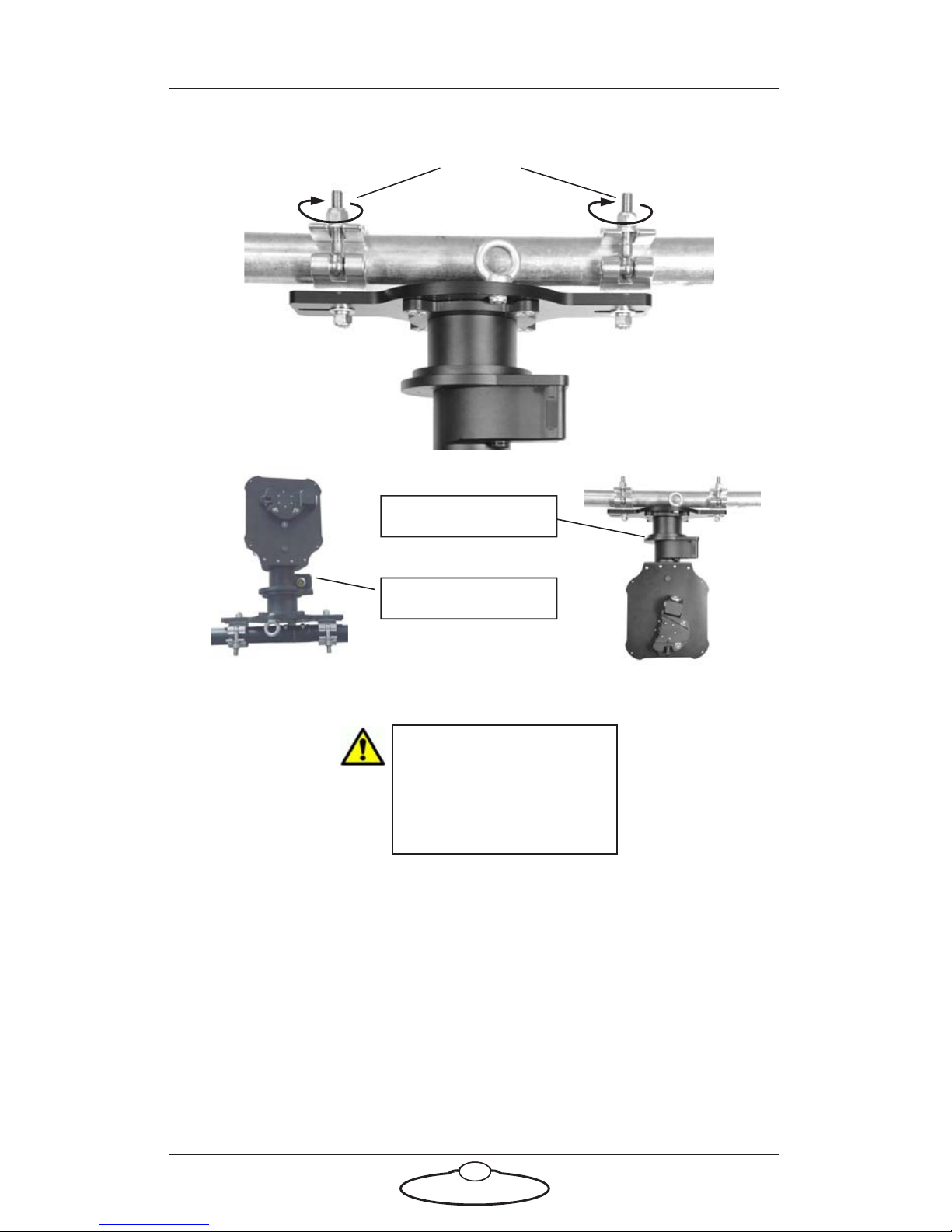
Nuts
PTA underslung
PTA overslung
If the head is going to be
used for target tracking,
then ensure that the PTA
is perfectly levelled to the
ground using a spirit level.
Robotic Pod Quick Start Guide
5

Note
Safety cables should be wound up to keep them short:
Robotic Pod Quick Start Guide
6
2. Attach the safety cable around the bar, through at least one eyelet,
and through the pan safety hole (near the connector socket).
Remove any excess slack by making extra loops around the bar.
Then join with a carabiner and screw the carabiner shut.
In the event of a fall, the falling item has less opportunity
to get speed before the cable catches it.
This prevents them catching on any moving parts.
Pan safety hole
Eyelet Wind any excess
cable around
scaffolding pole
Carabiner screwed shut
Autres manuels pour Robotic Pod
1
Ce manuel convient aux modèles suivants
1
Table des matières
Autres manuels MRMC Accessoires pour appareils photo

MRMC
MRMC MRMC-1502-04 Manuel utilisateur

MRMC
MRMC MRMC-1488-00 Manuel utilisateur

MRMC
MRMC NUCLEUS-M LENS MOTOR Manuel utilisateur

MRMC
MRMC Pan Bars Manuel utilisateur

MRMC
MRMC MRMC-2318-00 Manuel utilisateur

MRMC
MRMC MRMC-1166-02 Manuel utilisateur

MRMC
MRMC MRMC-2016-00 Manuel utilisateur

MRMC
MRMC Robotic Pod Manuel utilisateur

MRMC
MRMC MRMC-1096-00 Manuel utilisateur

MRMC
MRMC SFH-50 Manuel utilisateur


