MotoCrane RADICAL INS 2 Manuel utilisateur

RADICAL INS 2 Advanced Stabilization Operation Manual v1.0
NOVEMBER 2021

To minimize risk of serious injury, death or damage,
before using MotoCrane RADICAL INS 2, all
drivers and operators must read this Operation
Manual and all on-product labels.
All practices and procedures stated herein are
required for the proper and safe operation of
the RADICAL INS 2.
If there are any questions, please contact
MotoCrane Support at
support@motocrane.com.
Keep this Operation Manual near your RADICAL INS
2 for future reference.
Safety Signal Words
This manual and the safety labels attached to this equipment utilize signal words that
signify safety hazards with different levels of severity. The words are preceded by a
triangle signifying that these are safety related. Below are the words used and the
definitions for these words:
●indicates a hazardous situation which, if not avoided, could result in
death or serious injury or damage
●indicates a hazardous situation which, if not avoided, could result in
minor or moderate injury or damage
●is used to address practices not related to physical injury
The terms IMPORTANT and NOTE are also used to describe ideas for better and more
ecient use of the RADICAL INS 2.
2

Table of Contents
Safety Signal Words 2
Table of Contents 3
Before the First Drive 5
IMPORTANT PRODUCT AND SAFETY INSTRUCTIONS 6
Safety 6
IMPORTANT: Restricted Use Statement 6
Disclaimer and Limitations of Liability 6
Limited Warranty 7
Intellectual Property 7
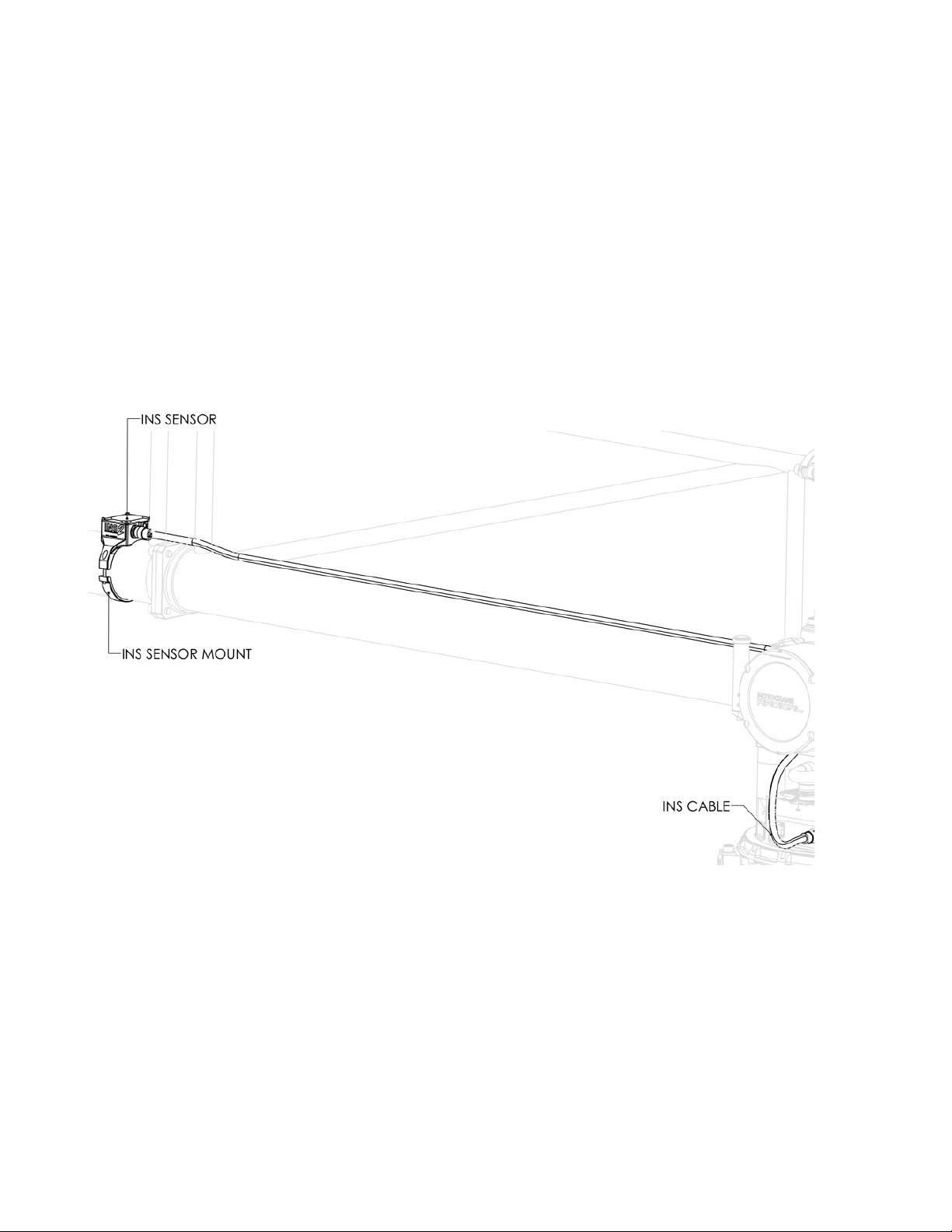
Parts of the RADICAL INS 2 8
RADICAL INS 2 System Overview 8
Setting up RADICAL INS 2 Advanced Stabilization 9
Installing the RADICAL INS 2 Sensor 9
Electrical Connections 10
Startup Sequence and Configuration 10
RADICAL INS 2 Control Panel Layout 12
Status 12
Performance Monitoring Gauges 12
Tuning 13
Basic RADICAL INS 2 Tuning 13
Recommended Initial Tuning Values 13
Description of Settings 13
STRENGTH 13
STIFFNESS 13
FILTER 13
Understanding INS Advanced Stabilization 14
High-frequency vs. High-amplitude 14
Optimizing RADICAL INS 2 Tuning 15
Passive Isolator Tuning 15
STRENGTH/STIFFNESS Ratio 15
Oscillation vs. Performance 15
Recommended- Flowcine Tranquilizer 16
Range of Motion Limits in RADICAL INS 2 Stabilization Mode 16
RADICAL INS 2 Restrictions 17
Useful Tips 18
Known Hazards 19
Transporting the RADICAL INS 2 20
Troubleshooting RADICAL INS 2 Advanced Stabilization 20
Diagnosing with LEDs 20
Diagnosing with GUI Warning and Error Messages 20
3

Before the First Drive
Do the following before using RADICAL INS 2 Advanced Stabilization for the first time.
1. Read this entire Operation Manual
2. Read the Warranty in the Terms of Sale
3. Watch the Video Tutorials at www.motocrane.com/support
4. Recommended: Attend MotoCrane Training for in-person demonstration
5

IMPORTANT PRODUCT AND SAFETY INSTRUCTIONS
Safety
The RADICAL INS 2 Advanced Stabilization upgrade is not a toy and can cause serious
injury, death or damage if not used properly. You must exercise caution during use of the
RADICAL INS 2 to ensure a safe filming environment for everyone. This Operation Manual
describes safe operation and should be read in conjunction with the applicable online
training videos or additional in-person training.
IMPORTANT: Restricted Use Statement
The RADICAL INS 2 Advanced Stabilization upgrade must only be used by trained operators
18 years of age or older when properly mounted on an appropriate motor vehicle driven on a
closed course with paved or finished surfaces (for example, asphalt, concrete, or tarmac)
or moderate off-road (for example, gravel or dirt roads) conditions. In addition, the speed
and acceleration of the motor vehicle must not exceed system ratings for RADICAL INS 2
as set forth in this Operation Manual.
Do not modify or adjust the RADICAL INS 2 assembly. The RADICAL INS 2 has been
calibrated before it is shipped to you. No modification or adjustment to the RADICAL INS 2
is allowed without the express written approval of MotoCrane, LLC.
Disclaimer and Limitations of Liability
You agree that you are responsible for your own conduct and any content created while
using the RADICAL INS 2, and for any consequences thereof. You agree to use this product
only for purposes that are proper and in accordance with local laws, regulations or other
legal requirements.
You also agree:
1. Any part of this disclaimer is subject to change without prior notice. Refer to
www.motocrane.com/support for the latest version.
2. MotoCrane, LLC reserves the right of final interpretation of this disclaimer.
3. MotoCrane, LLC has no control over the use, setup, assembly, modification or misuse of
the RADICAL INS 2, and therefore no liability shall be assumed or accepted by
MotoCrane, LLC for any resulting damage, death, or injury incurred directly or indirectly
from the use of the RADICAL INS 2. By the act of use, setup or assembly, the operator
accepts all resulting liability.
6

Limited Warranty
The RADICAL INS 2 has a limited manufacturer's warranty on parts and assembly. See the
Terms and Conditions of Sale for your RADICAL INS 2 for a complete description of this
limited warranty. This Limited Warranty is incorporated by reference into this Operation
Manual.
Intellectual Property
MotoCrane™, and are trademarks of MotoCrane, LLC. You may not use the
trademarks of MotoCrane, LLC without express written permission. All rights reserved.
7

Parts of the RADICAL INS 2
●1 pc RADICAL INS 2 Sensor + mount
●1 pc RADICAL INS 2 Cable
●2 pc M4 x 35mm SHCS
RADICAL INS 2 System Overview
8

Setting up RADICAL INS 2 Advanced Stabilization
Follow these steps to set up and configure your RADICAL INS 2 Advanced Stabilization.
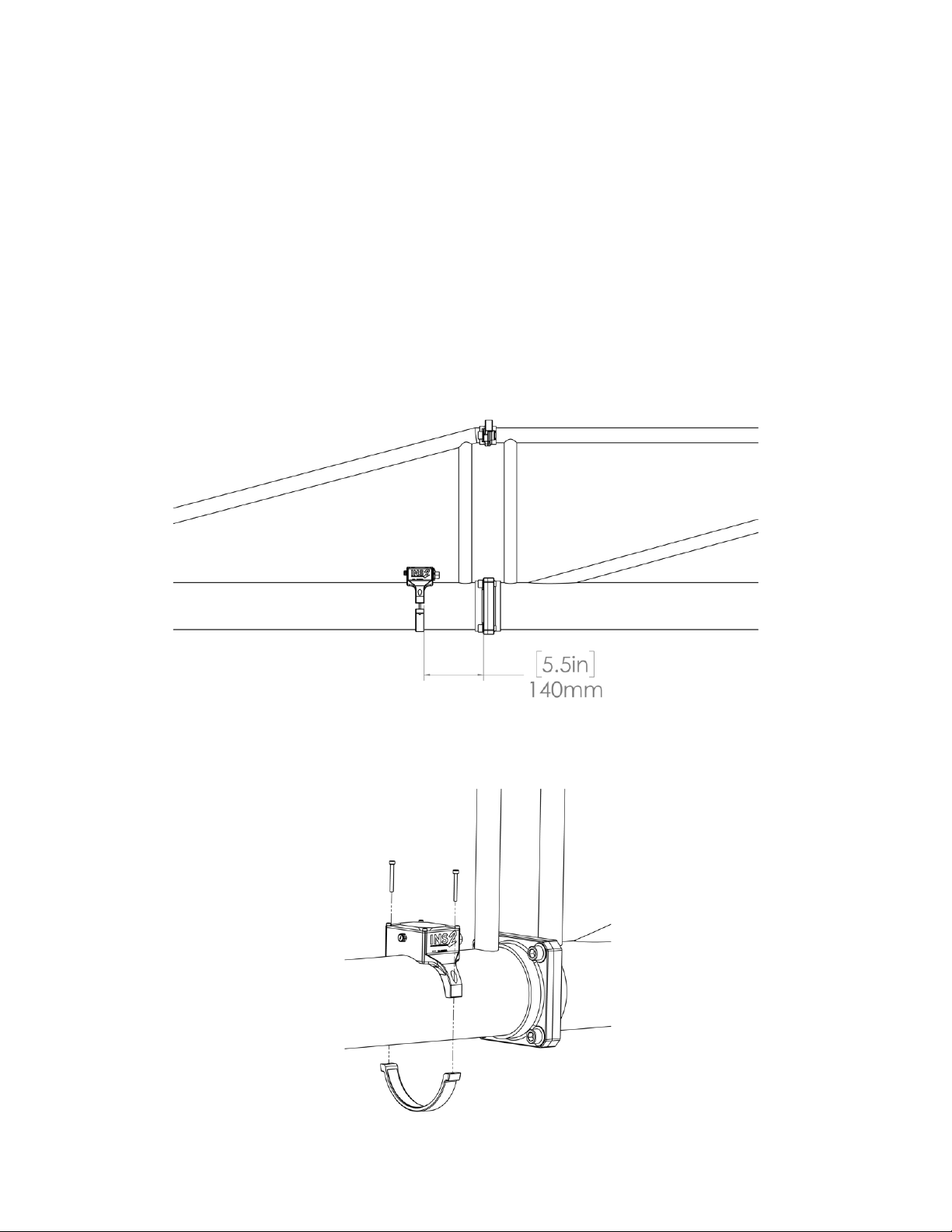
1. Installing the RADICAL INS 2 Sensor
1. The RADICAL INS 2 Sensor will be placed on the front boom section that is closest
to the middle boom. Loosely place the unit on the boom as shown, with about
140mm between the RADICAL INS 2 Sensor and the boom mounting features (this
dimension is not critical, but should be +/- 5 mm).
2. Fasten the unit to the boom using the provided M4 fasteners - make sure the top of
the housing is horizontal (this is not critical, but the more accurate it is, the better
the performance will be - visual alignment should be sucient)
9

2. Electrical Connections
1. Connect the RADICAL INS 2 Cable between the RADICAL INS 2 Module and the
‘SERIAL’ connector on the RADICAL Base. Secure the RADICAL INS 2 Cable to the
fulcrum leg, handle and the boom tube using a velcro strap or elastic tie, so it does
not get caught or snagged. Make sure that the cable will not be pulled or strained
during full upwards and downwards Lift Axis movements.
3. Startup Sequence and Configuration
1. Make sure that the full RADICAL system is set up according to the instructions in the
RADICAL Operation Manual, and that the proper payload and counterweight are
installed and correctly balanced
RADICAL INS 2 setup/configuration should occur only after complete RADICAL setup, with all
booms, payload and counterweight attached. See RADICAL Operation Manual for more information.
Make sure the safety pin (Labeled “Remove Before Flight”) is removed from the RADICAL
Fulcrum before attempting to drive or move the system - this can be done at any later stage before
movement is attempted, but DO NOT FORGET!
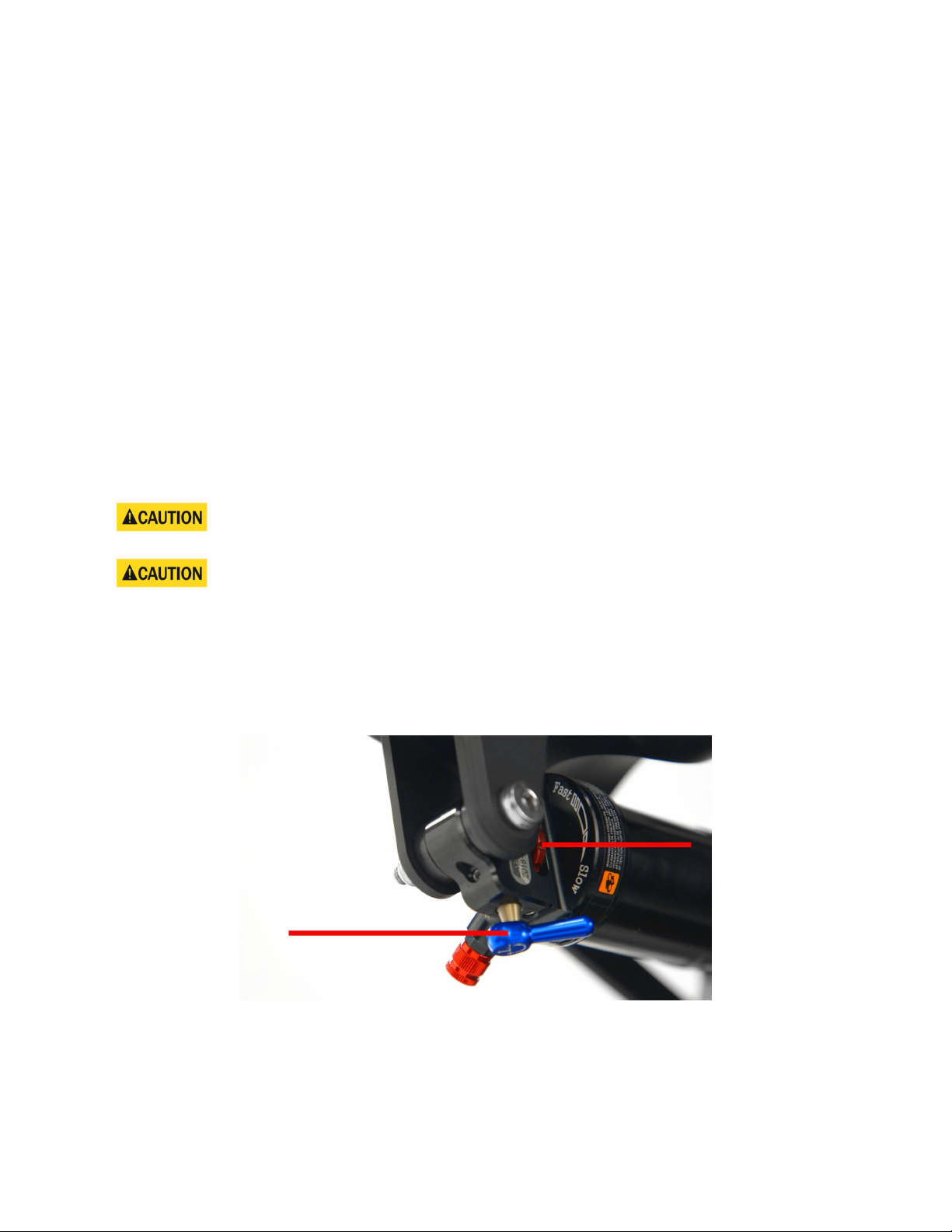
2. Confirm that the Z-Axis Air Shock damping is adjusted to 100% “Slow” (fully
damped), and that the blue lockout is in the “-” (disengaged) position
3. Power up RADICAL (Turn ON the SYSTEM POWER switch on RADICAL PSU)
4. On the Command Console, navigate to the INS2 Control Panel and wait (up to 15
seconds) for the INS 2 sensor to come online (status indications will turn green, and
the graphs will be showing real-time data) - if data is not present, but the sensor is
connected, try to power cycle again
10
Table des matières
Autres manuels MotoCrane Accessoires pour appareils photo