Mitel MiVoice Business EX Controller Mode d’emploi

MiVoice Business
EX Controller Installation and Administration
Guide
Release 9.1
March 2021

Notices
The information contained in this document is believed to be accurate in all respects
but is not warranted by Mitel Networks™ Corporation (MITEL®
.The information is
subject to change without notice and should not be construed in any way as a commitment
by Mitel or any of its affiliates or subsidiaries. Mitel and its affiliates and subsidiaries
assume no responsibility for any errors or omissions in this document. Revisions of this
document or new editions of it may be issued to incorporate such changes. No part of this
document can be reproduced or transmitted in any form or by any means - electronic or
mechanical - for any purpose without written permission from Mitel Networks Corporation.
Trademarks
The trademarks, service marks, logos and graphics (collectively “Trademarks”)
appearing on Mitel's Internet sites or in its publications are registered and
unregistered trademarks of Mitel Networks Corporation (MNC) or its subsidiaries
(collectively "Mitel") or others. Use of the Trademarks is prohibited without the
express consent from Mitel. Please contact our legal department at [email protected]
for additional information. For a list of the worldwide Mitel Networks Corporation
registered trademarks, please refer to the website:http://www.mitel.com/trademarks.
®,™ Trademark of Mitel Networks Corporation
© Copyright 2021, Mitel Networks Corporation
All rights reserved

Contents
1 About this Guide.................................................................... 5
2 About EX Controller...............................................................7
2.1 Overview............................................................................................................ 7
2.2 EX Controller Architecture................................................................................. 7
2.3 User Interfaces.................................................................................................. 9
2.4 Supported Hardware Configuration................................................................. 13
2.4.1 Sample Configuration............................................................................. 13
2.4.2 Optional Accessory................................................................................. 14
2.5 Models and Part Numbers...............................................................................14
2.6 Specifications................................................................................................... 15
2.6.1 Operating Environment........................................................................... 15
2.6.2 Storage Temperature.............................................................................. 15
2.6.3 Dimensions and Weight..........................................................................15
2.6.4 Connection Interfaces and LEDs............................................................15
2.6.5 Power and Grounding.............................................................................18
2.6.6 Slots Order..............................................................................................18
2.7 Hardware Interface Comparison of EX with other 3300 ICP Controllers......... 19
3 Hardware Installation........................................................... 21
3.1 Overview.......................................................................................................... 21
3.2 Package Checklist........................................................................................... 22
3.3 Requirements...................................................................................................22
3.3.1 Location...................................................................................................22
3.3.2 Wiring...................................................................................................... 22
3.3.3 Tools and Equipment.............................................................................. 23
3.4 Installation Checklist........................................................................................ 23
3.5 Cleaning Instructions....................................................................................... 24
3.6 Installing the EX Controller..............................................................................24
3.7 Installing Telephony Cards.............................................................................. 25
3.8 Cabling............................................................................................................. 27
4 Software Installation............................................................ 27
4.1 Overview.......................................................................................................... 27
4.1.1 PC Requirements....................................................................................28

4.2 Prerequisites.................................................................................................... 28
4.3 Accessing the EX Controller Deployment Tool................................................28
4.4 Updating the EX Controller Deployment Tool..................................................30
4.5 Running the EX Controller Deployment Tool to Install the MiVoice Business
Virtual Machine.......................................................................................................31
4.6 Post-Installation Tasks..................................................................................... 39
4.6.1 Default Passwords.................................................................................. 39
4.6.2 Log into Server Manager........................................................................39
4.6.3 Licensing the MiVoice Business system.................................................40
4.6.4 Log into the MiVoice Business System Administration Tool................... 41
4.6.5 Log into the EX Controller Web GUI...................................................... 44
4.6.6 Program the MiVoice Business System..................................................46
4.6.7 Trunk Configuration................................................................................ 46
5 Maintenance.......................................................................... 49
5.1 Software Upgrade............................................................................................ 49
5.1.1 Prerequisite............................................................................................. 50
5.1.2 Procedure................................................................................................50
5.2 Backup and Restore........................................................................................ 52
5.2.1 Backup and Restore Using Server Manager..........................................52
5.2.2 Backup and Restore Using MiVoice Business System Administration
Tool................................................................................................................... 53
5.3 Field Replaceable Units...................................................................................53
5.3.1 Telephony Cards..................................................................................... 54
5.4 Change IP Address of the EX Controller Web GUI.........................................56
5.5 Configure the Server Using Server Console................................................... 58
6 Troubleshooting....................................................................66
6.1 System Software..............................................................................................66
6.2 Reset/Default Button........................................................................................73
6.2.1 Partial Reset........................................................................................... 73
6.2.2 Factory Reset..........................................................................................76
6.3 Reset the System Administration Tool Password............................................ 80
7 Appendix A: Assigning a Static IP Address to the EX
Controller Deployment Tool Manually................................... 80
8 Appendix B: Programming an R2 Trunk............................ 87

About this Guide
1 About this Guide
The EX Controller Installation and Administration Guide is intended for certified MiVoice
Business technicians who are installing, upgrading, maintaining, and troubleshooting the
Mitel® MiVoice Business software deployed on an EX Controller.
What’s new
Table 1: Issue 1.0
Feature/Enhancement Document Updates Location
individual trunk access is not s
upported as ISDN, T1, and FXO
trunks.
On the EX platform, individual trunk access
is not supported as ISDN, T1, and FXO tr
unks are not assigned trunk numbers when
programmed.
Trunk Configuration
Manually mount a software blade Added a procedure to manually mount a so
ftware blade iso file on Server Manager for
an upgrade.
Mount Software Blade on Server
Manager Manually
Programming an R2 Trunk on an
EX Controller Added an appendix to describe
the procedure for programming
an R2 Trunk on an EX
Controller.
Programming an R2 trunk
Resolve a mismatch in passwo
rds Added information on how
to resolve a mismatch in
passwords between the MiVoice
Business system and the EX
Controller.
Troubleshooting
Logs
Added more information
about the logs available for
troubleshooting EX issues.
Troubleshooting
Related Documents
Document Title Description Location
General Information Guide Provides an overview of the MiVo
ice Business system.
Document Center
Troubleshooting Guide Provides troubleshooting instruction
s related to MiVoice Business.
Document Center
5EX Controller Installation and Administration Guide

About this Guide
Document Title Description Location
MiVoice Business Migration Guide
lines
Provides guidelines for preparing an
d migrating your MiVoice Busines
s system to MiVoice Business Rel
ease 9.0 or later, or to another pla
tform.
Document Center
EX Controller and GX Gateway Saf
ety Instructions
Provides basic installation informat
ion, necessary for the proper and sa
fe functioning of this equipment.
Document Center
MiVoice Business Engineering Gui
delines
Provides guidelines for planning an
installation of a MiVoice Business C
ommunications Platform.
Document Center
MiVoice Business Security Guidel
ines
Provides guidelines for secure deplo
yment and secure operation of the
MiVoice Business (MiVoice Business
) system.
Document Center
Ethernet Twisted Pair Cabling Plant,
Power and Grounding Guidelines
Provides information about network
cabling and guidelines for twisted pa
ir cabling installation.
Document Center
Mitel IP Sets Engineering Guidelines Provides guidelines for individuals
who are planning for the installation
of Mitel IP phones.
Document Center
Network Engineering for IP Telep
hony
Provides guidelines that should be
considered prior to deploying IP pho
nes, such as network design, QoS
mechanisms and related protocols.
Document Center
Contacting Mitel Technical Support
Keep the following information handy when you contact the Mitel Technical Support:
•MiVoice Business software version installed or trying to install
•DGW firmware version
•EX Controller Deployment Tool version number or the exdeploy zip file (exdeploy-
x.x.x.x.zip) version number
•Product serial number
•Nature of the problem
•What you were doing with the application when the problem occurred
•Troubleshooting results
For information about contacting Mitel Technical Support:
1. Go to Mitel MiAccess, and in the left navigation pane, click InfoChannel.
2. In the Select Infochannel drop-down, click Mitel - Worldwide.
3. In the left navigation pane, click Services and Support > Support Services.
4. Under Support Services, click Technical Support.
EX Controller Installation and Administration Guide 6

About EX Controller
5. Under Technical Support, click Contacting Mitel Technical Support.
The Contacting Mitel Technical Support page is displayed that describes various ways
to contact Mitel Technical Support.
2 About EX Controller
2.1 Overview
The EX Controller is a hardware platform that supports the MiVoice Business call
processing software. The EX Controller supports up to 1400 IP users and provides
analog capabilities of up to 28 Foreign Exchange Subscriber (FXS) or Foreign Exchange
office (FXO) ports or 8 T1/E1 ports.
Important:
The architecture and deployment of the EX Controller is different from MiVoice
Business 3300 Integrated Communication Platform (ICP) controllers. Strictly
follow the deployment procedures provided in this document to avoid issues with
deployment.
2.2 EX Controller Architecture
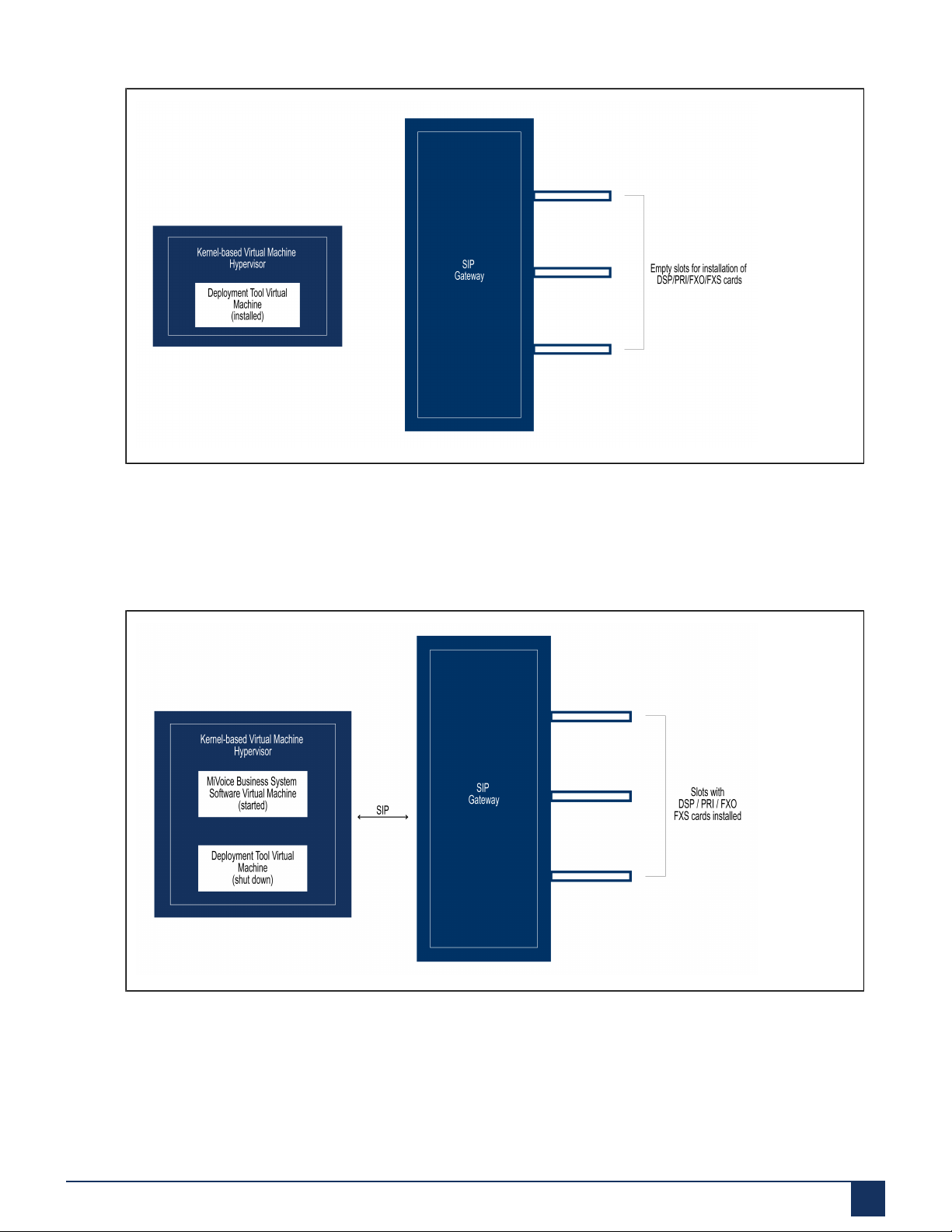
The EX Controller is shipped from the factory with the Deployment Tool installed as a
virtual machine on a Kernel-based Virtual Machine (KVM) hypervisor.
The following is a graphical representation of the EX Controller (factory) architecture.
7EX Controller Installation and Administration Guide

About EX Controller
The Deployment Tool is a web-based application that is used for deploying the MiVoice
Business virtual machine on the EX Controller.
The following is a graphical representation of the EX Controller architecture after
deploying the MiVoice Business system software.
After the deployment, the controller shuts down the Deployment Tool virtual machine
and starts the MiVoice Business virtual machine. The MiVoice Business virtual machine
provides access to the MiVoice Business system software through a browser-based
interface called the MiVoice Business System Administration Tool. The System
Administration Tool is used for programing the MiVoice Business system. The SIP
EX Controller Installation and Administration Guide 8

About EX Controller
Gateway facilitates the communication between PRI/FXO/FXS cards and the MiVoice
Business system (call server). For more information about the MiVoice Business system,
see the General Information Guide.
2.3 User Interfaces
The EX Controller has the following user interfaces:
•Deployment Tool
•Server Manager
•MiVoice Business System Administration Tool
•Mitel Configuration Wizard (MiCW)
•EX Controller Web GUI
Deployment Tool
The Deployment Tool is a web-based application that is used for deploying the MiVoice
Business system software on the EX Controller. The Deployment Tool is available during
the deployment.
Figure 1: Deployment Tool Home Page
Server Manager
Server Manager is a web-based application that allows you to perform administrative
tasks on the MiVoice Business system. Sever Manager is available after the deployment.
9EX Controller Installation and Administration Guide

About EX Controller
Figure 2: Server Manager Home Page
MiVoice Business System Administration Tool
The MiVoice Business System Administration Tool is a web-based application that is
used for programming the MiVoice Business system (call programming). The MiVoice
Business System Administration Tool is available after the deployment.
EX Controller Installation and Administration Guide 10
Autres manuels pour MiVoice Business EX Controller
1
Table des matières
Autres manuels Mitel Contrôleurs

Mitel
Mitel MiVoice Office 400 Guide de l'utilisateur

Mitel
Mitel SmarT-1 EuroRoute Mode d'emploi

Mitel
Mitel SX-200 Manuel utilisateur

Mitel
Mitel MiVoice Business SMB Controller Guide de l'utilisateur

Mitel
Mitel Navigator 3300 ICP Guide de démarrage rapide

Mitel
Mitel MiVoice Business EX Controller Manuel utilisateur

Mitel
Mitel SMarT-1 FBC Mode d'emploi

Mitel
Mitel Smart-T Guide d'installation

Mitel
Mitel MiVOICE BUSINESS Mode d’emploi

Mitel
Mitel MiVoice Office 400 Guide de l'utilisateur