Mircom OpenBAS-HV-NX4AO Manuel utilisateur

Installation Manual LT-6632 Rev. 0
February 2018
Analog Output Expansion
OpenBAS-HV-NX4AO


3
Table of Contents
1.0 Introduction 6
1.1 OpenBAS-HV-NX4AO Analog Output Expansion .......................................................... 6
1.2 Features ......................................................................................................................... 6
2.0 Overview 7
2.1 OpenBAS-HV-NX4AO Components .............................................................................. 7
3.0 Installation 8
3.1 Parts of the Enclosure .................................................................................................... 8
3.2 Controller Board Connections ........................................................................................ 11
3.3 Installing Accessories .................................................................................................... 11
3.4 Voltage Input Selection Jumper ..................................................................................... 13
3.5 USB ................................................................................................................................ 14
3.6 Reset and Download Buttons ........................................................................................ 14
3.7 Optional Battery ............................................................................................................. 14
3.8 Enclosure Dimensions ................................................................................................... 15
3.9 Assembly ....................................................................................................................... 16
3.10 Mounting the Enclosure ................................................................................................. 17
4.0 Field Wiring 19
4.1 Wiring the Terminals ...................................................................................................... 19
4.2 Power Supply Connection .............................................................................................. 19
4.3 Analog Outputs .............................................................................................................. 20
4.4 Field Bus Connection and OpenBAS-ACC-DB9 ............................................................ 22
4.5 Networking ..................................................................................................................... 22
4.6 Circuit Board LEDs ........................................................................................................ 23
5.0 Specifications 24
6.0 Warranty and Warning Information 25

4
List of Figures
Figure 1 Parts of the enclosure .................................................................................................... 8
Figure 2 Tabs on enclosure .......................................................................................................... 9
Figure 3 Lift tabs and remove circuit board .................................................................................. 10
Figure 4 Board connections ......................................................................................................... 11
Figure 5 COM1 port ...................................................................................................................... 12
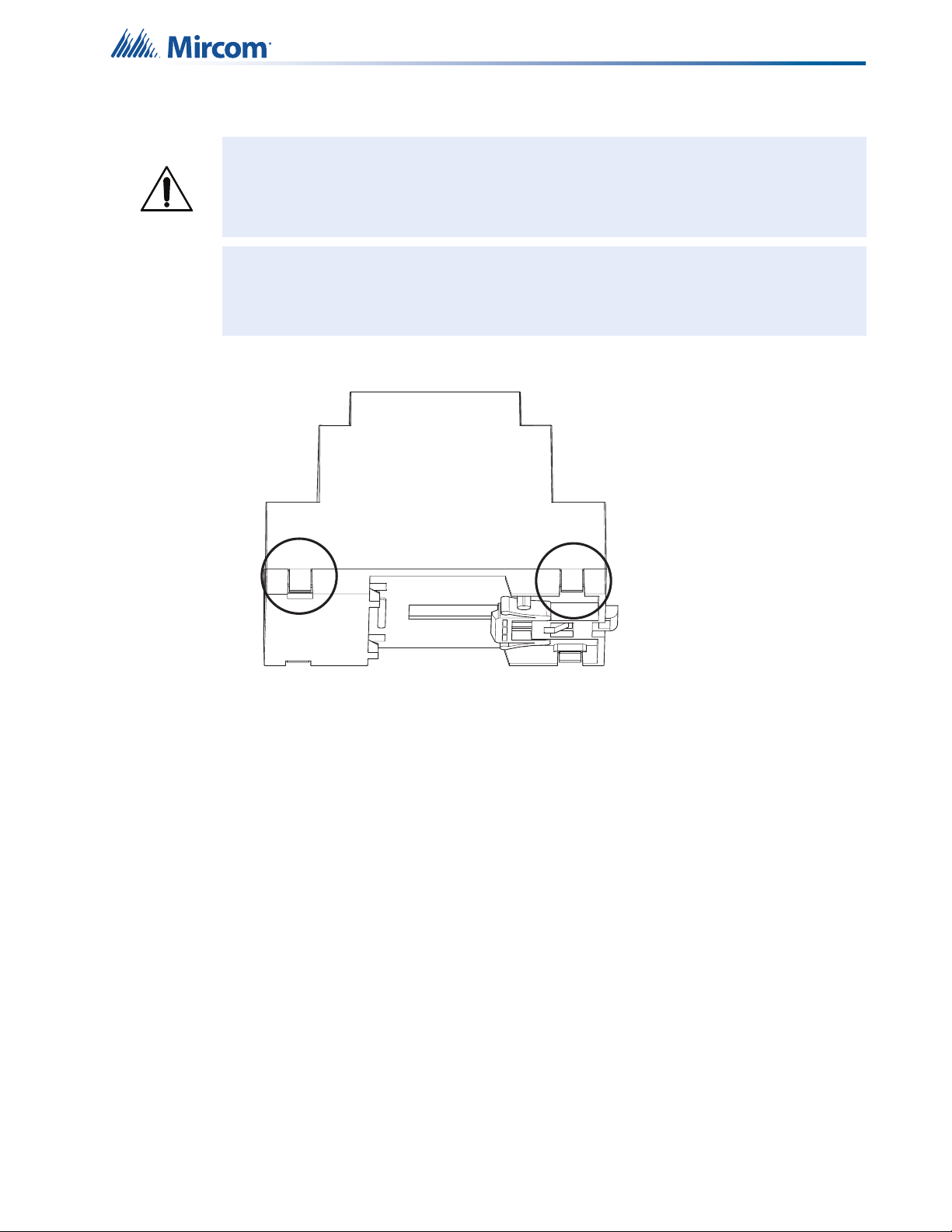
Figure 6 The jumper and RS-485 module are removed from P1 ................................................. 12
Figure 7 OpenBAS-ACC-RS232 is installed ................................................................................ 13
Figure 8 Voltage input selection jumper set for 24 V .................................................................... 14
Figure 9 Voltage input selection jumper set for 12 V .................................................................... 14
Figure 10 Enclosure (back view) .................................................................................................... 15
Figure 11 Fit the circuit board in enclosure .................................................................................... 16
Figure 12 Enclosure mounted on DIN rail ...................................................................................... 17
Figure 13 Enclosure mounted on DIN rail (back view) ................................................................... 17
Figure 14 OpenBAS-HV-NX4AO mounting orientation .................................................................. 18
Figure 15 Power supply connection ............................................................................................... 19
Figure 16 Analog outputs 1-4 ......................................................................................................... 21
Figure 17 Field bus connection ...................................................................................................... 22
Figure 18 Networking with RS-485 ................................................................................................. 23
Figure 19 LEDs .............................................................................................................................. 23

5
List of Tables
Table 1 OpenBAS-HV-NX4AO Controllers ................................................................................. 7
Table 2 OpenBAS-HV-NX4AO Accessories ............................................................................... 7
Table 3 OpenBAS-HV-NX4AO Compatible Modules .................................................................. 7
Table 4 Analog Output Wiring ..................................................................................................... 21

6
1.0 Introduction
This document provides information on installing the OpenBAS-HV-NX4AO Analog Output
Expansion.
1.1 OpenBAS-HV-NX4AO Analog Output Expansion
Mircom’s OpenBAS-HV-NX4AO Analog Output Expansion is an HVAC controller with an
integrated PLC (programmable logic controller) and scheduler. It includes 4 hardware analog
output points, 1 RS-485 field bus connection, 1 USB port, and 1 I2C bus.
1.2 Features
Mircom’s OpenBAS-HV-NX4AO Analog Output Expansion integrates into Mircom’s unified
platform for automating HVAC and mechanical rooms as well as incorporating energy
management features and lighting control to offer building owners and managers a seamless
operation with the following features:
•Modular design to cover any small, medium or large project.
•Industry standard field bus protocols to integrate into any existing BAS system, such as
BACnet, Modbus, Optomux, N2-Open, and ASCII.
•Advanced Networking to integrate into IP networks and use the most advanced features
and protocols such as distributed computing, USB and Cloud storage, HTML5,
JavaScript, XML, Ajax, SMS, and GSM.
•Modular add-ons for every Building Automation System solution.
•The OpenBAS software which provides owners and managers a single solution for
managing all their building’s automation needs.

7
2.0 Overview
2.1 OpenBAS-HV-NX4AO Components
2.1.1 Controllers
2.1.2 Accessories
Accessories are powered from the controller.
2.1.3 Compatible Modules
Compatible modules are mounted separately from the controller.
Table 1 OpenBAS-HV-NX4AO Controllers
Picture Model Description
OpenBAS-HV-NX4AO
Analog output expansion
• Integrated programmable logic
controller and scheduler
• 4 hardware output points
• 1 RS-485 field bus connection
• USB and 1²C buses
Table 2 OpenBAS-HV-NX4AO Accessories
Model Description
OpenBAS-ACC-RS485 Optically isolated RS-485 converter
OpenBAS-ACC-RS232 RS-232 converter
OpenBAS-ACC-DB9 DB9 adapter
OBS-ACC-32K128 128 KB plus 32 KB memory expansion
Table 3 OpenBAS-HV-NX4AO Compatible Modules
Model Description
OpenBAS-NWK-ETH3
Ethernet controller with support for multiple protocols
• 2 field bus connections
• 1 I2C connection
• Mounts in a DIN rail-mounted box
• Powered separately
0V 24V
AO1 AO2 AO3
Power
AO4
ref1 d1+ d1-
COM1
USB
I2C
DWNLD RESET

8
3.0 Installation
3.1 Parts of the Enclosure
Figure 1 Parts of the enclosure
Note: Installation of OpenBAS-HV-NX4AO controllers should be in accordance with the
Canadian Electrical Code or the National Electrical Code, and comply with all
local regulations. Final acceptance is subject to the Local Authority Having
Jurisdiction (AHJ).
i
Circuit board
Base with
mounting clip
Enclosure
Cover

9
Installation
To remove the circuit board from the enclosure
1. Insert a flathead screwdriver under the tabs on the enclosure, shown in Figure 2, in order
to lift the tabs and remove the base.
Figure 2 Tabs on enclosure
Caution: Risk of Electric Shock. Disconnect the mains power and disconnect the
controller from all wiring before opening the enclosure.
Attention: Always hold circuit boards by the edges to prevent damage from static
electricity. Always wear an anti-static bracelet when handling circuit
boards.
!

10
Installation
2. Hold the circuit board with one hand, and with the other hand lift the tabs so that you can
remove the circuit board from the enclosure. See Figure 3.
Figure 3 Lift tabs and remove circuit board
Attention: Be careful not to break the tabs. Do not apply excessive force.
Lift tabs and remove
circuit board
Circuit board
!
Table des matières
Autres manuels Mircom Contrôleurs

Mircom
Mircom RB-MD-1086 Series Manuel utilisateur

Mircom
Mircom TX3 Series Manuel

Mircom
Mircom RAM-2944LCD Manuel utilisateur

Mircom
Mircom TX3-BBCX-4W Guide de référence

Mircom
Mircom TX3 Series Manuel

Mircom
Mircom OpenBAS-HV-NX10 Series Manuel utilisateur

Mircom
Mircom TX3 Series Manuel utilisateur

Mircom
Mircom OpenBAS-LC-NX12R Manuel utilisateur

Mircom
Mircom TX3-BBCX-4W Manuel utilisateur

Mircom
Mircom TX3 Series Manuel utilisateur


