
Mesalabs DataTrace Pro Manuel utilisateur
Rev. 01.10.2018
DT Pro Quick Start Guide: MPRF Systems
Mesa Labs, Inc.
www.mesalabs.com

Mesa Laboratories, Inc.
12100 W. 6th Avenue
Lakewood, CO 80228 USA
Tel: +1-303-987-8000
www.MesaLabs.com
DT Pro MPIII Systems Quick Start Guide
Table of Contents
• Introduction...........................................................................pg 3
• System Test..........................................................................pg 3
• Programming Loggers..........................................................pg 4
• Program Wizard Screen One...........................................pg 5
• Program Wizard Screen Two............................................pg 6
• Program Wizard Screen Three.........................................pg 7
• Program Wizard Screen Four, Part 1...............................pg 8
• Program Wizard Screen Four, Part 2...............................pg 9
• Receiving RF (Radio Frequency) Data................................pg 9
• Reading Loggers................................................................pg 10
• Standard Read...............................................................pg 11
• Batch Read Mode...........................................................pg 11
• Read Views and Detail...................................................pg 11
• Creating Reports................................................................pg 12
• Exporting Data....................................................................pg 13

Mesa Laboratories, Inc.
12100 W. 6th Avenue
Lakewood, CO 80228 USA
Tel: +1-303-987-8000
www.MesaLabs.com
DT Pro MPIII Systems Quick Start Guide
Introduction
This is a basic user guide. For more thorough detail, press the F1 key in any screen of DT Pro to
access the applicable detailed Help Topic!
Before you begin, power up your PC and ensure that the DataTrace reader Interface is
connected via USB. Start the DataTrace Pro Software. If you need assistance downloading the
software, please visit our website: http://DataTrace.MesaLabs.com/DataTrace-Pro-Software/
System Test
This feature is used to check the general functionality of the reader interface and loggers (it is
not vital for everyday programming or reading).
• Expand Logger Functions and select Test and Calibration.
• Place logger in the interface.
• Click the “Test Logger” button.

Mesa Laboratories, Inc.
12100 W. 6th Avenue
Lakewood, CO 80228 USA
Tel: +1-303-987-8000
www.MesaLabs.com
DT Pro MPIII Systems Quick Start Guide
• The software will perform a short test of logger functionality.
• Test results will be displayed within 10 seconds.
• If successful, logged data will be shown. Battery status and rmware revision level will also
be displayed.
• Check that test results are consistent with environmental conditions.
NOTE: The Test function will not aect Programming or Reading. However, if you have unread
data currently residing in a logger’s memory, the Test function will override and erase it. Please
Read the logger rst if unread data is present (read instructions are on Page 8 of this guide).
Programming Loggers
Expand the Logger Functions bar. Select Program to start the Program Wizard.

Mesa Laboratories, Inc.
12100 W. 6th Avenue
Lakewood, CO 80228 USA
Tel: +1-303-987-8000
www.MesaLabs.com
DT Pro MPIII Systems Quick Start Guide
Program Wizard Screen One
• Place logger in interface reader.
• Dene a Study Name. This will allow for easy future retrieval and viewing of your data.
(FYI: If no Study Name is dened, a study will automatically be created and it will be named
according to the date and time the study was performed.)
• Select Use Radio to enable real-time RF data transmission when MPRF data loggers are
used. (Note: If you have ONLY MPIII data loggers OR if you have MPRF data loggers and
you would rather not use RF data collection, select No Radio (Logger Only)).
• Dene Number of Loggers in Group: How many loggers will you be using in this study?
• Channel Number should be the default channel and will not typically require adjustment. To
receive radio data, both the transmitter and receiver must be on the same radio channel.
• Select Next.
Mesa Laboratories, Inc.
12100 W. 6th Avenue
Lakewood, CO 80228 USA
Tel: +1-303-987-8000
www.MesaLabs.com
DT Pro MPIII Systems Quick Start Guide
Program Wizard Screen Two
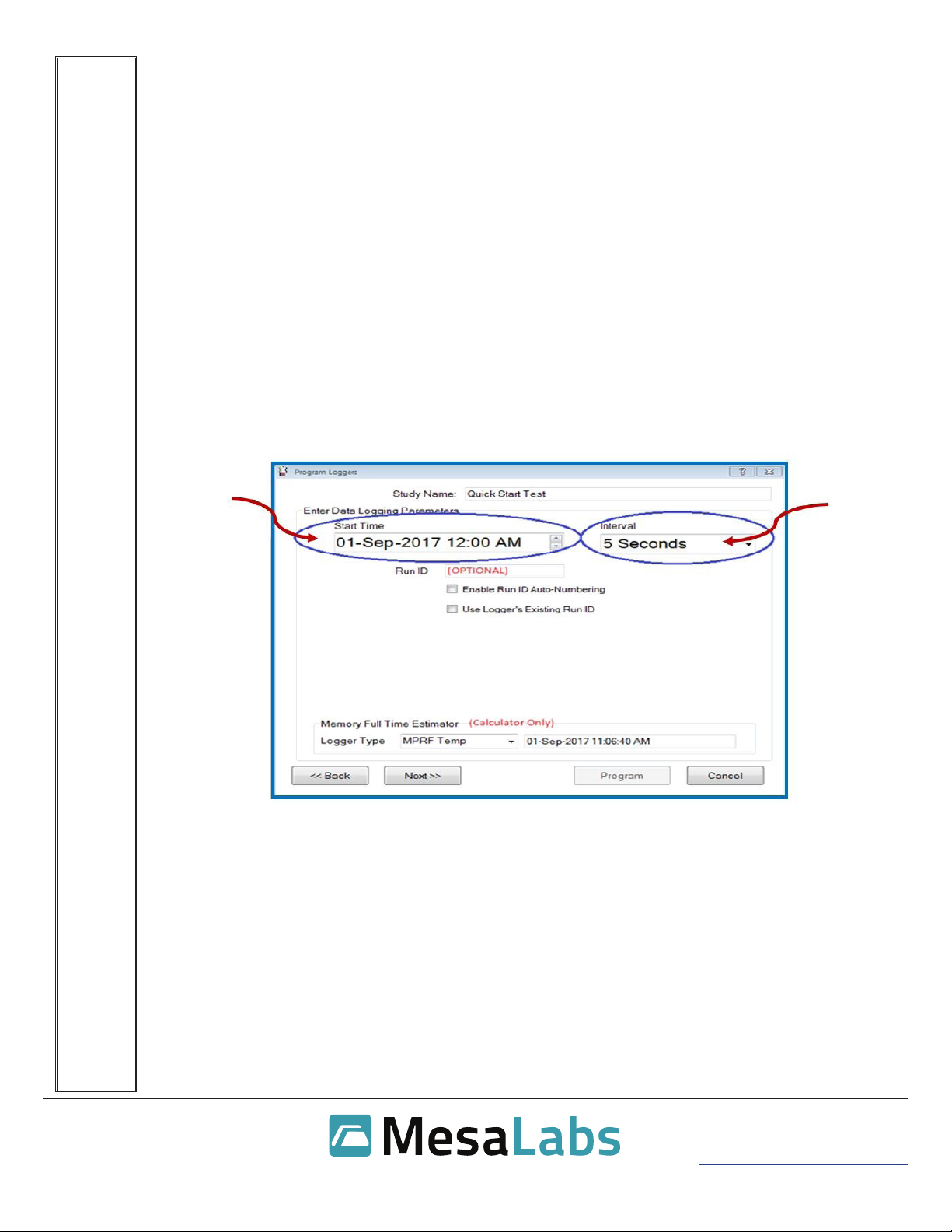
• Enter Data Logging Parameters Start Time.
-This is the date and time you intend for data logging to begin.
-No “End Time” exists. The loggers will stop logging data when they are Read or when
the memory is full (see next section).
-When setting the Start Time be sure to allow enough lead time for programming all
sensors before the scheduled time is to start.
• Dene Interval: How often would you like the logger to collect data? (For MPRF systems,
5 second intervals or longer will have the best results. Intervals shorter than two seconds
produce more data than the system is able to eectively transmit over radio.)
• Run ID: This feature allows you to put your loggers in numerical order according to when
they were programmed. This eld is optional but may be useful for some testing protocols.
For example, loggers with Run IDs DT-01 and DT-02 are in Retort Basket 1, DT-03 and DT-
04 are in Retort Basket 2, and so on.
• The Memory Full Time Estimator is a convenience calculator only and does not aect the
programming in any way.
• Select Next.

Mesa Laboratories, Inc.
12100 W. 6th Avenue
Lakewood, CO 80228 USA
Tel: +1-303-987-8000
www.MesaLabs.com
DT Pro MPIII Systems Quick Start Guide
Program Wizard Screen Three
• In most applications, this screen will not require any adjustment. Press the F1 key for in-
depth detail.
• Select your desired MPRF Stop Option.
-Stop Logging when Full: Recommended setting. Logger will log data points up to
capacity and then stop logging.
-Use Data Compression: When selected, allows logger to log twice as many data
points by compressing data. Compressed data will be limited to two decimal places of
resolution.
-Never Stop: Newly collected data removes and replaces the oldest data in the logger’s
memory once full data capacity is reached.
• Select your RF Data Transmission Rate. Within limits, this allows adjustment of how often
logged data is transmitted via radio.
-The data transmission rate will usually be the same as the logging interval, but may be
less when the interval is short or the number of loggers is large. For example, it is not
usually necessary to transmit data collected every 2 seconds. In that instance, battery
life and real-time data reliability will be improved by setting the data transmission
interval to 10 seconds (5 data points per transmission) or 20 seconds (10 data points per
transmission).
-DT Pro automatically determines a minimum allowed transmission interval using
the default standard data packing. High Density Data Packing will allow a reduced
transmission interval, but there will be a decrease in RF communication reliability.
• Select Next.

Mesa Laboratories, Inc.
12100 W. 6th Avenue
Lakewood, CO 80228 USA
Tel: +1-303-987-8000
www.MesaLabs.com
DT Pro MPIII Systems Quick Start Guide
Program Wizard Screen Four, Part 1
• In most applications, this screen will not require any adjustment. Press the F1 key for in-
depth detail.
• Several elds will be populated automatically upon logger programming and do not require
user input. All other elds are optional.
• Optional Fields:
-The Comment eld may be dened if desired. This comment will be associated with the
programmed logger and be visible in the program and other reports as well as in the
Data Table after the logger is read. This identier can be associated with location (“Top
Left Corner,” for instance, or “Can Three”) or other desired details.
-Batch Program. Select to program multiple loggers quickly without the need to press the
“Program” button after each logger. Select “Stop” when done.
-Program Host. Select for rst time system use. This function sets the RF communication
channel of an MPRF logger interface to the same channel as the loggers being
programmed.
-Logger body at ambient temperature – used in applications where the probes of the
data loggers WILL be in the processing chamber but the body of the data loggers WILL
NOT be inside the processing chamber (i.e. the bodies will not be heated).
-Increment Start Time button may appear and can be used to increment the start time
by the pre-selected interval, assuring that logged data can be aligned in grid format for
reports.

Mesa Laboratories, Inc.
12100 W. 6th Avenue
Lakewood, CO 80228 USA
Tel: +1-303-987-8000
www.MesaLabs.com
DT Pro MPIII Systems Quick Start Guide
Program Wizard Screen Four, Part 2
• Click the Program button.
• A popup message will indicate successful programming.
• Select Close when all loggers are programmed.
Receiving RF (Radio Frequency) Data
Two buttons on the Wireless Data bar control radio reception.
• (PLAY button) - Start RF Reception
• (PAUSE button) - Stop RF Reception
• If Auto-Start RF was previously specied in the System Setup preferences, RF reception will
activate automatically.
Mesa Laboratories, Inc.
12100 W. 6th Avenue
Lakewood, CO 80228 USA
Tel: +1-303-987-8000
www.MesaLabs.com
DT Pro MPIII Systems Quick Start Guide
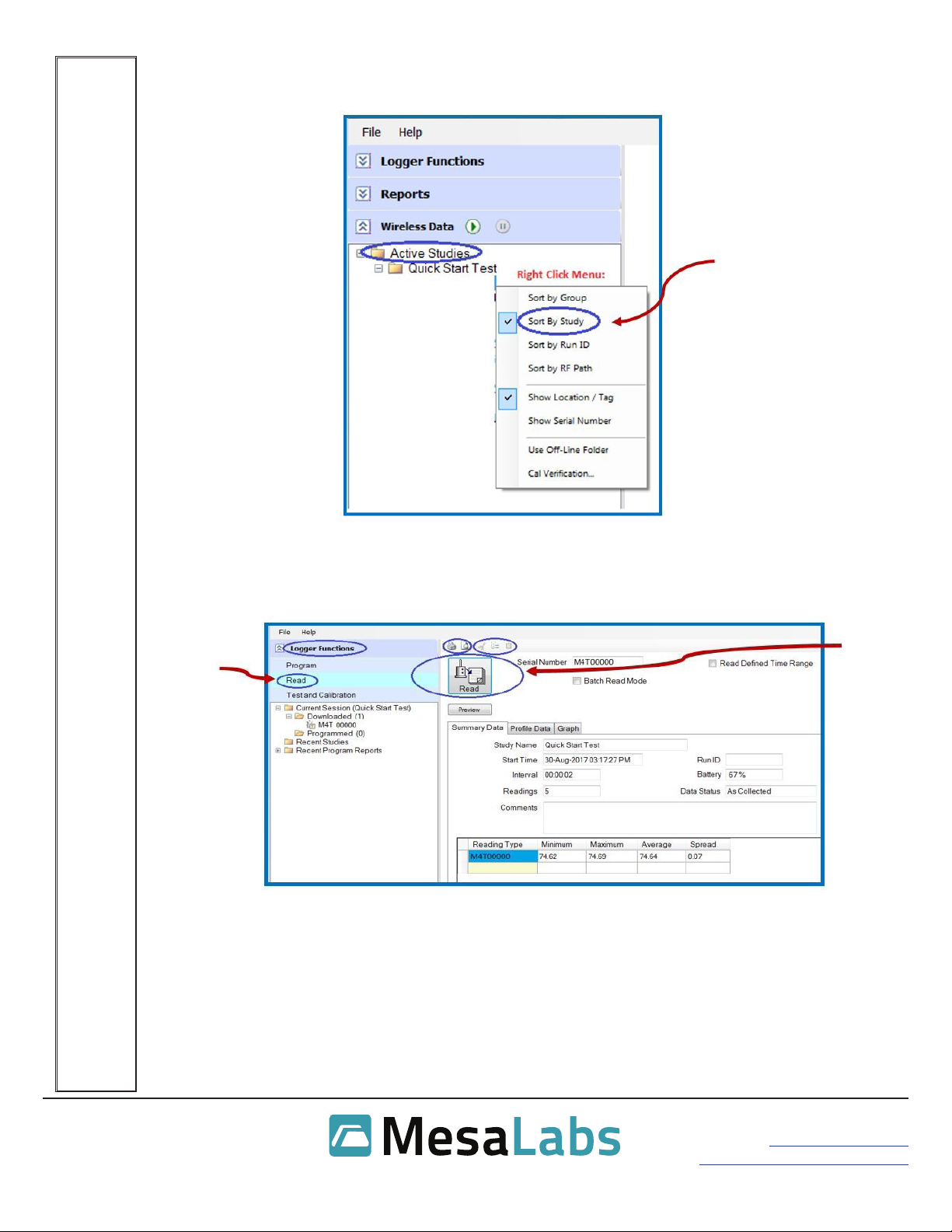
Real time data may be viewed under the Wireless Data bar. Views may be specied in the right-
click menu. “Sort By Study” is the most commonly used setting and will allow easy viewing of
your current study.
Reading Loggers
Expand Logger Functions and select Read to start the data download process.
PRESS THE F1 KEY IN DT PRO FOR MORE DETAILED INFORMATION.
Ce manuel convient aux modèles suivants
5
Table des matières


