Meriam M130 Manuel utilisateur

M130 – T/C Calibrator Instruction Manual Z1017-IR
E.O. 6566 Sept. 2008
www.meriam.com
Page 1 of 21
M130 – THERMOCOUPLE CALIBRATOR
USER MANUAL
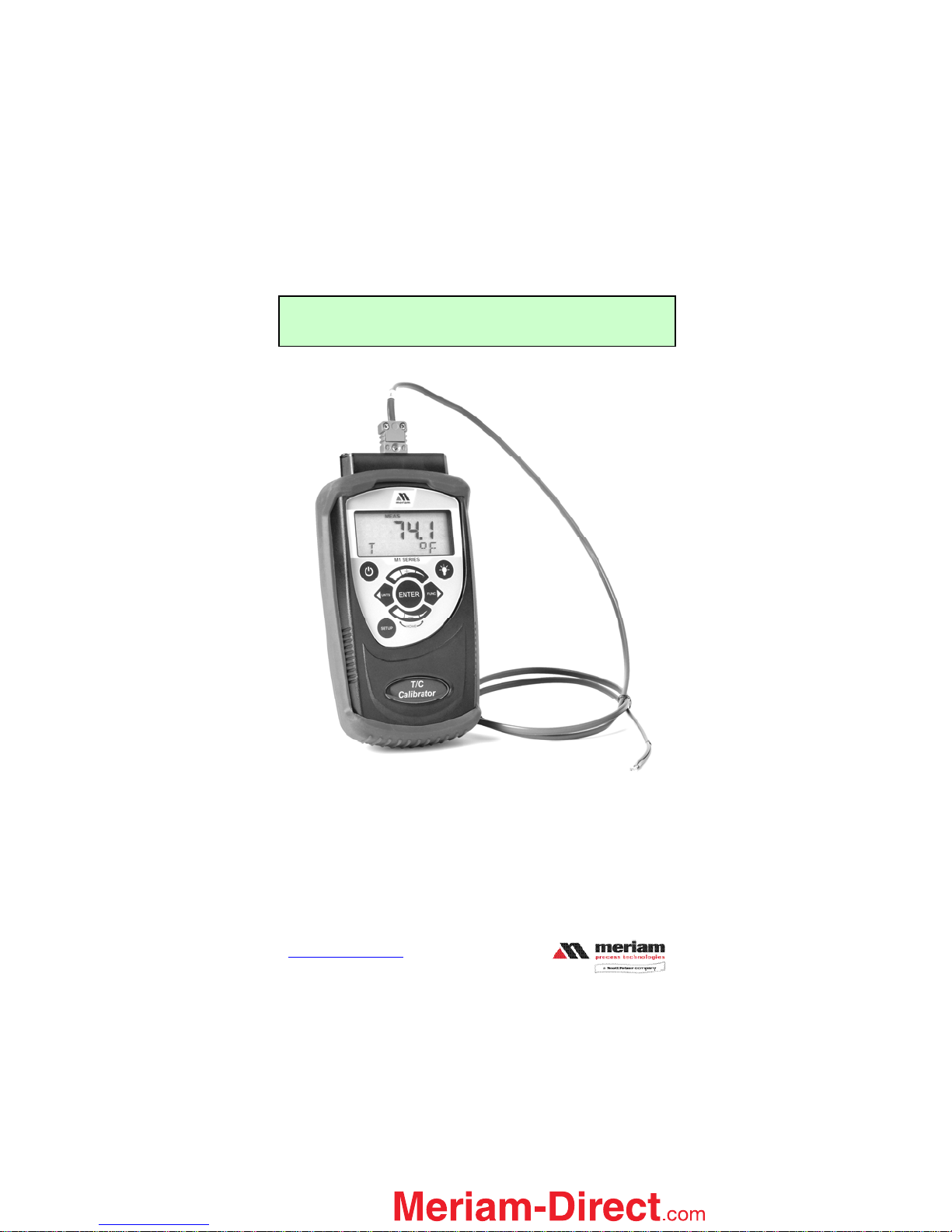
Meriam Process Technologies’ M130 is a handheld
calibrator for thermocouple (T/C) measurement or
simulation. Eight T/C types are supported referencing
NIST175 and ITS90 standards. Temperature can be
displayed in selectable engineering units of ºC, °F, ºR, K
1.888.475.5235info@Meriam-Direct.com

M130 – T/C Calibrator Instruction Manual Z1017-IR
E.O. 6566 Sept. 2008
www.meriam.com
Page 2 of 21
Table of Contents
Introduction .............................................................................3
User Interface...........................................................................4
Keypad Functions....................................................................4
ON/OFF Key ...........................................................................4
BACKLIGHT Key...................................................................4
SETUP Key .............................................................................4
FUNCTION Key .....................................................................5
UNITS Key..............................................................................5
ENTER Key.............................................................................5
INCREMENT (+) Group Keys................................................5
DECREMENT ( – ) Group Keys.............................................6
Liquid Crystal Display (LCD).................................................6
Functional Modes and States...................................................7
T/C Measurement ....................................................................8
T/C Simulation (Manual).........................................................9
T/C Simulation (Auto).............................................................9
MEAS SETUP.......................................................................10
SIM (MANUAL) SETUP......................................................11
SIM (AUTO) SETUP............................................................12
Engineering Units Select .......................................................14
Record Mode .........................................................................14
OFF Timer.............................................................................15
Zeroing the M130..................................................................15
Specifications.........................................................................16
T/C Measurement & Simulation Accuracy Table..................17
Certification...........................................................................18
Changing the Batteries...........................................................18
User Connections...................................................................20
Contact Information...............................................................21
1.888.475.5235info@Meriam-Direct.com

M130 – T/C Calibrator Instruction Manual Z1017-IR
E.O. 6566 Sept. 2008
www.meriam.com
Page 3 of 21
Introduction
Thank you for purchasing this Meriam product. Meriam has been providing
innovative, reliable, cost-effective measurement and calibration solutions
since 1911.
The M130 Thermocouple calibrator has been designed using the latest
technology to provide reliable accuracy throughout its entire operating
temperature range, dependable operation, and exceptional battery life.
The compact design makes the unit easy to carry and the intuitive user
interface makes it easy to use.
Temperature measurements/simulations are displayed on a large, easy-to-read
liquid crystal display (LCD). This unit has two backlights: a green backlight
which is user activated to improve readability in low light conditions, and an
automatic red backlight which indicates an over-range condition.
Twelve keys provide access to the functional modes and menus, including
Measure, Simulate, Setup, Run, Record, Edit, and Backlight activation. A list
of these functions is printed on the back of the case.
1.888.475.5235info@Meriam-Direct.com

M130 – T/C Calibrator Instruction Manual Z1017-IR
E.O. 6566 Sept. 2008
www.meriam.com
Page 4 of 21
User Interface
Keypad Functions
ON/OFF Key
The ON/OFF key, represented by the standard ON/OFF symbol,
turns the M130 ON or OFF (note: the ON/OFF key must be held until the
display turns on or off). Upon power on, the M130 will perform a self-test,
displaying the Meriam product ID, and all segments for approximately 1-2
seconds, then go into the mode in use when unit was powered off. The
firmware version is displayed at the end of the self-test.
BACKLIGHT Key
The BACKLIGHT key, represented by the standard light-bulb
symbol, turns the green display backlight on and off. The backlight will
remain on for approximately 20 seconds if not manually turned off. To
override the auto shut off timer, press and hold the BACKLIGHT key to turn
the backlight on. After holding the key for approximately 2 seconds, the
backlight will flash off and back on. Release the key now and the backlight
will remain on until manually turned off or until power is cycled.
SETUP Key
The SETUP key enters or exits the setup mode and is also used to go
back one menu level. The SETUP icon is displayed while in the setup mode.
Setup menus are shown in the bottom (alpha-numeric) row of the LCD. The
SETUP key also ends simulation activities.
1.888.475.5235info@Meriam-Direct.com

M130 – T/C Calibrator Instruction Manual Z1017-IR
E.O. 6566 Sept. 2008
www.meriam.com
Page 5 of 21
FUNCTION Key
The FUNCTION key, represented by the FUNC symbol, selects one
of 3 functional modes: Measure, Simulate (manual), or Simulate (auto), and
displays the corresponding icons (MEAS, SIM). This key can also be used to
advance one menu item or will advance to next recorded value while in
RECORD view mode.
UNITS Key
The UNITS key selects the engineering unit of
measurement/simulation desired for temperature probes: °F, °C, °R, and K.
The UNITS function is only available when the M130 is actively measuring or
simulating temperature signals. This key is also used to go back one menu
item in SETUP or back to the previous recorded value while in VIEW mode.
ENTER Key
The ENTER key accepts the currently displayed item/value
during setup activities. During active simulation activity, the ENTER key
toggles between T/C type with temperature unit information and % of range.
INCREMENT (+) Group Keys
The three keys beneath this symbol allow the user to scroll through edit
selections when EDIT icon is lit. The keys are also used to increment numeric
values. For this function, the narrow band signifies fine adjustment, the
medium band signifies medium adjustment, and the wide band signifies coarse
1.888.475.5235info@Meriam-Direct.com

M130 – T/C Calibrator Instruction Manual Z1017-IR
E.O. 6566 Sept. 2008
www.meriam.com
Page 6 of 21
adjustment for changing the values. The positive sign (+) indicates the Group
Keys will increment the displayed value.
DECREMENT ( – ) Group Keys
The three keys beneath this symbol allow the user to scroll
through edit selections when EDIT icon is lit. The keys are also used to
decrement numeric simulation values. For this function, the narrow band
signifies fine adjustment, the medium band signifies medium adjustment, and
the wide band signifies coarse adjustment for changing the values. The
negative sign (-) indicates the Group Keys will decrement the displayed value.
In addition, when the narrow band and wide band areas are pressed
simultaneously (HOME) the unit will return to the Measure mode default
position.
Liquid Crystal Display (LCD)
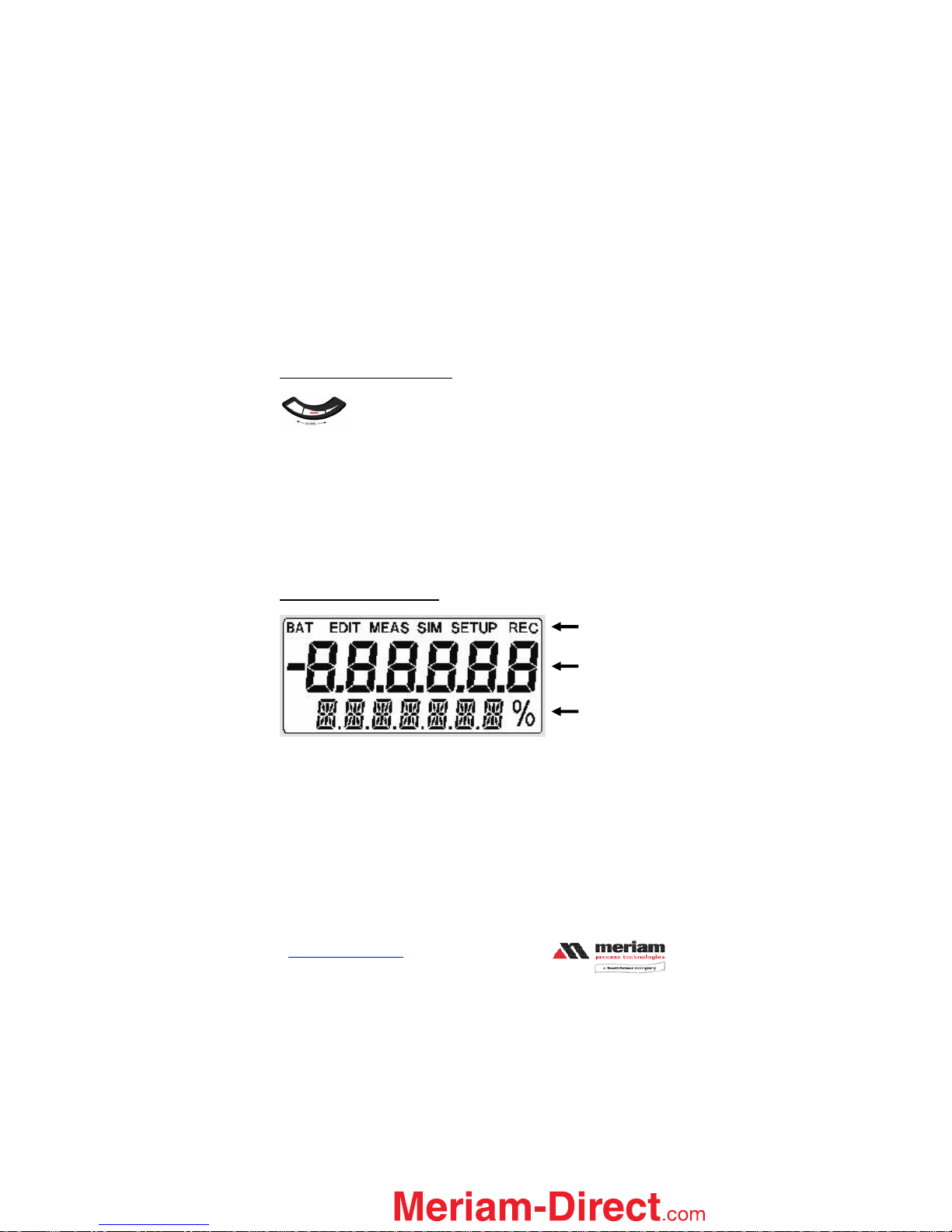
The LCD displays:
•current Functional Mode and/or state via icons along top of display
•primary measurements via the large middle segments
•menu items and additional information via the bottom alpha-numeric
segments
The LCD incorporates two backlights:
•a green backlight which is user activated via the BACKLIGHT key
•a red backlight which is automatically activated during an over-
range/under-range condition.
Mode icons
Measure or
Simulate Values
Menus, units or
other information
1.888.475.5235info@Meriam-Direct.com

M130 – T/C Calibrator Instruction Manual Z1017-IR
E.O. 6566 Sept. 2008
www.meriam.com
Page 7 of 21
During an over-range/under-range condition, the red backlight will over-ride
the green backlight if it was already on. Once the condition is corrected, the
green backlight will be restored to its previous state (assuming the backlight
auto-off timer did not expire).
Notes: 1. The backlight should be turned off when not needed to conserve
battery power.
2. The backlight will be automatically disabled when the M130
reaches battery mode.
Functional Modes and States
The M130 supports measurement and simulation activities using the following
Functional Modes:
1. Measure - temperature units or measure mV; MEAS icon shown at
top of display
2. Simulate, Manual - simulate fixed values of temperature units or
mV; SIM icon shown at top of display
3. Simulate, Auto - simulate step or ramp output functions in
temperature units or mV; SIM icon shown at top of display
Each Functional Mode has three possible States:
1. Run - active measurement or simulation; MEAS or SIM icon
shown at top of display
2. Setup – access navigation menus; MEAS & SETUP or SIM &
SETUP icons shown at top of display
3. Edit Setup - edit a parameter within a navigation menu; “EDIT,
MEAS & SETUP” or “EDIT, SIM & SETUP” icons shown at top
of display
The M130 will power up in its previous functional mode when turned ON.
Example: if previous use was SIM (Auto), then next power up will default to
SIM (Auto). Simulation will restart when user confirms the desired setup and
presses the ENTER key (two times).
See the table below for functional modes, states and key functions.
1.888.475.5235info@Meriam-Direct.com

M130 – T/C Calibrator Instruction Manual Z1017-IR
E.O. 6566 Sept. 2008
www.meriam.com
Page 8 of 21
FUNCTIONAL MODES, STATES, AND KEY FUNCTIONS
Run Setup Edit Setup
Keys MEAS
or
SIM
MEAS SETUP
or
SIM SETUP
EDIT MEAS
SETUP, or
EDIT SIM SETUP
SETUP Enters Setup state,
or ends simulation
activity
Back one menu
level, or exits
Setup state
Discards changes and
exits Edit Setup state
FUNC XNext Functional
mode Next menu item ---
WUNITS Next engineering
unit Previous menu
item ---
ENTER Toggles lower
display line
between TC type /
temp. unit and %
of range (SIM
only)
Selects menu
item Saves changes and
exits Edit Setup state
Increment
(+) Group MEAS: ---
SIM Manual:
Change values
---
Change value
Decrement
(-) Group MEAS: ---
SIM Manual:
Change values
---
Change value
T/C Measurement
•When the M130 is turned on the display defaults to the previous mode it
was in with the previous T/C type and Unit. To change the mode press the
FUNC Xkey until the Measure mode is obtained. Once in Measure mode,
press the WUNITS key until the desired unit is obtained.
•Press the SETUP key to enter the initial setup menu for the current
functional mode. To go back one menu item press the WUNITS key. To
advance the menu, press the FUNC Xkey. SETUP key also backs out of
the Setup state and returns to the Measure mode.
1.888.475.5235info@Meriam-Direct.com

M130 – T/C Calibrator Instruction Manual Z1017-IR
E.O. 6566 Sept. 2008
www.meriam.com
Page 9 of 21
•ENTER key accepts the menu item to edit and saves the selection. During
the SETUP EDIT state the WUNITS key goes back one increment value,
and the FUNC Xkey advances one increment value.
•T/C measurements can be recorded to memory either manually or
automatically. See the Record Mode section of this manual for more
information.
•When an over-range/under-range message is displayed, the M130 is
measuring values outside the specified range for a particular T/C type (See
the T/C Measurement Accuracy Table for specified ranges). The red
backlight will illuminate and “----” will be displayed.
•If a thermocouple has not been connected to the unit “T/C OPEN” will be
displayed.
T/C Simulation (Manual)
•When unit is turned on the display defaults to the previous mode with the
last T/C type and Units chosen. To enter the Simulation Manual mode
press the FUNC Xkey until SIM MANUAL appears, then press the
SETUP key.
T/C Simulation (Auto)
•When unit is turned on the display defaults to the previous mode with the
last T/C type and Units chosen. To enter the Simulation Auto mode press
the FUNC Xkey until SIM AUTO appears, then press the SETUP key.
1.888.475.5235info@Meriam-Direct.com

M130 – T/C Calibrator Instruction Manual Z1017-IR
E.O. 6566 Sept. 2008
www.meriam.com
Page 10 of 21
MEAS SETUP: Measure Mode Setup menu structure
T/C TYPE select ENTER to access submenus
mV engineering units are mV
B engineering units are temperature only
E engineering units are temperature only
J engineering units are temperature only
K engineering units are temperature only
N engineering units are temperature only
R engineering units are temperature only
S engineering units are temperature only
T engineering units are temperature only
OFF TMR select ENTER to access submenus
30 MIN shuts off in 30 min without new key stroke
OFF must use ON/OFF key to shut off
F RECAL select ENTER to access submenu
ZERO set zero. See “Zeroing the M130” section
VIEW view previously recorded values
RECORD select ENTER to access submenus
MANUAL press ENTER button to record values
AUTO values automatically recorded every 5 seconds
Note: Main and submenus are continuous scrolling menus. Use Wor Xto
scroll through the menus.
1.888.475.5235info@Meriam-Direct.com
Table des matières
Autres manuels Meriam Équipement de test
Manuels Équipement de test populaires d'autres marques

SMART
SMART KANAAD SBT XTREME 3G Series Manuel utilisateur

Agilent Technologies
Agilent Technologies BERT Serial Manuel utilisateur

Agilent Technologies
Agilent Technologies N3280A Manuel utilisateur

Vernier
Vernier Go Direct Voltage Manuel utilisateur

Lifeloc
Lifeloc R.A.D.A.R. Manuel utilisateur

Fluke
Fluke T5-600 Instructions d'utilisation et d'installation