
MediaMatrix VSC-101tn Manuel utilisateur

VSC-101tn Quick Set-Up Guide
Version 1.7.2.0
March 27, 2015

ii Version 1.7.2.0 March 27, 2015
Copyright notice
The information contained in this manual is subject to change without notice. Peavey Electronics is not liable for
improper installation or configuration. The information contained herein is intended only as an aid to qualified
personnel in the design, installation and maintenance of engineered audio systems. The installing contractor or end
user is ultimately responsible for the successful implementation of these systems.
All creative content in this manual, including the layout, art design, content, photography, drawings, specifications
and all other intellectual property is Copyright © 2015 Peavey Electronics Corporation. All Rights Reserved. Features
& specifications subject to change without notice. All other registered trademarks or trademarks are the property of
their respective owners.
The ratc-server component is based in part on the work of the libwebsockets project: http://libwebsockets.org.
Prepared by Peavey Digital Research, 6 Elm Place, Eynsham, Oxford, OX29 4BD, UK.
Email:mmtechsupport@peavey.com (mailto:mmtechsupport@peavey.com).
Scope
This guide describes how to configure a VSC-101tn Video Scaler-Switcher with basic settings.

March 27, 2015 Version 1.7.2.0 1
Warning: When using electrical products, basic cautions should always be followed,
including the following:
1. Read these instructions.
2. Keep these instructions.
3. Heed all warnings.
4. Follow all instructions.
5. Do not use this apparatus near water.
6. Clean only with a dry cloth.
7. Do not block any of the ventilation openings. Install in accordance with manufacturer’s
instructions.
8. Do not install near any heat sources such as radiators, heat registers, stoves or other
apparatus (including amplifiers) that produce heat.
9. Do not defeat the safety purpose of the polarized or grounding-type plug. A polarized plug
has two blades with one wider than the other. A grounding type plug has two blades and a
third grounding plug. The wide blade or third prong is provided for your safety. If the
provided plug does not fit into your outlet, consult an electrician for replacement of the
obsolete outlet.
10. Protect the power cord from being walked on or pinched, particularly at plugs,
convenience receptacles, and the point they exit from the apparatus.
11. Only use attachments/accessories provided by the manufacturer.
12. Use only with a cart, stand, tripod, bracket, or table specified by the manufacturer, or sold
with the apparatus. When a cart is used, use caution when moving the cart/apparatus
combination to avoid injury from tip-over.
13. Unplug this apparatus during lightning storms or when unused for long periods of time.
14. Refer all servicing to qualified service personnel. Servicing is required when the apparatus
has been damaged in any way, such as power-supply cord or plug is damaged, liquid has
been spilled or objects have fallen into the apparatus, the apparatus has been exposed to
rain or moisture, does not operate normally, or has been dropped.
15. Never break off the ground pin. Write for our free booklet Shock Hazard and Grounding.
Connect only to a power supply of the type marked on the unit adjacent to the power
supply cord.
16. If this product is to be mounted in an equipment rack, rear support should be provided.
17. Control panel devices, including the xControl range, D series and nTouch 60, are designed
for mounting in NEMA metal enclosures. Grounding to the front plate is required.
18. Note for UK only: If the colors of the wires in the mains lead of this unit do not
correspond with the terminals in your plug‚ proceed as follows:
1 - Important safety instructions

2 Version 1.7.2.0 March 27, 2015
a) The wire that is colored green and yellow must be connected to the terminal that is
marked by the letter E‚ the earth symbol‚
b) colored green or colored green and yellow.
c) The wire that is colored blue must be connected to the terminal that is marked with the
letter N or the color black.
d) The wire that is colored brown must be connected to the terminal that is marked with
the letter L or the color red.
19. This electrical apparatus should not be exposed to dripping or splashing and care should be
taken not to place objects containing liquids, such as vases, upon the apparatus.
20. The on/off switch in this unit does not break both sides of the primary mains. Hazardous
energy can be present inside the chassis when the on/off switch is in the off position. The
mains plug or appliance coupler is used as the disconnect device, the disconnect device
shall remain readily operable.
21. Exposure to extremely high noise levels may cause a permanent hearing loss. Individuals
vary considerably in susceptibility to noise-induced hearing loss, but nearly everyone will
lose some hearing if exposed to sufficiently intense noise for a sufficient time. The U.S.
Government’s Occupational Safety and Health Administration (OSHA) has specified the
following permissible noise level exposures:
Duration Per Day in Hours
Sound Level dBA, Slow
Response
8
90
6
92
4
95
3
97
2
100
1½
102
1
105
½
110
¼ or less
115
According to OSHA, any exposure in excess of the above permissible limits could result in
some hearing loss. Ear plugs or protectors to the ear canals or over the ears must be worn when
operating this amplification system in order to prevent a permanent hearing loss, if exposure is
in excess of the limits as set forth above. To ensure against potentially dangerous exposure to
high sound pressure levels, it is recommended that all persons exposed to equipment capable
of producing high sound pressure levels such as this amplification system be protected by
hearing protectors while this unit is in operation.
SAVE THESE INSTRUCTIONS!

March 27, 2015 Version 1.7.2.0 3
What is VSC-101tn?
VSC-101tn is a full HD video scaler switcher. The device scales and switches any HDMI,
VGA, YPbPr, C-Video or S-video video signal to HDMI up to 1080P. It is controllable via
buttons on the front, the IR sensor and the RS232 port. It has 12 video inputs and 10 audio
inputs.
In addition, the VSC-101tn can be controlled via TCP/IP. The device also includes an
HDBaseT output, and includes a VCAT-HD Receiver.
Features
12 video Inputs: 4 x HDMI, 4 x VGA, 1 x YPbPr, 2 x C-video & 1 x S-video.
2 independent audio inputs with level control and mixer function.
1 x HDMI output
1 x VGA (subject to HDCP) output
Balanced left/right output pair on Euro-Connector.
Built-in 2x10Watt@8Ω amplifier.
Five selectable output resolutions.
Adjustable display H/V size solves over-scale problems.
Adjustable display H/V position.
Mic volume and line volume adjustable.
Powerful On-Screen Display (OSD) for control and setup functions.
Quick switching through black.
HDMI 1.3 and HDCP compliant.
Firmware upgradeable via USB.
Output freeze function.
Front panel lockout.
Controllable via front-panel, IR and RS-232.
HDBaseT output.
VCAT-HD Receiver for 70M shielded CAT6 transmission.
Passes projector control strings via the VCAT-HD Receiver.
TCP/IP control.
2 - Introduction

4 Version 1.7.2.0 March 27, 2015
.
What's in the box?
VSC-101tn products are packaged in a single container. This container includes the following
items:
1 x VSC-101tn
1 x Power Cord
1 x IR remote (Cell battery is not included)
4 x Captive screw connectors
4 x Plastic feet cushions (for use when mounted on a shelf)
1 x RS232 cable
1 x User Manual
1 x VCAT-HD Receiver (with 2 mounting ears & 4 screws)
1 x Power Adapter (DC 5V).
If any of these items is missing, please contact your Authorized Peavey MediaMatrix
contractor/dealer.
VSC-101tn front and rear
1. POWER: Lit (red) when the external power supply is connected properly.
2. IR (infrared) internal receiver. For use with the remote control.
3. Video input source selection buttons: HDMI, VGA or analog video.
4. Video source channel selection buttons.
5. Output resolution selection button. Supported resolutions: 1024×768, 1280x720p,
1280×800, 1360×768, 1920×1080p.
6. Non-switched audio input volume control buttons (both mic and line inputs).
Mute for mic and stereo line inputs, arrow buttons for volume up and down.
7. Line volume control buttons for controlling the levels of switched video inputs.
Mute for switched video volume, arrow buttons for volume up and down.

March 27, 2015 Version 1.7.2.0 5
1. Output section.
5-pin Euro-connector for balanced stereo audio output, one VGA output, one HDMI
output with embedded audio. One HDBaseT port for HDMI (works with the
VCAT-HDR).
2. Four VGA input connectors.
3. Four HDMI input connectors.
4. Four 3.5mm stereo audio connectors for VGA audio inputs.
5. RCA stereo inputs. Shared audio inputs for video inputs #1 and #3.
6. Analog video inputs.
a) Input #1: composite video.
b) Input #2: component video (Y/Pb/Pr)
c) Input #3: S-Video
d) Input #4: composite video.
7. RCA stereo inputs. Shared audio inputs for video inputs #2 & #4.
8. USB port for firmware updates.
9. Non-Switched audio inputs.
a) Balanced mic level input.
b) Line level stereo input.
10. Amplifier with 2x10W@8Ω output.
11. Power connector.
12. RS232 port for serial control.
13. Ethernet port for telnet control.
Control string commands received via control ports are passed on through the HDBaseT
output for control of far end video devices.

6 Version 1.7.2.0 March 27, 2015
Infrared remote control
Video source select:
HDMI inputs 1,2,3,4.
VGA inputs 1,2,3,4.
Component video inputs: 1. Composite video, 2.
Component video (YPbPr), 3. S-Video, 4. Composite
video.
Menu and volume control area. Mute for line and mic audio
inputs.
Line volume control. This can be used when not in MENU
mode.
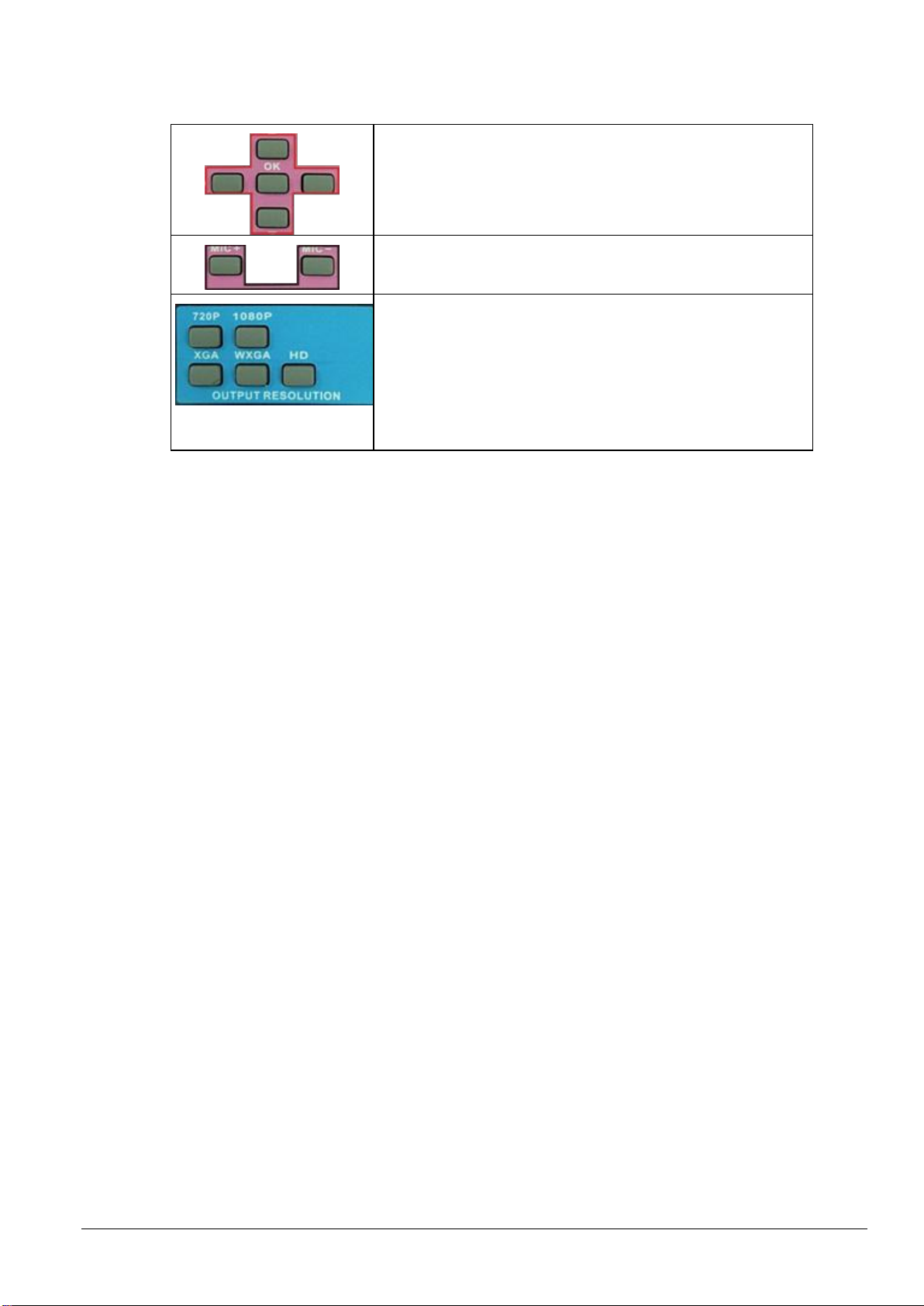
March 27, 2015 Version 1.7.2.0 7
Direction buttons and OK button. These are only available in
MENU mode.
Mic volume control. This can be used when not in MENU
mode.
Output resolution select:
720P (1280x720)
1080P (1920x1080)
XGA (1024x768)
WXGA (1280x800)
HD (1360x768)

8 Version 1.7.2.0 March 27, 2015
Introduction
The product provides an On-Screen Display (OSD) menu.
Note: Many of the features are used only during initial installation and setup.
Specifying the picture parameters
The first icon from the left of the OSD menu is used to set the picture parameters.
The settings include the picture mode presets, color temperature, contrast, brightness, hue,
saturation, sharpness, scale, and Advance picture adjust. The Advance Picture Adjust is used
to enable/disable the Digital Noise Reduction (DNR), Color Trend Increase (CTI), flesh tone
and Adaptive Luma Control.
Note: Not all parameters are available with all inputs.
3 - Setting up the unit using the
OSD
Table des matières


