
MCS MCS-DOOR-KEYPAD Manuel utilisateur
MCS Total
Solution
for all your
Control
Needs
Energy Efcient and RoHS Compliant
5580 Enterprise Pkwy.
Fort Myers, FL 33905
Ofce: 239-694-0089
Fax: 239-694-0031
www.mcscontrols.com
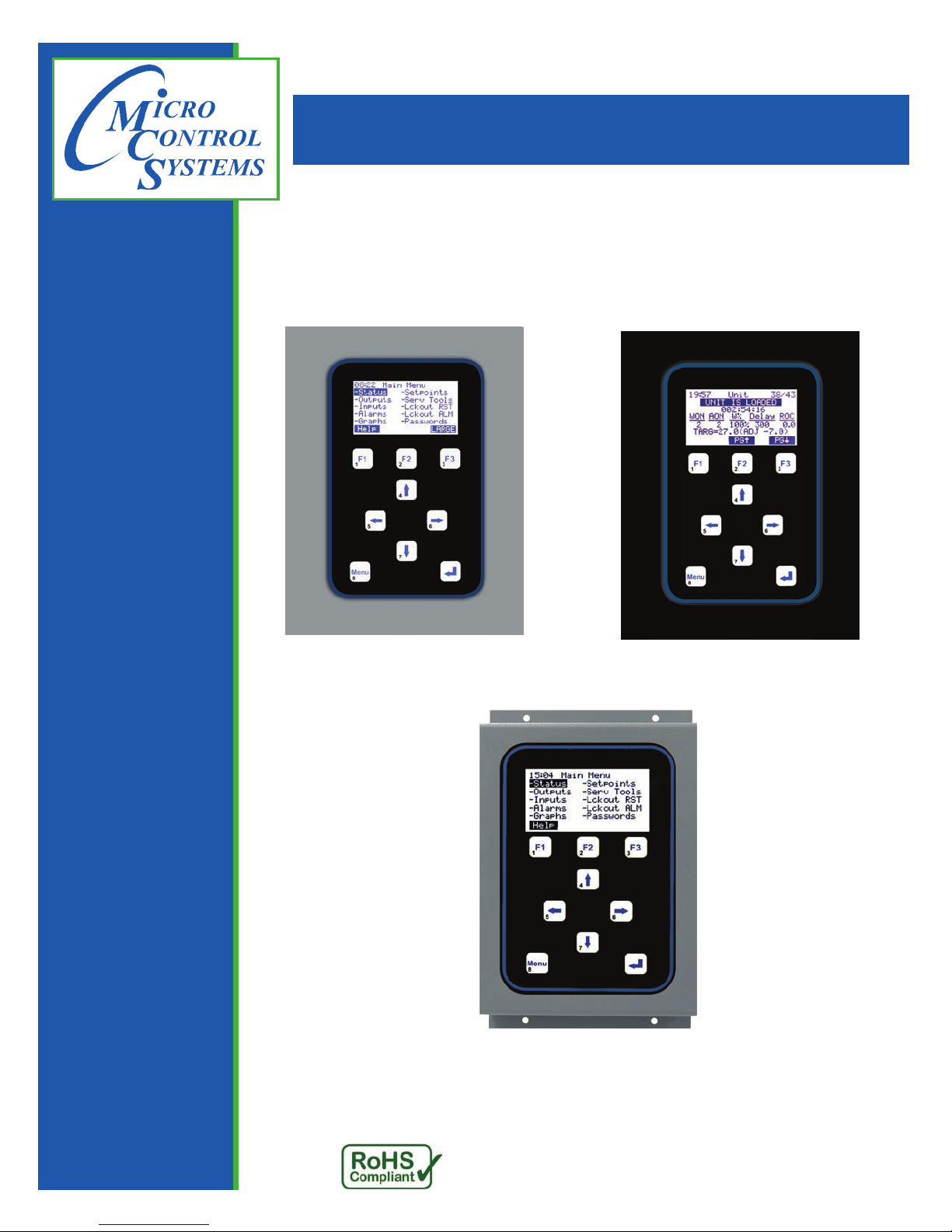
Magnum Keypad / Display
Rev 2.2
(HVAC 14.00 & Higher)
MCS-DOOR-KEYPAD MCS-OEM-KEYPAD
MCS-PANEL-KEYPAD
Revision-2017-11-10

MAGNUM KEYPAD/DISPLAY REVISION 2.2
2
The MCS Commitment is to provide practical solutions for the industries
needs and to be both a leader and partner in the effective use of
microprocessor controls.
Micro Control Systems, Inc.
5580 Enterprise Parkway
Fort Myers, Florida 33905
PH:(239) 694-0089 FAX:(239) 694-0031
www.mcscontrols.com
All information contained within this document is considered to be proprietary information of Micro Control Systems, Inc.
No information or data from this document shall be published, used, reproduced, transmitted, or disclosed to others out-
side your organization without the prior expressed written consent of Micro Control Systems, Inc. This document and the
information contained herein shall be treated as proprietary. Reasonable provisions shall be provided to ensure that this
information remains proprietary by your employees, agents, and other personnel that may have access to this document.
Copyright ©2017
Date Author Description of Changes
02/28/12 JGW Created Version 8 manual
2015-03-18 DEW Restructured manual, Indesign
2015-03-18 DEW New Cover, revision pages, ow tx.
2017-11-09 DEW add Service Tools Time/Date
Revision/Disclaimer Page

MAGNUM KEYPAD/DISPLAY REVISION 2.2
3
Table of Contents
Chapter - 1. Keypad / Display Specications...................................................................................5
1.1. Cable Connection........................................................................................................................................5
1.2. MCS-MAGNUM-DOOR...............................................................................................................................6
1.3. MCS-MAGNUM-OEM .................................................................................................................................6
1.4. MCS-MAGNUM-DOOR...............................................................................................................................7
1.5. MCS-MAGNUM-OEM..................................................................................................................................7
Chapter - 2. Main Screen Layouts .........................................................................................................8
2.1. MAIN MENU SCREENS..............................................................................................................................8
2.1.1 HELP F1 ............................................................................................................................................8
2.1.2 LARGE F3..........................................................................................................................................8
Chapter - 3. Status Screens......................................................................................................................9
3.1. UNIT STATUS (WTD/ACT)..........................................................................................................................9
3.2. UNIT STATUS (KW/TON)............................................................................................................................9
3.3. COMPRESSOR 1 STATUS (PSI & Temp).................................................................................................10
3.4. COMPRESSOR 1 STATUS (Superheats).................................................................................................10
3.5. COMPRESSOR 1 STATUS (EXV or LLS).................................................................................................10
3.6. COMPRESSOR2 STATUS (PSI & Temp...................................................................................................11
3.7. COMPRESSOR2 STATUS (Superheats)..................................................................................................11
3.8. COMPRESSOR2 STATUS (EXV or LLS)..................................................................................................11
Chapter - 4. Relay / Analog Outputs ...................................................................................................12
4.1. RELAY OUTPUTS (Status) ......................................................................................................................12
4.2. RELAY OUTPUTS (Last On).....................................................................................................................12
4.3. RELAY OUTPUTS (Last Off) ....................................................................................................................13
4.4. RELAY OUTPUTS (Run TDY)...................................................................................................................13
4.5. RELAY OUTPUTS (Cycles TDY)...............................................................................................................13
4.6. RELAY OUTPUTS (Run YDY)...................................................................................................................14
4.7. RELAY OUTPUTS (Cycles YDY) ..............................................................................................................14
4.8. RELAY OUTPUTS (TTL Run HR) .............................................................................................................14
4.9. RELAY OUTPUTS (TTL Cycles) ...............................................................................................................15
4.10. ANALOG OUTPUTS (Status)....................................................................................................................15
4.11. ANALOG OUTPUTS (Max TDY)...............................................................................................................15
4.12. ANALOG OUTPUTS (Min TDY)................................................................................................................16
4.13. ANALOG OUTPUTS (AVG YDY) ..............................................................................................................16
4.14. ANALOG OUTPUTS (Max YDY)...............................................................................................................16
4.15. ANALOG OUTPUTS (MinYDY).................................................................................................................17
4.16. ANALOG OUTPUTS (AVG YDY) ..............................................................................................................17
Chapter - 5. Sensor Inputs.......................................................................................................................18
5.1. SENSOR INPUTS (Value).........................................................................................................................18
5.2. SENSOR INPUTS (Type)..........................................................................................................................18
5.3. SENSOR INPUTS (Last On).....................................................................................................................19
5.4. SENSOR INPUTS (Last Off).....................................................................................................................19
5.5. SENSOR INPUTS (Max TDY)...................................................................................................................19
5.6. SENSOR INPUTS (Min TDY)....................................................................................................................20
5.7. SENSOR INPUTS (Run TDY)...................................................................................................................20
5.8. SENSOR INPUTS (Avg TDY)....................................................................................................................20
5.9. SENSOR INPUTS (Cycles TDY)...............................................................................................................21
5.10. SENSOR INPUTS (RUN YDY)..................................................................................................................21
5.11. SENSOR INPUTS (Max YDY)...................................................................................................................21
5.12. SENSOR INPUTS (Cycles YDY)...............................................................................................................22
5.13. SENSOR INPUTS (Min YDY)....................................................................................................................22
5.14. SENSOR INPUTS (TTL Run HR)..............................................................................................................22
5.15. SENSOR INPUTS (Avg YDY) ...................................................................................................................23

MAGNUM KEYPAD/DISPLAY REVISION 2.2
4
5.16. SENSOR INPUTS (TTL Cycles)................................................................................................................23
Chapter - 6. Alarms.....................................................................................................................................24
6.1. ALARMS....................................................................................................................................................24
Chapter - 7. Graphs.....................................................................................................................................25
7.1. GRAPHS (Relay or Sensor)......................................................................................................................25
7.2. GRAPHS (Edit)..........................................................................................................................................25
Chapter - 8. Setpoints................................................................................................................................26
8.1. SETPOINTS (Value)..................................................................................................................................26
Chapter - 9. Service Tools.......................................................................................................................27
9.1. SERVICE TOOLS (RS485 Setup).............................................................................................................27
9.2. SERVICE TOOLS (RS485 Setup).............................................................................................................27
9.3. SERVICE TOOLS (Ethernet Network).......................................................................................................28
9.4. SERVICE TOOLS (Ethernet Setup) ..........................................................................................................28
9.5. SERVICE TOOLS (Subnet Mask) .............................................................................................................28
9.6. SERVICE TOOLS (MCS Port)...................................................................................................................29
9.7. SERVICE TOOLS (System Info) ...............................................................................................................29
9.8. SERVICE TOOLS (Firmware & Cfg) .........................................................................................................29
9.9. SERVICE TOOLS (Company name & Model #)........................................................................................30
9.10. SYSTEN INFO (Unit Serial Number & Install Date) ..................................................................................30
9.11. SYSTEM INFO (Cong Version & Date) ...................................................................................................30
9.12. SYSTEM INFO (Bootloader & HW Serial Number)...................................................................................31
9.13. SYSTEM INFO (Phy Mac Addr & I/O Types).............................................................................................31
9.14. SYSTEM INFO (Time / Date) ....................................................................................................................31
9.15. SYSTEM INFO (Setting Time / Date) ........................................................................................................32
9.16. SYSTEM INFO (Saving Time / Date) ........................................................................................................32
9.17. SYSTEM INFO (Display)...........................................................................................................................32
9.18. DISPLAY (Contrast & Reverse Background).............................................................................................33
9.19. DISPLAY (Background Reversed).............................................................................................................33
9.20. SERVICE TOOLS (Clear Alarm History) ...................................................................................................33
9.21. CLEAR ALARM HISTORY (Yes / No)........................................................................................................34
9.22. SERVICE TOOLS (Clear Point Info)..........................................................................................................34
9.23. CLEAR POINT INFO (Yes / No) ................................................................................................................34
9.24. CHANGES MADE / HIGHER AUTH REQUIRED......................................................................................35
9.25. SERVICE TOOLS (Sensor Diagnostics) ...................................................................................................35
9.26. SENSOR DIAGNOSTICS (M-1)................................................................................................................35
9.27. CONFIG CHECKSUMS.............................................................................................................................36
9.28. CONFIG CHECKSUMS (#0).....................................................................................................................36
9.29. SERVICE TOOLS (Operating Schedule)...................................................................................................36
9.30. OPERATING SCHEDULE (Sunday) .........................................................................................................37
9.31. OPERATING SCHEDULE -SETUP...........................................................................................................37
9.32. SERVICE TOOLS (Holiday Dates)............................................................................................................37
9.33. Holiday Dates setup ..................................................................................................................................38
9.34. SERVICE TOOLS (BACnet Settings)........................................................................................................38
9.35. BACnet Settings (Device ID - TCP/IP Port)...............................................................................................38
9.36. BACnet Settings (Setting the Device ID #)................................................................................................39
9.37. BACnet Setting (TCP / IP Port)..................................................................................................................39
Chapter - 10. Lockout Reset......................................................................................................................40
10.1. LOCKOUT RESET (Reset)........................................................................................................................40
Chapter - 11. Lockout Alarms...................................................................................................................41
Chapter - 12. Password................................................................................................................................42
12.1. PASSWORDS (Enter Format)...................................................................................................................42
12.2. After Entering Password............................................................................................................................42
12.3. PASSWORDS (Results)............................................................................................................................43

MAGNUM KEYPAD/DISPLAY REVISION 2.2
5
1.1. Cable Connection
• 6 wire (3 twisted pairs) shielded cable 10’ length
Chapter - 1. Keypad / Display Specications

MAGNUM KEYPAD/DISPLAY REVISION 2.2
6
1.2. MCS-MAGNUM-DOOR
1.3. MCS-MAGNUM-OEM
PANEL MOUNT PACKAGE
•Magnum
•Panel Mount Keypad/Display
•For rainproof enclosures
•115/230 eld selectable
•24 vac option
•10 Relay outputs (6.3 amps)
•12 Analog or Digital inputs
•4 Digital inputs
•RS 485
•Ethernet
Graphics Display
• 128 x 64 Dot pixel graphics LCD
• 2.8” Diagonal viewing area
• White characters on Dark background (reversible)
Function Keys
Direction Movement Keys
Enter Key
Menu Key

MAGNUM KEYPAD/DISPLAY REVISION 2.2
7
1.4. MCS-MAGNUM-DOOR
1.5. MCS-MAGNUM-OEM
DOOR MOUNT PACKAGE
•Magnum
•Door Mount Keypad/Display
•For inside use
•115/230 eld selectable
•24 vac option
•10 Relay outputs (6.3 amps)
•12 Analog or Digital inputs
•4 Digital inputs
•RS 485
•RS 232
•Ethernet
OEM MOUNT PACKAGE
•Magnum
•OEM Mount Keypad/Display
•For rainproof enclosures
•115/230 eld selectable
•24 vac option
•10 Relay outputs (6.3 amps)
•12 Analog or Digital inputs
•4 Digital inputs
•RS 485
•RS 232
•Ethernet

MAGNUM KEYPAD/DISPLAY REVISION 2.2
8
2.1. MAIN MENU SCREENS
2.1.1 HELP F1
2.1.2 LARGE F3
Pressing the F1 (Help) Key
• By selecting the Help function you get a short
description of the control keys.
• The 3 function keys change depending on the
screen.
• Notice that only the numbers (lower bottom left
of keys) 1 thru 8 is available from the keypad.
• From here you need to return back to the Menu
key to make another selection.
Select ‘Menu’ then F3 (LARGE)
Pressing the F3 (Large) key
• To get to Large you can only do so from the
Menu display.
• Once positioned at the menu key press the
function key F3 which says LARGE.
• The display shows the controlling sensor rst in
large characters.
• The refrigerant type is displayed at the bottom of
the display.
Next Select ‘Menu’
Chapter - 2. Main Screen Layouts
Pressing the Menu Key
• Results in displaying the 10 available Menu
items. The highlight is on the Status display.
• To select any item use the ▲ ▼ ◄ ► arrow
keys to position the highlight and press .
• To understand the options select F1 for help.
• For a LARGE display of the current chillers
performance press F3.
Select ‘F 1’ (Help)

MAGNUM KEYPAD/DISPLAY REVISION 2.2
9
3.1. UNIT STATUS (WTD/ACT)
3.2. UNIT STATUS (KW/TON)
Chapter - 3. Status Screens
Pressing the Menu Key- Status
• Results in displaying the 10 available Menu
items. The highlight is on the Status display.
• To select any item use the ▲ ▼ ◄ ► arrow
keys to position the highlight and press ↲.
• To understand the options select F1 for help.
• To display the current Status Screens press the
Enter Key.
Press ↲
Unit Status WTD/ACT
• On the top line right chiller out & chiller in is
displayed rounded to a whole number.
• The second line shows system status.
• The third line shows mode & time in that mode.
• The next two lines show the following:
-Steps wanted on -Steps actually
on -Wanted capacity % -Integration
delay -Rate of change.
• The next line shows the current target.
Press F3 PGi
Unit Status KW/TON
• On the top line right chiller out & chiller in is
displayed rounded to a whole number.
• The second line shows Unit status.
• The third line shows time in that mode.
• The next two lines show the following:
-Current amps -Current voltage
-Current KW -Current tons
-Current KW/Ton
• This information is only available if the sensors
are provided.
Press F3 PGi

MAGNUM KEYPAD/DISPLAY REVISION 2.2
10
3.3. COMPRESSOR 1 STATUS (PSI & Temp)
3.4. COMPRESSOR 1 STATUS (Superheats)
3.5. COMPRESSOR 1 STATUS (EXV or LLS)
Press F3 PGi
Compressor 1 Superheats
• On the top line right chiller out & chiller in is
displayed rounded to a whole number.
• The second line shows Circuit status.
• The third line shows time in that mode.
• The next line shows the following:
-Sat Suct Tmp -Suct Superheat
-Sat Cond Tmp -Disc Superheat
• The function keys F1 & F2 allow paging up or down.
Press F3 PGi
Compressor 1 EXV or LLS
• On the top line right chiller out & chiller in is
displayed rounded to a whole number.
• The line also shows EXV or LLS status.
• The third line shows time in that mode.
• The display shows information for the EXV or
LLS for circuit 1. If EXV the information is as
follows:
-Valve % open -Delay till next chg
-Curr Suct SH -Slope of SH
Compressor 1 PSI & Temp
• On the top line right chiller out & chiller in is
displayed rounded to a whole number.
• The second line shows Circuit status.
• The third line shows time in that mode.
• The next two lines show the following:
-Suct psi -Suct temp
-Disc psi -Disc temp
-Oil psi differential -Oil temp
-Motor % -Motor temp
Press F3 PGi
Ce manuel convient aux modèles suivants
2
Table des matières
Autres manuels MCS Clavier


