
Maxxus AirRow Instructions d'installation

ENG
MAXXUS AirRow
Rowing Machine
INSTALLATION & OPERATING MANUAL

2
Index
Index 2
Safety Instructions 3
Overview of the Device 4
Fixing Material 4
Assembly 5-9
Adjusting the Rope Pulley 10
Transport, Location and Storage 11
Training Intensity 12
Rowing Handle Storage 12
Adjusting the Footrests 13
Power Supply 13
Care,Cleaning and Maintenance 13
Cockpit 14-18
Heart Rate Measurement 19-20
Safety Advice - Rowing Machines 21
Training Advice 22
Training Recommendations 23-24
FAQ 25
Technical Details 25
Recommended Accessories 26
Disposal 26
Exploded Diagram 27
Parts List 28-29
Warranty* 30
Repairs Contract / Notication of Damage Claim 31
© 2015 by MAXXUS Group GmbH & Co. KG
All rights reserved
This publication may not be reproduced, stored in retrieval system, or transmitted in whole or in part, in any form or by any means, electronic,
mechanical, photocopying, recording, or otherwise, without the prior written permission of Maxxus Group GmbH & Co. KG.
Duplication, including electronic form, is only permitted with prior written permission directly from MAXXUS Group GmbH & Co. KG.
Errors, colour and technical modication are subject to change

3
ENG
Before you start exercising, be sure to read the entire user guide, especially the safety information, the maintenance & cleaning in-
formation and the training information. Take care too that everyone who uses this training device is also familiar with this information
and observes it.
Be sure to carefully follow the maintenance and safety instructions in this manual.
This training device may only be used for its specic purpose. Improper use may present a risk of accidents, damage to health or
damage to the exercise device. No liability whatsoever is accepted by the distributor for injury or damage caused by improper use.
Power connection (only applies to devices with an external electrical connection)
−A mains voltage of 220-230V is required for the operation of the device.
−The exerciser may only be connected to a professionally installed, earthed, 16 A, fused single socket with the mains cable
supplied.
− The training device is switched on and o only using the ON / OFF switch.
−Always disconnect the power plug from the power outlet when moving the exerciser.
−Before carrying out any cleaning, maintenance or other work, always disconnect the mains plug from the socket.
−When connecting the mains plug, do not use socket strips or cable reels.
−If an extension cable is required, then it must comply with DIN standards, VDE regulations and guidelines, technical rules
issued by other European Union member states or other states which are party to the Agreement on the European Economic
Area.
−Always lay the power cord in such a way that it can neither be damaged nor is a tripping hazard.
−In operating or standby mode, electrical devices such as mobile phones, PCs, Televisions (LCD, plasma, tube, etc.), game
consoles etc. will emit electro-magnetic radiation. For this reason, all these types of devices should be kept away from your
training device as they could lead to malfunction, disturbances or false outputs being shown in heart rate measurements.
Training environment
−Select a suitable space for your training device to provide an optimum amount of free space and highest level of safety. You
should leave a free space of at least 100 cm in front of and behind the device and a minimum of 100 cm to each side of the
training device.
−Ensure good ventilation and that optimal oxygen is available during exercise.Avoid draughts.
−Your exercise equipment is not suitable for outdoor use, so storage and training is only possible in temperate, clean dry rooms.
−Do not operate or store your training device in wet areas, such as swimming pools, saunas, etc.
−Make sure that your exercise equipment is always mounted on a level clean surface is. Unevenness in the ground must be
removed or compensated.
− To protect delicate oors, such as wood, lamina, tiles, etc. and from damage such as scratches, it is recommended to put a
oor protection (carpet piece, mat, etc.) permanently under the device. Make sure that the pad is secured against slipping.
−Do not place the exerciser on pale or white carpets, as the feet of the appliance may cause marks.
−Make sure that your exercise equipment, including the power cord, does not come into contact with hot objects and there is a
sucient safety distance from any heat source, such as radiators, stoves, open replaces, etc.
Personal safety instructions for training
−Remove the batteries or mains cable (if present) when the training device is not in use to avoid inappropriate or uncontrolled
use by any other third party, e.g. children
− You should make a health check with your doctor before your rst workout.
−If you feel any physical discomfort or experience breathing problems, stop training immediately.- Always start your workouts
with a light load and increase it during the course of your workout evenly and gently. Reduce the load towards the end of your
training session.
−Be sure to wear suitable sportswear and sports shoes during exercise. Note that loose clothing can get caught in the running
belt or rollers during exercise.
−Your exercise equipment can only be used by one person at a time.
−Check whether your device is in perfect condition before every training session. Never use your exerciser if it has any faults or
defects.
−Independent repair work can only be done after agreement and approval from our service department has been received. Only
original spare parts may be used.
−Your exercise equipment must be cleaned after each use. In particular, remove all residues caused by body perspiration or
other liquids.
−Always make sure that liquids (drinks, body sweats, etc.) never enter the vibrating plate or penetrate the cockpit, as this leads
to corrosion and damage to the mechanical and electronic components.
−Your exercise equipment is not suitable for use by children.
− During training, third parties - especially children and animals - must have a sucient safety zone.
−Before any training, check whether there are objects under your training device and remove them. Never exercise with your
exerciser when there are objects underneath.
−Always make sure that your exerciser is not misused by children as a toy or climbing equipment.
−Make sure that you and third parties never bring body parts close to moving mechanisms.
The construction of this training device is based on the latest technical and safety standards.
This training device should only be used by adults!
Wrong and / or unplanned training can lead to extreme health problems!
Safety Instructions

4
Part Desrcription Qty Drawing
72 Round Head Bolt M61010 2
78 Allen Head Bolt M8x75mm 1
79 Washer M8 9
80 Locknut M8 1
81 Allen Head Bolt M8x12 8
84 Allen Head Bolt M8x150 4
98 Securing Pin 1
9 Spacer 4
Tools Supplied:
1x Allen key
1x Phillips screwdriver
1x Combination wrench
Overview of the Device
Smartphone Holder
Cockpit
Rowing Handle
Bracket for Rowing Handle
Foot Strap
Seat
Slide
Resistance Adjustment
Adjustable Pedal
Fixing Material

8
81
81
B
7
1
A
81
81
79
79
79
79
5
ENG
Damage that has arisen due to assembly errors is not covered by the warranty. Please read the
instructions carefully before starting, follow the sequence of assembly steps exactly and follow the
instructions of each assembly step. Installation of the exercise equipment must be performed by
competent adults. Since some components may have sharp edges, wear suitable work gloves dur-
ing assembly.
Carry out the assembly of your training equipment in a place that is level, clean and free from
obstructions. Carry out assembly with 2 people. Only after assembly is fully completed can training
begin on your device.
Step 1: Assemble the Base
To make this step easier, use two Styrofoam blocks (A & B) from the packaging and lay the base
frame (1) upside down on them as shown in the picture.
Mount the right and left support legs (8 & 7) on the base frame (1) using two Allen screws M8x12
(81) and two M8 washers per side (79).
Assembly

4
81
81
81
79
79
79
7
8
6
Assembly
Step 2: Assemble the Front Stabiliser
Attach the stabiliser (4) to the ends of the right and left support legs (8 & 7). Using two Allen screws
M8x12 (81) and two M8 washers (79) per side.
Be sure to observe the correct orientation of the stabiliser - see illustration.
2
2
2
1
72
58
72
6
57
98
7
ENG
Assembly
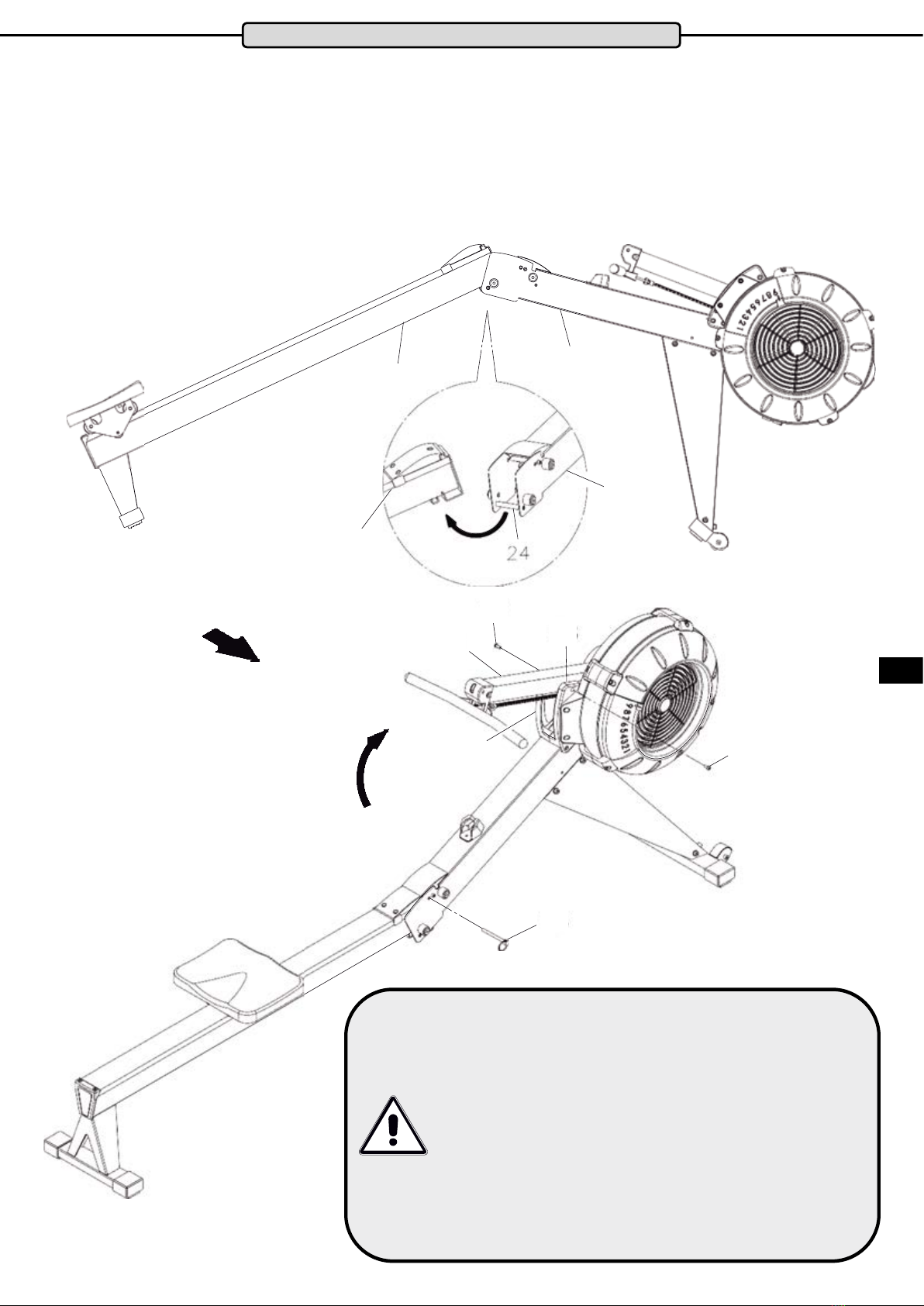
Step 3: Assemble the Slide Rail & the Cockpit Frame
Lift the slide frame (2) and the base frame (1) as shown in the illustration.
Insert the mounting of the slide frame (2) in the socket (24) of the base frame.
Raise the connected frames and secure both using the pin (98).
Raise the cockpit frame (6) and secure it with one Allen head screw M6x10 (72) each side on the
right and left housings (58 & 57).
Important safety notice
Check that the two frame parts are securely connect-
ed together and the locking pin properly attached
before every use or transport of the device. Failure to
do so may lead to injuries if the device is used, raised
or moved.
Connect and disconnect the two frame parts careful-
ly to avoid possible injuries, such as pinching your
hands.
If you separate the two frame parts for storage, do not
stand them upright in case they fall over.

L
R
84
84
9
9
45L
1
45R
9
9
84
84
8
Assembly
Step 4: Assemble the Pedals
To facilitate identication of the pedals, the left one (45L) is marked with an “L” and the right
One (45R) is marked with an “R”.
Attach the left pedal (45L) with two Allen screws M8x150 (84) and two spacers (9) on the left side of
the base frame (1).
Do the same with the right pedal (45R).

9
ENG
Assembly
Step 5: Assemble the Cockpit
Slide the smartphone holder (20) into the corresponding slot on the back of the cockpit
(19). Then put the rubber band (21) on the holder (20) and cockpit (19) as shown in the
picture.
Insert the two C batteries and attach the cockpit (19) to the cockpit frame (6) using one
bolt M8x75 (78), washer M8 (79) and locknut M8 (80).
Connect the cable (23) to the connector of the cockpit (19).
Inserting and changing the batteries
Step 1: Open and remove the battery compartment cover.
Step 2: Insert two C batteries paying attention to the correct orientation of the
battery poles - see illustration.
Step 3: Replace the battery compartment cover.
Please note:
1. Use only new batteries when changing batteries.
2. Do not use rechargeable batteries
3. Observe the disposal instructions for batteries in this manual
C Batteries

A.
B.
C.
D.
E.
F.
70
70
68
68
12L
12L 12L 12L
38
38
38
38 38 38
38
38
38
1
12L 12L
12L
12R
A
A
B
B
10
After about 250,000 rowing strokes (at an average of 30 strokes / minute and an average
exercise time of 30 minutes this equals approximately 250 training sessions. Please note
that this value may vary depending on strokes / minute, training time and intensity of
training) the pulley rope can stretch. To re-tighten the rope again proceed as follows:
Step 1
1. Position the base frame as shown on a block.
2. Remove the cover (68).
3. Pull out the cover (70).
Step 2
1. Position the front of the base frame as shown in the illustration.
2. Detatch the left hook (12L)
3. Mark the rope (38) at the contact point to the hook (12L)
4. Release the cable (38) from the hook (12L).
5. Slide the hook (12L) along the rope about 5cm (38) back from the mark
6. Fix the rope (38) back to the hook (12L)
7. Re-attach the left hook (12L) by holding the hook with one hand and the rope with
the other.
8. Repeat with the right hook (12R).
Adjusting the Rope Pulley
Step 3
1. Position the base frame on a block as shown.
2. Reinstall the cover (70).
3. Finally, replace the cover (68).
Autres manuels pour AirRow
1
Table des matières
Autres manuels Maxxus Salle de sport à domicile

Maxxus
Maxxus RunMaxx 7.4 Instructions d'utilisation

Maxxus
Maxxus WalkMaxx 6.1 Instructions d'installation

Maxxus
Maxxus UNIVERSAL-TRAINING BENCH PRO Manuel utilisateur

Maxxus
Maxxus AirRow Manuel utilisateur

Maxxus
Maxxus OXFORD AXR Instructions d'installation

Maxxus
Maxxus Multipress 8.1 Instructions d'installation
Manuels Salle de sport à domicile populaires d'autres marques

Horizon Fitness
Horizon Fitness OXFORD 6 Manuel utilisateur

Energetics
Energetics Multi Trainer 5.1 Manuel utilisateur

Matrix
Matrix MG-PL Series Manuel utilisateur

Reebok
Reebok Tbr2i Manuel d'utilisation et d'entretien

Weider
Weider 8300 Hard Drive Manuel utilisateur

Pure Fitness
Pure Fitness 8526HE Manuel utilisateur


