Magic PM160 Manuel utilisateur

User Manual
Applicable Model: P160/P200/P260
Version 1.0
Date: August, 2017

Due to the constant renewal of products, the company cannot undertake the
actual product in consistence with the information in the document, also any
dispute caused by the difference between the actual technical parameters
and the information in this document. Please forgive any change without
notice.
Important Claim
Firstly, thank you for purchasing this hybrid-bio terminal. Before using, please read this manual
carefully to avoid the unnecessary damage! The company reminds you that the proper use will
improve the use affect and authentication speed.
No written consent from our company, any unit, or individual isn’t allowed to excerpt, copy the
content of this manual in part or in full, also spread in any form.
The product described in the manual maybe includes the software which copyrights are shared
by the licensors including our company. Except for the permission of the relevant holder, any
person can’t copy, distribute, revise, modify, extract, decompile, disassemble, decrypt, reverse
engineering, leasing, transfer, sub-license the software, other acts of copyright infringement, but
the limitations applied to the law is excluded.
The title with represents the optional function.
Copyrights
ⒸCopyright 2017 ZKTeco Co, Ltd. All rights reserved.
All rights reserved. Except as specifically permitted herein, no portion of the information in this
document may be reproduced in any form or by any means without the prior written permission
from ZKTeco.

Table of Contents
1.
Introduction ....................................................................................................................................... 1
2.
Features ............................................................................................................................................. 2
3.
Specifications ..................................................................................................................................... 3
4.
Instructions for Use ............................................................................................................................ 4
Palm placement ............................................................................................................................... 4
Finger placement.................................................................................................................... 4
Verification Modes .......................................................................................................................... 5
Fingerprint verification ................................................................................................................ 5
Palm Verification.......................................................................................................................... 6
Badge verification
7
5.
Main Menu......................................................................................................................................... 8
6.
User Management............................................................................................................................ 10
New User ....................................................................................................................................... 10
Enter User ID and Name............................................................................................................. 10
Enter User Role .......................................................................................................................... 10
Verification Mode ...................................................................................................................... 10
Enrolling a fingerprint ................................................................................................................ 11
Enrolling a palm ................................................................................................................ 11
Enrolling a Badge
11
Enrolling a password.................................................................................................................. 12
All Users12
Editing a user ............................................................................................................................. 12
Deleting a User........................................................................................................................... 13
Display Style ......................................................................................................................... 13
7.
User Role .......................................................................................................................................... 14
Creating a new role and its function .............................................................................................. 14
8.
Communication Setting........................................................................................................... 15
Ethernet......................................................................................................................................... 15
Serial Comm ......................................................................................................................... 16
PC Connection ...................................................................................................................... 16
ADMS16
9.
System.............................................................................................................................................. 17
Date Time ...................................................................................................................................... 17

Attendance .................................................................................................................................... 17
Reset 18
USB Upgrade ........................................................................................................................
18
10.
Personalize.................................................................................................................................... 20
User Interface ................................................................................................................................ 20
Voice 20
Bell Schedule ................................................................................................................................. 21
New Bell Schedule ..................................................................................................................... 21
All Bell Schedule................................................................................................................
21
Options 22
Punch State Options .............................................................................................................
22
Shortcut Key Mappings .........................................................................................................
23
11.
Data Mgt. ...................................................................................................................................... 25
Delete Data.................................................................................................................................... 25
Backup Data................................................................................................................................... 25
Restore Data .................................................................................................................................. 26
12.
Access Control .............................................................................................................................. 27
Time Schedule ......................................................................................................................
27
Holidays28
Access Groups ............................................................................................................................... 28
Combined Verification29
Anti-passback Setup
30
Duress Option................................................................................................................................ 31
13.
USB Manager ................................................................................................................................ 33
Download.............................................................................................................................
33
Upload
33
Download Options................................................................................................................
34
14.
Attendance Search ....................................................................................................................... 35
15.
Print .............................................................................................................................................. 36
Data Field Setup....................................................................................................................
36
Printer Options .............................................................................................................................. 36
16.
Short Message .............................................................................................................................. 36
Creating a New Message .............................................................................................................. 37
Message Options ........................................................................................................................... 38
17.
Work Code .................................................................................................................................... 39
New Work Code............................................................................................................................. 39

All Work Code ................................................................................................................................ 39
Work Code options ........................................................................................................................ 40
18.
Autotest ........................................................................................................................................ 41
19.
System Info ................................................................................................................................... 42
20.
Appendix ............................................................................................................................. 43


P160UserManual
1
1.
Introduction
P160 is a multibiometric identification time & attendance and access control terminal, which can
connect with third party electric lock, door sensor, and exit button etc.
With the latest palm/fingerprint identification algorithm and streamlined technology, it can hold
600 palm templates and up to 20,000 fingerprint templates without dividing into groups.
Communicating via Wi-Fi(Optional) , TCP/IP, and USB client, it ensures a smooth connection and
data transfer. Amazing verification speed and intuitive operation process make it popular.
Elaborately designed and finely processed, it matches your slap-up office perfectly.

2
P160UserManual
2.
Features
Palm, Fingerprint, RFID Ready
Elegant ergonomic design; Easy installation.
Wi-Fi(Optional), TCP/IP, and USB communication.
Professional ZKTeco Palm and fingerprints identification algorithm.
Optional Modules:
PoE module/3G module/ high (general) level access control module/battery module/printer

P160UserManual
3
3.
Specifications
Display
2.8-inch TFT color Display
Capacity
Palm templates:600(Standard)
Fingerprint templates 3,000
ID Card Capacity
10,000(Optional)
Logs Capacity
100,000
Communication
TCP/IP, USB, Wi-Fi(Optional)
Standard Functions
Automatic Status Switch, Self-Service Query,
AC module 1: Exit Button, Door Lock, Alarm,12V OUT, AUX IN;
Work Code, T9 Input, 9 Digit User ID, DST, Scheduled-bell and
SMS
Optional Functions
ID Card, Mifare Card
AC module 2: Exit Button, Door Lock, Alarm,12V OUT, AUX IN,
Door Sensor, RS485, Wiegand IN/OUT.
PoE,3G, Battery Module,ADMS
Power Supply
12V/1.5A
Verification Speed
≤1 sec
Operating Temperature
0-45 °C
Operating Humidity
20%-80%

4
P160UserManual
4.
Instructions for Use
Palm placement
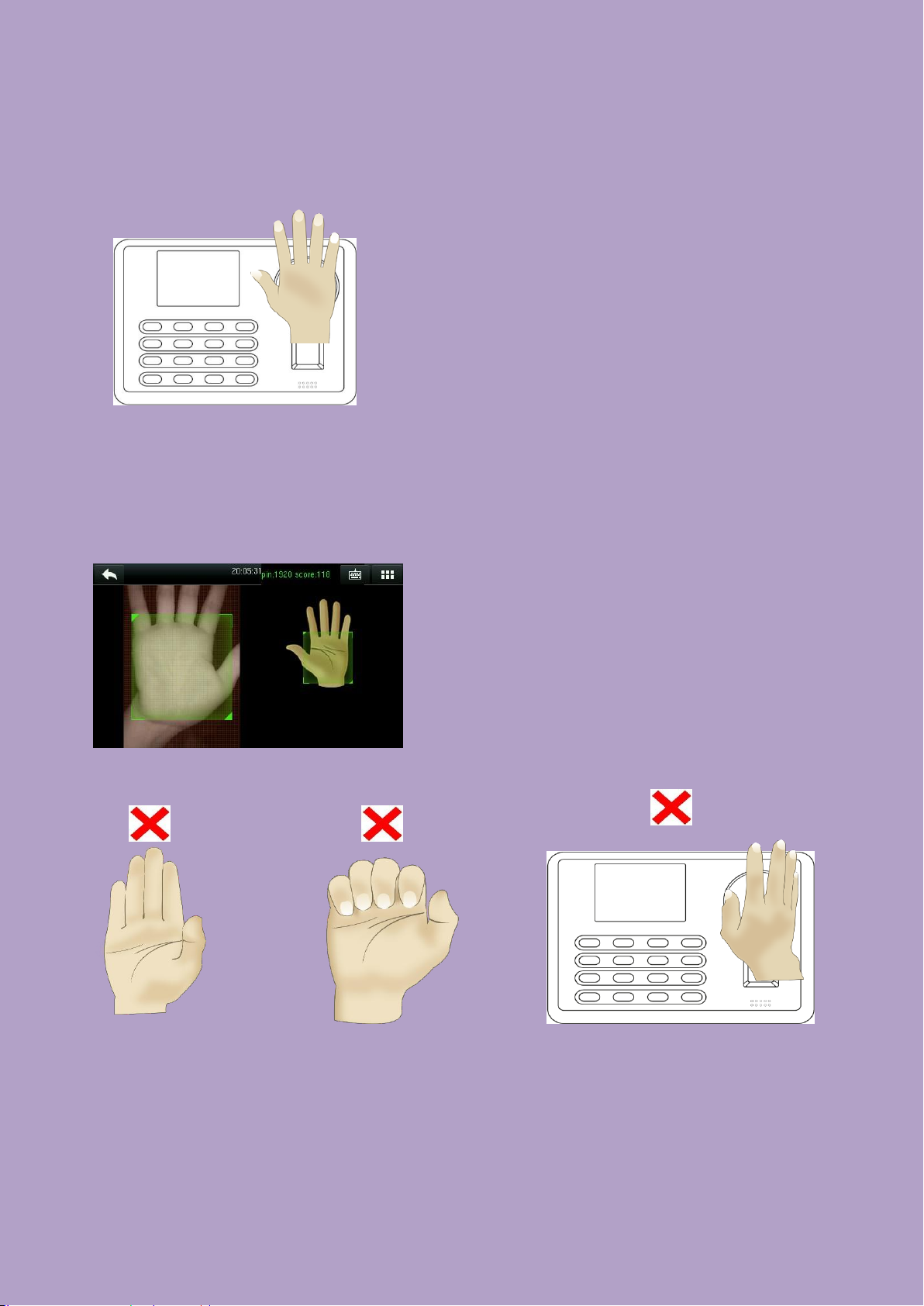
How to correctly enroll the palm
Place your palm in the palm multi-mode
collection area, such that the palm is placed
parallel to the device.
Make sure to keep space between your fingers.
During enrollment locate your palm at the center of the screen, and follow the voice prompts "Focus the
center of the palm inside the green box". The user needs to move forward and backward to adjust the
palm position during the palm registration.
Verification
Incorrect palm gestures
Finger placement
Place your palm in the green area parallel to the
device with space between the fingers.
Table des matières