
MacDermid ColorSpan 5440 Guide d'installation

Technical Training
Manual
for ColorSpan 5400UV Series
Version: 2007.07.17


About this Manual
This manual is used in conjunction with Authorized Service Provider training courses for
the 5400UV series UV-curable ink printers.
Revision History
May 2007 Initial Release
June 2007 Maintenance Release
July 2007 Maintenance Release
5400 Technical Training Manual MacDermid ColorSpan Confidential Page i of i
MacDermid, Inc. 11311 K-Tel Drive, Minnetonka, MN 55343
Phone: 952-944-9457 Fax: 952-944-8507

I. Product Description
Models
There are four models in the 5400uv series. Other than the differences noted in the fol-
lowing table, they are identical in all respects. There is no upgrade path from one model
to another.
Model Color Set Total Printheads
5440 CMYK 4 (1 per color)
5445 CMYK 8 (2 per color)
5460 CMYKcm 6 (1 per color)
5465 CMYKcm 12 (2 per color)
Speeds vary based on number of printheads per color.. The 5440 and 5460, with one
printhead per color, have the same speeds. The 5445 and 5465, with two printheads per
color, are twice as fast. See the chart in section III for speed detail.
The final apparent output resolution varies based on the presence or absence of the
light-density inks. The 5460 and 5465, with the CMYKcm color set, have a maximum ap-
parent output resolution of 1800. The 5440 and 5445, with the CMYK-only color set, do
not benefit from any apparent resolution enhancements.
Key Specifications
Maximum media thickness of 1.00"
Maximum print width 54" (rigid) or 53.5" (roll-fed)
See the following sections for full description of product features.
Naming Convention
The 5400 series moniker is parsed in the following way:
• 54: the printable width
• 4 or 6: four colors (CMYK) or six colors (CMYKcm)
• 0 or 5: 1 head per color or 2 heads per color
5400 Technical Training Manual MacDermid ColorSpan Confidential Page 1 of 39
MacDermid, Inc. 11311 K-Tel Drive, Minnetonka, MN 55343
Phone: 952-944-9457 Fax: 952-944-8507

Orientation
Some documents use the following conventions to identify printer orientation.
This document also uses the term “X-axis” to describe motion of mechanical parts from
left-to-right, or service-end to user-end; in other words, the axis in which the carriage
moves. The term “Y-axis” is used to describe motion of mechanical parts that feed the
media through the printing area; in other words, from front-to-back or top-to-bottom with
regard to a finished print. There is generally no discussion of Z-axis motion, but if there
were it would encompass the up and down motion of the service station and/or the up
and down motion of the rail and carriage for the accommodation of various thicknesses
of media.
Input Side
Output Side
User End
Service End
X axis
Y-axis
Z-axis
5400 Technical Training Manual MacDermid ColorSpan Confidential Page 2 of 39
MacDermid, Inc. 11311 K-Tel Drive, Minnetonka, MN 55343
Phone: 952-944-9457 Fax: 952-944-8507

II. Printer Function/Feature Overview
In this section we review the main features of the printer and highlight their advantages.
Media Handling & Ink Compatibility
The 5400 can print on a wide range of media types. The printer supports roll-fed media
up to 54" wide and cut-sheet materials 54" wide by 8’ long. The sheet-fed method is also
referred to as the Straight-Through Paper Path or STPP. UV-cure inks are compatible
with an even greater array of substrates, ranging from paper, vinyl, plywood, glass, and
many synthetic materials. It is far more likely that the UV-cure ink will work with a given
media than that it will not work.
The printer uses ColorSpan SolaChrome-UV ink. UV-curable ink is unlike most other
inkjet ink in that it does not need to be absorbed into the substrate or a topcoat. UV-ink
instead sits on the surface of the media, much like enamel paint. So while the ink will
successfully cure onto most any surface, there are varying degrees of adhesion. Adhe-
sion is a measurable trait that indicates how resistant the ink is to scratching or other
attempts to remove it from the substrate. Adhesion improves as curing continues. When
immediately printed and exposed to the UV energy, the ink sets up and begins to cure. It
is “dry” to the touch (i.e., it will not smear) but the molecular linking process that was set
in motion by the UV energy continues for up to 48 hours after exposure. A particular me-
dia may have poor adhesion immediately after printing, but that adhesion can improve
significantly when left another 24-48 hours.
Print Server Connectivity
The network connectivity to the printer is mediated through a print server only, either
a ColorSpan Kodiak RIP, which supports NetBEUI (Windows Networking) and TCP/IP
connections, or a supported third-party RIP, which may support any number of network
protocols. The printer itself does not connect directly to any existing ethernet network,
nor does it use any standard protocols such as TCP/IP. The print server, regardless of
type, connects to the printer via a dedicated 100baseT ethernet network card. Data com-
munication between the printer and print server is through ColorSpan’s VideoNet proto-
col. Typically the printer is connected directly to a single server by a crossover cable. In
environments with multiple servers or multiple printers, a hub can usually be employed
to make the printer available to multiple servers. This should be a physically segregated,
VideoNet-only network, not the local ethernet network.
5400 Technical Training Manual MacDermid ColorSpan Confidential Page 3 of 39
MacDermid, Inc. 11311 K-Tel Drive, Minnetonka, MN 55343
Phone: 952-944-9457 Fax: 952-944-8507
Printheads
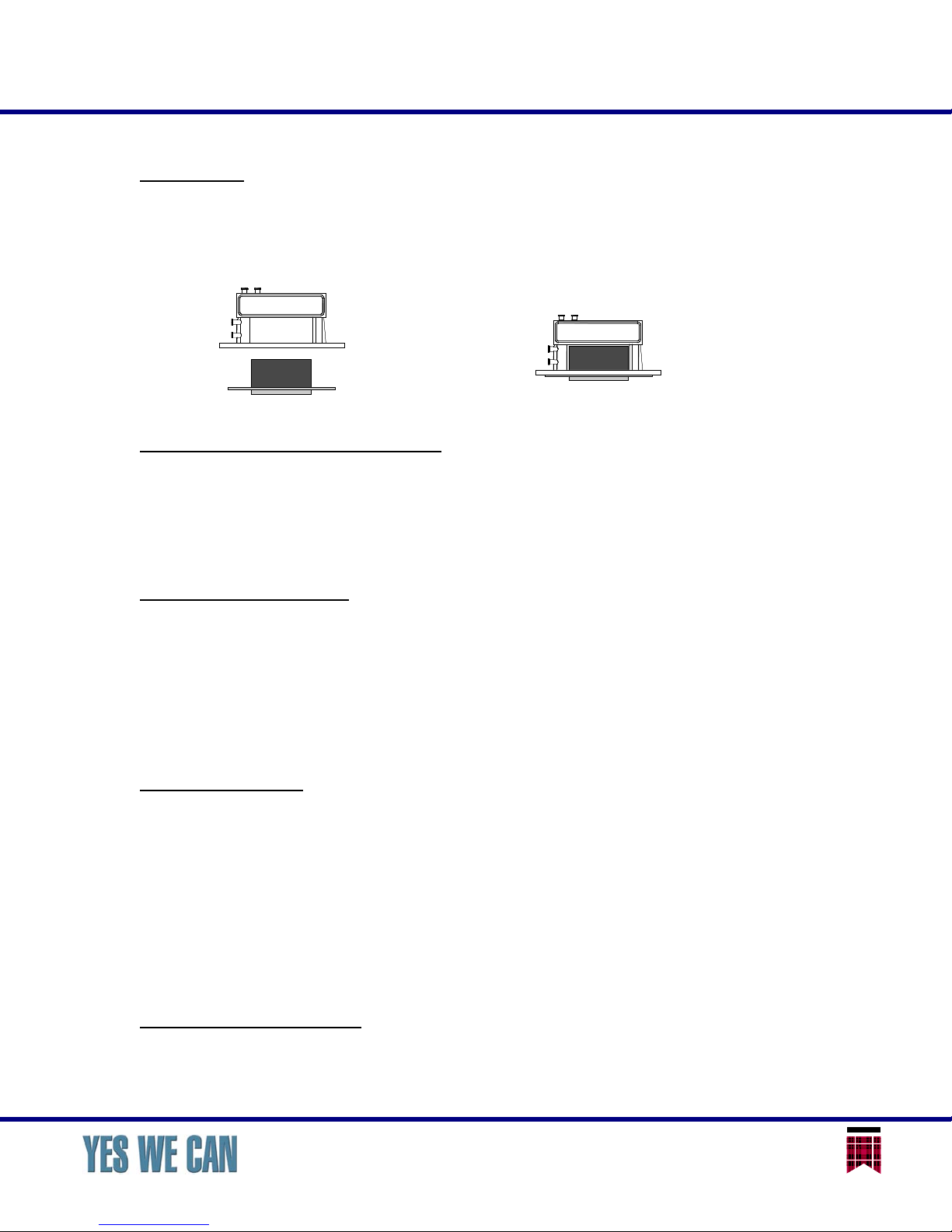
Depending on model, the 5400 uses four, six, eight, or twelve piezoelectric printheads,
with one or two printheads per color. Each printhead has 192 jets. The printhead con-
sists of two parts, the piezoelectric mechanism or “jetpack” and an engineered-compos-
ite material reservoir.
Onboard digital imaging sensor
All printers are equipped with a digital image sensor that performs several functions.
First, it automatically measures the width of the media when a new media is installed on
the printer. On rigid media, it also finds the leading edge and can detect if the media has
been loaded with any skew. Second, it can perform several of the calibrations necessary
to prepare the system for printing.
Onboard color sensor
In addition to the image sensor, the printer is equipped with a color sensor, also known
as the photodiode or spectrophotometer, for the purpose of linearizing, or color calibrat-
ing, the printer. The linearization function is available for many, though not all, media
substrates. Substrates such as backlit film or other transmissive media require an exter-
nal, transmissive input device for color calibration. The color sensor can also be used to
create custom ink & media color profiles. Both linearization and profile creation using the
color sensor depend on support from the attached print server.
Jet Replacement
By using either the image sensor for automated calibration or operator input for manual
calibration, the printer can identify individual jets on any printhead that are not perform-
ing satisfactorily, and then re-map the functions of that bad jet to a different jet. This
feature is also known as Jet Mapping. Depending on the print mode configuration (see
section IV), the number of jets available as replacement for any one other jet varies. It
is possible to have a large number of jets not working on a printhead and still be able to
map in replacements so that no jets are missing during printing. If a jet that was previ-
ously identified as “bad” begins to work again, that jet can be cleared from the list and
re-enabled for printing.
Adjustable head height
The “head height” of the carriage is the distance from the printhead orifice plate, or jets,
to the surface of the media. This distance typically remains constant regardless of the
Reservoir
Piezo Inkjet
Mechanism
Printhead
Assembly
5400 Technical Training Manual MacDermid ColorSpan Confidential Page 4 of 39
MacDermid, Inc. 11311 K-Tel Drive, Minnetonka, MN 55343
Phone: 952-944-9457 Fax: 952-944-8507

thickness of the media. To accommodate media thicknesses up to one inch, the entire
rail assembly is moved up and down by a pair of lift motors. The carriage assembly rides
along with the rail and is positioned precisely above the media by the aid of a sensor that
determines media thickness. Based on the detected thickness of the media, the rail is
moved to an appropriate height so that the carriage achieves the desired head height
above the surface of the media.
The standard or default head height is 0.085" above the surface of the media. The
standard head height will accommodate the majority of media with a good compromise
between minimized overspray and safe distance from the media to avoid headstrikes.
The maximum head height is 0.120" and the minimum is 0.065". Head height is set
through the control panel, requiring no tools or other operator intervention. The bidirec-
tional registration (see section IV) is automatically recalculated for different head heights,
no recalibration is required.
Automated Head Maintenance
Regular printhead maintenance (cleaning) is essential to long life and quality output. The
5400 printer uses an automated system to clean the printheads, requiring no operator
contact. The printhead cleaning routine is called the Purge. The printer uses a real-time
clock to track its usage and cleaning history, and will automatically initiate a Purge in
order keep the printheads in good condition. The operator can also command the printer
to Purge at any time by using a button on the control panel.
The Purge consists of two stages. First, air is pumped into the printheads to force ink out
through the nozzles, clearing any blockages. The service station then wipes the nozzle
orifices and conveys the expelled ink to a receptacle within the printer. For more difficult
blockages, more than one Purge may be necessary. A Purge can be performed on pairs
of adjacent heads only or on all heads together. (The pairs are dictated by the construc-
tion of the service station wiping assembly.)
UV Lamp System
Ultraviolet light energy is delivered by a pair of lamps on the carriage. Each lamp has
a shutter mechanism that opens and closes to regulate the output of the lamps. When
the lamp leaves the printable area of the media, the shutter closes to prevent light from
escaping; this prevents accidental curing of the ink on the printheads through reflection
of light onto the carriage. The shutters also can be configured to be partially closed while
over the media, which reduces the amount of heat transferred to the media. Excess heat
can cause some media to change shape (i.e., bow), leading to increased possibility of
head strikes.
Each lamp has two fans and a temperature sensor that control cooling of the bulb. The
lamps have a warm-up and cool-down cycle. If unused for a length of time, the lamps
will turn off the bulb and begin the cool-down cycle. If a print job is sent to the printer
during cool-down, the cycle must complete before the warm-up can begin. The control
5400 Technical Training Manual MacDermid ColorSpan Confidential Page 5 of 39
MacDermid, Inc. 11311 K-Tel Drive, Minnetonka, MN 55343
Phone: 952-944-9457 Fax: 952-944-8507

panel displays the status of the lamps. Allow the lamps to complete their cool-down cycle
before shutting down the printer.
Each UV bulb has an expected usable life of 500-1000 hours. The light output will not
visibly diminish but the amount of UV energy will. The 500-hour figure assumes exclu-
sive use of Billboard mode only. The bulbs can be changed from Low power to Medium
and High power as they continue to age. Eventually, however, even the High setting will
not output enough energy to continue curing in Billboard mode. Using the slower print
modes (Production, High Quality) will extend the usable life of the bulbs. A maintenance
clock on the printer tracks the bulb on-time and will alert the operator when 500 hours
has been reached. The bulbs are user-replaceable, consumable items. The replacement
cost of the bulbs adds between ½ and 1 cent per square foot.
Integrated Rigid Media Support Tables and Alignment Fences
The input and output tables that support rigid media are integrated into the printer and
fold down for storage when not in use, so there is no requirement for additional storage
space to accommodate the tables when not in use. A fixed alignment fence facilitates
loading rigid media squarely, and a movable fence can be deployed to push heavier me-
dia into consistent contact with the fixed fence. The movable fence folds out of the way
when not in use.
Anti-Static Measures
Many of the media that users of UV printers prefer are susceptible to static electricity
issues that diminish print quality. The 5400 series uses a conductive platen to help dis-
sapate static and employs a pair of anti-static ionizer bars on the printhead carriage that
greatly help to eliminate static electricity that could interfere with print quality. Increased
humidity in the printer environment (40% RH or more) also contributes significantly to
static reduction.
Media Wizard
All engines have a number of printer settings that are media-dependent: vacuum fan
setting, lamp power, and recommended pass mode. The Media Wizard saves these
settings and can be used, when media is loaded, to change these settings to the values
that were previously used with the selected media. The factory-defined media choices
cannot be changed, but they can be copied and the copies altered. User-defined choices
may be added, changed, and deleted at will.
The selected media name affects only the printer’s handling of the media. No informa-
tion is communicated back to the print server; any selection relating to media on the print
server is entirely independent.
5400 Technical Training Manual MacDermid ColorSpan Confidential Page 6 of 39
MacDermid, Inc. 11311 K-Tel Drive, Minnetonka, MN 55343
Phone: 952-944-9457 Fax: 952-944-8507
Ce manuel convient aux modèles suivants
3
Table des matières
Autres manuels MacDermid Imprimante


