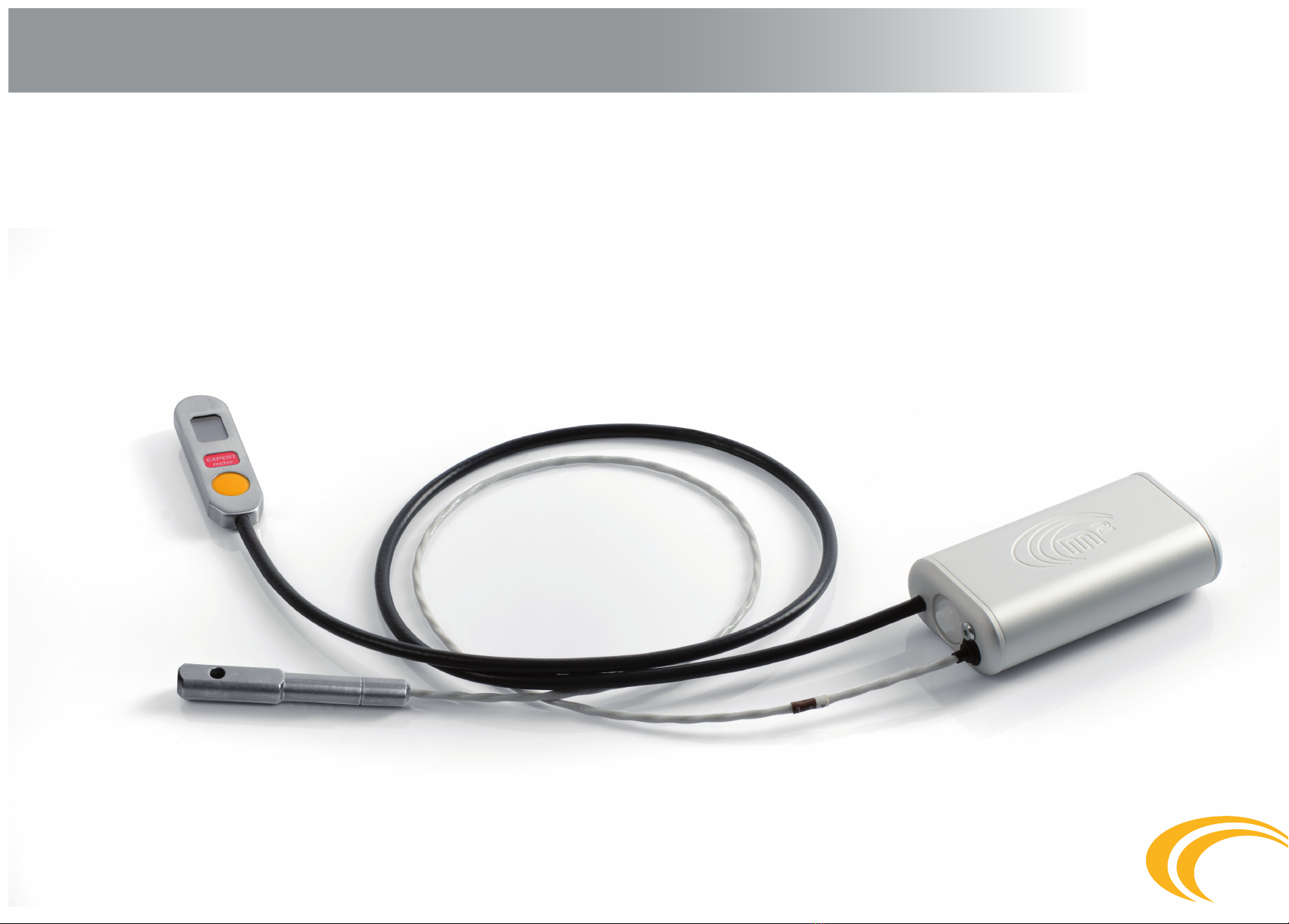
M2 AAD Manuel utilisateur

01.12.04 EN
USER´S GUIDE
m2 AAD

2
CONTENT
1. Warning ............................................................................. page 3
2. Introduction ....................................................................... page 4
3. Function ........................................................................... page 5
3.1 Construction and principal ................................................. page 5
3.2 Individual device parts ....................................................... page 5
3.3 Function principle............................................................... page 6
3.4 Activation zone................................................................... page 10
3.5 Altitude lock ....................................................................... page 11
3.6 Limited speed .................................................................... page 12
4. Models................................................................................ page 13
4.1 Student............................................................................... page 13
4.2 Expert (Swoop)................................................................... page 13
4.3 Tandem .............................................................................. page 13
5. Installation ......................................................................... page 14
6. Control ............................................................................... page 17
6.1 Switching the device on ..................................................... page 17
6.2 Switching the device o ..................................................... page 18
6.3 Resetting the height of landing location ............................ page 18
6.4
Information in the device memory calibrated in meters (m)
... page 20
6.5 Information in the device memory calibrated in feet (ft).... page 22
6.6 Switching on Schema – meter version ............................... page 24
6.7 Switching o Schema – meter version ............................... page 25
6.8 Switching on Schema – feet version................................... page 26
6.9 Switching o Schema – feet version................................... page 27
7. Maintenance ...................................................................... page 28
7.1 m2release unit (cutter) replacement ................................. page 28
7.2 Filter replacement .............................................................. page 29
7.2.1 Procedure when the m2is used under water ..................... page 29
7.2.2 Procedure during the lter incorrect function..................... page 29
7.2.3 Waste disposal ................................................................... page 29
7.3 Battery ............................................................................... page 30
8. Ensuring closing loop to the washer .................................. page 31
9. Error reports ....................................................................... page 32
10. Technical data..................................................................... page 33
11. Warranty............................................................................. page 34

3
1. Warning
Skydiving is a dangerous activity which can result in serious or even fatal injury.
Training and experience are required in order to reduce such risk. Using the m2safety device during skydiving can signicantly reduce
the risks. Never solely rely on the m2, since it is not the primary tool for opening of your parachute. Remember the m2is an electronic
device and, just like other equipment, it can fail. Read the instruction manual thoroughly prior to using the device. The device is not
designed for PARAGLIDING, PARASCENDING, PARASAILING, or BASE JUMPING. The failure-free function of the m2cannot ensure the
correct function of the parachute system, i.e. the harness with the container, the reserve parachute, and the accessories.
Warning for users !!!!
Each part and component of the m2is thoroughly checked several times during production. Despite all due care applied during
production, assembly and appropriate use, the m2can fail!!!
The m2device is responsible solely for cutting the closing loop of the reserve parachute!!!
The m2is not responsible for the correct function of the system with container, reserve parachute, and other accessories.
1.1
1.2

4
2. Introduction
The m2safety device provides automatic cutting of the closing loop of the reserve parachute in cases where the safety of the skydiver is
in danger. It is constructed and manufactured based on the latest skydiving research. Its function fully complies with the requirements
of current skydiving. Professional design engineers that participated in its development are also excellent skydivers.
The device is available in EXPERT, STUDENT, or TANDEM models. Upon activation, the m2’s operation is fully automatically. The main
features of the m2are its solid structure, exible cables, the possibility of being submerged under water during swooping, a lifetime for
the device of 15 years or up to 15,000 dives, simple operation, acceptable price, and quality service.
The device stores a ight record during active use. The metal parts are made from stainless steel or aluminum alloy.

5
3. Function
Construction and principal
The m2is constructed in order to comply with the requirements for resistance and correct function in all situations. It operates with
minimum requirements for energy consumption, which enables it to retain a sucient energy source capacity for its entire service life
without the necessity of battery replacement.
Individual device parts
The m2is comprised of the processing unit – the device body with battery, processor, electronic circuits, and pressure sensor. The con-
trol unit with multifunction display and control button is connected to the device body by means of a cable. The cutter is connected to
the body of the device by means of a connector that is a replaceable part of the device.
Function principal
The m2device is an electronic safety device, operating on the principal of pressure sensing.
The pressure sensor monitors the actual atmospheric pressure 8x per second during free fall; the received information is evaluated
by means of software and recalculated to the real falling speed and actual height. Upon exceeding the activation limits preset for the
individual Expert, Student or Tandem versions, the m2device is able to use the cutter to cut the closing loop on the reserve parachute
and initiate its opening. The device is activated upon exceeding the altitudes and speeds specied.
The device is responsible solely for cutter activation as per specied limits, and cutting the closing loop of the reserve parachute.
It is not responsible for the correct and full function of the whole harness system with the container, reserve parachute, and other
accessories!!!
3.1
3.2
3.3
3.3.1
3.3.2

Ground
zero
+40m / + 130ft
Restricted area
+450m / + 1475ft
6
3. Function
The m2function for landing at a dierent altitude above sea level than the altitude the aircraft takes o from
Only three options can occur in regard to the skydiver´s landing:
Landing location at the same elevation as the take-o location
in such a case, the m2device requires for the aircraft to ascend up to at least 40m; it is further necessary, in order to provide
problem-free functioning and start the detection capability, to remain above this altitude until the skydiver´s dive. The alti-
tude lock is at either 450m or 900m, depending on the version.
3.3.3
a)

7
Ground
zero
+40m / + 130ft
+40m / + 130ft
Restricted area
Restricted area
+450m / + 1475ft
3. Function
Landing location higher than the take-o location
The m2device must be preset to the positive value for the elevation dierence between the take-o and landing location altitudes. The
altitude lock in such a case depends on the landing location, i.e. as per version 450m or 900m, plus the specied altitude dierence. In
order to provide problem-free functioning and take-o detection ability in such a case, the m2device requires an ascent up to at least
40m above the take-o location and, upon reaching and exceeding this preset altitude of +40m, remaining above this altitude level
until the skydiver´s jump. Upon landing with the preset altitude, the device automatically switches o. Switch on the device prior to the
next dive, i.e. at the take-o altitude of the aircraft. You will be provided with failure free calibration and functioning of the m2device.
b)

Ground
zero
+40m / + 130ft
+40m / + 130ft
Restricted area
+450m / + 1475ft
90 seconds
8
3. Function
Landing location lower than the take-o location
The m2device must be preset to the negative value for the elevation dierence between the take-o and the landing location altitude. The
altitude lock in such cases depends on the landing location, i.e. as per version 450m or 900m, minus the specied altitude dierence. In or-
der to provide problem free functioning and take-o detection ability in such cases, the m2device requires an ascent up to at least 40m abo-
ve the take-o location and, upon reaching the preset altitude of +40m, remaining above this altitude level for at least 90 seconds. After 90
seconds, it is possible to even descend lower than the take-o altitude; nevertheless, descending more than -40m below the preset landing
altitude is strongly warned against. Upon landing with the preset altitude, the device will automatically switch o. Switch on the device
prior to the next jump, i.e. at the take-o altitude of the aircraft. This will provide failure free calibration and functioning of the m2device.
c)

9
3. Function
Should you accidentally land in a location 30m higher or lower than the preset landing elevation, switch the device o after
landing and turn it on just before the next dive. The device must always be switched o during transport.
Altitude protection zone of the m2device – “! Important for the aircraft pilot !”
The altitude protection zone of the m2device consists of the rst 40m of elevation above the aircraft take-o location. It is necessary
to exceed the 40m as fast as possible at a steady ascent. At 40m, the m2device detects the aircraft take-o and switches from “stand-
-by” mode to “y” mode. Upon exceeding the 40m protection zone, the device must not drop under this altitude (40m) until the dive
is completed. The only exceptions are in those cases when the skydiver’s landing zone is located at a dierent altitude than the
aircraft take-o location. For such cases, carefully read“the m2function for landing at dierent altitudes above sea level than the
aircraft take-o altitude” chapter, where the specied m2functions are detailed and illustrated with diagrams.
Function of the m2during use in pressurized aircraft
The m2device can be used in pressurized aircraft providing the conditions below are observed:
The ambient atmospheric pressure (outside the aircraft) must be maintained inside the aircraft up to 450m above the aircraft take-o
location for the Expert and Student device versions and 900m for the Tandem version. At the specied altitudes, the device will be un-
locked, which will be indicated by the disappearance of the centre line on the control unit. Once the altitude lock unlocks, the aircraft
can be pressurized.
The aircraft must not be pressurized to a pressure higher than the ambient atmospheric pressure adequate for an altitude of 450m or
900m. If there are devices present in the aircraft with preset altitude locks for 450m and 900m, the pilot must pressurize the aircraft for
ambient atmospheric pressure at 900m.
If the specied limits are not observed, the device may fail.
d)
3.3.4
3.3.5
a)
b)
c)

10
3.4 Activation zone
AZgz – Activation zone above ground zero;
EXPERT 270m (885ft) to 100m (330ft)
STUDENT 330m (1085ft) to 60m (200ft)
TANDEM 610m (2000ft) to 100m (330ft)
BAgz – Beginning of activation zone above ground zero;
EXPERT 270m (885ft)
STUDENT 330m (1085ft)
TANDEM 610m (2000ft)
Autres manuels pour AAD
1
Table des matières
Autres manuels M2 Équipements de sécurité
Manuels Équipements de sécurité populaires d'autres marques

Innova
Innova Xtirpa Mode d’emploi

bolle SAFETY
bolle SAFETY B810 Manuel utilisateur

SHENZHEN FANHAI SANJIANG ELECTRONICS
SHENZHEN FANHAI SANJIANG ELECTRONICS A9060T Manuel utilisateur

Hiltron security
Hiltron security POWER8E Mode d’emploi

Hatco
Hatco B-950P Manuel utilisateur

Sitec
Sitec TX MATIC Manuel utilisateur