
Longshine LCS-WRM-3214 Manuel utilisateur

Model No. LCS-WRM-3214
ADSL2/2+ 4 Port Wireless Router
For Annex A/B
Version 1.0
May.2006

1
Table of Contents
Specification............................................................................................................... 4
Package Contents ...................................................................................................... 6
Hardware Connecting................................................................................................. 7
LED Indicators............................................................................................................ 7
General Setting........................................................................................................... 8
Advanced Setup....................................................................................................... 12
Setup................................................................................................................. 12
LAN Setup.................................................................................................. 12
LAN Configuration...................................................................................... 12
Ethernet Switch.......................................................................................... 14
WAN Setup................................................................................................. 15
Two Step PVC............................................................................................ 15
New Connection......................................................................................... 16
PPPoE Settings................................................................................... 19
PPPoA Settings................................................................................... 21
Static Settings ..................................................................................... 23
DHCP Settings.................................................................................... 24
Bridge Settings.................................................................................... 25
CLIP Settings...................................................................................... 26
Modem....................................................................................................... 27
ADVANCED....................................................................................................... 28
UPnP.......................................................................................................... 28
SNTP.......................................................................................................... 29
SNMP......................................................................................................... 30
TR-069....................................................................................................... 31
Port Forwarding.......................................................................................... 32
DMZ ........................................................................................................... 33
Custom Port Forwarding ............................................................................ 34
IP Filter....................................................................................................... 35
Custom IP Filters........................................................................................ 35
LAN Clients ................................................................................................ 37
LAN Isolation.............................................................................................. 38
TR-068 WAN Access.................................................................................. 39
Bridge Filters.............................................................................................. 40
Web Filters................................................................................................. 42
Dynamic DNS Client................................................................................... 43

2
IGMP Proxy................................................................................................ 44
Static Routing............................................................................................. 45
Dynamic Routing........................................................................................ 46
Policy Routing ............................................................................................ 48
Ingress ....................................................................................................... 50
Egress........................................................................................................ 51
Shaper........................................................................................................ 52
Web Access Control................................................................................... 53
Web Access Control................................................................................... 53
SSH Access Control................................................................................... 54
WIRELESS........................................................................................................ 55
Setup.......................................................................................................... 55
Configuration.............................................................................................. 56
Multiple SSID ............................................................................................. 57
Security...................................................................................................... 58
Management.............................................................................................. 59
WDS........................................................................................................... 60
TOOLS.............................................................................................................. 65
System Commands.................................................................................... 65
Remote Log................................................................................................ 66
User Management...................................................................................... 67
Update Gateway......................................................................................... 68
Ping Test .................................................................................................... 69
Modem Test................................................................................................ 70
STATUS............................................................................................................. 71
Network Statistics....................................................................................... 71
Connection Status...................................................................................... 73
DDNS Update Status.................................................................................. 73
DHCP Clients............................................................................................. 74
Modem Status ............................................................................................ 74
Product Information.................................................................................... 75
System Log................................................................................................ 75
WDS Report............................................................................................... 76
HELP................................................................................................................. 77
Firewall Help .............................................................................................. 77
Bridge Filter Help........................................................................................ 77
LAN Clients ................................................................................................ 78
LAN Group Configuration........................................................................... 78
PPP Connection......................................................................................... 79
UPnP Help.................................................................................................. 79

3
RIP Help..................................................................................................... 80
QoS Help.................................................................................................... 80
Troubleshooting................................................................................................. 81
Appendix ........................................................................................................... 88
4
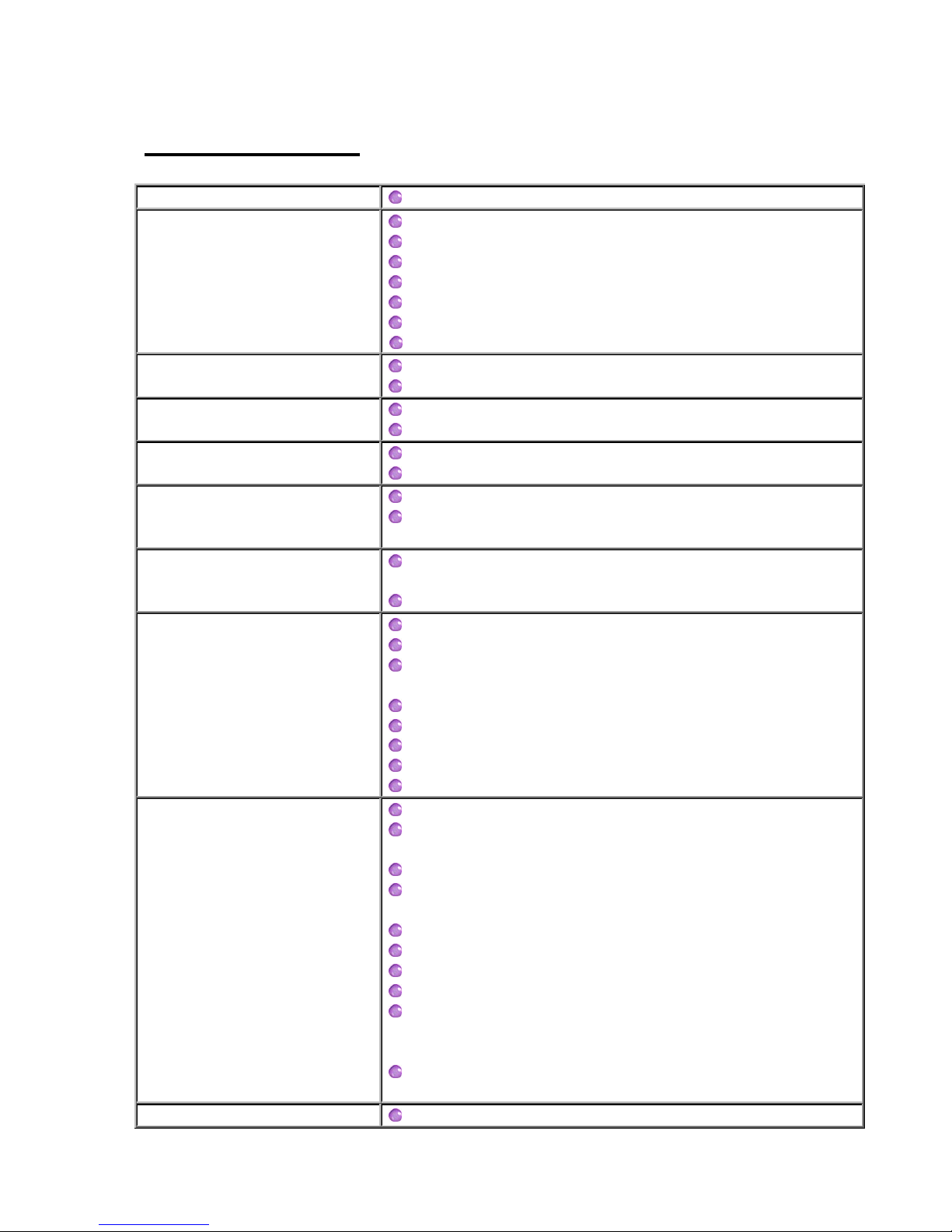
Specification
Line Connection RJ-11(2 wires) , RJ-45 (4 port)
ADSL Features
DMT modulation and demodulation
Tone detection for low power mode
ITU 992.1 (G.dmt) Annex A, B
ITU 992.2 (G.lite)
ITU 992.3 ADSL2 (G.dmt.bis)
ITU 992.5 ADSL2+
ANSI T1.413 Issue 2
Full-rate adaptive modem Maximum downstream rate of 24 Mbps (ADSL2+)
Maximum upstream rate of 1 Mbps
G.lite adaptive modem Maximum downstream rate of 1.5 Mbps
Maximum upstream rate of 512 Kbps
WAN Mode Support PPP overATM (RFC 2364)
PPP over Ethernet (RFC 2516)
LAN Mode Support Bridged/routed Ethernet over ATM (RFC 2684/1483)
Classical IP over ATM (RFC 1577) and PPP over Ethernet
(RFC 2516)
Bridge Mode Support Ethernet to ADSL self-learning Transparent Bridging (IEEE
802.1D)
Supports up to 128 MAC learning addresses
Router Mode Support
IP routing-RIPv2 (backward compatible with RIPv1)
Static routing
DHCP (Dynamic Host Configuration Protocol) Server and
Client
NAPT (NetworkAddress and Port Translation)
NAT (Network Address Translation)
ICMP (Internet Control Message Protocol)
Secure HTTP server (HTTPS)
IGMP (Internet Group Management Protocol)
802.11g Wireless Access
Point
54MbpsAccess Point for wireless connectivity
Interoperable with IEEE 802.11g (PBCC & OFDM
Modulation
Technology supports) 2.4GHz compliant equipment
Supports full mobility and seamless roaming from cell to
cell
Support Ad hoc and Infrastructure mode
Support AP client architecture
Support WEP (64/128/256 bit), WPA/WPA2
Provides up to 30 users wireless connection
Work range : per node indoors approximately
30m~100m,outdoors (line of sight) 200m~300m
depending on data rates
External antenna : one 2dbi detachable antennas with
diversity support (Reverse SMA connector)
Ethernet Features Four RJ-45 connectors for 10/100 Mbps Ethernet LAN
5
connection,DMZ function can be set up between them
Complies with IEEE 802.3u specification
Supports Auto-Negotiation
Supports Auto-MDIX, Auto-MDI
Supports IEEE 802.3x Flow control in Full Duplex mode
Certification CE,LVD
OS WIN 98SE ; WIN 2000;WIN ME;WIN XP
System Requirement PII-266 + 32M RAM
Power
External AC Power
Power ON/OFF switch (option)
Input : 90~120V or 200~240V , 50/60Hz
Output : 12VAC/800mA
LED Indication Power , ADSL Link , WLAN , LAN PORT1~4
PCB SIZE 134mm×96.5mm
Software Upgrade Upgrade by Ethernet Port
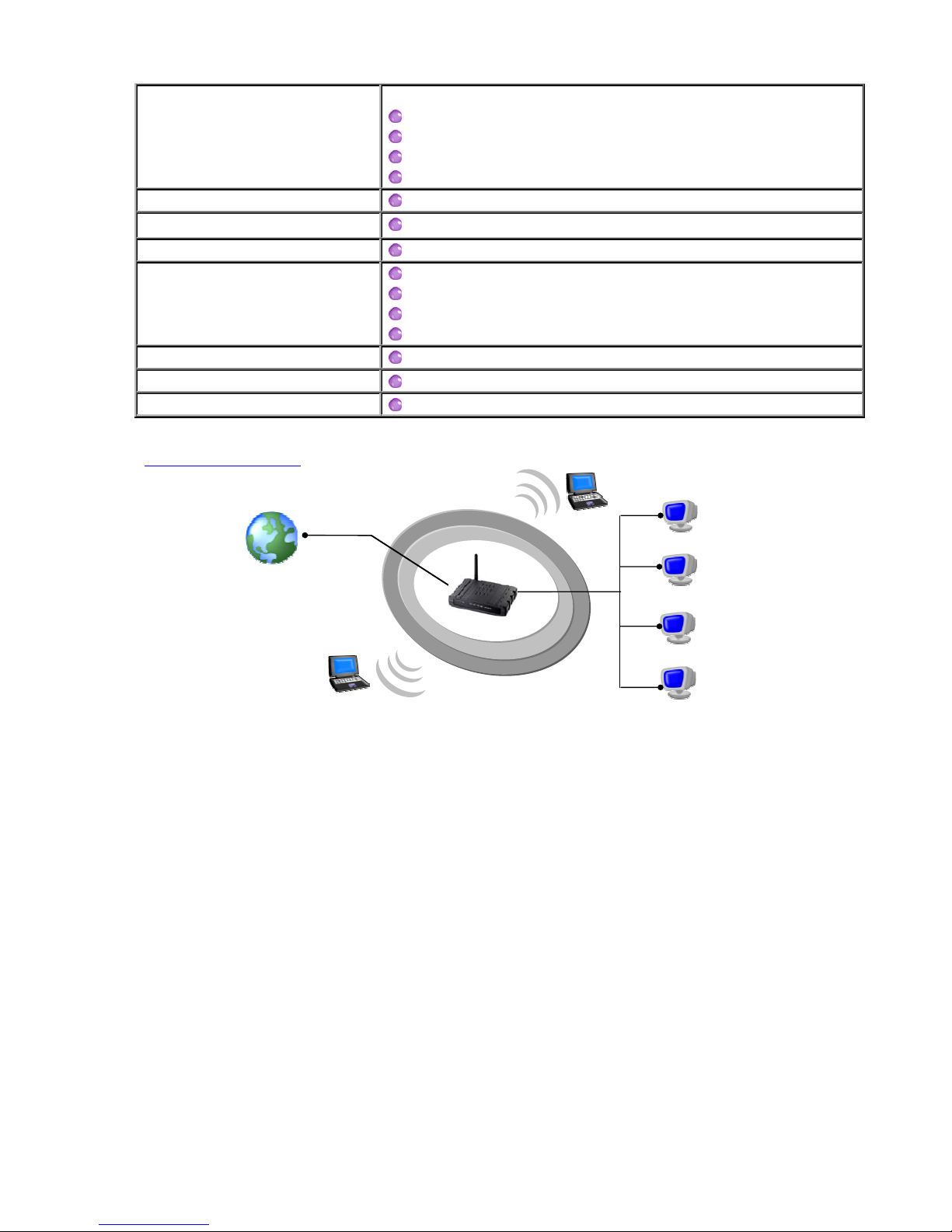
Application Diagram
Internet
ADSL

6
Package Contents
zLongshine ADSL 2/2+ Wireless 4 Port Router
zCD-ROM containing Manual, Quick start Guide
zEthernet Cable (CAT5 UTP Straight-Through)
zTelephone Cable (RJ11)
zPower Adapter (12VAC 800mA)
zQuick Installation Guide
zSplitter (Optional)
7
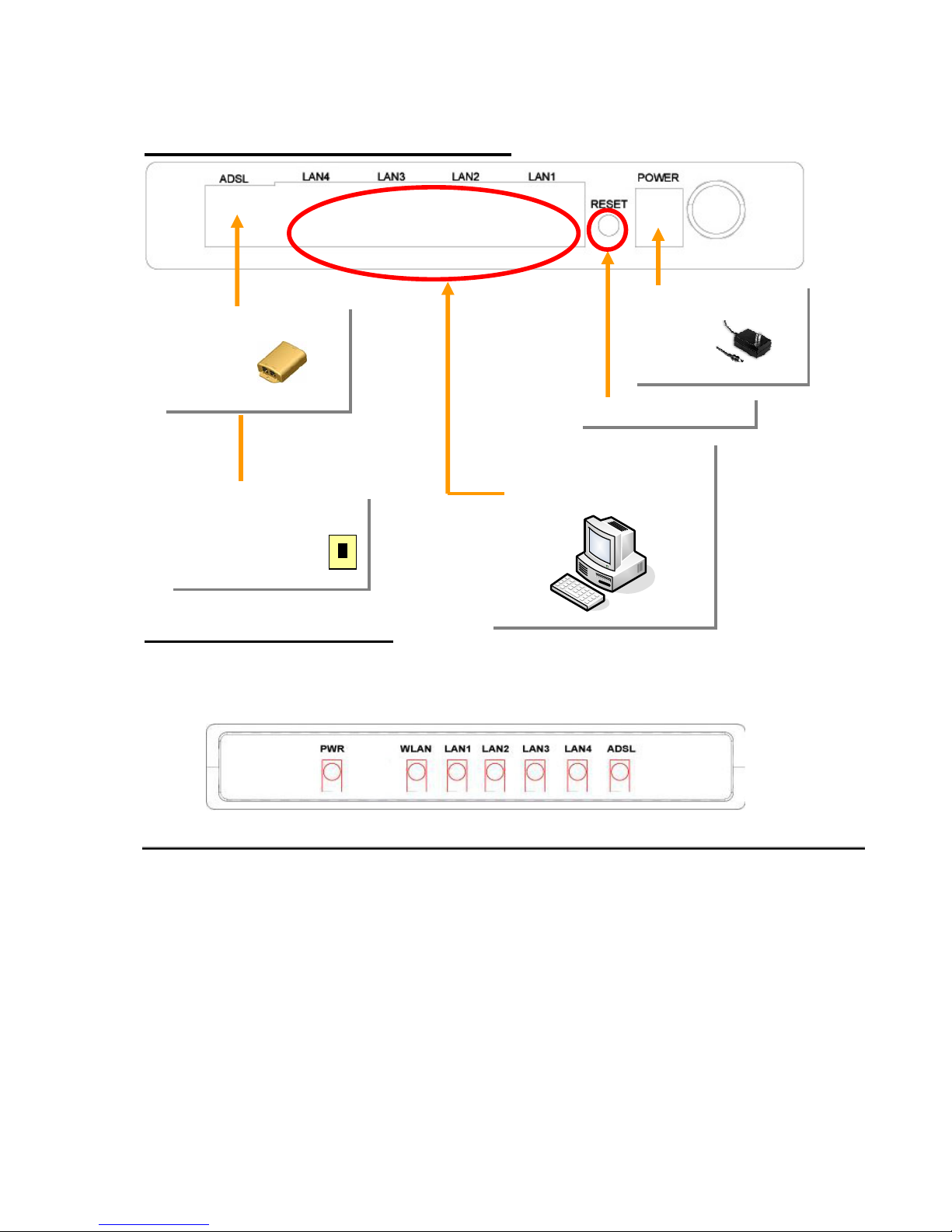
Hardware Connecting
LED Indicators
The LED Indicators are located on the front of the unit, they are green in color. The
meanings are as follows:
Label Meaning Status Indicates
PWR Power On Power is on
Off Power is off
WLAN Wireless LAN On Wireless LAN active.
LAN 1/ LAN 2/
LAN 3/ LAN 4 LAN Link Flashing Flashes when data is being sent or
received on the LAN connection.
On
Indicates a link to your LAN or Network
card is active.
Off
Indicates no link to LAN
ADSL Link On A valid ADSL connection.
Flashing
An active WAN session.
Off
No ADSL connection.
Factory reset button
Connect to Power
Adapter
Phone cable connect
to Splitter
Phone Cable connect
to wall phone jack
RJ-45 connect to
computer Ethernet Port
8
General Setting
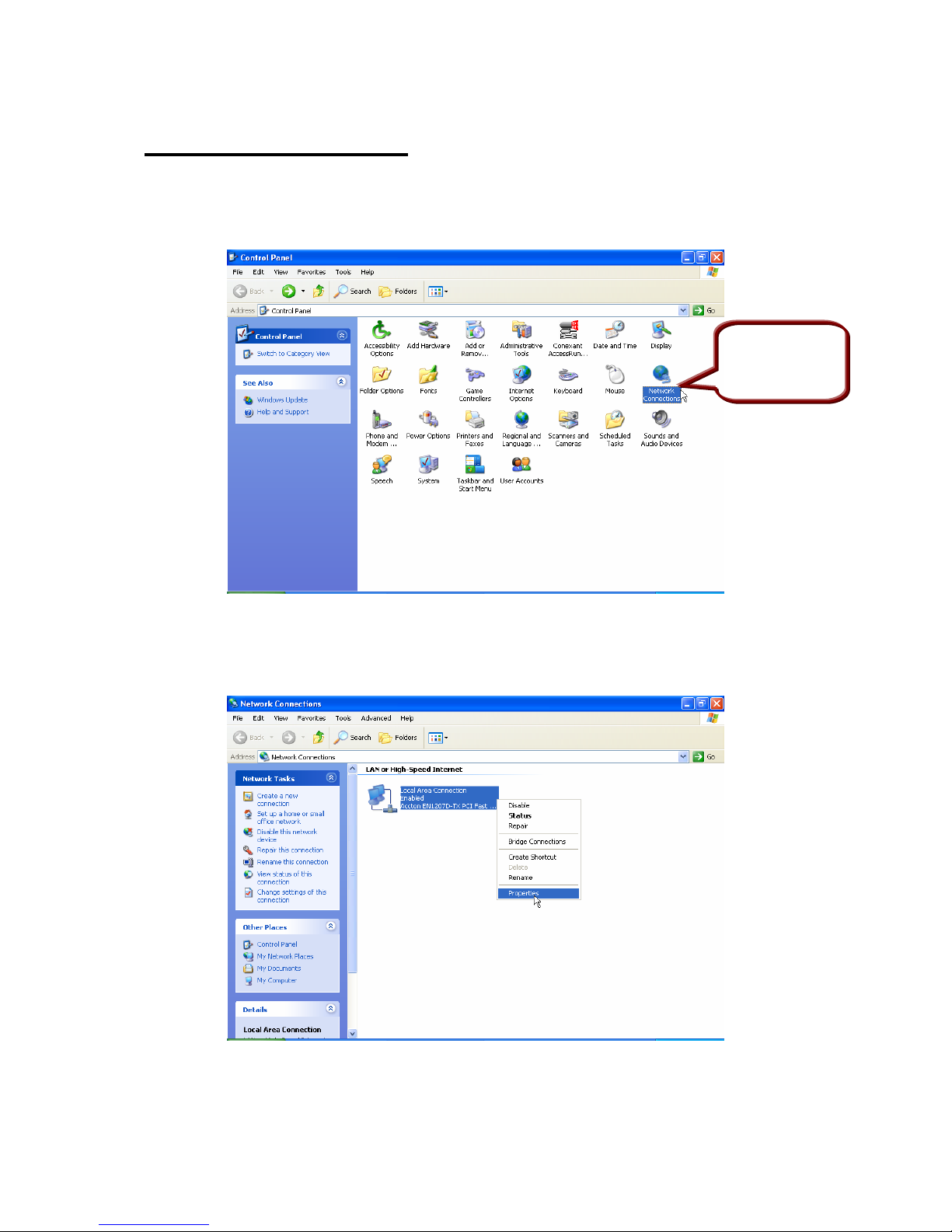
1. Move your cursor as flowing sequence Start \ Settings \ Control Panel and
click Control Panel. Then double-click on the Network Connections
2. In the LAN or High-Speed Internet window, right-click on icon corresponding
to your network interface card (NIC) and select Properties.(This icon may be
labeled Local Area Connection).
Double Click
on this icon
9
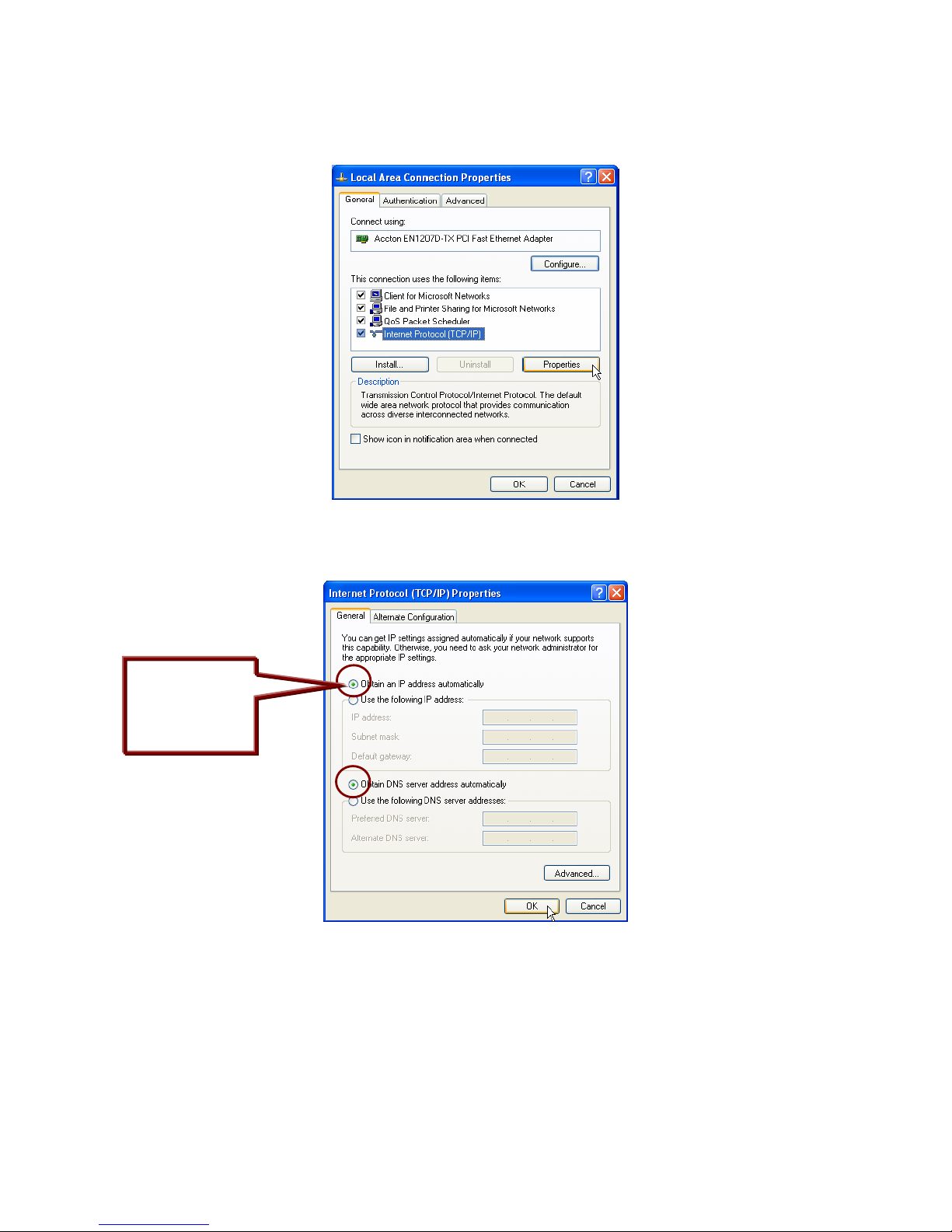
3. In the General Tab of the Local Area Connection Properties menu. Highlight
Internet Protocol (TCP/IP) under “This connection uses the following items.”
by click on it once. Click on the Properties button.
4. Select Obtain an IP Address automatically: by clicking once in the circle.
Click OK button to confirm and save your changes, and the close the Control
Panel.
Select Obtain an
IP address
automatically
Table des matières
Autres manuels Longshine Routeur sans fil


