
LINOVISION IOT-R51W Manuel utilisateur

vSIM Routers
IOT-R51W
Updated on July 01, 2023
User Manual
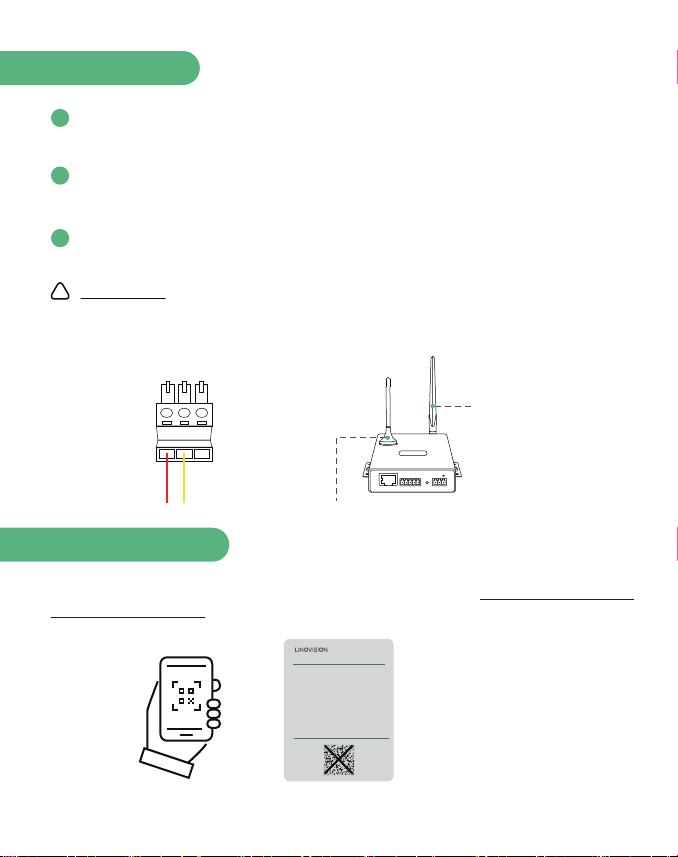
Attach the antennas to the SMA connectors on the back of the router to the
pos labelled “Main” and “Aux.” Turn clockwise to fasten the antenna.
Connect cables to a terminal base. Once it is powered on, the router's indicator
lights will activate.
Wait a minute or two after plugging in the router, as it may take a few moments
for it to get up and running.
Improper wiring may cause damage to the device, please be sure to connect the
red wire ( positive ) to the left po, yellow wire ( negative ) to the right po.
Scan the QR code on the label at the top of the router or visit https://linovision.com/
pages/vsim-data-plan, to activate your vSIM Data Plan.
1
2
3
1
Installation
WARNING
Scan QR code
WiFi Folding antenna x 1
4G Mag-mount antenna x 1
ETH
RX TX GNDA
RST
B+-
LINOVISION
!
vSIM Cellular Router
IOT-R51W
Power Input: DC 6 ~ 35V
Default IP: 192.168.1.1
Username: admin
Password: admin
WiFi SSID: 2.4 _20xxxxxxxxxx
WiFi Pass: 12345678
To activate data plan, please visit
https://linovision.com/pages/vsim-data-plan
IMEI: XXXXXXXXXXXXXXX
SN: XXXXXXXXXXXXX
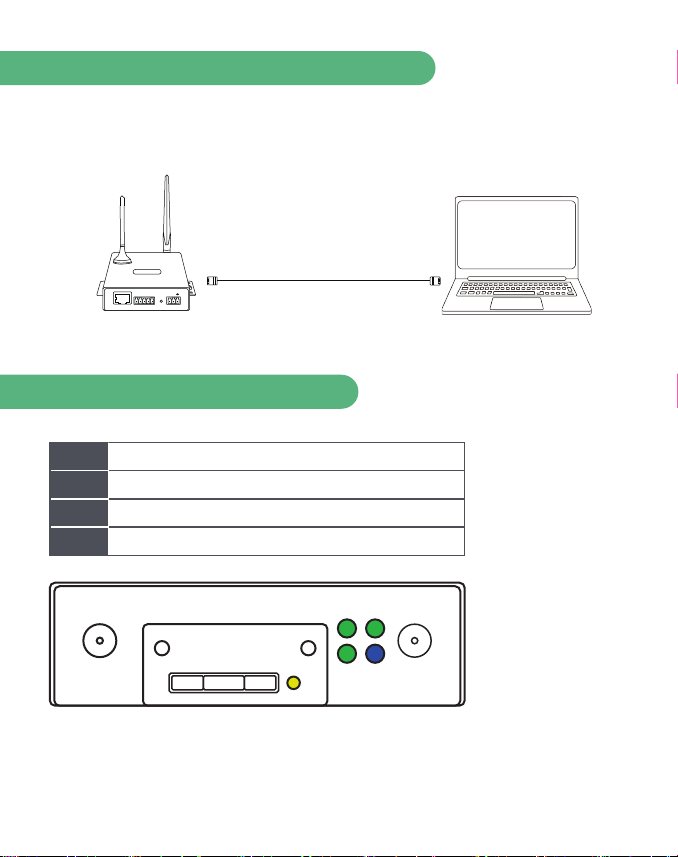
Connect IOT-R51W router to PC
2
Connect the Ethernet cable to the router’s Ethernet po and to the Ethernet po
on the PC. Or use WiFi open web browser type in default IP to gain access to the web
platform.
Rear Panel LED Indicator
ETH
RX TX GNDA
RST
B+-
LINOVISION RJ45
Router Laptop
SYS A green LED indicates system online.
Flashes green when there is Ethernet trac.
A green LED indicates the R51W is receiving power.
A blue LED indicates Internet connectivity.
ETH
PWR
NET
WiFi/AUX PWR
SIM NET
SYS ETH
MAIN
3
Access the router's web platform
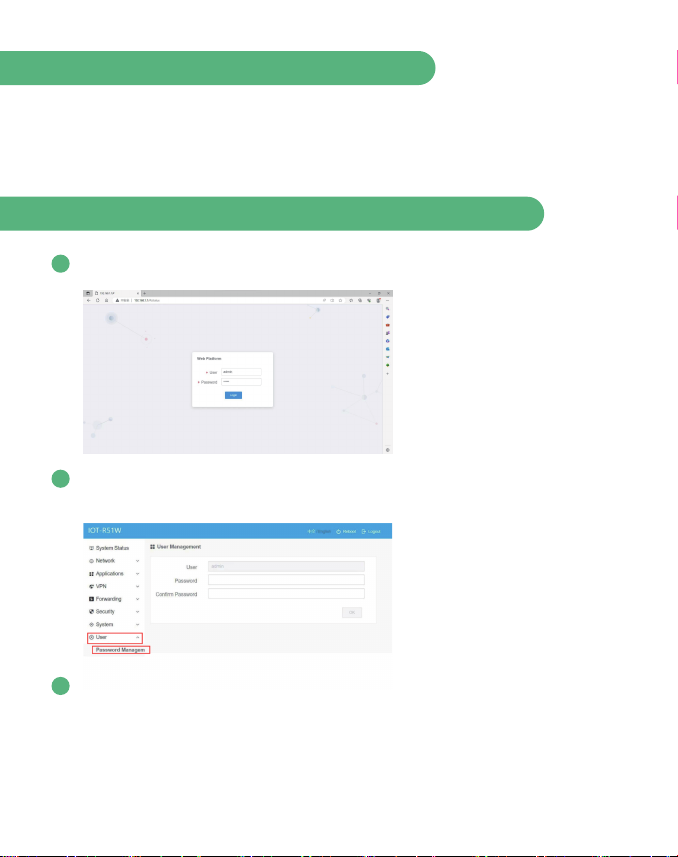
Open a web browser on a computer and go to your router's IP address. The default
IP is “192.168.1.1”. Yon can nd the SSID ( network name ) and wireless password
printed on the label at the top of the router.
Enter the default username and password
The default user name is "admin" and the password is "admin".
Login to the Web Platform to setup new password on “User > Password Manage-
ment” section.
1
2
The Web Platform provides basic conguration, Applications, VPN, Forwarding,
Security and other functions.
3
4
WiFi Settings
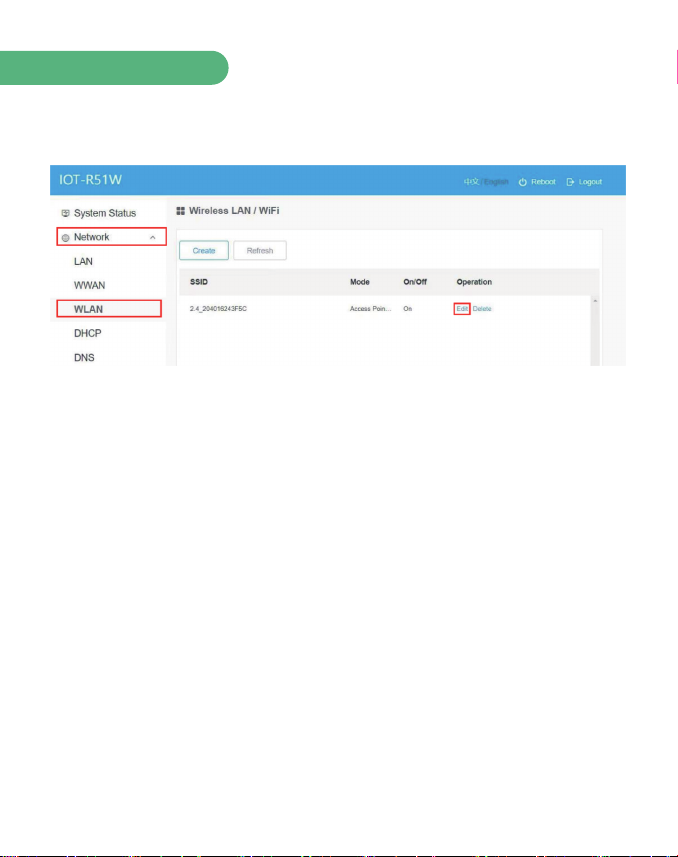
The default SSID is “2.4_2xxxxxxxxxx” and the password is “12345678”. Click
“Network > WLAN > Edit” to modify.
The IOT-R51W router provides two functions of Access Point mode ( AP ) and Client
mode ( STA ). Through the function of AP mode, you can provide wireless LAN
hotspots for easy access to the network and save wiring troubles; use the client
mode, you can connect the router to other AP devices.
When using AP mode to you can opt to make your network invisible “Hide SSID >
On”. Only those who know your network name and password will be able to join.
IOT-R51W also can suppo multiple networks/SSID “Network > WLAN > Create”.
These can be used to dene dierent networks for security reasons or to apply some
rules and policies on networks.

5
Save your settings
Once you are nished naming and securing your wireless network, click the OK
button. The changes will be applied to your router, which may take a few moments.
Once the router has nished resetting, your wireless network will be enabled.
6
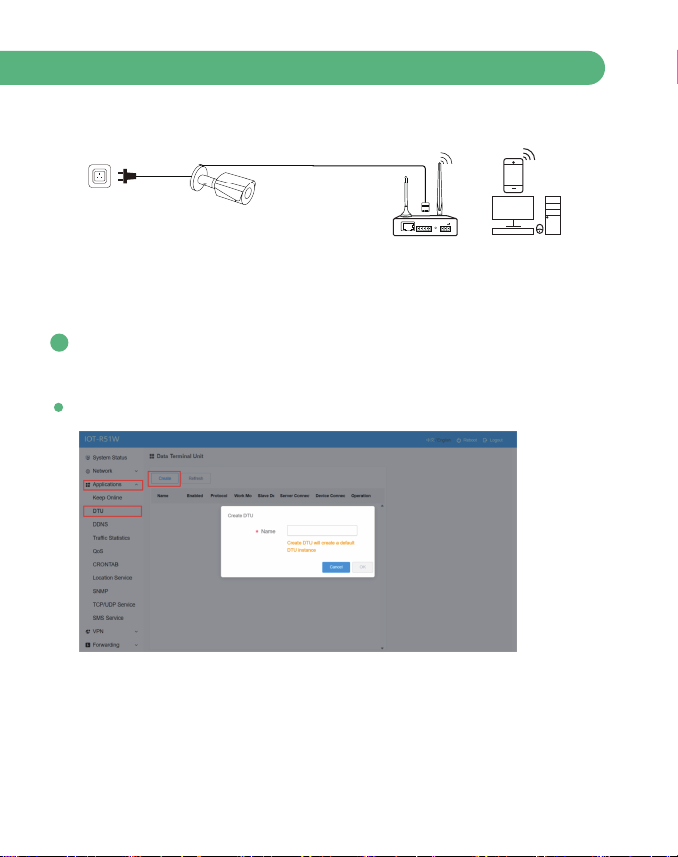
Use Case ( Set up remote access for IP camera )
Plug and play easy installation, instant connection
(12V)
ETH
RX TX GNDA
RST
B+-
Advanced Settings
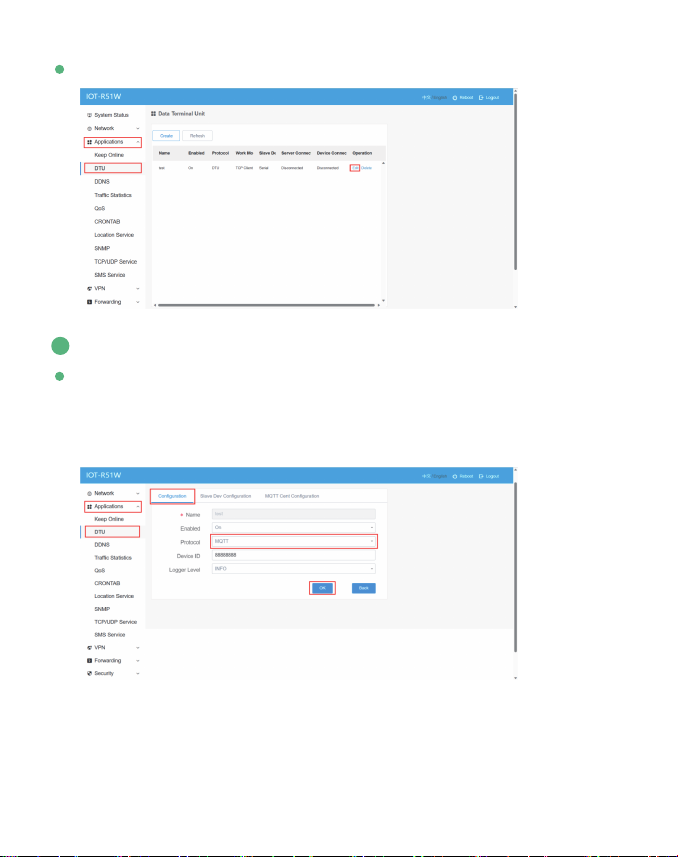
DTU Setting
DTU provides wireless connectivity, data collection, and transmission for
industrial applications.
Click “Applications > DTU > Create”
1
7
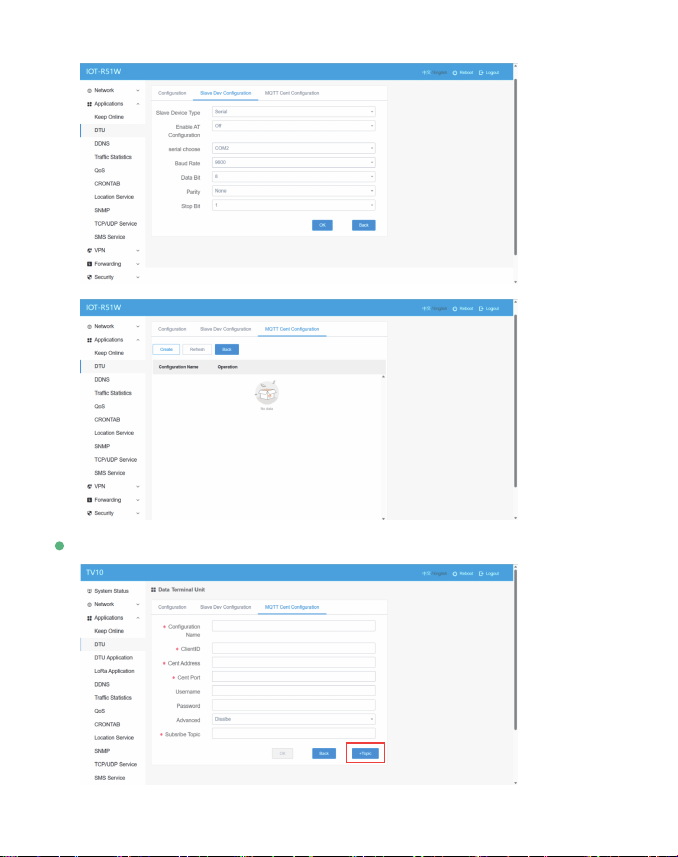
Suppos MQTT Protocol Conve
Click Applications > DTU > Conguration > Select Protocol > OK"
Lightweight publish/subscribe messaging transpo that is ideal for connecting
remote devices with a small code footprint and minimal network bandwidth.
MQTT is used in a wide variety of industries, such as water, mining, power, oil
and gas, etc.
2
Click “Applications > DTU > Edit"
8
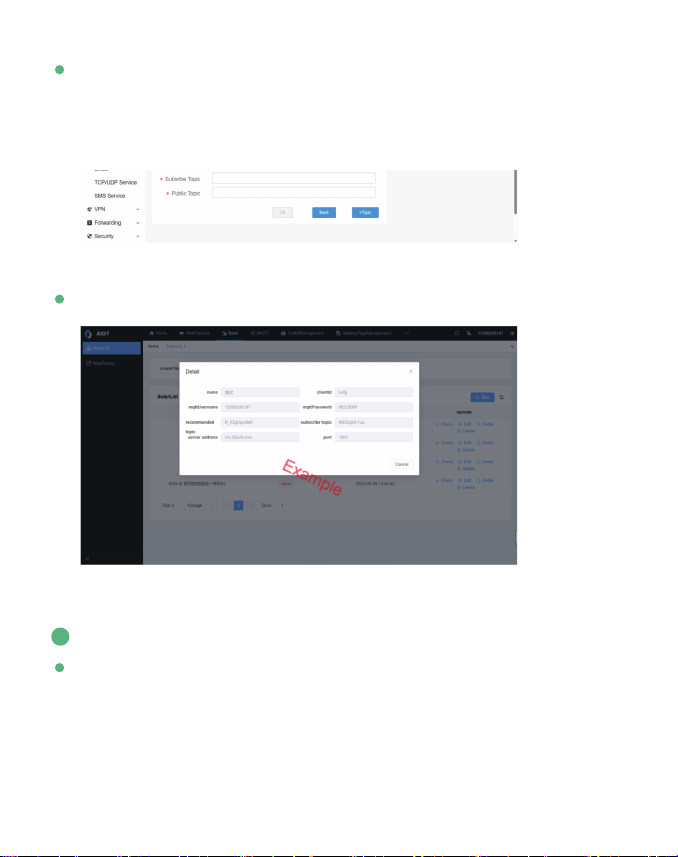
Click "+Topic” to create multiple public topics
9
LAN Conguration
3
MQTT topic is a string used in the MQTT protocol to identify and route messag-
es. It is a key element in communication between MQTT publishers and
subscribers. In the MQTT publish/subscribe model, publishers send messages to
specic topics, while subscribers can subscribe to those topics to receive the
messages.
Broker platform as an example from AIOT
The conguration of the LAN po is mainly used for the connection between
the router and the slave device, so that the slave device can access the external
network through the router, and also ensures the normal communication
between the various network segments connected to the router.
Table des matières
Autres manuels LINOVISION Routeur réseau


Manuels Routeur réseau populaires d'autres marques


NETGEAR
NETGEAR FS526T - Switch Manuel utilisateur

Korenix
Korenix JetNet 5710G Series Manuel utilisateur

Automated Logic
Automated Logic ZN551 Manuel du propriétaire

Cisco
Cisco ASR 1000 Series Manuel de l'opérateur

EnGenius
EnGenius ESR-9710 Manuel utilisateur

Cisco
Cisco 805 Series Instructions d'utilisation et de sécurité