LI-COR TriSonica LI-570 Mode d’emploi

Using the LI-570
TriSonica™ Data Logger
LI-COR Biosciences
4647 Superior Street
Lincoln, Nebraska 68504
Phone: +1-402-467-3576
Toll free: 800-447-3576 (U.S. and Canada)
Regional Offices
LI-COR Biosciences GmbH
Siemensstraße 25A
61352 Bad Homburg
Germany
Phone: +49 (0) 6172 17 17 771
LI-COR Biosciences UK Ltd.
St. John’s Innovation Centre
Cowley Road
Cambridge
CB4 0WS
United Kingdom
Phone: +44 (0) 1223 422102
LI-COR Distributor Network:
www.licor.com/envdistributors

Notice
The information in this document is subject to change without notice.
LI-COR MAKES NO WARRANTY OF ANY KIND WITH REGARD TO THIS MATERIAL, INCLUDING BUT NOT
LIMITED TO THE IMPLIED WARRANTIES OF MERCHANTABILITY AND FITNESS FOR A PARTICULAR
PURPOSE. LI-COR shall not be held liable for errors contained herein or for incidental or consequential damages in con-
nection with the furnishing, performance, or use of this material.
This document contains proprietary information, which is protected by copyright. All rights are reserved. No part of this
document may be photocopied, reproduced, or translated to another language without prior written consent of LI-COR,
Inc.
Windows® is a trademark of Microsoft, Inc. TriSonica is a trademark of LI-COR, Inc.
Printing History
© Copyright 2023, LI-COR, Inc. All rights reserved.
Publication Number: 984-20376
Created on Thursday, June 1, 2023
Notes on Safety
This LI-COR product has been designed to be safe when operated in the manner described in this manual. The safety of
this product cannot be assured if the product is used in any other way than is specified in this manual. The product is
intended to be used by qualified personnel. Read this entire manual before using the product.
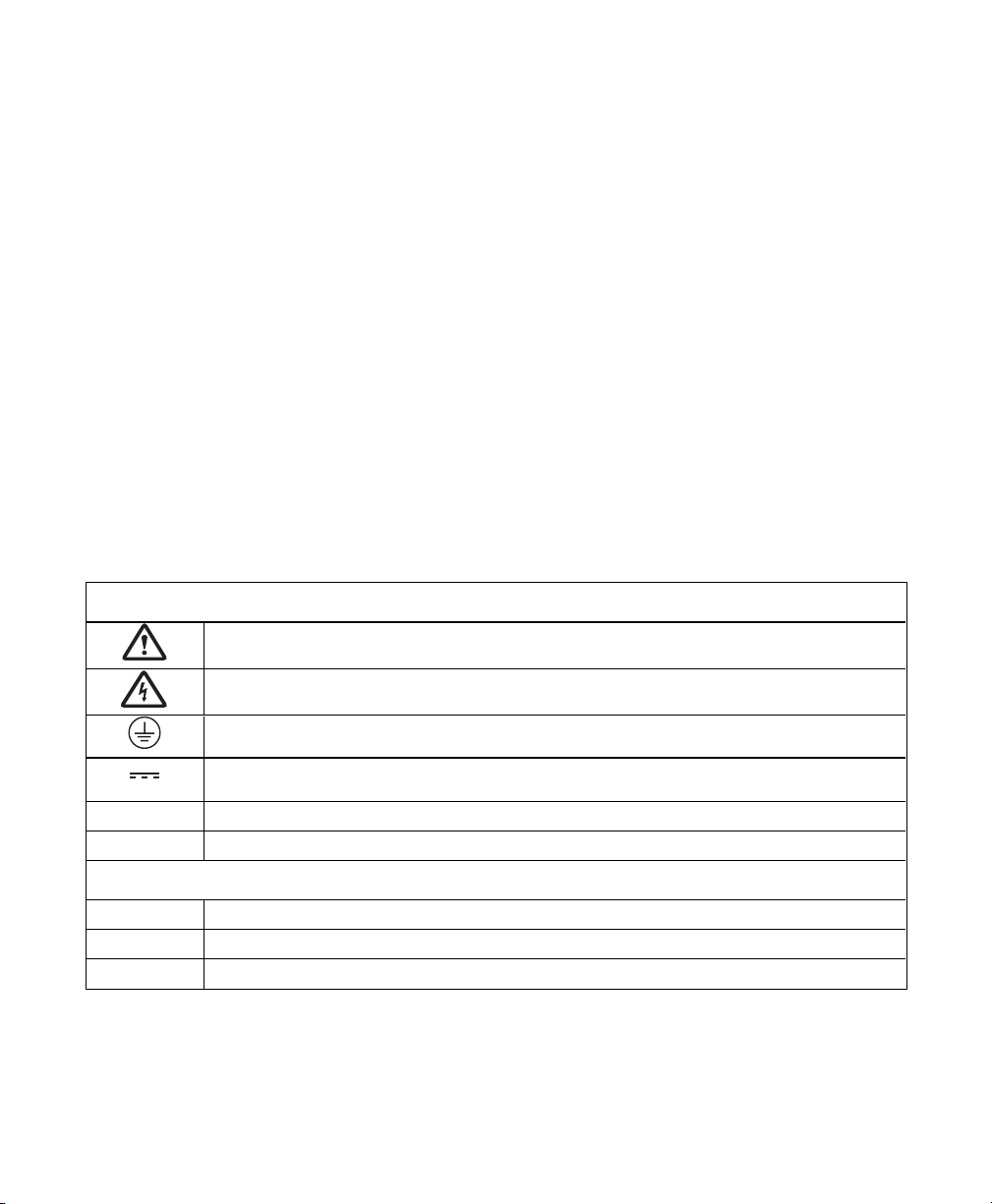
Equipment markings:
The product is marked with this symbol when it is necessary for you to refer to the manual or
accompanying documents in order to protect against injury or damage to the product.
The product is marked with this symbol when a hazardous voltage may be present.
The product is marked with this symbol if a Chassis Ground connection is required.
The product is marked with this symbol to indicate that a direct current (DC) power supply is
required.
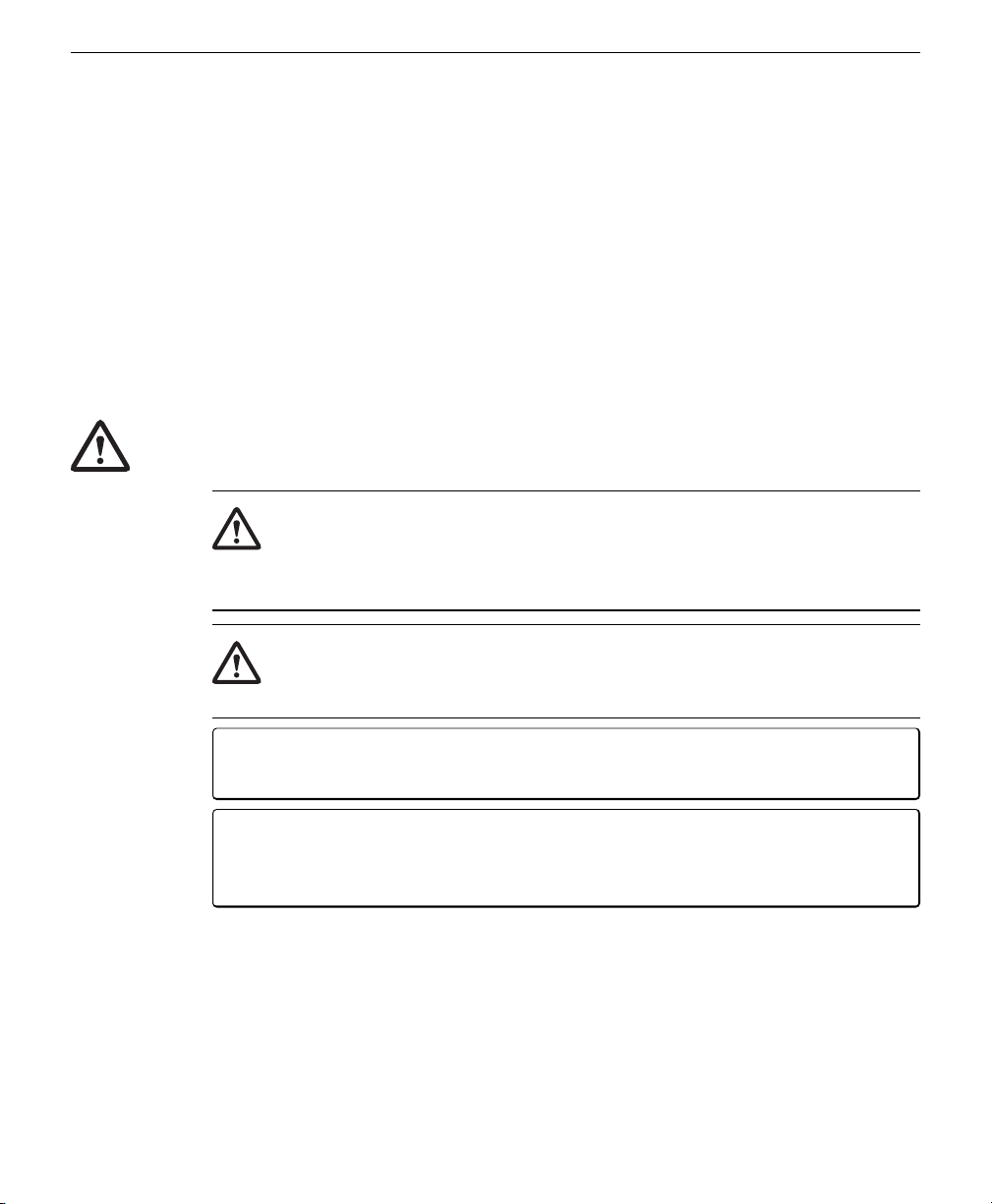
WARNING Warnings must be followed carefully to avoid bodily injury.
CAUTION Cautions must be observed to avoid damage to your equipment.
Manual markings:
Warning Warnings must be followed carefully to avoid bodily injury.
Caution Cautions must be observed to avoid damage to your equipment.
Note Notes contain important information and useful tips on the operation of your equipment.
ii

iii
CE Marking:
This product is a CE-marked product. For conformity information, contact LI-COR Support at [email protected]. Out-
side of the U.S., contact your local sales office or distributor.
California Proposition 65 Warning
WARNING: This product contains chemicals known to the State of California to cause cancer and birth defects or other
reproductive harm.
Federal Communications Commission Radio Interference Statement
WARNING: This equipment generates, uses, and can radiate radio frequency energy, and if not installed in accordance
with the instruction manual, may cause interference to radio communications. It has been tested and found to comply
with the limits for a Class A computing device pursuant to Subpart J of Part 15 of FCC rules, which are designed to
provide a reasonable protection against such interference when operated in a commercial environment. Operation of this
equipment in a residential area is likely to cause interference in which case the user, at his own expense, will be required to
take whatever measures may be required to correct the interference.
Waste Electronic and Electrical Equipment (WEEE) Notice
This symbol indicates that the product is to be collected separately from unsorted municipal waste. The fol-
lowing applies to users in European countries: This product is designated for separate collection at an appro-
priate collection point. Do not dispose of as household waste. For more information, contact your local
distributor or the local authorities in charge of waste management.
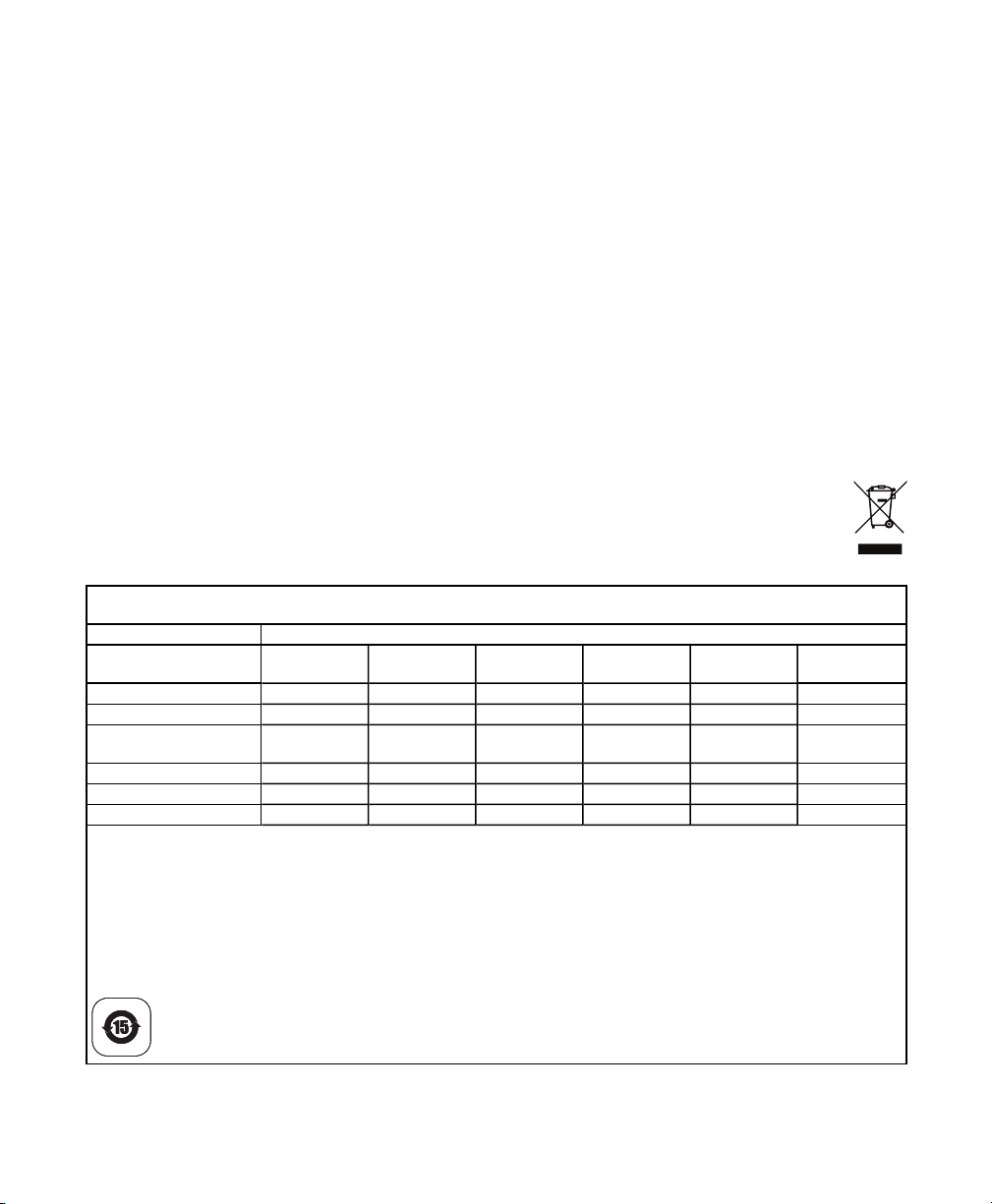
LI-570 数据记录仪
LI-570 Data Logger
零件名称 Part Name 有毒有害物质或元素 Toxic and Hazardous Substances or Elements
铅 (PB) 汞(Hg) 镉 (Cd) 六价铬 (Cr(VI)) 多溴联苯 (PBB) 多溴二苯醚
(PBDE)
印刷电路板 (PCBs) X O O O O O
连接器 (Connectors) X O O O O O
电缆和电线 (Cables and
Wires) O O O O O O
金属零件 (Metal Parts) X O O O O O
塑料零件 (Plastic Parts) O O O O O O
电池 (Batteries) O O O O O O
该表是根据SJ / T 11364的规定编制的。
O = 表示该有毒有害物质在该部件所有均质材料中的含量低于GB/T 26572规定的限量。
indicates that the content of the toxic and hazardous substance in all the Homogeneous Materials of the part is below the concentration limit
requirement as described in GB/T 26572
X = 表示该有毒有害物质至少在该部件的某一均质材料中的含量高于GB/T 26572规定的限量。
indicates that the content of the toxic and hazardous substance in at least one Homogeneous Material of the part exceeds the concentration
limit requirement as described in GB/T 26572
Doc. 53-21315-A(DRAFT)
April 17, 2023
page 1 of 1


iv

v
Contents
Section 1. Introduction to the LI-570
What's what 1-2
Connector panel and cable connector assemblies 1-2
Anemometer cables 1-2
User-supplied MicroSD card 1-3
Safety information 1-3
Anemometer ports 1-4
Power in 1-4
GPS receiver 1-4
Radio transceiver 1-4
Section 2. Using the LI-570
Field installation 2-1
Powering the LI-570 2-2
Connecting devices to the data logger 2-3
Connecting TriSonica™ anemometers 2-3
Connecting other serial instruments 2-3
Connecting a GPS receiver or radio transceiver 2-5
Assembling cable connectors 2-6
Section 3. The data stream and data files
Serial communication settings 3-1
Instrument ports 3-1
GPS port 3-1
Radio port 3-2
Serial data format 3-2
Time tagging 3-3
GPS data 3-3
Missing instrument data 3-3
Retrieving data 3-3
Section 4. Configuring in menu-interface mode
Connecting to the LI-570 4-1
Using the USB port 4-1

Using the radio serial port 4-2
Data and menus 4-2
Main menu 4-3
Section 5. Configuring with the command-line interface
The Help menu 5-2
Summary of commands 5-2
Application programming interface 5-9
Section 6. Hardware configurations
Configuring anemometer ports 6-1
Changing the digital voltage setting 6-4
Section 7. Maintenance
Installing and removing the MicroSD card 7-1
Replacing the clock battery 7-2
Updating the firmware 7-3
Cleaning 7-3
Section 8. Specifications
Appendix A. Lists of tables and figures
Standard Terms and Conditions
Index
vi

Section 1.
Introduction to the LI-570
The LI-570 is a four-port data logger in a weather-resistant enclosure. It features
serial inputs to connect up to four LI-550P TriSonica™ Minis, up to three LI-560
TriSonica™ Spheres, a combination with up to two of each, and other serial devices.
It also supports a GPS receiver and radio transceiver. Collated data can be output to
an external data recorder or logged to a user-supplied MicroSD card installed in the
LI-570. This document provides basic operating information for the product.
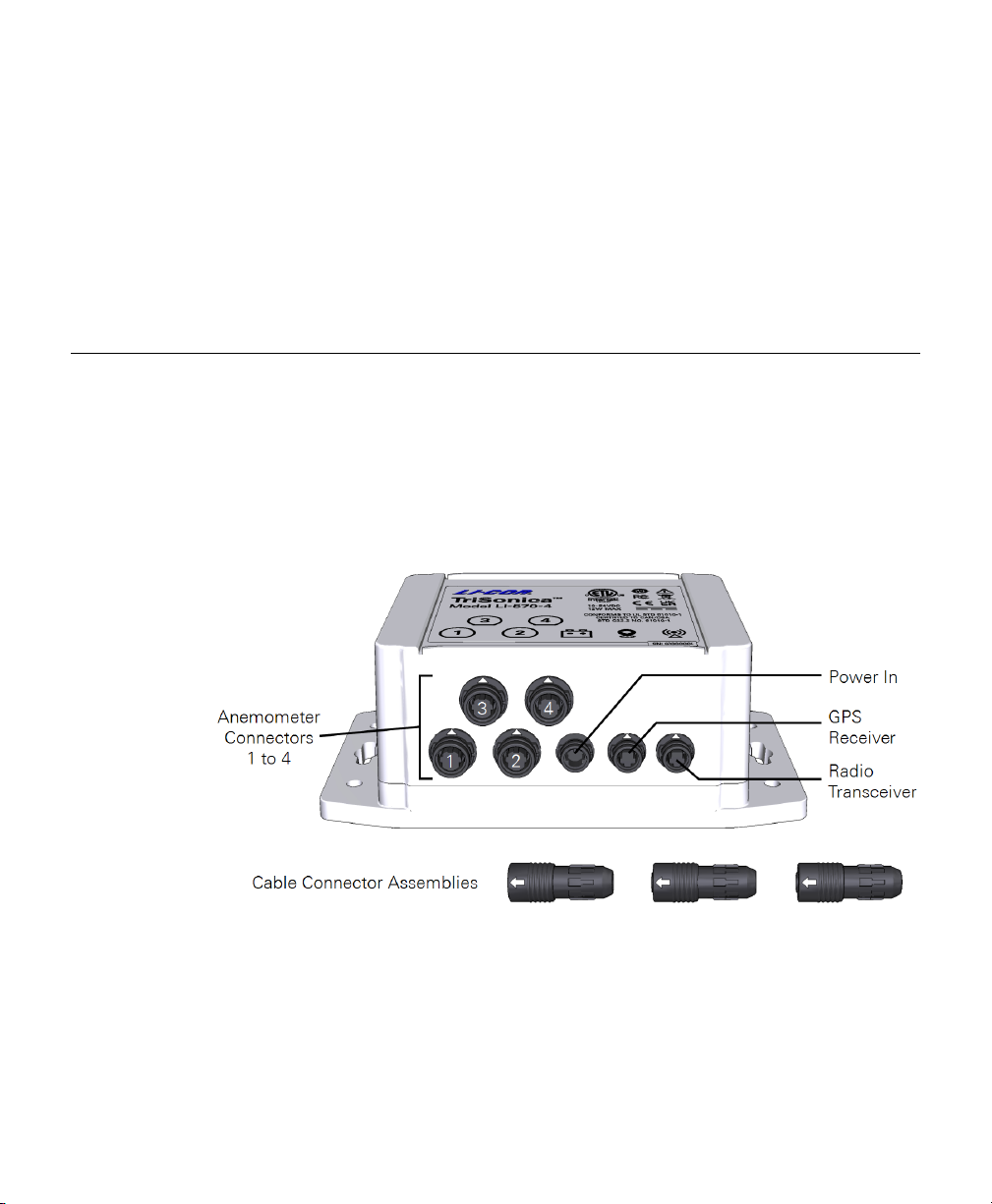
Figure 1-1. The LI-570 Data Logger provides four ports for anemometers, one for power in,
one for a GPS receiver, and one for a radio transceiver.
Instructions for earlier models, including the DL422-B, DL422-E1, DL422-E2, or
DL422-E4 are available from licor.com/env/TriSonica-support.
1-1Using the LI-570 TriSonica™ Data Logger

Section 1. Introduction to the LI-570
What's what
If you have just received your LI-570, check the packaging list and be sure you have
received everything you ordered.
Connector panel and cable connector assemblies
The LI-570 has a connector panel for devices and power. It includes cable connector
assemblies that are ready to assemble to a user-supplied cable.
lAnemometer connectors 1 to 4: To connect LI-550s, LI-560s, or other serial
devices. Provides power (12 VDC output; 0.8 watts maximum per connector; 2.4
watts combined maximum) and communication.
lPower in: Power to the LI-570 (10 to 54 VDC; 12 watts).
lGPS receiver: To connect a GPS device. Supports 3.3 UART NEMA0183 pro-
tocols. Provides power (5 VDC output; 0.5 watts maximum) and data trans-
mission.
lRadio transceiver: To connect a cellular or satellite transceiver. Supports 3.3 V
UART. Provides power (5 VDC output; 4.7 watts maximum) and data trans-
mission.
lCable connector assemblies: User-supplied cables can be attached to the power,
GPS, and radio connectors.
Anemometer cables
The following cables are to connect a LI-550s and LI-560s to the data logger.
l571S-1: 1.25-meter cable with one connector and bare leads. Connects a LI-550P
or LI-560 to a serial data recorder.
l571D-1: 1.25-meter cable with two connectors. Connects a LI-550P or LI-560 to
the LI-570 Data Logger.
l571D-10: 10-meter cable with two connectors. Connects a LI-550P or LI-560 to
the LI-570 Data Logger.
l571D-C: Custom cable kit with two sets of connector assemblies for a user-sup-
plied cable. Connects a LI-550P or LI-560 to the LI-570 Data Logger or a serial
data recorder. 25 meters maximum length.
1-2 Using the LI-570 TriSonica™ Data Logger

User-supplied MicroSD card
The data logger has an internal slot that holds a user-supplied MicroSD card for data
storage. No card is provided, but most MicroSD cards will work. Supported formats
are FAT16, FAT32, or exFAT with capacities in excess of 32 GB. Select an SD card
that is rated for the operating conditions you expect for your deployment. Industrial
rated SD cards should be used in some environments. See Installing and removing the
MicroSD card on page7-1 for installation and removal instructions.
Safety information
The LI-570 is a scientific instrument intended to be used and handled by trained pro-
fessionals only. Protect the LI-570 from public access. Mind the safety information
in this manual.
Warning: The LI-570 has an internal coin cell CR1225 battery that maintains the clock
setting when main power is not connected. Replace as needed and dispose of the bat-
tery according to local regulatory guidelines. See Replacing the clock battery on
page7-2.
Warning: Use only batteries or LPS power supply certified with local standards to
power the LI-570. LI-COR is not responsible for any harm or safety issue caused by sup-
plying the product with uncertified batteries, power supplies, or circuits.
Caution: Electric shock risk. Turn off power supply or external battery before
unplugging power connector from LI-570.
Caution: Protect from electrostatic discharge (ESD). The LI-570 circuit board con-
tains electrostatic-sensitive components. Use appropriate ESD handling procedures
when working with the exposed circuit board.
Section 1. Introduction to the LI-570
1-3User-supplied MicroSD card

Section 1. Introduction to the LI-570
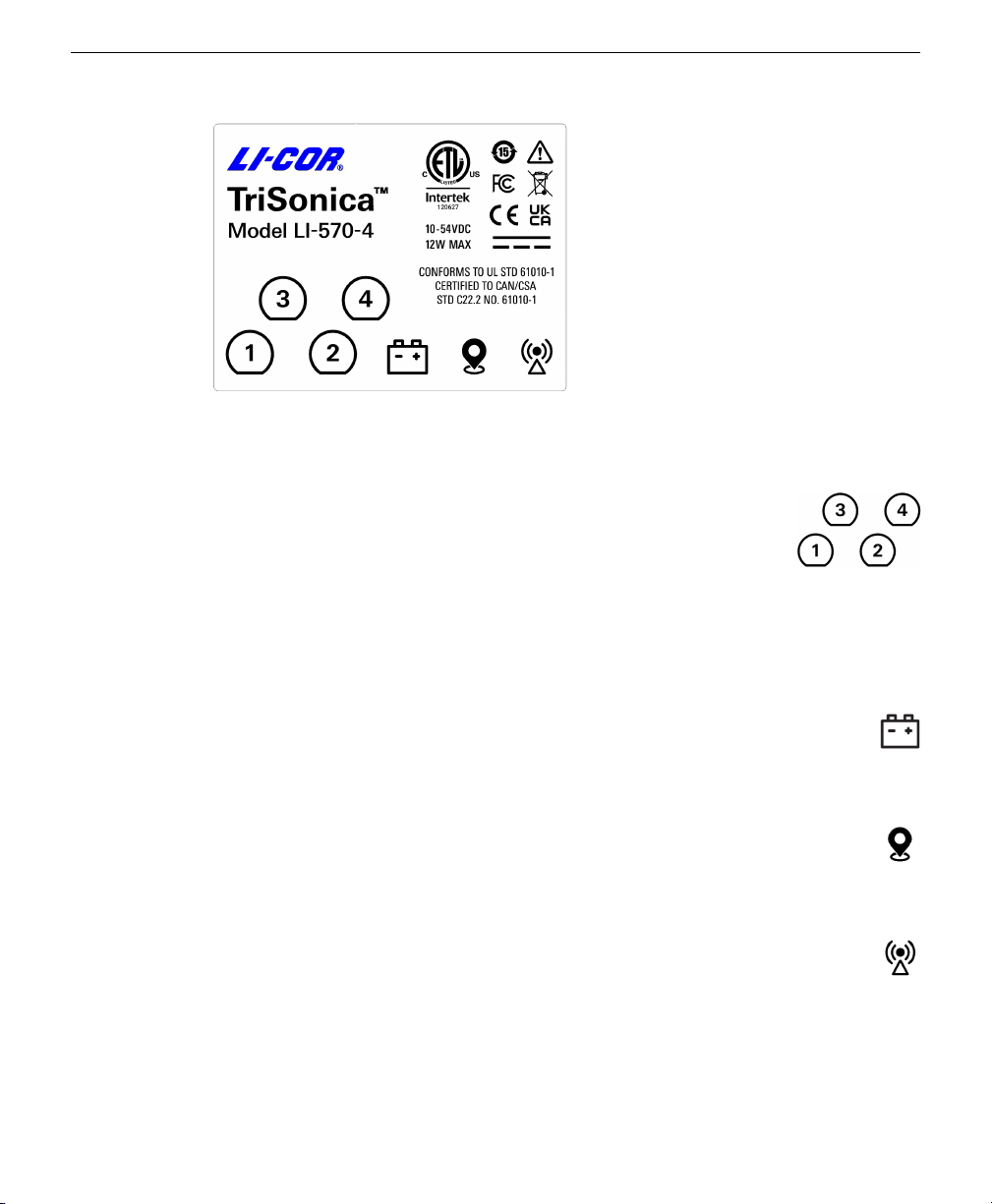
Figure 1-2. The LI-570 label and safety information.
Anemometer ports
Four ports are for a combination of up to four LI-550P TriSonica™
Minis, or up to three LI-560 TriSonica™ Spheres, or a combination
of up to two LI-550s and two LI-560s. Pin assignments are
described in Connecting devices to the data logger on page2-3, with
power output of 12 VDC, 0.8 watts maximum for each port (2.4
watts combined maximum).
Power in
Connect a power supply of +10 to 54 VDC, 12 watts. See Powering the LI-570
on page2-2.
GPS receiver
Provides power to and receives data from a GPS device. Outputs 5 VDC, 0.5
watts maximum. See Connecting a GPS receiver or radio transceiver on page2-5.
Radio transceiver
Provides power to and transfers data between a compatible radio transceiver.
Outputs 5 VDC, 4.7 watts maximum. See Connecting a GPS receiver or radio
transceiver on page2-5.
1-4 Using the LI-570 TriSonica™ Data Logger
Autres manuels pour TriSonica LI-570
1
Table des matières
Autres manuels LI-COR Enregistreur de données