
LevelOne NVR-0316 Manuel utilisateur

NVR-0316 User’s Manual
1
Version 1.0.0
NVR-0316
User’s Manual

2
NVR-0316 User’s Manual
Table of Contents
Hardware ................................................................................. 4
Overview ........................................................................................ 4
LED & Buttons Definitions .............................................................. 4
Connect to the NVR .................................................................. 5
Use NVR Search Utility ................................................................... 5
Access the NVR with its default IP address .................................. 10
Main/Live View ...................................................................... 12
a.The UI’s 5 main functions:......................................................... 13
b. Date and Time display .............................................................. 13
c. User’s configuration.................................................................. 13
d. Hardware events notification ................................................... 14
e. Channels status ........................................................................ 14
f. Video frame............................................................................... 14
g. List view ................................................................................... 15
h.1, 4, 9, 16 Pattern view ............................................................. 16
i. Sequence view........................................................................... 16
j. Save view .................................................................................. 16
k. Saved view ............................................................................... 17
l. Digital zoom .............................................................................. 18
Playback view ........................................................................ 20
a. Zoom on a range of time ........................................................ 21
b. Minimize the bar of the playback............................................ 21
c. Certain functions you can perform to the playback video......... 21
d. Take a snapshot of a playback video ........................................ 21
Event view.............................................................................. 26
NVR Setup –Settings ............................................................. 28
Display ......................................................................................... 28
Network Settings.......................................................................... 29
DHCP Server.................................................................................32
DDNS Service ...............................................................................32
Time and Date .............................................................................. 33
Storage......................................................................................... 34
Users & privileges ........................................................................ 35
Add a new user .............................................................................36
Change the password of the “admin” account ...................................36
Group Privilege .............................................................................37
Camera......................................................................................... 38
Automatic Search ..........................................................................38
Add a camera manually..................................................................41
Recording ..................................................................................... 42
Scheduling.................................................................................... 44
Preset Point Setting ..................................................................... 45
PTZ Preset Settings .......................................................................45

NVR-0316 User’s Manual
3
PTZ Preset Sequence .....................................................................47
OSD Settings ................................................................................ 47
Event sources ............................................................................... 50
Event sources ...............................................................................50
Notifications..................................................................................52
Event actions ................................................................................54
E-Map ........................................................................................... 55
Local E-Map Setting .......................................................................55
Google Map Setting .......................................................................58
Device Info................................................................................... 59
Log ............................................................................................... 60
Maintenance ................................................................................. 61
Firmware Upgrade .........................................................................61
Backup & Restore ......................................................................... 63
USB backup .................................................................................. 64
NVR Media Player ................................................................... 66
Play the backup file with the NVR Media Player............................ 66
Open Event Snapshot images with NVR Media Player................... 71

4
NVR-0316 User’s Manual
Hardware
Overview
LED & Buttons Definitions
NVR-0316 User’s Manual
5
Connect to the NVR
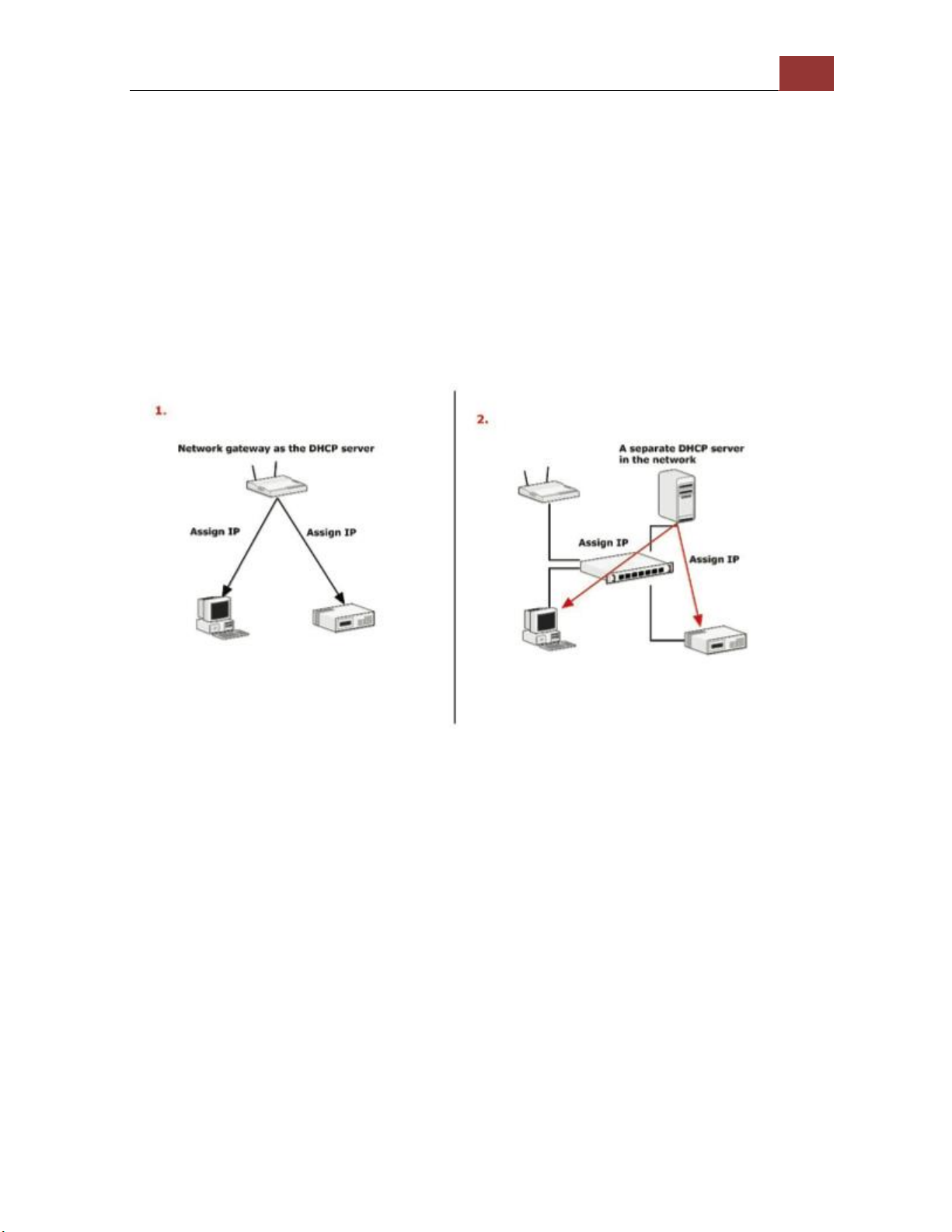
There are various ways you can connect to the NVR and below are the
suggested methods for different network setup:
•The NVR is placed in a network with a DHCP server: Connect to
the NVR by using “NVR Search” Utility
•The NVR is placed in a network without DHCP server (or you are
connecting to it directly): Access the NVR with its default IP
Use NVR Search Utility
If the NVR is placed in a corporate network or a local area network
where a DHCP server is already presented, run the “NVR Search”
utility from a computer that is on the same network and locate the
NVR with its IP address that is assigned by the top-level DHCP server.

6
NVR-0316 User’s Manual
To begin, launch the “NVR Search” utility from the CD and proceed
with the installation:

NVR-0316 User’s Manual
7
Once the installation is complete, check the “Launch the Search AP”
option and click “Finish”.
The search should start automatically and its status should be dis-
played.

8
NVR-0316 User’s Manual
The NVR should be located and its IP address should be displayed.
Double-click on an NVR and the search program should automatically
access the NVR’s web administration page from your default browser.

NVR-0316 User’s Manual
9
You should be prompted for the NVR’s username and password. Enter
its default username “root” and password “root” and then
click ”OK” to enter the system
Please make sure you are using Internet Explorer 7 or above
If you are running Windows Vista or 7, please make sure you are
running Internet Explorer with the “administrator” privilege.

10
NVR-0316 User’s Manual
Access the NVR with its default IP address
The NVR comes with a pre-configured static IP “192.168.101.50”.
However, it is only used when there is no DHCP server presented in
the network. The NVR will turn on its DHCP server function and act as
the DHCP server in the network. To connect to the NVR, use a PC that
is on the same network over a switch or hub, or connect the PC
directly to the NVR using a crossover CAT5 Ethernet cable.
The PC that is connected directly to the NVR (or within the same local
area network) should receive an IP from the NVR. Simply access the
NVR from your web browser with its IP address
Autres manuels pour NVR-0316
1
Table des matières
Autres manuels LevelOne DVR

LevelOne
LevelOne HUBBLE Series Guide de l'utilisateur

LevelOne
LevelOne NVR-0204 Manuel utilisateur

LevelOne
LevelOne NVR-0204 Manuel utilisateur

LevelOne
LevelOne NVR-0204 Manuel utilisateur

LevelOne
LevelOne NVR-0104 Manuel utilisateur

LevelOne
LevelOne NVR-0104 Manuel utilisateur

LevelOne
LevelOne NVR-1204 Manuel d'utilisation et d'entretien


