Leica DSX Manuel utilisateur

Leica DSX
User Manual
Version 1.0
English

Introduction
Congratulations on the purchase of the Leica DSX.
This manual contains important safety directions as well as instructions for
setting up the product and operating it. Refer to "1 Safety Directions" for fur-
ther information.
Read carefully through the User Manual before you switch on the product.
The model and serial number of your product are indicated on the type plate.
Always refer to this information when you need to contact your agency or
Leica Geosystems authorised service centre.
This manual applies to the DSX instruments.
Differences between the versions are marked and described.
•Windows is a registered trademark of Microsoft Corporation in the United
States and other countries
•Google is a registered trademark of Google Inc.
All other trademarks are the property of their respective owners.
Name Description/Format
DSX User Manual To operate the instrument to a basic
level all instructions required, are inclu-
ded in the User Manual. Provides an
overview of the instrument together
with technical data and safety direc-
tions.
–ü
DSX Quick Guide Short introduction for setting up the
DSX.
ü ü
Refer to the following resources for all DSX documentation/software:
•the Leica USB stick
•https://myworld.leica-geosystems.com
On the last page of this manual, you can nd the address of Leica Geosystems
headquarters. For a list of regional contacts, please visit
http://leica-geosystems.com/contact-us/sales_support.
myWorld@Leica Geosystems (https://myworld.leica-geosystems.com)
offers a wide range of services, information and training material.
With direct access to myWorld, you are able to access all relevant services
whenever it is convenient for you.
Purchase
Product identication
Trademarks
Available documenta-
tion
Leica Geosystems
address book
2

Service Description
myProducts Add all products that you and your company own
and explore your world of Leica Geosystems: View
detailed information on your products and update
your products with the latest software and keep up-
to-date with the latest documentation.
myService View the current service status and full service his-
tory of your products in Leica Geosystems service
centres. Access detailed information on the services
performed and download your latest calibration cer-
ticates and service reports.
mySupport Create new support requests for your products that
will be answered by your local Leica Geosystems
Support Team. View the complete history of your
support requests and view detailed information on
each request in case you want to refer to previous
support requests.
myTraining Enhance your product knowledge with Leica Geosys-
tems Campus - Information, Knowledge, Training.
Study the latest online training material on your
products and register for seminars or courses in
your country.
myTrustedServices Add your subscriptions and manage users for Leica
Geosystems Trusted Services, the secure software
services, that assist you to optimise your workow
and increase your efciency.
3

Table of Contents
1 Safety Directions 5
1.1 General 5
1.2 Denition of Use 6
1.3 Limits of Use 6
1.4 Responsibilities 6
1.5 Hazards of Use 7
1.6 Electromagnetic Compatibility (EMC) 12
1.7 FCC Statement, Applicable in U.S. 13
1.8 Requirements of RSS-220 for Ground Antennas (EN/FR), Applicable in Canada 15
2 Description of the System 16
2.1 General 16
2.2 System Components 16
2.3 Delivery Contents 16
2.4 DSX Components 17
2.5 Accessories 18
2.6 General Battery Handling 18
2.7 Requirements for Using a GNSS Antenna with the DSX 19
3 Setup 20
3.1 Unfolding and Adjusting the Handle 20
3.2 Attaching and Connecting the Laptop or Tablet 20
3.3 Inserting the Battery 21
3.4 Mounting the Pole Support (Surveyor Kit Only) 22
3.5 Switching the DSX ON/OFF 22
3.6 Calibrating the Encoders 23
4 Software 24
4.1 Software Installation 24
4.2 Main Menu 24
4.3 Acquisition of Scan Data 24
4.3.1 The Acquisition Screen 24
4.4 Review of Scan Data 24
4.4.1 The Review Acquisition Screen 24
4.5 Export of Scan Data 24
4.6 Settings 24
5 Planning a Survey 25
6 Procedures for Working with the DSX 26
6.1 Preparing an Acquisition 26
6.2 Marking Out Targets on-Site 26
6.3 Mapping Utilities without Using GPS 27
6.4 Mapping Utilities Using GPS 28
7 Care and Transport 30
7.1 Transport 30
7.2 Storage 30
7.3 Cleaning and Drying 30
8 Technical Data 32
8.1 General 32
8.2 Conformity to European Regulations 33
9 Software Licence Agreement 34
4 Table of Contents

1 Safety Directions
1.1 General
The following directions enable the person responsible for the product, and
the person who actually uses the equipment, to anticipate and avoid opera-
tional hazards.
The person responsible for the product must ensure that all users understand
these directions and adhere to them.
Warning messages are an essential part of the safety concept of the instru-
ment. They appear wherever hazards or hazardous situations can occur.
Warning messages...
•make the user alert about direct and indirect hazards concerning the use
of the product.
•contain general rules of behaviour.
For the users‘ safety, all safety instructions and safety messages shall be
strictly observed and followed! Therefore, the manual must always be available
to all persons performing any tasks described here.
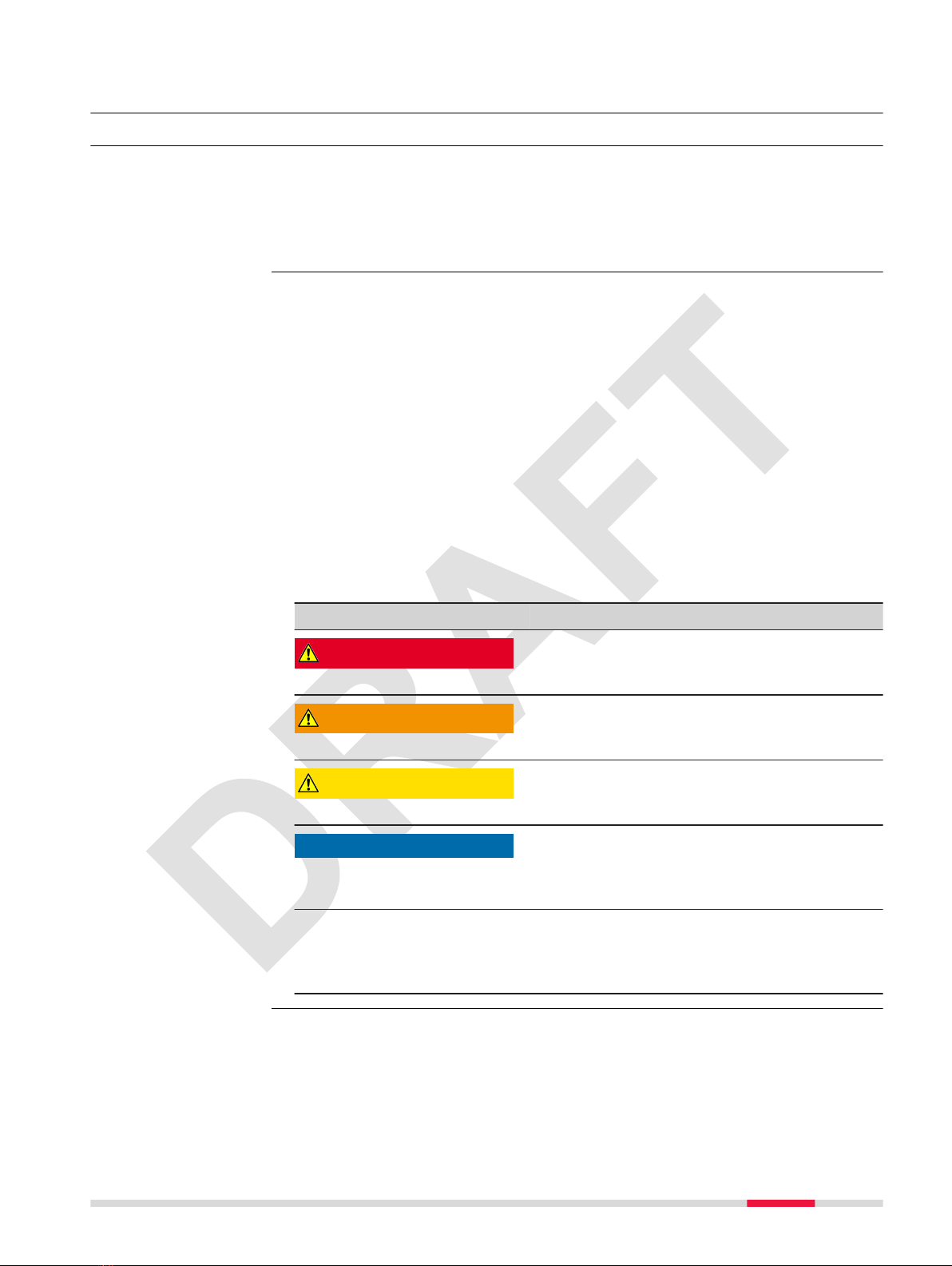
DANGER, WARNING, CAUTION and NOTICE are standardised signal words for
identifying levels of hazards and risks related to personal injury and property
damage. For your safety, it is important to read and fully understand the fol-
lowing table with the different signal words and their denitions! Supplemen-
tary safety information symbols may be placed within a warning message as
well as supplementary text.
Type Description
DANGER Indicates an imminently hazardous situation
which, if not avoided, will result in death or
serious injury.
WARNING Indicates a potentially hazardous situation or
an unintended use which, if not avoided,
could result in death or serious injury.
CAUTION Indicates a potentially hazardous situation or
an unintended use which, if not avoided,
may result in minor or moderate injury.
NOTICE
Indicates a potentially hazardous situation or
an unintended use which, if not avoided,
may result in appreciable material, nancial
and environmental damage.
☞Important paragraphs which must be
adhered to in practice as they enable the
product to be used in a technically correct
and efcient manner.
Description
About warning
messages
Safety Directions 5

1.2 Denition of Use
•Data communication with external appliances
•Carrying out measurement tasks using various GNSS measuring techniques
•Remote control of product
•Validating user-input utilities based on the processed data
•Locating utilities and estimating the depth
•Detecting both metallic and non-metallic underground utilities
•Use of the product without instruction.
•Use outside of the intended use and limits.
•Disabling safety systems.
•Removal of hazard notices.
•Opening the product using tools, for example screwdriver, unless this is
permitted for certain functions.
•Modication or conversion of the product.
•Use after misappropriation.
•Use of products with obvious damages or defects.
•Use with accessories from other manufacturers without the prior explicit
approval of Leica Geosystems.
•Inadequate safeguards at the working site.
1.3 Limits of Use
Suitable for use in an atmosphere appropriate for permanent human habita-
tion: not suitable for use in aggressive or explosive environments.
WARNING
Working in hazardous areas, or close to electrical installations or simi-
lar situations
Life Risk.
Precautions:
▶Local safety authorities and safety experts must be contacted by the per-
son responsible for the product before working in such conditions.
The following advice is only valid for battery charger, power adapter and car
adapter.
Suitable for use in dry environments only and not under adverse conditions.
1.4 Responsibilities
Leica Geosystems AG, CH-9435 Heerbrugg, hereinafter referred to as Leica
Geosystems, is responsible for supplying the product, including the User Man-
ual and original accessories, in a safe condition.
Intended use
Reasonably foreseea-
ble misuse
Environment
☞
Environment
Manufacturer of the
product
6 Safety Directions

The person responsible for the product has the following duties:
•To understand the safety instructions on the product and the instructions
in the User Manual.
•To ensure that it is used in accordance with the instructions.
•To be familiar with local regulations relating to safety and accident pre-
vention.
•To inform Leica Geosystems immediately if the product and the applica-
tion becomes unsafe.
•To ensure that the national laws, regulations and conditions for the oper-
ation of the product are respected.
1.5 Hazards of Use
The product is normally operated at least 1 m away from the user. At a dis-
tance of at least 1 m or greater, the typical power density level is below
1 mW/cm2 (0.01 W/m2). This value is far below the level specied by the cur-
rent regulations.
☞When operated in the normal manner of intended use, this product
does not pose health or safety risks regarding radio frequency sig-
nals.
To ensure that the radio modem is not operated without the permission of
the local authorities on frequencies and/or output power levels other than
those specically reserved and intended for use without a specic permit, the
internal and external radio modems have been designed to operate on fre-
quency ranges and output power ranges. The exact use of the frequency
ranges differs from one region and/or country to another.
NOTICE
Dropping, misusing, modifying, storing the product for long periods or
transporting the product
Watch out for erroneous measurement results.
Precautions:
▶Periodically carry out test measurements and perform the eld adjust-
ments indicated in the User Manual, particularly after the product has
been subjected to abnormal use as well as before and after important
measurements.
Person responsible
for the product
Exposure to Radio
Frequency (RF) Sig-
nals
☞
Safety Directions 7

DANGER
Risk of electrocution
Because of the risk of electrocution, it is dangerous to use poles, levelling
staffs and extensions in the vicinity of electrical installations such as power
cables or electrical railways.
Precautions:
▶Keep at a safe distance from electrical installations. If it is essential to
work in this environment, rst contact the safety authorities responsible
for the electrical installations and follow their instructions.
WARNING
Lightning strike
If the product is used with accessories, for example masts, staffs, poles, you
may increase the risk of being struck by lightning.
Precautions:
▶Do not use the product in a thunderstorm.
WARNING
Folding the handle
Risk of crushing hands and ngers.
Precautions:
▶Keep hands and ngers clear from crossing parts when folding handle to
avoid crushing.
CAUTION
Not properly secured accessories
If the accessories used with the product are not properly secured and the
product is subjected to mechanical shock, for example blows or falling, the
product may be damaged or people can sustain injury.
Precautions:
▶When setting up the product, make sure that the accessories are correctly
adapted, tted, secured, and locked in position.
▶Avoid subjecting the product to mechanical stress.
8 Safety Directions

WARNING
Inadequate securing of the working site
This can lead to dangerous situations, for example in trafc, on building sites
and at industrial installations.
Precautions:
▶Always ensure that the working site is adequately secured.
▶Adhere to the regulations governing safety, accident prevention and road
trafc.
WARNING
Distraction/loss of attention
During dynamic applications, for example stakeout procedures, there is a dan-
ger of accidents occurring if the user does not pay attention to the environ-
mental conditions around, for example obstacles, excavations or trafc.
Precautions:
▶The person responsible for the product must make all users fully aware of
the existing dangers.
WARNING
Unauthorised opening of the product
Either of the following actions may cause you to receive an electric shock:
•Touching live components
•Using the product after incorrect attempts were made to carry out repairs
Precautions:
▶Do not open the product!
▶Only Leica Geosystems authorised service centres are entitled to repair
these products.
For the AC/DC power supply and the battery charger:
WARNING
Electric shock due to use under wet and severe conditions
If unit becomes wet it may cause you to receive an electric shock.
Precautions:
▶If the product becomes humid, it must not be used!
▶Use the product only in dry environments, for example in buildings or
vehicles.
▶Protect the product against humidity.
Safety Directions 9

For the AC/DC power supply and the battery charger:
WARNING
Unauthorised opening of the product
Either of the following actions may cause you to receive an electric shock:
•Touching live components
•Using the product after incorrect attempts were made to carry out repairs.
Precautions:
▶Do not open the product!
▶Only Leica Geosystems authorised service centres are entitled to repair
these products.
WARNING
Inappropriate mechanical inuences to batteries
During the transport, shipping or disposal of batteries it is possible for inap-
propriate mechanical inuences to constitute a re hazard.
Precautions:
▶Before shipping the product or disposing it, discharge the batteries by the
product until they are at.
▶When transporting or shipping batteries, the person in charge of the
product must ensure that the applicable national and international rules
and regulations are observed.
▶Before transportation or shipping, contact your local passenger or freight
transport company.
WARNING
Exposure of batteries to high mechanical stress, high ambient tempera-
tures or immersion into uids
This can cause leakage, re or explosion of the batteries.
Precautions:
▶Protect the batteries from mechanical inuences and high ambient tem-
peratures. Do not drop or immerse batteries into uids.
WARNING
Short circuit of battery terminals
If battery terminals are short circuited e.g. by coming in contact with jewellery,
keys, metallised paper or other metals, the battery can overheat and cause
injury or re, for example by storing or transporting in pockets.
Precautions:
▶Make sure that the battery terminals do not come into contact with met-
allic objects.
10 Safety Directions
Autres manuels pour DSX
2
Table des matières
Autres manuels Leica Capteur de sécurité